QuickTiles 1.8
Android Quick Settings Tiles
Download
6.17 MB
23downloads
1this week
FreeFreeware
0reviews
Screenshots
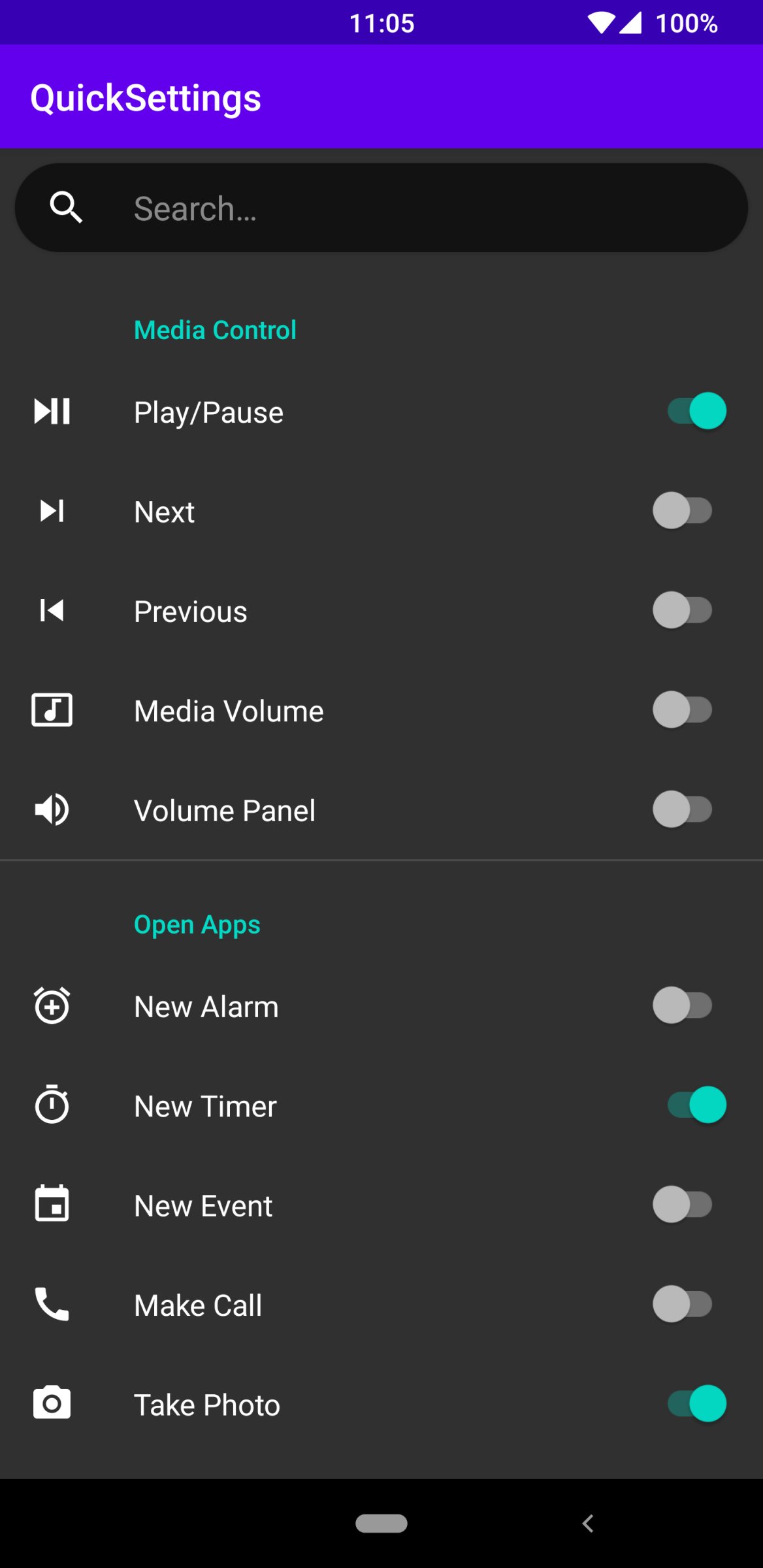
About QuickTiles
QuickTiles lets you add custom quick settings tiles to your Android device, enabling fast access to
your favorite actions and shortcuts. The app is open source and privacy-friendly.
Features:
- Media control (play/pause, next, previous, media volume)
- Show volume panel
- New event/alarm/timer
- Make call
- Take photo/record video
- Open calculator/file manager
- Open custom apps
- Search settings
- Open languages
- Open dictionary/privacy
- Open VPN/data usage/screen cast/connected devices/about
- ? Set screen timeout
- Switch volume modes (normal, vibrate, priority only, alarms only, total silence)
- Adjust brightness
- Adaptive brightness toggle
- Grayscale
- Take screenshot
- Force rotation (0?, 90?, 180?, 270?)
- Lock screen
- Split screen
- Set vibration on calls
- ? Open power menu
- Show battery level
- Counter
- Enable/disable USB debugging
- Enable/Disable demo mode
- Open developer options
- Enable/Disable keep screen on
- Set animator duration scale
- Disable all animations
- Always finish activities
**Important:**
Google Play Protect may warn that QuickTiles is a "harmful app."
This is a false positive. You can check the full source code in this repository -- there is no
malicious activity.
If you disable Play Protect, Android may still periodically show warnings. This seems to be because
Android stores previously detected warnings and repeats them, even after Play Protect is turned off.
Acknowledgments:
Icons
- Old App icon by [Freepik]([link removed])
from [Flaticon]([link removed])
- New App Icon generated with DALL-E 3
([OpenAI]([link removed]))
- Toggle-split-screen icon by [Smashicons]([link removed])
from [Flaticon]([link removed])
Open Source Projects
- [Dev-Tiles]([link removed]) by Mustafa
Ali ([Apache License 2.0]([link removed]))
- [Dev-QuickSettings]([link removed]) by Adrian
Garcia ([Apache License 2.0]([link removed]))
- [Adaptive Brightness Tile]([link removed]) by
rascarlo ([GNU GPLv3]([link removed]))
- [PowerButtonTile]([link removed]) by
rascarlo ([GNU GPLv3]([link removed]))
- [Greyscale]([link removed]) by
fei-ke ([Apache License 2.0]([link removed]))
License: GPL-3.0-or-later
| Release info | New Release on Sep 16, 2025 |
|---|---|
| Listing data | F-Droid |
Reviews
No reviews yet. Be the first to review QuickTiles.
Used QuickTiles? Tell other visitors what you thought.
Log in to write a reviewOther products by this publisher
- "No Distractions" for YouTube 4.10 ----
- #Bible 11.6.1 "Incredible App - My sister shared this app with me a few weeks ago and it is truly incredible.
- #filmphotography 1.4.2 So, you decided to shoot on film?
- #LookBusy Fake Calendar Events 1.0.6 Look Busy scans your work calendar for open time slots and fills them with realistic-looking (but secretly fake) work events.
- #Small Talk Is Canceled 1.0.2 #Small Talk Is Canceled — Conversations That Matter
Most viewed Android Developer Tools
- 1 HTTP Request Shortcuts 4.10.0 Submit HTTP Requests from Shortcuts on your Home Screen
-
2
 RandomFileMaker 1.0
Make random files with SecureRandom. For KeePass keyfile, shredding disk, etc
- 3 ADB Captain 1.7 Run ADB commands on your phone. No root, no PC — via Shizuku.
-
4
 Shellwave 1.11.0
Open-source SSH client and terminal with SFTP, port forwarding and jump hosts
-
5
 TermuC 0.2.4
A simple C/C++ IDE backed on Termux
-
6
 DevSwitch 1.4
Toggle developer options, USB and wireless debugging, with Quick Settings tiles
-
7
 AutoPie 0.21.2-beta
Turn Linux commands into Android apps.
- 8 Turtle 2.0.12 A Platform with Pythonic language to practice CPU/GPU programming on mobile
- 9 DadosD 20160914_V4 Generate Brazilian test IDs for development/test
- 10 Squircle CE - Code Editor 2025.1.3 Fast and powerful code editor & file manager for over 30 programming languages
Most downloaded Android Developer Tools
-
1
 Micro REPL 4.0.0
MicroPython IDE
-
2
 QR Code Displayer 1.4.1
Reconstruct damaged or blurry QR codes entirely on-device for easy scanning.
- 3 ADB Captain 1.7 Run ADB commands on your phone. No root, no PC — via Shizuku.
-
4
Shellwave 1.11.0
Open-source SSH client and terminal with SFTP, port forwarding and jump hosts
- 5 JekyllEx 0.2.6 The mobile IDE to create, build, edit, preview, and publish Jekyll sites.
-
6
 OMN-Go 26.11.16f
Self-hosted Markdown notes with git sync, LAN sharing, and SQL scripting
- 7 ELM327 Emulator 31 OBD-II ELM327 adapter emulator for testing diagnostic apps
-
8
 Taiga Mobile Nova 2.2.3
Unofficial Android client for Taiga.io project management
-
9
 Terminator 3.4.1
Multi-session terminal emulator with Material UI theming and root support
- 10 Cookie Extractor 1.3.0 Extract your own session cookies after a manual login