Quick Startup 5.3.1.96
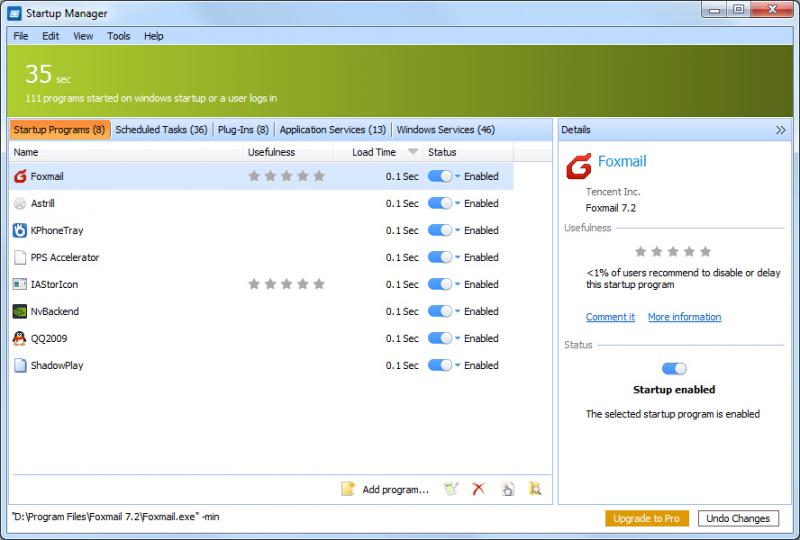
Quick StartUp was developed to provide quick access to all of the programs that are automatically started when you turn on or logon to your computer.
Product Specifications
| User Rating: | item has less then 1 vote |
|
| FileCart Rating | ||
| Submitted by: | glarysoft | |
| Homepage | Visit Homepage | |
| License | Freeware | |
| Price | $0.00 | |
| Downloads | 579 | |
| OS Support | Windows Install and Uninstall | |
| File Name | qssetup.exe | |
| File Size | 4.89 MB ( 5,007 KB ) | |
| Published | Aug 16, 2007 (19 years ago) | |
| Updated | Aug 25, 2014 (12 years ago) | |
Follow Us!
Latest Searches
JAKES WOMEN FILM 7 minutes ago
tecnica de soplado 8 minutes ago
sketchfab gta 6 8 minutes ago
sigma camera 9 minutes ago
exile conm 2026 15 minutes ago
catalogo de bombas alta vazão 16 minutes ago
unhcr funding cuts 16 minutes ago
how to equip 2 unique charms diablo 4 19 minutes ago
que es una notacion desarrollada 19 minutes ago
Popular Searches
id cards 602 times
2025 495 times
2024 386 times
Softperfect 331 times
Gypsy 2.0 Onlyfans Leaked Photos 330 times
5g spf sonicwall compatible copper module 327 times
2026 310 times
ds1628 compatible 10gb sfp cards 281 times
Who is Music 280 times
Product Details
| Requirements: | 20 MB free hard disk space at least,32 MB RAM |
| Release Info: | Major Update on Aug 20, 2014 |
| Release Notes: | Fixed some bugs. |
| Related Tags: | startup uninstall registry remove fix |
Reviews
You must be logged in to write a review
Reviews of Quick Startup 5.3.1.96
You can be the first to write a review of Quick Startup!Other products submitted by this publisher
This program helps you uninstall applications that you no longer want to use. It can display programs that have missing or bad uninstallers. It offers a more user-friendly way to remove unneeded applications and to improve your computer efficiency.
Glary Registry RepairRegistry Repair is an advanced registry cleaner for Windows that allows you to safely scan, clean, and repair registry problems.
Security Process ExplorerSecurity Process Explorer is an enhanced task manager, that provides advanced information about programs and processes running on the computer. It displays all the standard information, including file name, directory path, description, CPU usage etc