
PS Tray Factory 3.3.1
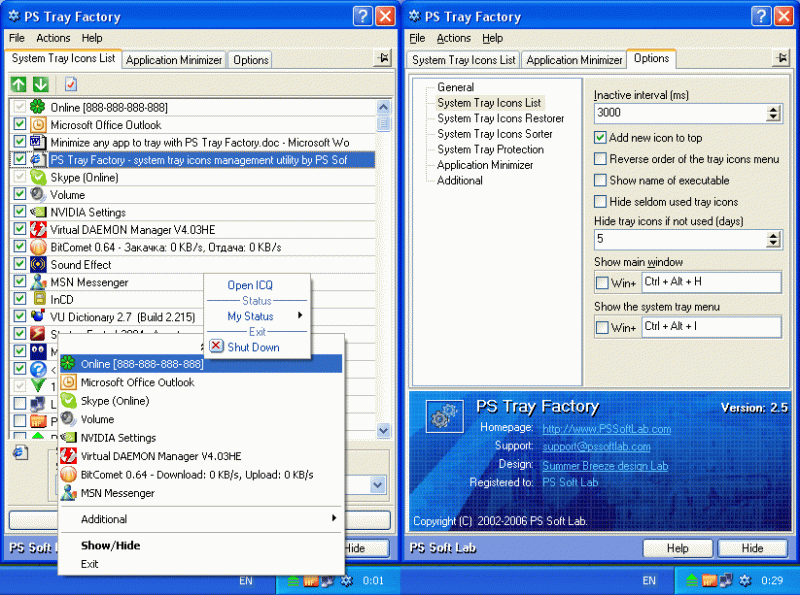
PS Tray Factory is a system tray icons manager that will allows you to: hide low-activity icons from a system tray into special menu,change the order of icons in the system tray (sort tray icons),restore icons in system tray at crash Explorer.
Download
1.33 MB · pstrayf.exe
1.2Kdownloads
0this week
$24.95Shareware
0reviews
Screenshots
About PS Tray Factory
PS Tray Factory is a powerful and handy tool meant to flexibly control ALL the other icons in the system tray of the taskbar. PS Tray Factory will help you to manage all the applications that place their icons in the taskbar tray. When you have installed PS Tray Factory, you will forget about the problem of lack of space in the system tray, and will also get an easy, fast and handy tool to handle those applications. In short, ALL Windows users will get this handy and powerful tool at their disposal, whereas only Windows XP users have an idea of it. For the latter, we have made a nice surprise, as the features of PS Tray Factory exceed the standard built-in ones of this OS. PS Tray Factory is a system tray icons manager that will allows you to: hide low-activity icons from a system tray into menu, get fast access to hidden icons, change the order of icons in the menu, change the order of icons in the system tray (sort system tray icons), hide from the menu seldom used icons, protect tray menu with password, minimize any application to tray, restore icons in system tray area at crash or restarting Explorer.exe, change original tray icons with your own icons.
| Requirements | Windows 95-98, Me, 2K, NT4, XP, Vista, 7(Seven), 8, 10 |
|---|---|
| Release info | New Release on Feb 15, 2023 |
| Release notes | - added new system tray icons identification method - new way for 'reading' system tray icons - improvements for better compatibility with Windows 7,8,10. - minor bugfixes |
| Related tags | system tray systray hide tray icons sort tray tray aria |
Reviews
No reviews yet. Be the first to review PS Tray Factory.
Used PS Tray Factory? Tell other visitors what you thought.
Log in to write a reviewMost viewed Windows Desktop Utilities
-
1
 Speed Test 1.0.736
Actual Maximum Speed Test Monitor for FREE. Full Bandwidth speed test Meter.
Speed Test 1.0.736
Actual Maximum Speed Test Monitor for FREE. Full Bandwidth speed test Meter.
-
2
 Ardamax Keylogger 4.8
Ardamax Keylogger is a small, easy-to-use keylogger that captures user activity and saves it to a logfile. The logfile can be viewed as a text or web page. Use this tool to find out what is happening on your computer while you're away.
Ardamax Keylogger 4.8
Ardamax Keylogger is a small, easy-to-use keylogger that captures user activity and saves it to a logfile. The logfile can be viewed as a text or web page. Use this tool to find out what is happening on your computer while you're away.
- 3 Copernic Desktop Search Professional 3.4.0.25 Designed for small & medium size business owners and professionals who want to free up their time so they can focus on their clients. CDS Professional lets you quickly find the stuff that helps you do business - files, emails, contracts, presentations and more.
-
4
 Window Hide Tool 1.9
Window Hide Tool will help you to quickly hide a window of any application. You can set hotkeys for basic program commands: hide a window; hide all windows; hide a group of windows.
Window Hide Tool 1.9
Window Hide Tool will help you to quickly hide a window of any application. You can set hotkeys for basic program commands: hide a window; hide all windows; hide a group of windows.
-
5
 Key Transformation 201111131821
Key Transformation can customize your keyboard layout, change any key on the keyboard to other keys. Its on-screen-keyboard ( soft keyboard ) is very easy to use. Want the F1 key to type B? Want the D key to type f? Want the Shift+Enter key to press
Key Transformation 201111131821
Key Transformation can customize your keyboard layout, change any key on the keyboard to other keys. Its on-screen-keyboard ( soft keyboard ) is very easy to use. Want the F1 key to type B? Want the D key to type f? Want the Shift+Enter key to press
- 6 Active Keyboard 3.1 Launch applications, documents, and URLs, and over 80 other actions to hot keys - Control your Winamp player - Hide application windows - Open, Play and close your CD-ROM - Change the volume, mute - Empty recycle bin - Lock/Unlock Desktop
-
7
 Clever Keyboard Indicator 5.0
The Clever Keyboard Indicator is a program which stays in your Windows system tray and displays "Caps Lock", "Num Lock" and "Scroll Lock" status, allows you to switch key status, plays a sound when the key status changed and many more.
Clever Keyboard Indicator 5.0
The Clever Keyboard Indicator is a program which stays in your Windows system tray and displays "Caps Lock", "Num Lock" and "Scroll Lock" status, allows you to switch key status, plays a sound when the key status changed and many more.
-
8
 Data Extractor 3.3
Do you have a group of files that contains important data that you can't get to? Using Data Extractor you can simply extract any information from any files on your computer or from webpages. Simply extract email addresses or URLs, or your own data.
Data Extractor 3.3
Do you have a group of files that contains important data that you can't get to? Using Data Extractor you can simply extract any information from any files on your computer or from webpages. Simply extract email addresses or URLs, or your own data.
-
9
 A Form Filler 3.5.1
A Form Filler automatically fill in windows as quickly as they appear on your screen!
A Form Filler 3.5.1
A Form Filler automatically fill in windows as quickly as they appear on your screen!
-
10
 ObjectDock 1.9
ObjectDock is a free program that allows you to have a nice animated launchbar/taskbar on your screen that reacts to your mouse when you mouse over it. Organize your short-cuts and running tasks onto this customizable dock.
ObjectDock 1.9
ObjectDock is a free program that allows you to have a nice animated launchbar/taskbar on your screen that reacts to your mouse when you mouse over it. Organize your short-cuts and running tasks onto this customizable dock.
Most downloaded Windows Desktop Utilities
-
1
Speed Test 1.0.736
Actual Maximum Speed Test Monitor for FREE. Full Bandwidth speed test Meter.
-
2
Ardamax Keylogger 4.8
Ardamax Keylogger is a small, easy-to-use keylogger that captures user activity and saves it to a logfile. The logfile can be viewed as a text or web page. Use this tool to find out what is happening on your computer while you're away.
-
3
Window Hide Tool 1.9
Window Hide Tool will help you to quickly hide a window of any application. You can set hotkeys for basic program commands: hide a window; hide all windows; hide a group of windows.
-
4
A Form Filler 3.5.1
A Form Filler automatically fill in windows as quickly as they appear on your screen!
- 5 Copernic Desktop Search Professional 3.4.0.25 Designed for small & medium size business owners and professionals who want to free up their time so they can focus on their clients. CDS Professional lets you quickly find the stuff that helps you do business - files, emails, contracts, presentations and more.
- 6 Active Keyboard 3.1 Launch applications, documents, and URLs, and over 80 other actions to hot keys - Control your Winamp player - Hide application windows - Open, Play and close your CD-ROM - Change the volume, mute - Empty recycle bin - Lock/Unlock Desktop
-
7
ObjectDock 1.9
ObjectDock is a free program that allows you to have a nice animated launchbar/taskbar on your screen that reacts to your mouse when you mouse over it. Organize your short-cuts and running tasks onto this customizable dock.
-
8
Key Transformation 201111131821
Key Transformation can customize your keyboard layout, change any key on the keyboard to other keys. Its on-screen-keyboard ( soft keyboard ) is very easy to use. Want the F1 key to type B? Want the D key to type f? Want the Shift+Enter key to press
-
9
 Clock Tray Skins Lite 2.1
View the time, day, and date in different skins in the Windows system tray clock. Clock Tray Skins is the advanced replacement for standard Windows tray clock. Over 50 skins are included in the distribution.
It's also an atomic-time synchronizer.
Clock Tray Skins Lite 2.1
View the time, day, and date in different skins in the Windows system tray clock. Clock Tray Skins is the advanced replacement for standard Windows tray clock. Over 50 skins are included in the distribution.
It's also an atomic-time synchronizer.
-
10
 Talisman Desktop 3.4
Desktop Manager and Shell Replacement for Windows
Talisman Desktop 3.4
Desktop Manager and Shell Replacement for Windows