Proxy Exit 1.0
Use your phone's mobile connection as a proxy for desktop browsers.
Download
4.28 MB
26downloads
5this week
FreeFreeware
0reviews
Screenshots
About Proxy Exit
Proxy Exit is NOT a way to set up a proxy on your phone. It is a part of a setup to route your desktop browser's internet traffic through your phone's mobile data connection.
Setup requires three components: a Proxy Server, this app, and a configured browser.
? Start the Proxy Server
Run the following Docker command on a machine accessible from the internet:
docker run -d -p 8888:8888 -p 9999:9999 -e AUTH_CODE=XXX registry.gitlab.com/viru7/proxy:latest
Port 8888 -- browser HTTP proxy connections
Port 9999 -- mobile app connections
XXX -- your chosen password
If the server is running on a home machine, ensure port 9999 is forwarded to it.
? Configure the app
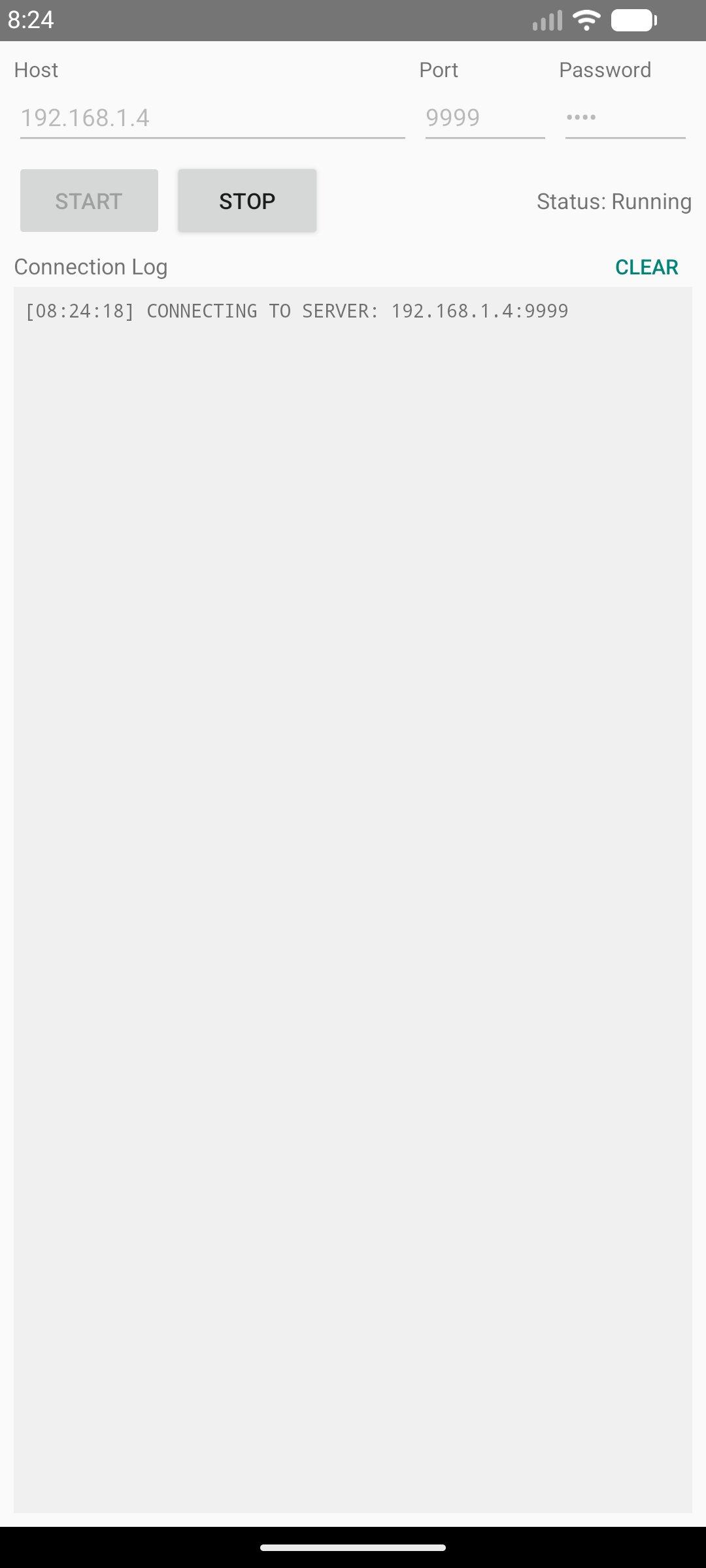
Enter the server's IP address, port (9999), and your password, then tap Start.
Keep the app running in the foreground while in use. If the connection to the server drops, the app will automatically retry every minute.
? Configure your browser
Set the browser's HTTP and HTTPS proxy to the server's IP address and port (8888).
How it works:
1. The app connects to the Proxy Server, making the phone available as a proxy exit node.
2. When the browser needs to make an HTTP request, it sends it to the Proxy Server.
3. The Proxy Server forwards the request to the phone over the established connection.
4. The phone fetches the content via mobile data and returns it through the server to the browser.
For more details see: [link removed]
License: MIT
Setup requires three components: a Proxy Server, this app, and a configured browser.
? Start the Proxy Server
Run the following Docker command on a machine accessible from the internet:
docker run -d -p 8888:8888 -p 9999:9999 -e AUTH_CODE=XXX registry.gitlab.com/viru7/proxy:latest
Port 8888 -- browser HTTP proxy connections
Port 9999 -- mobile app connections
XXX -- your chosen password
If the server is running on a home machine, ensure port 9999 is forwarded to it.
? Configure the app
Enter the server's IP address, port (9999), and your password, then tap Start.
Keep the app running in the foreground while in use. If the connection to the server drops, the app will automatically retry every minute.
? Configure your browser
Set the browser's HTTP and HTTPS proxy to the server's IP address and port (8888).
How it works:
1. The app connects to the Proxy Server, making the phone available as a proxy exit node.
2. When the browser needs to make an HTTP request, it sends it to the Proxy Server.
3. The Proxy Server forwards the request to the phone over the established connection.
4. The phone fetches the content via mobile data and returns it through the server to the browser.
For more details see: [link removed]
License: MIT
| Release info | New Release on May 27, 2026 |
|---|---|
| Release notes | Initial release |
| Listing data | F-Droid |
Reviews
No reviews yet. Be the first to review Proxy Exit.
Used Proxy Exit? Tell other visitors what you thought.
Log in to write a reviewOther products by this publisher
- "No Distractions" for YouTube 4.10 ----
- #Bible 11.5 "Incredible App - My sister shared this app with me a few weeks ago and it is truly incredible.
- #filmphotography 1.4.2 So, you decided to shoot on film?
- $quirrel 1.5.1 $quirrel Budget & Finance helps you plan each paycheck, track spending, manage debt, and see what is safe to spend before the next payday.
- % Percentage Calculator Pro 1.41 This is the Pro version of % Percentage Calculator.
Most viewed Android Vpn & Proxy
-
1
 TunnelForge 0.7.4
L2TP/IPsec VPN client for modern Android
TunnelForge 0.7.4
L2TP/IPsec VPN client for modern Android
-
2
 mqvpn 0.19.2
Multipath VPN combining Wi-Fi and cellular for bonding and failover
mqvpn 0.19.2
Multipath VPN combining Wi-Fi and cellular for bonding and failover
- 3 Socks5 Proxy 3.0.3 Socks5 client based on VPN
-
4
 Tor VPN Beta 1.9.1Beta-arm64-v8a
Tor-powered with per-app routing, access unblocking & network-level privacy.
Tor VPN Beta 1.9.1Beta-arm64-v8a
Tor-powered with per-app routing, access unblocking & network-level privacy.
- 5 Mercurygram Tor Plugin 13.0.3.2 Tor companion plugin that routes Mercurygram traffic through the Tor network
-
6
 MegaProxy 1.3.0
VPN with HTTPS/SSH Jump, SOCKS5, MASQUE and optional app ownership checks
MegaProxy 1.3.0
VPN with HTTPS/SSH Jump, SOCKS5, MASQUE and optional app ownership checks
-
7
 Private Internet Access VPN 4.1.5
Fast, secure and open source VPN client for Android.
Private Internet Access VPN 4.1.5
Fast, secure and open source VPN client for Android.
- 8 Proxy Exit 1.0 Use your phone's mobile connection as a proxy for desktop browsers.
-
9
 Parvaz 0.1.18
Farsi-first browser tunnel through a self-hosted Apps Script relay
Parvaz 0.1.18
Farsi-first browser tunnel through a self-hosted Apps Script relay
-
10
 Forkray 2.3.14
A V2Ray client for Android, forked from v2rayNG and built from source
Forkray 2.3.14
A V2Ray client for Android, forked from v2rayNG and built from source
Most downloaded Android Vpn & Proxy
-
1
TunnelForge 0.7.4
L2TP/IPsec VPN client for modern Android
- 2 Socks5 Proxy 3.0.3 Socks5 client based on VPN
- 3 Proxy Exit 1.0 Use your phone's mobile connection as a proxy for desktop browsers.
-
4
MegaProxy 1.3.0
VPN with HTTPS/SSH Jump, SOCKS5, MASQUE and optional app ownership checks
-
5
mqvpn 0.19.2
Multipath VPN combining Wi-Fi and cellular for bonding and failover
-
6
Tor VPN Beta 1.9.1Beta-arm64-v8a
Tor-powered with per-app routing, access unblocking & network-level privacy.
-
7
Private Internet Access VPN 4.1.5
Fast, secure and open source VPN client for Android.
- 8 Mercurygram Tor Plugin 13.0.3.2 Tor companion plugin that routes Mercurygram traffic through the Tor network
-
9
Parvaz 0.1.18
Farsi-first browser tunnel through a self-hosted Apps Script relay
-
10
Forkray 2.3.14
A V2Ray client for Android, forked from v2rayNG and built from source