
0downloads
0this week
FreeCommercial
0reviews
Screenshots
About Popcorn for TeamCity
Check your TeamCity builds without opening your laptop.
Popcorn brings build status, live logs and common build actions to your iPhone and iPad. Browse your projects, investigate failures and keep an eye on your build agents wherever you are.
Requires access to an existing TeamCity Cloud instance or self-hosted HTTPS server and a personal access token. Choose TeamCity Cloud and enter your instance name, or Self-hosted and enter the full HTTPS server address. Popcorn does not include a TeamCity account or hosting.
CHECK YOUR BUILDS
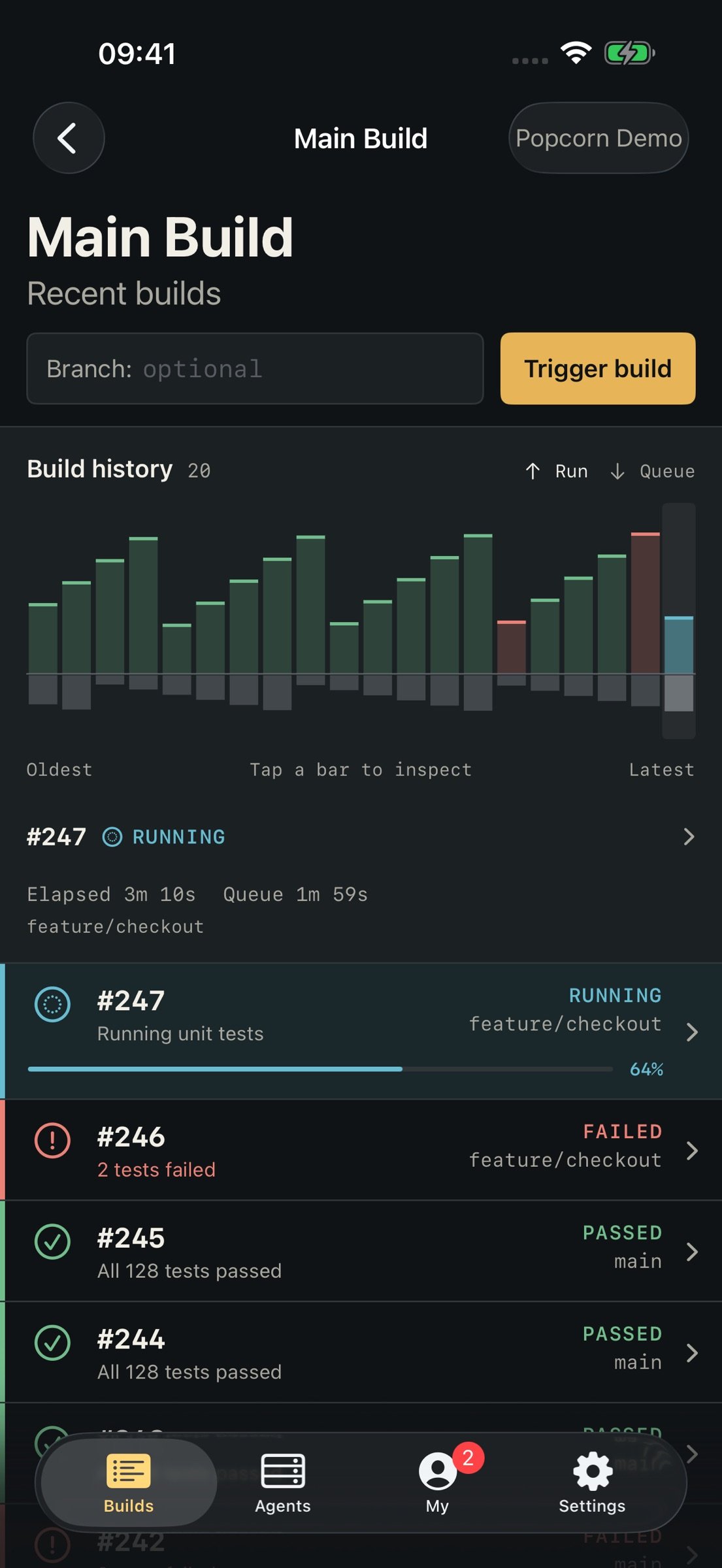
Browse projects and build configurations, then see recent builds across branches with their status, number and progress. Build lists refresh automatically while you view them, and queued or running build details stay up to date. Pull to refresh whenever you need.
BUILD STATUS ON YOUR HOME SCREEN
Add a small or medium widget for a server, project, build configuration and branch. Check its latest build status and tap to open it in Popcorn. Widgets show when their information was last checked.
SEE BUILD HISTORY
Compare the latest 20 builds in an interactive history chart. See run time and time spent in the queue, with colours for build status. Tap a bar to inspect its timings and open that build.
READ LIVE LOGS
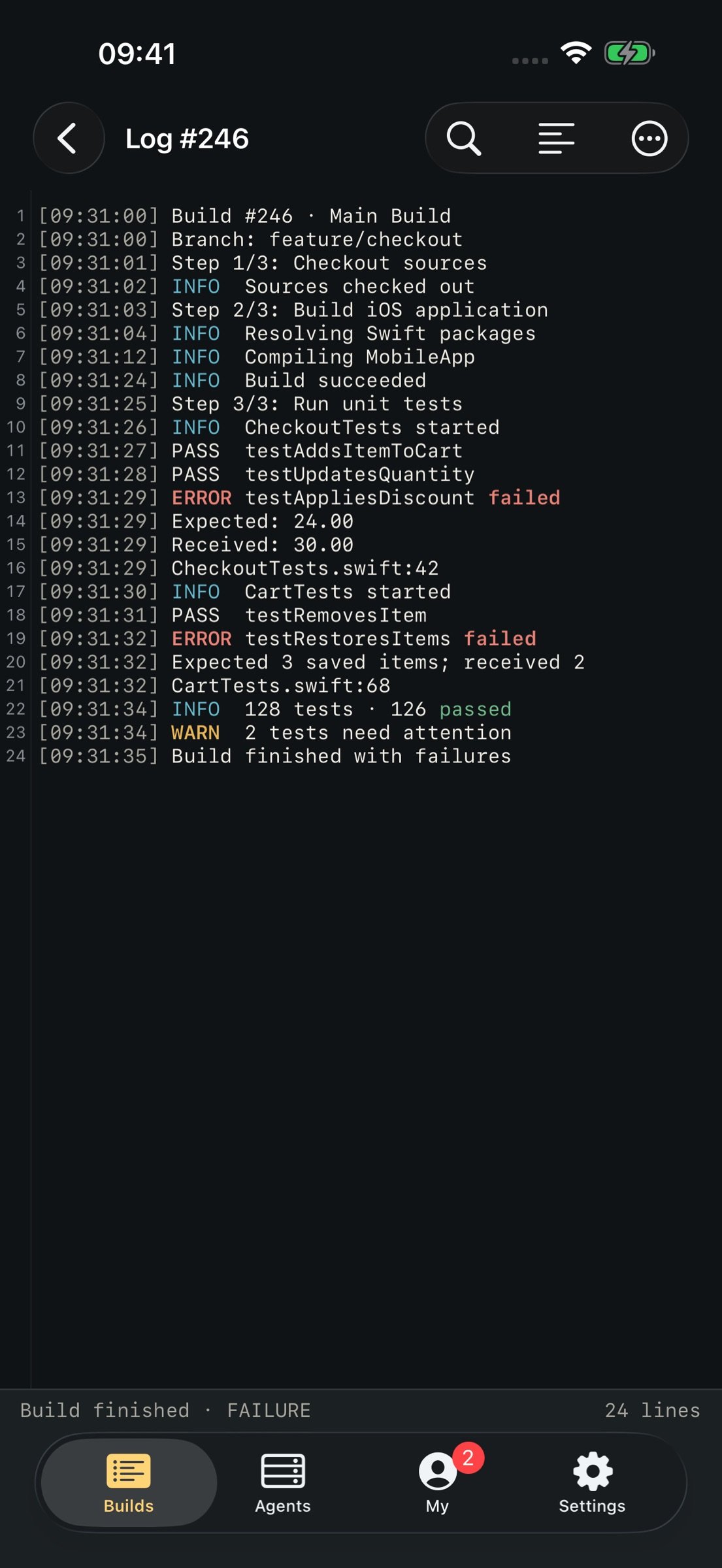
Follow build output as it arrives. Find text, view line numbers and switch line wrapping, with highlighting for log messages. ANSI escapes and TeamCity service messages are hidden to keep output readable.
UNDERSTAND FAILURES
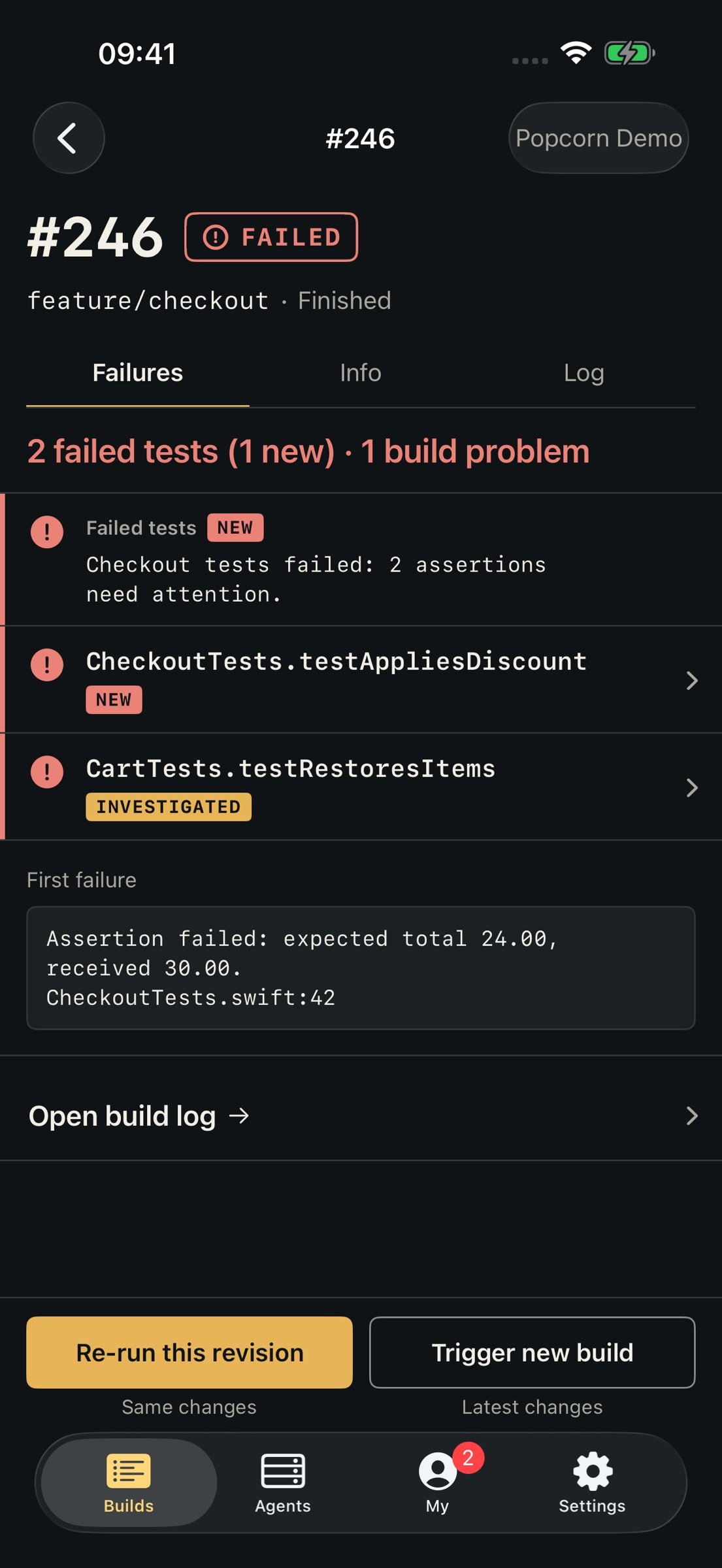
See build problems and failed tests, with new failures first and badges for muted or investigated failures. Open a test to read its error message and stack trace when your server provides them.
START, RE-RUN OR CANCEL
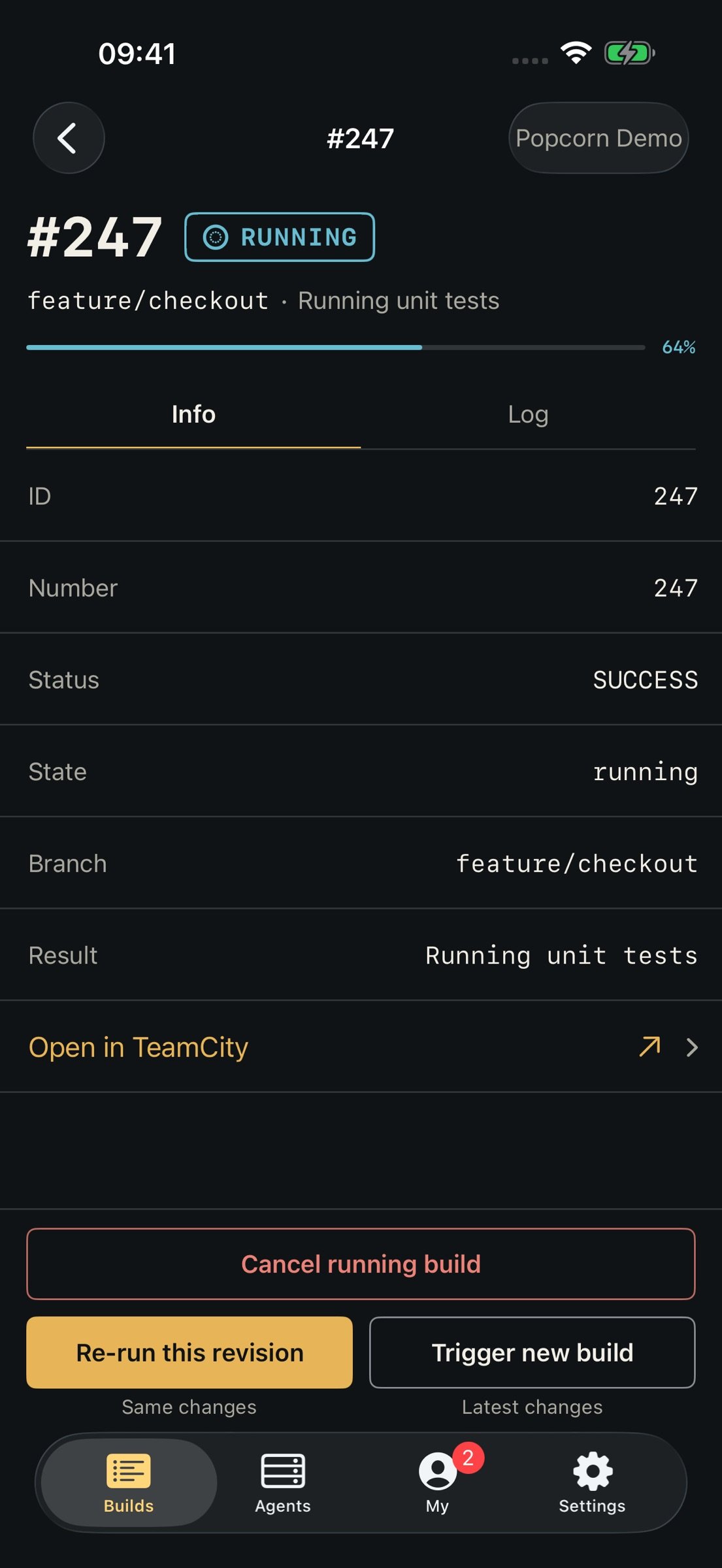
Trigger a build with an optional branch, run a configuration again, or re-run the same source revision. Cancel a queued or running build when plans change. Available actions depend on your TeamCity permissions.
WATCH YOUR AGENTS
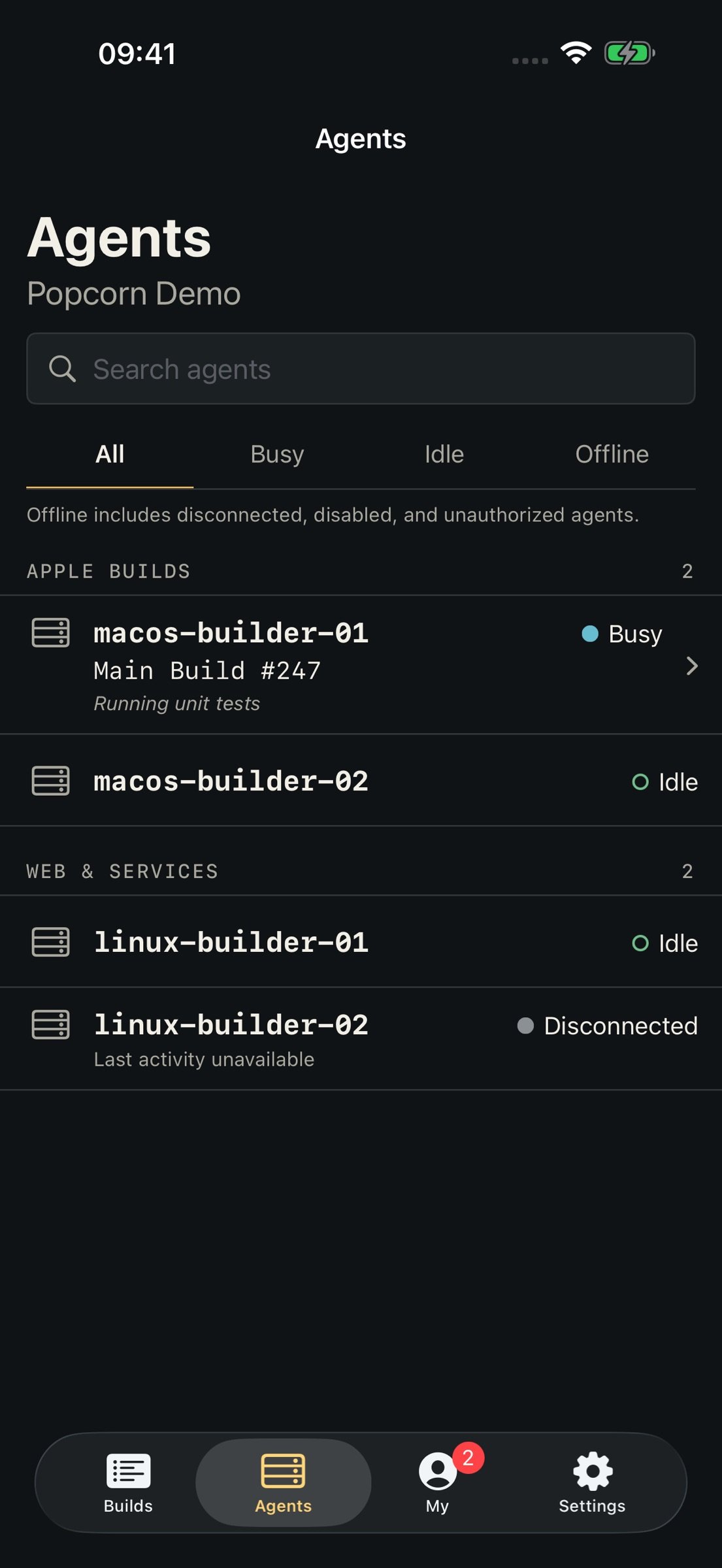
Check agents grouped by pool, see their status and current build activity, and filter by busy, idle or offline. Search by name and open a running build for its details. Agent controls are read-only.
FOLLOW YOUR INVESTIGATIONS
The My tab shows active investigations assigned to you, grouped by project and configuration. Read assignment comments and open the latest build to inspect matching failures. Swipe an investigation to unassign yourself after confirmation. Available investigations and actions depend on your token's permissions.
MAKE IT YOURS
Save multiple TeamCity connections and switch between them. Add, rename or remove servers in Settings, choose from nine app icons, and open TeamCity links inside Popcorn or in Safari.
CONNECT DIRECTLY
Your access token is stored in the iOS Keychain. TeamCity requests go directly to your server. Popcorn has no advertising, analytics SDKs or separate Popcorn account.
ONE PURCHASE
A one-time app purchase with no subscription or in-app purchases. Your TeamCity service is separate.
Built for iPhone and iPad. Requires iOS 17 or later and an internet connection to your TeamCity server.
Popcorn is an independent client and is not affiliated with or endorsed by JetBrains. TeamCity is a trademark of JetBrains s.r.o.
Support: [link removed]
Privacy policy: [link removed]
Terms of service: [link removed]
License: Commercial
Popcorn brings build status, live logs and common build actions to your iPhone and iPad. Browse your projects, investigate failures and keep an eye on your build agents wherever you are.
Requires access to an existing TeamCity Cloud instance or self-hosted HTTPS server and a personal access token. Choose TeamCity Cloud and enter your instance name, or Self-hosted and enter the full HTTPS server address. Popcorn does not include a TeamCity account or hosting.
CHECK YOUR BUILDS
Browse projects and build configurations, then see recent builds across branches with their status, number and progress. Build lists refresh automatically while you view them, and queued or running build details stay up to date. Pull to refresh whenever you need.
BUILD STATUS ON YOUR HOME SCREEN
Add a small or medium widget for a server, project, build configuration and branch. Check its latest build status and tap to open it in Popcorn. Widgets show when their information was last checked.
SEE BUILD HISTORY
Compare the latest 20 builds in an interactive history chart. See run time and time spent in the queue, with colours for build status. Tap a bar to inspect its timings and open that build.
READ LIVE LOGS
Follow build output as it arrives. Find text, view line numbers and switch line wrapping, with highlighting for log messages. ANSI escapes and TeamCity service messages are hidden to keep output readable.
UNDERSTAND FAILURES
See build problems and failed tests, with new failures first and badges for muted or investigated failures. Open a test to read its error message and stack trace when your server provides them.
START, RE-RUN OR CANCEL
Trigger a build with an optional branch, run a configuration again, or re-run the same source revision. Cancel a queued or running build when plans change. Available actions depend on your TeamCity permissions.
WATCH YOUR AGENTS
Check agents grouped by pool, see their status and current build activity, and filter by busy, idle or offline. Search by name and open a running build for its details. Agent controls are read-only.
FOLLOW YOUR INVESTIGATIONS
The My tab shows active investigations assigned to you, grouped by project and configuration. Read assignment comments and open the latest build to inspect matching failures. Swipe an investigation to unassign yourself after confirmation. Available investigations and actions depend on your token's permissions.
MAKE IT YOURS
Save multiple TeamCity connections and switch between them. Add, rename or remove servers in Settings, choose from nine app icons, and open TeamCity links inside Popcorn or in Safari.
CONNECT DIRECTLY
Your access token is stored in the iOS Keychain. TeamCity requests go directly to your server. Popcorn has no advertising, analytics SDKs or separate Popcorn account.
ONE PURCHASE
A one-time app purchase with no subscription or in-app purchases. Your TeamCity service is separate.
Built for iPhone and iPad. Requires iOS 17 or later and an internet connection to your TeamCity server.
Popcorn is an independent client and is not affiliated with or endorsed by JetBrains. TeamCity is a trademark of JetBrains s.r.o.
Support: [link removed]
Privacy policy: [link removed]
Terms of service: [link removed]
License: Commercial
| Release info | New Release on Oct 26, 2026 |
|---|---|
| Release notes | Projects are easier to browse, with clearer project and build-configuration rows and a refreshed project detail view. You can now unassign yourself from an investigation in the My tab. Swipe the investigation and confirm to remove your assignment. |
| Listing data | App Store |
Reviews
No reviews yet. Be the first to review Popcorn for TeamCity.
Used Popcorn for TeamCity? Tell other visitors what you thought.
Log in to write a reviewOther products by this publisher
- "No Distractions" for YouTube 4.10 ----
- #Bible 11.6.1 "Incredible App - My sister shared this app with me a few weeks ago and it is truly incredible.
- #filmphotography 1.4.2 So, you decided to shoot on film?
- $quirrel 1.5.1 $quirrel Budget & Finance helps you plan each paycheck, track spending, manage debt, and see what is safe to spend before the next payday.
- % Percentage Calculator Pro 1.41 This is the Pro version of % Percentage Calculator.
Most viewed iOS Developer Tools
-
1
 ZScripter 13.2.0
ZScripter plays compatible Ren'Py, RealLive, NScripter, (PONS)ONScripter-EN/RU/JH/Yuri, Artemis, Siglus, AI5 and UK2 games as well as KiriKiri (+Kirikiroid2 patches) and RPG Maker MV/MZ & XP, VX and VX Ace support.
-
2
 GitHub 1.285.0
There’s a lot you can do on GitHub that doesn’t require a complex development environment – like sharing feedback on a design discussion, or reviewing a few lines of code.
-
3
 Agents Anywhere 2.1.0
Agents Anywhere is a developer tools mobile application for remotely controlling your local computer to complete coding tasks.
-
4
 Shader Playground 1.0
Shader Playground is a powerful real-time shader editor built for iPhone and iPad.
-
5
 LocalDevVPN 1.3.0
LocalDevVPN is a developer tool for creating and managing local network tunnels directly on iOS.
-
6
 Code Workspace 0.9.1
Code Workspace is a free, agent-first development environment for iPad and iPhone.
-
7
 Termius 8.2.0
Termius is a modern SSH client designed for productivity and collaboration.
-
8
 TestFlight 4.4.1
TestFlight makes it easy to test beta versions of apps and App Clips to provide valuable feedback to developers before they release their apps on the App Store.
-
9
 Cursor 1.18.0
Introducing Cursor for iOS: the best way to build, review, and ship software from anywhere.
-
10
 Rulify 1.0.7
Rulify ????? iOS App ????,???????? App ????,???????????????
Most downloaded iOS Developer Tools
-
1
Agents Anywhere 2.1.0
Agents Anywhere is a developer tools mobile application for remotely controlling your local computer to complete coding tasks.
-
2
Rulify 1.0.7
Rulify ????? iOS App ????,???????? App ????,???????????????
-
3
 a-Shell mini 2.3.2
a-Shell mini is a complete local terminal emulator, allowing to run most Unix commands on you iOS device.
-
4
 LadderTouch 2.1.5
LadderTouch is an app to learn the basics of ladder logic, which is a graphical programming language.
-
5
 FSNotes 7.6.1
FSNotes is a fast, modern notes manager for macOS and iOS.
-
6
 C/C++$-LLVM Clang 2.7
This is a learning tool for efficient C/C++ learning, fast programming, ?(LLVM+Clang)offline compilation and local execution?, Git fetching, iCloud storage, and efficient transfer and sharing via LAN HTTP/FTP multi-point connections.
-
7
 Herdy 1.5.0
Herdy puts your remote terminal and long-running coding-agent sessions in your pocket.
-
8
 Markdown2PDF 1.0
Easily Convert Markdown to PDF with Markdown2PDF
-
9
 python3$ 6.6
This is a Python 3.13 learning tool for efficient learning, fast programming, local execution, breakpoint debugging, precise error reporting, Git fetching, iCloud access, and efficient transfer and sharing via LAN HTTP/FTP multi-point connections.
-
10
 websta$-learn html css and js 3.2
This is a learning tool for efficient HTML, CSS, and JS learning, fast programming, local execution, Git retrieval, iCloud storage, efficient transfer and sharing via LAN HTTP/FTP multi-point connections.