
0downloads
0this week
FreeFreeware
0reviews
Screenshots
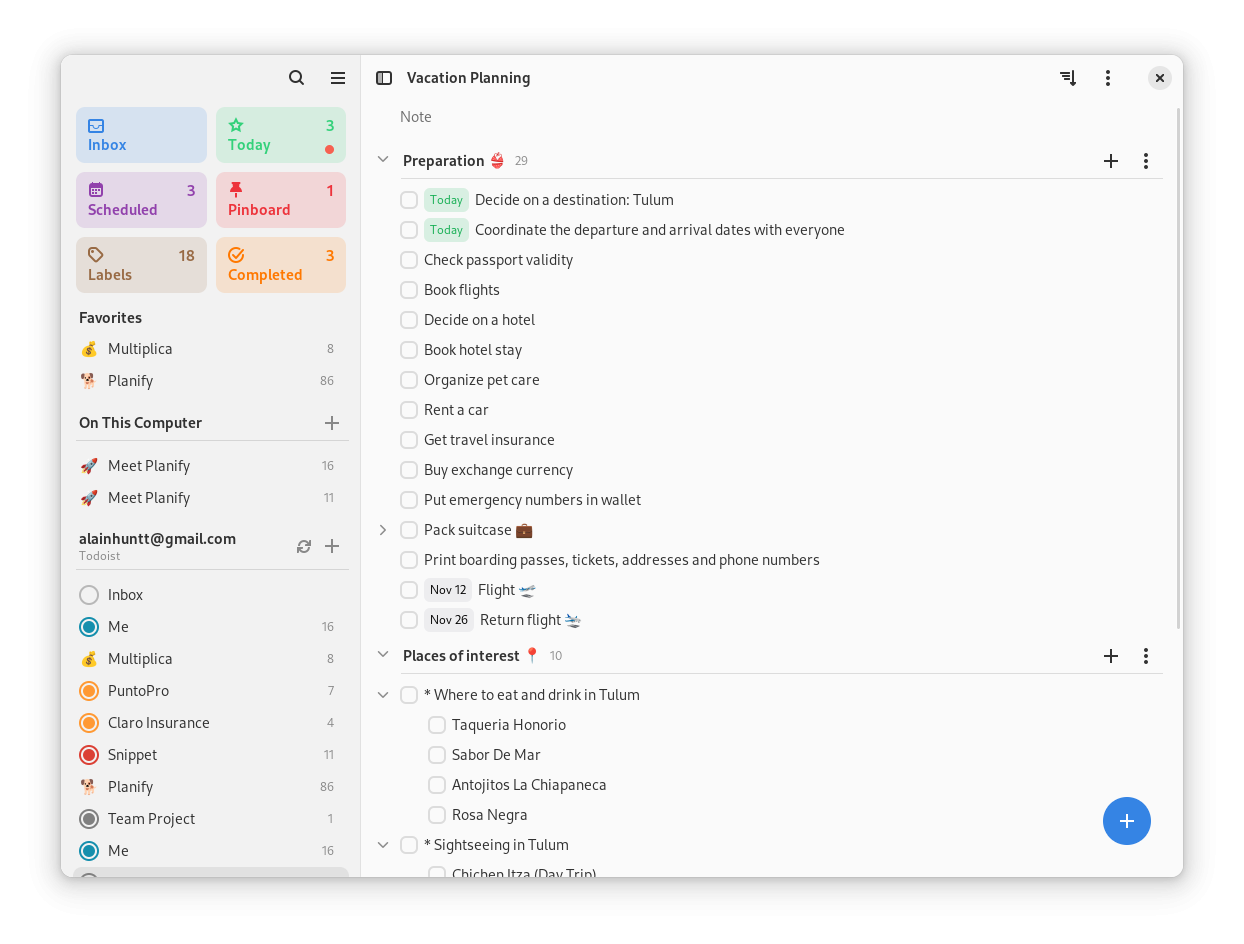
About Planify
Planify is your modern and powerful task manager that helps you keep your life organized. With a clean and intuitive interface, cloud synchronization, and advanced features, you'll never forget what matters again.
? Core Features:
o Modern and clean interface designed with GTK4 and libadwaita
o Drag and drop to organize tasks and projects effortlessly
o Visual progress indicators for each project
o Smart organization with sections and custom labels
o Calendar integration to visualize your schedule
o Multiple reminders per task to never miss a deadline
o Dark mode with seamless system theme integration
o Quick and powerful search to find anything instantly
o Recurring tasks with flexible patterns
o Attachments and links in your tasks
? Cloud Synchronization:
o Full synchronization with Todoist to access your tasks from anywhere
o Support for Nextcloud and CalDAV servers (Radicale, Baikal) to keep your data private
o Offline mode: work without internet and sync when you're back online
o Cross-platform synchronization to access from any device
* Planify is not created by, affiliated with, or supported by Doist
License: GPL-3.0+
? Core Features:
o Modern and clean interface designed with GTK4 and libadwaita
o Drag and drop to organize tasks and projects effortlessly
o Visual progress indicators for each project
o Smart organization with sections and custom labels
o Calendar integration to visualize your schedule
o Multiple reminders per task to never miss a deadline
o Dark mode with seamless system theme integration
o Quick and powerful search to find anything instantly
o Recurring tasks with flexible patterns
o Attachments and links in your tasks
? Cloud Synchronization:
o Full synchronization with Todoist to access your tasks from anywhere
o Support for Nextcloud and CalDAV servers (Radicale, Baikal) to keep your data private
o Offline mode: work without internet and sync when you're back online
o Cross-platform synchronization to access from any device
* Planify is not created by, affiliated with, or supported by Doist
License: GPL-3.0+
| Release info | New Release on Sep 09, 2026 |
|---|---|
| Release notes | Planify 4.20.0 is a big release with Nextcloud Deck integration, CalDAV reminder sync, productivity goals, GNOME Online Accounts detection, and many features, fixes and performance improvements. Update now and enjoy a smoother experience. New Features: • Added Nextcloud Deck integration — boards, stacks and cards sync two-way as projects, sections and tasks, with labels, archive, drag and drop between stacks and boards, and order preservation. • Added a productivity goals system — daily and weekly targets (fixed or dynamic), a mini progress widget in the app menu, and an 8-week activity heatmap in the productivity report. • Added "Repeat from completion date" — recurring tasks can repeat from the day they are completed instead of their due date, per task, matching how apps like Tasks.org behave (local and Todoist). • Added detection and import of CalDAV accounts from GNOME Online Accounts — a subtle link under the account list imports Nextcloud/ownCloud (via Login Flow v2) or generic CalDAV accounts with the server URL prefilled. • Added a completed tasks section to the Today view, toggleable from the view settings. • Added a project filter to the Completed view and sort/filter controls to the All Tasks view, matching the project views. • Added All Tasks and Labels as Home View options in Preferences. • Added a calendar sources preferences page to choose which calendars are shown. • Added quick date shortcuts to the Deadline picker (Tomorrow, In 3 days, Next week, In 2 weeks, In a month), matching the Date picker. • Added keyboard shortcuts to jump to projects (Ctrl+1–Ctrl+9) and cycle through them (Ctrl+Page Down / Ctrl+Page Up). • Improved the date picker with natural-language search (via Chrono), suggestion chips, and pre-selection of the item's existing due date. • Improved QuickFind — searches task descriptions, shows the parent project name for sections, adds a result count footer, and highlights a snippet when the match is in the… |
| Related tags | task tasks project |
| Listing data | Flathub |
Reviews
No reviews yet. Be the first to review Planify.
Used Planify? Tell other visitors what you thought.
Log in to write a reviewOther products by this publisher
- #Bible 11.5 "Incredible App - My sister shared this app with me a few weeks ago and it is truly incredible.
- % Percentage Calculator Pro 1.41 This is the Pro version of % Percentage Calculator.
- (beat) for iOS 0.5.8 An elegant Fountain screenwriting app, created by a screenwriter for screenwriters.
- (Deep) HIARCS Chess Explorer 1.14 Chess database, analysis and game playing program
- (How to) Pronounce PRO 1.5.6 This is a PRO version of (How to) Pronounce.
Most viewed Linux Utilities
- 1 Artemis 4.2.0 The reference for radio signal identification
- 2 ASHPD Demo 0.13.0 Play with portals
- 3 Elastic 1.0.4 Design spring animations
-
4
 Piccolo 0.3.4
Color picking with style
Piccolo 0.3.4
Color picking with style
- 5 Recipe Scribe 3.0.0 A program for writing recipes
-
6
 Touché 2.0.15
Multi-touch gestures
Touché 2.0.15
Multi-touch gestures
- 7 Apifox 2.7.46 Apifox = Postman + Swagger + Mock + JMeter
- 8 Decoder 0.10.0 Scan and generate QR codes
- 9 Obfuscate 0.0.10 Censor private information
- 10 Read It Later 0.6.2 Save and read web articles
Most downloaded Linux Utilities
- 1 Adventure List 0.15.0 Todo list that syncs
- 2 Metronome 1.3.0 Keep the tempo
- 3 Apifox 2.7.46 Apifox = Postman + Swagger + Mock + JMeter
- 4 Artemis 4.2.0 The reference for radio signal identification
- 5 Basemark GPU 1.2.3 GPU performance evaluation tool
- 6 Beaver Notes 4.4.0 Private note taking app
- 7 Decoder 0.10.0 Scan and generate QR codes
- 8 Obfuscate 0.0.10 Censor private information
- 9 Read It Later 0.6.2 Save and read web articles
- 10 ASHPD Demo 0.13.0 Play with portals