PDF2QFX 4.0.130
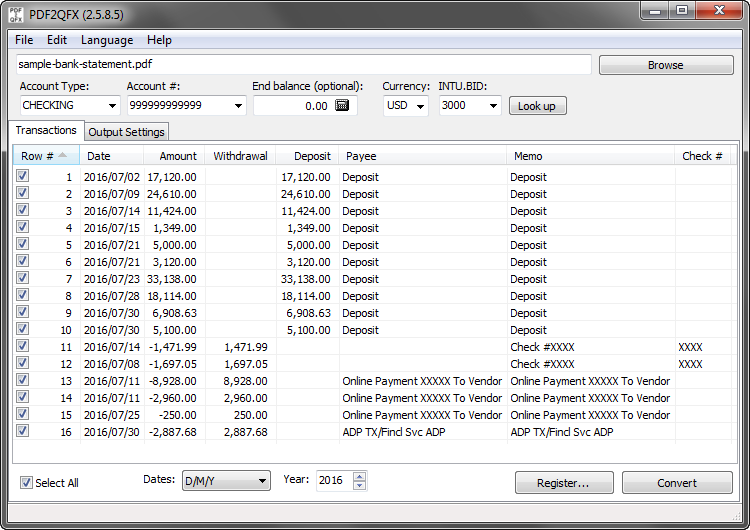
Need to import transactions, but the format is not supported? Convert PDF to QFX and import into Quicken. Extract transaction data from text-based PDF files from your bank. Support is available before and after purchase.
Product Specifications
| User Rating: | item has less then 1 vote |
|
| FileCart Rating | Not yet Rated | |
| Submitted by: | propersoft | |
| Homepage | Visit Homepage | |
| License | Shareware | |
| Price | $49.99 | |
| Downloads | 1,052 | |
| OS Support | Windows Install and Uninstall | |
| File Name | pdf2qfx_setup.exe | |
| File Size | 8.45 MB ( 8,651 KB ) | |
| Published | May 15, 2015 (11 years ago) | |
| Updated | Mar 01, 2017 (10 years ago) | |
Follow Us!
Latest Searches
rccb 8 minutes ago
what is worst state for education of history 8 minutes ago
como es plus ultra para viajar distintas categorias 10 minutes ago
what is the va tech hokie term from 10 minutes ago
yyg torrent 11 minutes ago
14 cny to myr 11 minutes ago
american classic 12 minutes ago
cs 1 6 download free for pc 14 minutes ago
gisele schmidt 15 minutes ago
Popular Searches
id cards 602 times
2025 495 times
2024 386 times
Softperfect 329 times
5g spf sonicwall compatible copper module 304 times
2026 300 times
Gypsy 2.0 Onlyfans Leaked Photos 297 times
targetamazon credit card.asp?highlight=0 272 times
ds1628 compatible 10gb sfp cards 268 times
Product Details
| Requirements: | Microsoft Windows 7/8/8.1/10 |
| Release Info: | Major Update on Jul 23, 2020 |
| Release Notes: | Maintenance release |
| Related Tags: | PDF QFX PDF to QFX convert PDF to QFX PDF to QFX converter PDF to Quicken |
Reviews
Reviews of PDF2QFX 4.0.130
You can be the first to write a review of PDF2QFX!Other products submitted by this publisher
Need to import transactions, but the format is not supported? Convert CSV, XLS, XLSX, PDF, QFX, OFX, QBO, QIF, MT940, STA to OFX and import into Xero, QB Online, Sage One, YNAB, AccountEdge, Banktivity, Ace Money.
Bank2PDFBank2PDF is an useful utility to convert your OFX, QFX, QIF, QBO files to PDF. Simply browse for your file, review transactions, save it or copy to clipboard.
Bank2QBOFinally, the solution to import your transactions. Convert CSV, XLS, XLSX, PDF, QFX, OFX, QBO, QIF, MT940, STA to QBO/IIF/CSV and import into QuickBooks. Created QBO files are regular Web Connect files for QuickBooks.
Bank2QFXFinally, the solution to import your transactions. Convert CSV, XLS, XLSX, PDF, QFX, OFX, QBO, QIF, MT940, STA to QFX and import into Quicken. Created QFX files are regular Web Connect files for Quicken.
Bank2QIFFinally, the solution to import your transactions. Convert CSV, XLS, XLSX, PDF, QFX, OFX, QBO, QIF, MT940, STA to QIF and import into Quicken PC, Banktivity, Quicken 2007 Mac, LessAccounting, YNAB, NetSuite, MYOB, AceMoney.