PDF to Word Converter Pro 19.4.2.4
PDF to Word Converter Pro converts PDF documents to Microsoft Word .DOC, DOCX, .XML and .RTF file formats, and plain text file. It also extracts images from PDF documents.
Product Specifications
| User Rating: | item has less then 1 vote |
|
| FileCart Rating | ||
| Submitted by: | girdac | |
| Homepage | Visit Homepage | |
| License | Shareware | |
| Expires | 50 Uses | |
| Price | $22.95 | |
| Downloads | 3,709 | |
| OS Support | Windows Install and Uninstall | |
| File Size | 6.40 MB ( 6,557 KB ) | |
| Published | Dec 10, 2007 (19 years ago) | |
| Updated | Jan 11, 2017 (10 years ago) | |
Follow Us!
Latest Searches
actvid.com 3 minutes ago
online youtube download 3 minutes ago
nazi flag 4 minutes ago
ancestry facts timeline glitch 5 minutes ago
tecnica para ansiedad 5 4 3 2 1 7 minutes ago
D&IT MTA Home 11 minutes ago
oscar nombre 13 minutes ago
redmi earphones driver 16 minutes ago
WHATS THE DELTA FORCE MAFIA 17 minutes ago
Popular Searches
id cards 602 times
2025 495 times
2024 386 times
Softperfect 329 times
2026 297 times
5g spf sonicwall compatible copper module 292 times
Gypsy 2.0 Onlyfans Leaked Photos 276 times
targetamazon credit card.asp?highlight=0 267 times
Data Protection Strategy (Sweet 260 times
Product Details
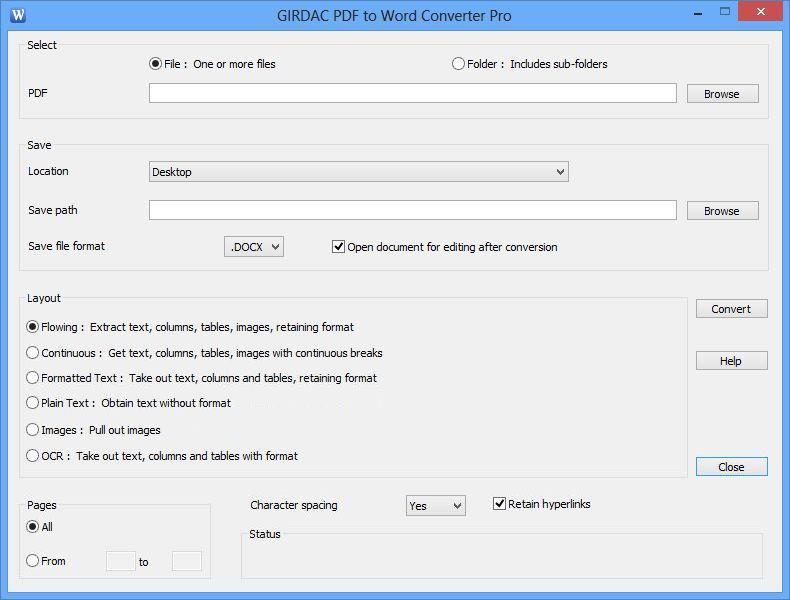
It converts PDF documents with six Layout options:
(a) Flowing: Converts PDF documents retaining the format with text, columns, tables and images.
(b) Continuous: Converts PDF documents picking out text, columns, tables and images with format, continuous breaks.
(c) Formatted text: Converts PDF documents retaining the format and text, discarding images.
(d) Plain text: Converts PDF documents by extracting text without format.
(e) Images: Converts PDF documents by picking images only.
(f) OCR: Converts scanned PDF documents through OCR.
It supports 32-bit and 64-bit operating systems.
It supports 115 user interface languages: Afrikaans, Albanian, Amharic, Arabic, Armenian, Azerbaijani, Bangla, Basque, Belarusian, Bosnian, Bulgarian, Burmese, Cantonese, Catalan, Cebuano, Chichewa, Chinese, Chinese Simple, Corsican, Creole, Croatian, Czech, Danish, Dari, Dutch, English, Esperanto, Estonian, Faroese, Fijian, Filipino, Finnish, French, Frisian, Galician, Georgian, German, Greek, Gujarati, Hausa, Hawaiian, Hebrew, Hindi, Hmong Daw, Hungarian, Icelandic, Igbo, Indonesian, Irish, Italian, Japanese, Javanese, Kannada, Kazakh, Khmer, Korean, Kurdish, Kyrgyz, Lao, Latin, Latvian, Lithuanian, Luxembourgish, Macedonian, Malagasy, Malay, Malayalam, Maltese, Maori, Marathi, Maya, Mongolian, Nepali, Norwegian, Occitan, Otomi, Papiamentu, Pashto, Persian, Polish, Portuguese, Punjabi, Romanian, Russian, Samoan, ScotsGaelic, Serbian, Sesotho, Shona, Sindhi, Sinhala, Slovak, Slovenian, Somali, Spanish, Sundanese, Swahili, Swedish, Tahitian, Tajik, Tamil, Telugu, Thai, Tongan, Turkish, Ukrainian Urdu, Uzbek, Valencian, Vietnamese, Welsh, Xhosa, Yiddish, Yoruba and Zulu.
| Requirements: | PC 133-MHz, 128 MB RAM, 15 MB hard disk space |
| Release Info: | Major Update on Jan 02, 2017 |
| Release Notes: | New user interface languages are added |
| Related Tags: | pdf to word pdf to word converter convert pdf to word pdf to doc pdf to rtf |
Reviews
You must be logged in to write a review
Reviews of PDF to Word Converter Pro 19.4.2.4
You can be the first to write a review of PDF to Word Converter Pro!Other products submitted by this publisher
Image Editor and Converter Pro is a software to create, edit, and compose digital images. It can read, write, convert, combine and modify images.
PDF Converter ProPDF Converter Pro converts PDF documents to Microsoft Word and Excel file formats. It also creates PDF documents from any printable file.
PDF Converter StandardPDF Converter Standard converts PDF documents to Microsoft Microsoft Word and Excel file formats. It also converts Word documents to PDF documents.
PDF Converter UltimatePDF Converter Ultimate converts PDF documents to Microsoft Word, Excel, HTML, PostScript and over 100 image formats. It also creates PDF documents from any printable file.
PDF Creator ProPDF Creator Pro creates PDF documents from Microsoft Word, Excel, PowerPoint or any printable file.
Most Viewed Windows Word Processing
PDF to Word Converter Pro 19.4.2.4
CAD KAS PDF Editor 5.5
Sonic PDF Creator 1.0
PhraseExpress Text Expander 12.0.138
ABA Document Convert 2.6
Convert XLS to PDF For Excel 4.00
AnyCount Word Count and Line Count 7
Microsoft Reader Converter 1.3.8
Convert DOC to PDF For Word 4.00
Most Downloaded Windows Word Processing
PDF to Word Converter Pro 19.4.2.4
CAD KAS PDF Editor 5.5
Convert XLS to PDF For Excel 4.00
ABC Amber PowerPoint Converter 2.04
Convert DOC to PDF For Word 4.00
AnyCount Word Count and Line Count 7
Atlantis Word Processor 4.4.5.4
Convert PPT to PDF For PowerPoint 4.00
Book Writer 5.50