
PDF to Image Converter 12.1.2.2
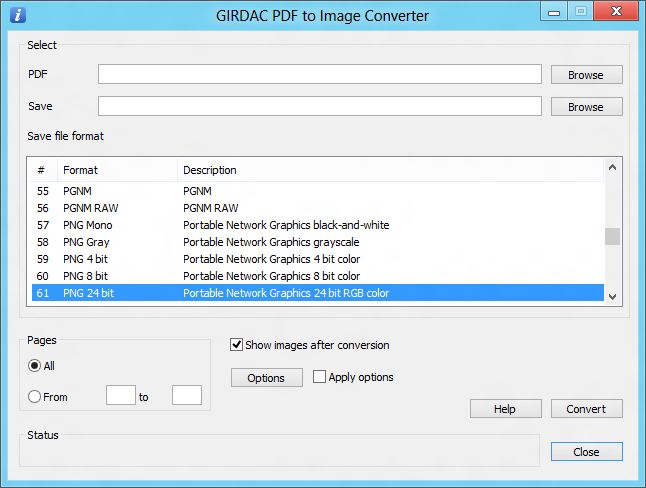
PDF to Image Converter converts PDF documents to BMP, GIF, JPG, MNG, PNG, TIF and over 100 image formats. It also adds many image enhancement properties.
Download
12.78 MB
530downloads
0this week
$19.95Shareware
0reviews
Screenshots
About PDF to Image Converter
GIRDAC PDF to Image Converter is a software application for converting PDF documents to to over 100 image file formats. It also adds many image enhancement properties.
It converts PDF documents image with the properties: Three dimensional edge, Border color, Chop, Crop, Resize, Compression, Contrast, Emboss, Frame, Gaussian Blur, Mirror, Flip, Rotate, Modulate, Oil Paint, Posterize, Resolution, Roll, Segment, Shade, Shape, Shear, Swirl, Text and Threshold.
It supports 90 user interface languages: Afrikaans, Albanian, Arabic, Armenian, Azerbaijani, Bangla, Basque, Belarusian, Bosnian, Bulgarian, Catalan, Cebuano, Chinese, Chinese Simple, Creole, Croatian, Czech, Danish, Dari, Dutch, English, Esperanto, Estonian, Faroese, Filipino, Finnish, French, Galician, Georgian, German, Greek, Gujarati, Hausa, Hebrew, Hindi, Hmong Daw, Hungarian, Icelandic, Igbo, Indonesian, Irish, Italian, Japanese, Javanese, Kannada, Kazakh, Khmer, Korean, Kurdish, Lao, Latin, Latvian, Lithuanian, Macedonian, Malay, Maltese, Maori, Marathi, Mongolian, Nepali, Norwegian, Occitan, Papiamentu, Pashto, Persian, Polish, Portuguese, Punjabi, Romanian, Russian, Serbian, Slovak, Slovenian, Somali, Spanish, Swahili, Swedish, Tamil, Telugu, Thai, Turkish, Ukrainian Urdu, Uzbek, Valencian, Vietnamese, Welsh, Yiddish, Yoruba and Zulu.
It provides four User Interface styles: Windows 8 Blue, Black, Aqua and Silver.
It supports 32-bit and 64-bit operating systems.
It converts PDF documents image with the properties: Three dimensional edge, Border color, Chop, Crop, Resize, Compression, Contrast, Emboss, Frame, Gaussian Blur, Mirror, Flip, Rotate, Modulate, Oil Paint, Posterize, Resolution, Roll, Segment, Shade, Shape, Shear, Swirl, Text and Threshold.
It supports 90 user interface languages: Afrikaans, Albanian, Arabic, Armenian, Azerbaijani, Bangla, Basque, Belarusian, Bosnian, Bulgarian, Catalan, Cebuano, Chinese, Chinese Simple, Creole, Croatian, Czech, Danish, Dari, Dutch, English, Esperanto, Estonian, Faroese, Filipino, Finnish, French, Galician, Georgian, German, Greek, Gujarati, Hausa, Hebrew, Hindi, Hmong Daw, Hungarian, Icelandic, Igbo, Indonesian, Irish, Italian, Japanese, Javanese, Kannada, Kazakh, Khmer, Korean, Kurdish, Lao, Latin, Latvian, Lithuanian, Macedonian, Malay, Maltese, Maori, Marathi, Mongolian, Nepali, Norwegian, Occitan, Papiamentu, Pashto, Persian, Polish, Portuguese, Punjabi, Romanian, Russian, Serbian, Slovak, Slovenian, Somali, Spanish, Swahili, Swedish, Tamil, Telugu, Thai, Turkish, Ukrainian Urdu, Uzbek, Valencian, Vietnamese, Welsh, Yiddish, Yoruba and Zulu.
It provides four User Interface styles: Windows 8 Blue, Black, Aqua and Silver.
It supports 32-bit and 64-bit operating systems.
| Requirements | PC 133-MHz, 128 MB RAM, 23 MB hard disk space |
|---|---|
| Release info | New Release on Jan 01, 2015 |
| Release notes | Windows 10 Technical Preview support added |
| Related tags | pdf to image pdf to image converter convert pdf to image pdf to bmp pdf to gif |
Reviews
No reviews yet. Be the first to review PDF to Image Converter.
Used PDF to Image Converter? Tell other visitors what you thought.
Log in to write a reviewOther products by this publisher
-
 Image Editor and Converter Pro 8.2.2.5
Image Editor and Converter Pro is a software to create, edit, and compose digital images. It can read, write, convert, combine and modify images.
Image Editor and Converter Pro 8.2.2.5
Image Editor and Converter Pro is a software to create, edit, and compose digital images. It can read, write, convert, combine and modify images.
-
 PDF Converter Pro 19.4.2.4
PDF Converter Pro converts PDF documents to Microsoft Word and Excel file formats. It also creates PDF documents from any printable file.
PDF Converter Pro 19.4.2.4
PDF Converter Pro converts PDF documents to Microsoft Word and Excel file formats. It also creates PDF documents from any printable file.
-
 PDF Converter Standard 19.4.2.4
PDF Converter Standard converts PDF documents to Microsoft Microsoft Word and Excel file formats. It also converts Word documents to PDF documents.
PDF Converter Standard 19.4.2.4
PDF Converter Standard converts PDF documents to Microsoft Microsoft Word and Excel file formats. It also converts Word documents to PDF documents.
-
 PDF Converter Ultimate 22.4.2.4
PDF Converter Ultimate converts PDF documents to Microsoft Word, Excel, HTML, PostScript and over 100 image formats. It also creates PDF documents from any printable file.
PDF Converter Ultimate 22.4.2.4
PDF Converter Ultimate converts PDF documents to Microsoft Word, Excel, HTML, PostScript and over 100 image formats. It also creates PDF documents from any printable file.
-
 PDF Creator Pro 19.4.2.4
PDF Creator Pro creates PDF documents from Microsoft Word, Excel, PowerPoint or any printable file.
PDF Creator Pro 19.4.2.4
PDF Creator Pro creates PDF documents from Microsoft Word, Excel, PowerPoint or any printable file.
Most viewed Windows PDF Tools
-
1
 PDF to Excel Converter 2.4
Converter pdf to excell documents
PDF to Excel Converter 2.4
Converter pdf to excell documents
- 2 FlippingBook Publisher 2.4.37 FlippingBook Publisher - modern flip book maker for digital catalogs with page flip animation. Convert your PDF to flip book and create online documents for websites, as well as online HTML5 page flip publications for mobile devices (iOS, Android)
-
3
 PDF Creator for Windows 7 7.00
PDF Creator installs as a virtual printer. You can print from virtually any Windows application to this PDF Creator printer, and get a press-ready, high quality, searchable, color PDF file. PDF Creator supports Font Embedding, Encryption, CMYK etc.
PDF Creator for Windows 7 7.00
PDF Creator installs as a virtual printer. You can print from virtually any Windows application to this PDF Creator printer, and get a press-ready, high quality, searchable, color PDF file. PDF Creator supports Font Embedding, Encryption, CMYK etc.
-
4
 A-PDF Merger 6.9.4
A-PDF Merger is an utility that lets you combine two or more image files or Acrobat PDF files into a single PDF document. Features include combining bookmarks, merge methods, changing properties and security settings of output PDF document etc.
A-PDF Merger 6.9.4
A-PDF Merger is an utility that lets you combine two or more image files or Acrobat PDF files into a single PDF document. Features include combining bookmarks, merge methods, changing properties and security settings of output PDF document etc.
-
5
 Excel to PDF Converter 5.0
Excel to PDF Converter is a Excel Addin component/DLL that convert XLS to PDF, Excel document to PDF automatically.
Excel to PDF Converter 5.0
Excel to PDF Converter is a Excel Addin component/DLL that convert XLS to PDF, Excel document to PDF automatically.
-
6
 PPT to PDF Converter 5.0
PPT to PDF Converter is a PowerPoint Plugin that convert PPT to PDF, PowerPoint document to PDF automatically.
PPT to PDF Converter 5.0
PPT to PDF Converter is a PowerPoint Plugin that convert PPT to PDF, PowerPoint document to PDF automatically.
-
7
 A-PDF Split 4.8.3
A-PDF Split is a lightning-quick desktop utility program that lets you split any pdf file into smaller pdf files. It provides complete flexibility and user control in terms of how files are split and how the split output files are uniquely named.
A-PDF Split 4.8.3
A-PDF Split is a lightning-quick desktop utility program that lets you split any pdf file into smaller pdf files. It provides complete flexibility and user control in terms of how files are split and how the split output files are uniquely named.
-
8
 Mgosoft Image To PDF SDK 8.8.0
Batch convert most of popular image formats, e.g., TIF, TIFF, JPG, JPEG, GIF, PNG, BMP, PSD, WMF, EMF, PCX, PIC, etc into PDF documents consist of entire graphics, text and resolution without any misrepresentation in original format.
Mgosoft Image To PDF SDK 8.8.0
Batch convert most of popular image formats, e.g., TIF, TIFF, JPG, JPEG, GIF, PNG, BMP, PSD, WMF, EMF, PCX, PIC, etc into PDF documents consist of entire graphics, text and resolution without any misrepresentation in original format.
-
9
 Mgosoft JPEG To PDF SDK 8.8.0
Batch convert JPEG, JPEG2000 formats into PDF documents consist of entire graphics, text and resolution without any misrepresentation in original format.
Mgosoft JPEG To PDF SDK 8.8.0
Batch convert JPEG, JPEG2000 formats into PDF documents consist of entire graphics, text and resolution without any misrepresentation in original format.
-
10
 Simpo PDF to Word 3.5.2
Simpo PDF to Word Converter makes it easy to reuse PDF contents, such as text, images and tables, by converting it to editable Microsoft Word. Users can convert a batch of encrypted PDFs to Word at a time and convert selected pages of a PDF document.
Simpo PDF to Word 3.5.2
Simpo PDF to Word Converter makes it easy to reuse PDF contents, such as text, images and tables, by converting it to editable Microsoft Word. Users can convert a batch of encrypted PDFs to Word at a time and convert selected pages of a PDF document.
Most downloaded Windows PDF Tools
-
1
PDF to Excel Converter 2.4
Converter pdf to excell documents
-
2
Mgosoft Image To PDF SDK 8.8.0
Batch convert most of popular image formats, e.g., TIF, TIFF, JPG, JPEG, GIF, PNG, BMP, PSD, WMF, EMF, PCX, PIC, etc into PDF documents consist of entire graphics, text and resolution without any misrepresentation in original format.
-
3
 Mgosoft TIFF To PDF SDK 8.8.0
Batch convert TIF, TIFF formats into PDF documents consist of entire graphics, text and resolution without any misrepresentation in original format.
Mgosoft TIFF To PDF SDK 8.8.0
Batch convert TIF, TIFF formats into PDF documents consist of entire graphics, text and resolution without any misrepresentation in original format.
-
4
Mgosoft JPEG To PDF SDK 8.8.0
Batch convert JPEG, JPEG2000 formats into PDF documents consist of entire graphics, text and resolution without any misrepresentation in original format.
-
5
PDF Creator for Windows 7 7.00
PDF Creator installs as a virtual printer. You can print from virtually any Windows application to this PDF Creator printer, and get a press-ready, high quality, searchable, color PDF file. PDF Creator supports Font Embedding, Encryption, CMYK etc.
-
6
A-PDF Merger 6.9.4
A-PDF Merger is an utility that lets you combine two or more image files or Acrobat PDF files into a single PDF document. Features include combining bookmarks, merge methods, changing properties and security settings of output PDF document etc.
-
7
A-PDF Split 4.8.3
A-PDF Split is a lightning-quick desktop utility program that lets you split any pdf file into smaller pdf files. It provides complete flexibility and user control in terms of how files are split and how the split output files are uniquely named.
-
8
 A-PDF PPT2PDF 1.0.0
A-PDF PPT2PDF is a software utility program that converts PowerPoint files into .pdf files which are compatible with Adobe Acrobat Reader Version 5 and above.
A-PDF PPT2PDF 1.0.0
A-PDF PPT2PDF is a software utility program that converts PowerPoint files into .pdf files which are compatible with Adobe Acrobat Reader Version 5 and above.
- 9 A-PDF Text Extractor 1.3.0 A-PDF Text Extractor is an utility designed to extract text from Adobe PDF files. There are three mode of output text: In PDF Order, Smart Rearrange and With Position. The program is a standalone application. No Adobe Acrobat needed.
- 10 FlippingBook Publisher 2.4.37 FlippingBook Publisher - modern flip book maker for digital catalogs with page flip animation. Convert your PDF to flip book and create online documents for websites, as well as online HTML5 page flip publications for mobile devices (iOS, Android)