
My Screen Recorder 5.17
Record your PC desktop screen activity to a AVI or WMV file. This advanced screen capturing tool can capture anything you see on the computer screen, including the entire desktop, windows, menus, cursors, and even video with sound.
Download
25.57 MB · MyScreenRecorder.exe
454downloads
1this week
$49.95Shareware
0reviews
Screenshots
About My Screen Recorder
Record your PC desktop screen activity to a AVI or WMV file. This advanced screen capturing tool can capture anything you see on the computer screen, including the entire desktop, windows, menus, cursors, and even video with sound.
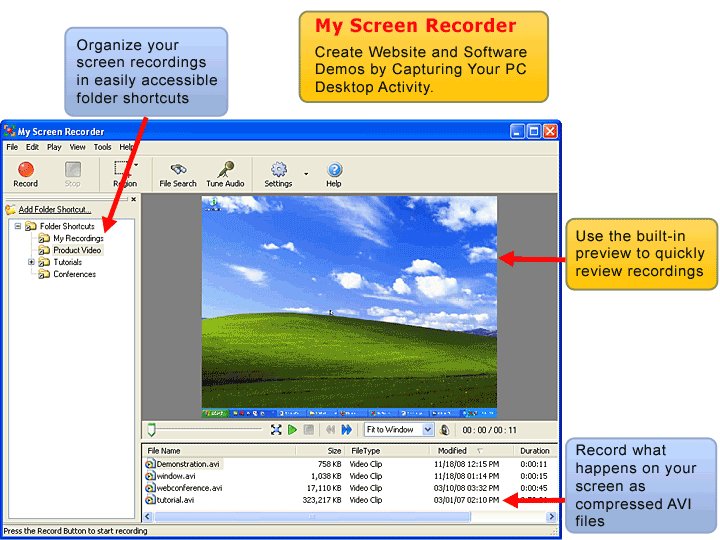
My Screen Recorder can capture the entire desktop, or only an area you select. You can use a connected microphone to add narration to your recordings, or have the program record the sounds the computer is playing. You can even record from the microphone and speakers at the same time - perfect for recording internet chat applications! The built-in Preview feature lets you quickly review your movies.
My Screen Recorder also helps you organize your recordings into Folder Shortcuts for easy management. The program is easy to use. You can select from a framed area capture or full desktop recording. You can adjust the video quality settings to reduce file size, use custom cursors and more.
You can use My Screen Recorder to demonstrate features of a web site or program, make tutorials, presentations, or any other task that requires showing screen activity. It's the perfect way to record a webinar or video call, including audio. Create flawless recordings of Internet tv and radio shows effortlessly. Try My Screen Recorder risk-free today!
| Requirements | 256MB RAM |
|---|---|
| Release info | Major Update on Jan 31, 2019 |
| Release notes | Windows 10 Support, Multi-Lingual Spanish, Portuguese, French, Italian, German, Dutch. Record from ANY sound device. Record direct to WMV files, Record from speakers and microphone simultaneously on Vista, Windows 7, 8, and 10. |
| Related tags | screen recorder desktop recorder screen capture |
Reviews
No reviews yet. Be the first to review My Screen Recorder.
Used My Screen Recorder? Tell other visitors what you thought.
Log in to write a reviewOther products by this publisher
-
 Auto FTP Manager 7.24
Auto FTP Manager is a powerful secure FTP client. Schedule FTP transfers to happen automatically. Automated Transfers perform complex tasks. It's intuitive and extremely easy to use. Secure transfers are supported.
-
 My Screen Recorder Pro 5.21
Record your PC desktop screen activity to AVI, WMV, MP4, or WebM files. This advanced screen capturing tool can capture all activity on your computer screen, webcam or mobile device, including menus, cursors, and video with sound.
-
 Security Monitor Pro 6.22
Video Surveillance with multiple IP or USB cameras. Monitor and record from multiple cameras simultaneously, create continuous video recordings, and view multiple cameras in a single window. Receive email/SMS alerts when motion or noise is detected.
-
 Site Translator 4.14
Translate entire web sites or localize software with a single click! Site Translator converts all HTML, ASP, ASPX, ASCX, PHP, RESX, XML and CHM files from one language to another. Expand your potential audience. Download Site Translator today.
Most viewed Windows Screen Capture
-
1
 Super Screen Capture 6.1
Super Screen Capture is a screen capture, screen record and audio record software. You can capture screen to image, recording screen to video, record audio from microphone. Please visit zeallsoft.com to learn more.
-
2
 Movavi Screen Capture Studio 6.1.0
Record screencasts, video chats, online video, or webcam. Capture screenshots. Edit screencasts using the built-in video editor: apply special effects, insert captions, change audio tracks. Save files in any media format, and burn them to DVDs
- 3 Capture Solution XE 12.9 Using Capture Solution XE you can perform professional capture screen immediately with just one. Capture videos from anything on the screen, saving as AVI, WMV, MP4, MOV. Record audios from the audio device, saving as Wav, WMA, M4A, AAC, MP3, Ogg.
-
4
 liteCam 5.0
liteCam HD is High Quality screen recorder that captures Videos, Screen Activities and Screenshots. Also, it can extract audio from videos to MP3, WMA or WAV format. Create professional tutorials, presentations, and video training and software demos.
-
5
 HardCopy Pro 4.18.0
HardCopy Pro is the professional, easy to use screen capture tool!
-
6
 Direct Stream Recorder 3.2
Direct Stream Recorder is a handy tool for capturing all kinds of video and audio streams, including video chats, Skype and DRM protected streams. Just select the area to capture, set the audio source, choose video/audio codecs and create a record.
-
7
 Solid Capture 3.0
Solid Capture is the ultimate screen capture and image sharing toolkit. Easily capture anything on your screen using our simple interface or a hotkey. You can also easily edit, format, and share your captures. Capture and collaborate with ease!
-
8
 ScreenVirtuoso PRO 4.61
Records screen activity as AVI video file. Can optionally record sound and synchronize it with video. Allows you to convert AVI files to MPEG-1/2/4,VCD/SVCD/DVD,FLV/SWF,WMV video formats. Supports hotkeys, annotation, timer, screenshots and more.
-
9
 ACA Screen Recorder 4.00
ACA Screen Recorder captures the Windows screen actions and sound, saves it as a standard, easily edited, AVI(Audio-Video Interleaved) movie file. This format can be played under Windows, as well as the Internet. More Info: http://www.acasystems.com
-
10
 Super Webcam Recorder 4.2002
Super Webcam Recorder is a simple and professional webcam video recording software. the webcam tool designed to help you capture streaming video and audio or snapshots with the hotkey. You can save video to avi, wmv, mp4, divx, xvid format.
Most downloaded Windows Screen Capture
- 1 Capture Solution XE 12.9 Using Capture Solution XE you can perform professional capture screen immediately with just one. Capture videos from anything on the screen, saving as AVI, WMV, MP4, MOV. Record audios from the audio device, saving as Wav, WMA, M4A, AAC, MP3, Ogg.
-
2
Movavi Screen Capture Studio 6.1.0
Record screencasts, video chats, online video, or webcam. Capture screenshots. Edit screencasts using the built-in video editor: apply special effects, insert captions, change audio tracks. Save files in any media format, and burn them to DVDs
-
3
liteCam 5.0
liteCam HD is High Quality screen recorder that captures Videos, Screen Activities and Screenshots. Also, it can extract audio from videos to MP3, WMA or WAV format. Create professional tutorials, presentations, and video training and software demos.
-
4
 Growler Guncam 3.1.9.0
Growler Guncam is a game recorder and video capture tool.
-
5
Super Screen Capture 6.1
Super Screen Capture is a screen capture, screen record and audio record software. You can capture screen to image, recording screen to video, record audio from microphone. Please visit zeallsoft.com to learn more.
-
6
ScreenVirtuoso PRO 4.61
Records screen activity as AVI video file. Can optionally record sound and synchronize it with video. Allows you to convert AVI files to MPEG-1/2/4,VCD/SVCD/DVD,FLV/SWF,WMV video formats. Supports hotkeys, annotation, timer, screenshots and more.
-
7
Super Webcam Recorder 4.2002
Super Webcam Recorder is a simple and professional webcam video recording software. the webcam tool designed to help you capture streaming video and audio or snapshots with the hotkey. You can save video to avi, wmv, mp4, divx, xvid format.
-
8
Direct Stream Recorder 3.2
Direct Stream Recorder is a handy tool for capturing all kinds of video and audio streams, including video chats, Skype and DRM protected streams. Just select the area to capture, set the audio source, choose video/audio codecs and create a record.
-
9
Solid Capture 3.0
Solid Capture is the ultimate screen capture and image sharing toolkit. Easily capture anything on your screen using our simple interface or a hotkey. You can also easily edit, format, and share your captures. Capture and collaborate with ease!
-
10
HardCopy Pro 4.18.0
HardCopy Pro is the professional, easy to use screen capture tool!