Junior Icon Editor 4.33
This free icon editor allows to make multi-resolution icons in 16x16, 24x24, 32x32, 48x48 sizes, in monochrome, 16 colors, 256 colors and 32-bit True Color with alpha channel color depths. Modify your icons with helpful paint tools with easy!
Product Disabled!
This product has been disabled by the site staff.Reason:
Product Specifications
| User Rating: | User Rating Disabled | |
| FileCart Rating | Staff Rating Disabled | |
| Submitted by: | Link Disabled | |
| License | Freeware | |
| Price | $0.00 | |
| Downloads | 318 | |
| OS Support | Windows Install and Uninstall | |
| File Name | junior-icon-editor.exe | |
| File Size | 5.65 MB ( 5,781 KB ) | |
| Published | Jun 08, 2006 (20 years ago) | |
| Updated | Jan 02, 2014 (12 years ago) | |
Latest Searches
HFBR 1521 6 minutes ago
pond phuwin live today 6 minutes ago
britta bötsch neumarkt ibbenbüren 7 minutes ago
what stage gives archers armor minecraft dungeons 11 minutes ago
Fill in the blank with a specific word to complete the sentence:The _______________ side of the heart that deals with oxygenated blood. 12 minutes ago
dünya geneli sunucu kontrolleri 12 minutes ago
megabonnku 15 minutes ago
VOLORANT 15 minutes ago
volorannt 15 minutes ago
Popular Searches
id cards 602 times
2025 445 times
2024 385 times
Softperfect 323 times
Database Workbench Pro 258 times
TeraByte Drive Image Backup and Restore 255 times
Elcomsoft Phone Breaker 251 times
ia que faz video com imagem 18 242 times
Elcomsoft Phone Viewer 232 times
Product Details
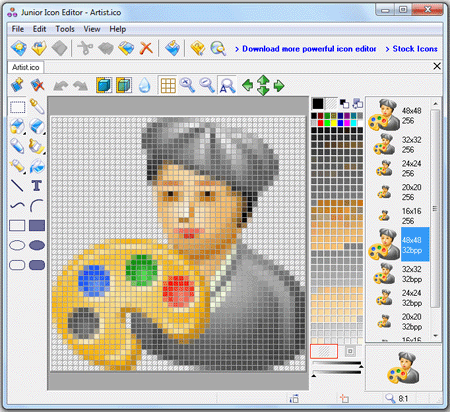
Launching Junior Icon Editor opens a window with a interface similar to the Windows paint program. You can set Junior Icon Editor to open to a new icon window or nothing. The new icon window shows a grid display with the grid matching the resolution of the icon you want to create. Along the left side are a set of drawing tools typical to most paint programs, including a color picker, eraser, pencil, air brush, paint brush and bucket (flood fill), text, rectangles, ellipses and lines. On the right side of the grid is a color chart (256) to choose from 256 colors. The grid overlay is tabbed, allowing you to open and work on more than one icon, either different sizes of the same icon, or completely different icons. Also shown on the right is a display of how your icon(s) appears actual size. With these tools, anyone can take advantage of the grid overlay and fill in the squares to create an icon that maximizes your artistic skills.
Junior Icon Editor is easy free icon editor!
Coming soon: iPhone Icon Extractor
| Requirements: | Windows PC |
| Release Info: | Major Update on Dec 16, 2013 |
| Release Notes: | Fixed: bug with text color |
Reviews
We have disabled this product, you can not write reviews of this product
Reviews of Junior Icon Editor 4.33
You can be the first to write a review of Junior Icon Editor!