1downloads
0this week
FreeCommercial
0reviews
Screenshots
About Internet Speed Limiter
Limit your internet speed using this simple app.
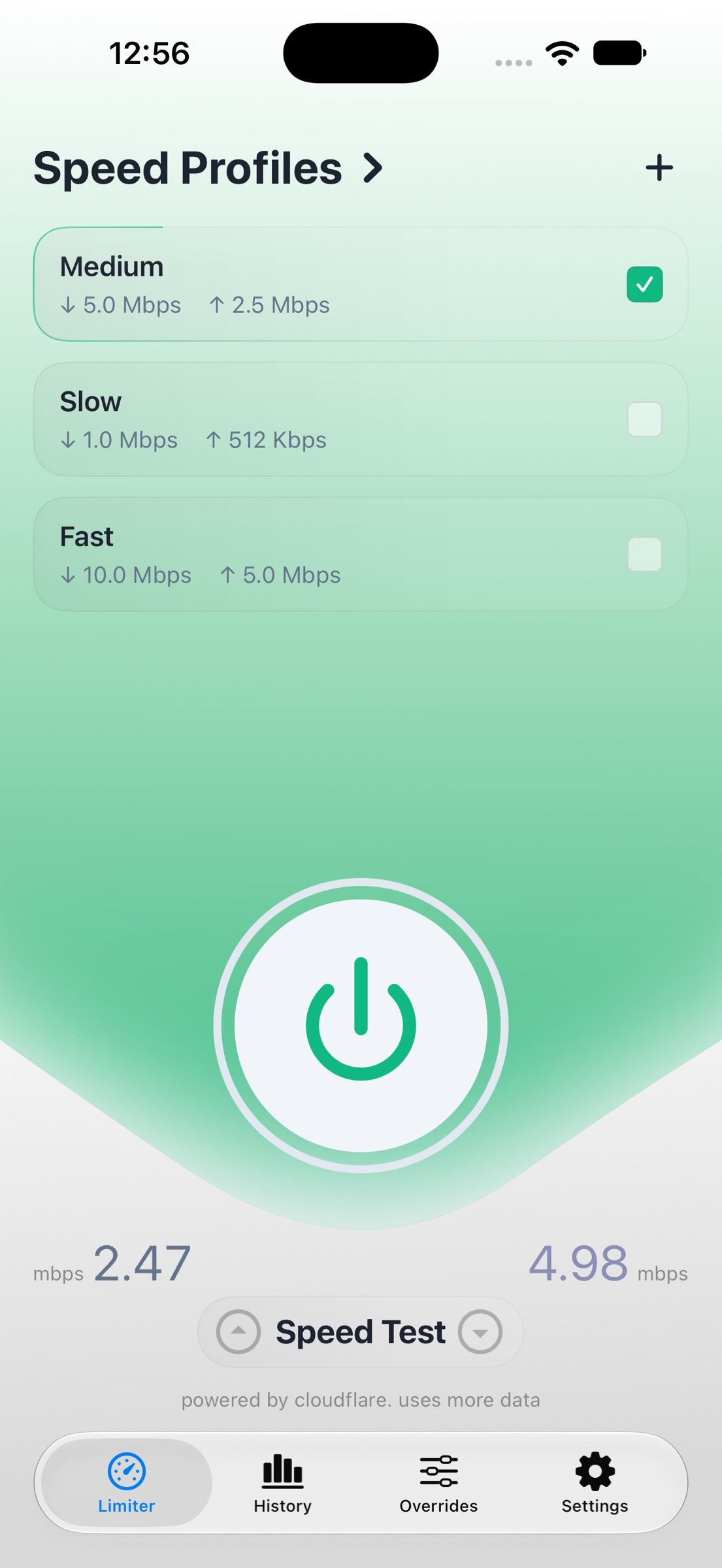
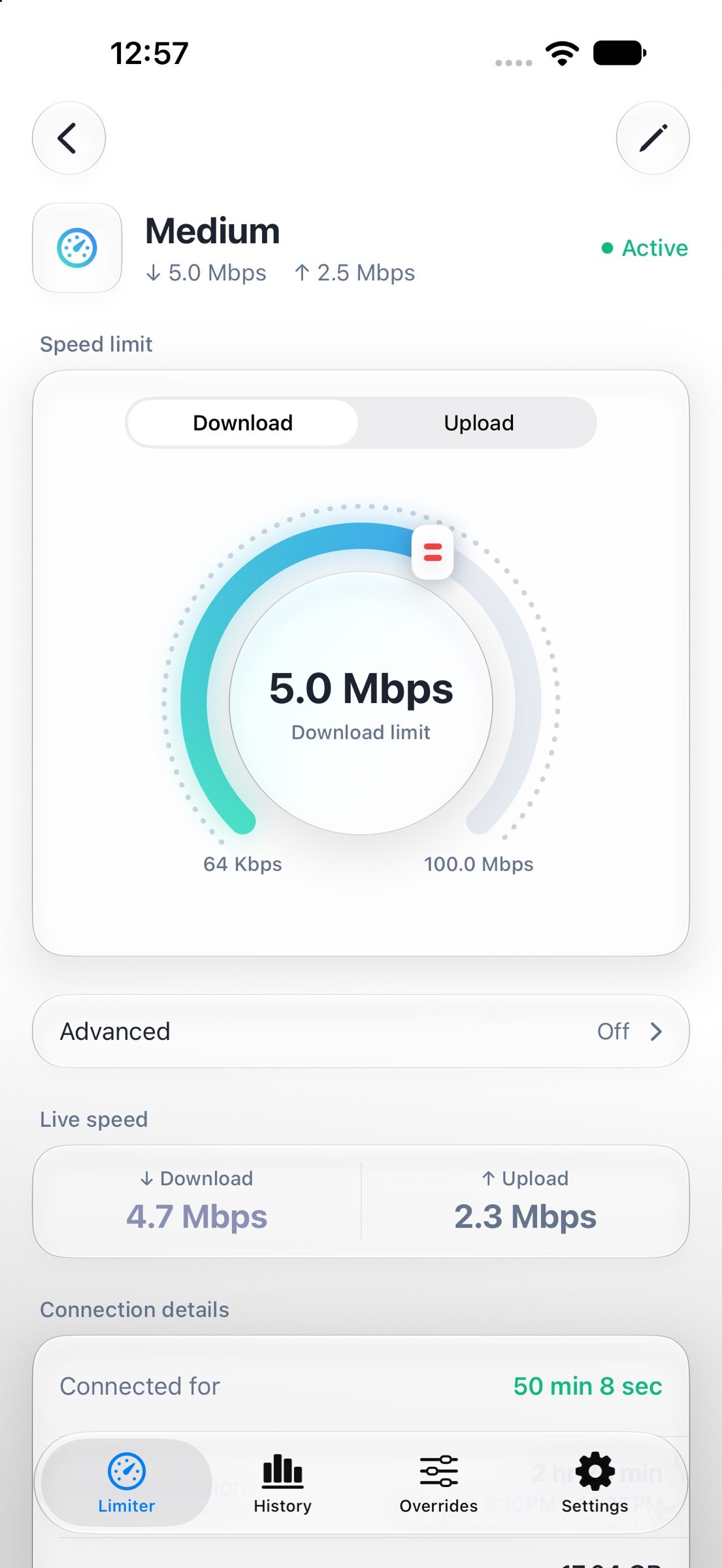
* It's simple to use and activate in one click. You can also add and manage different speed profiles and switch between them seamlessly.
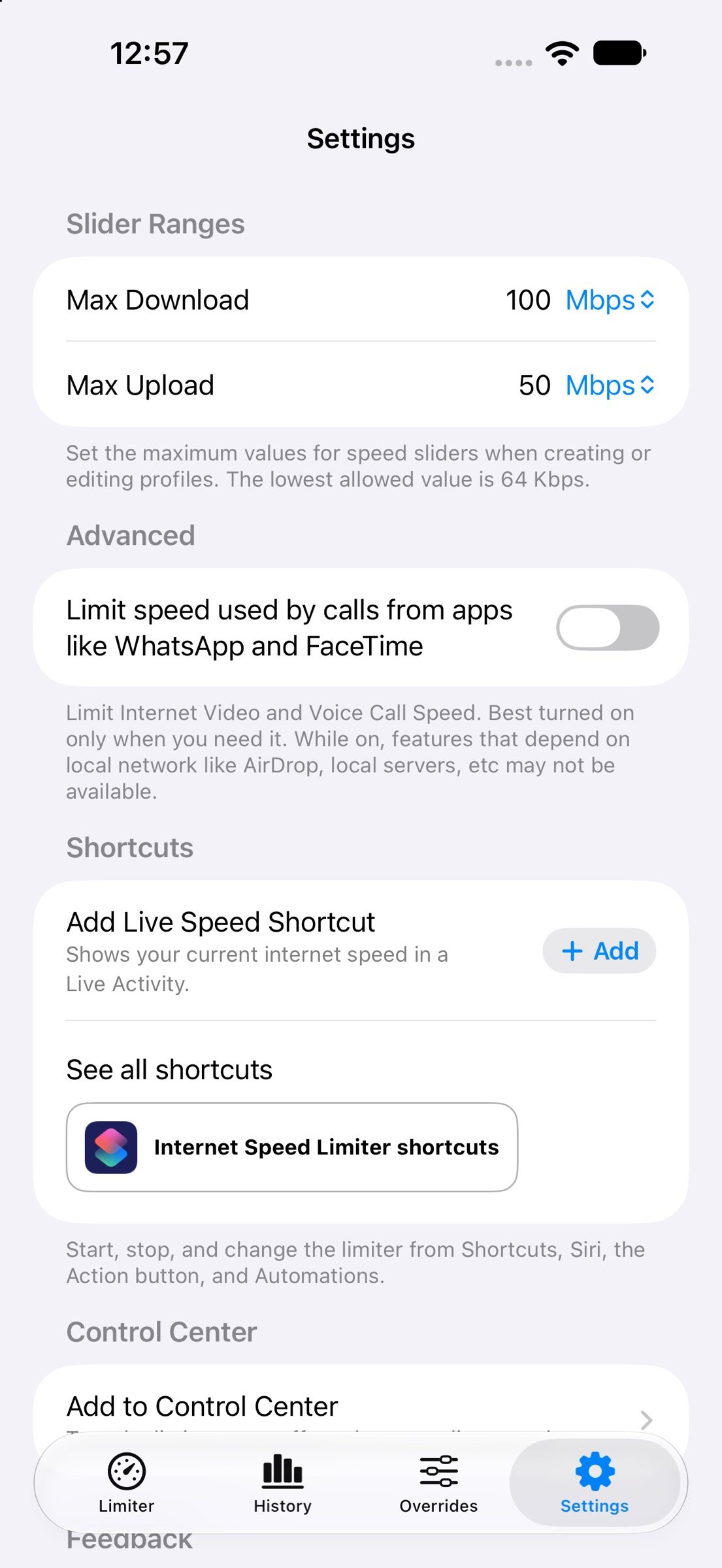
* Internet Speed Limiter lets you throttle the bandwidth of your Apple Device. Finely control download and upload speed on your device.
* It works by creating a local VPN that intelligently throttles all your internet traffic right on the device. Because the VPN is created and runs entirely locally, no data is ever sent to any third-party server. Your connection stays completely private. 100% safe and 100% under your control.
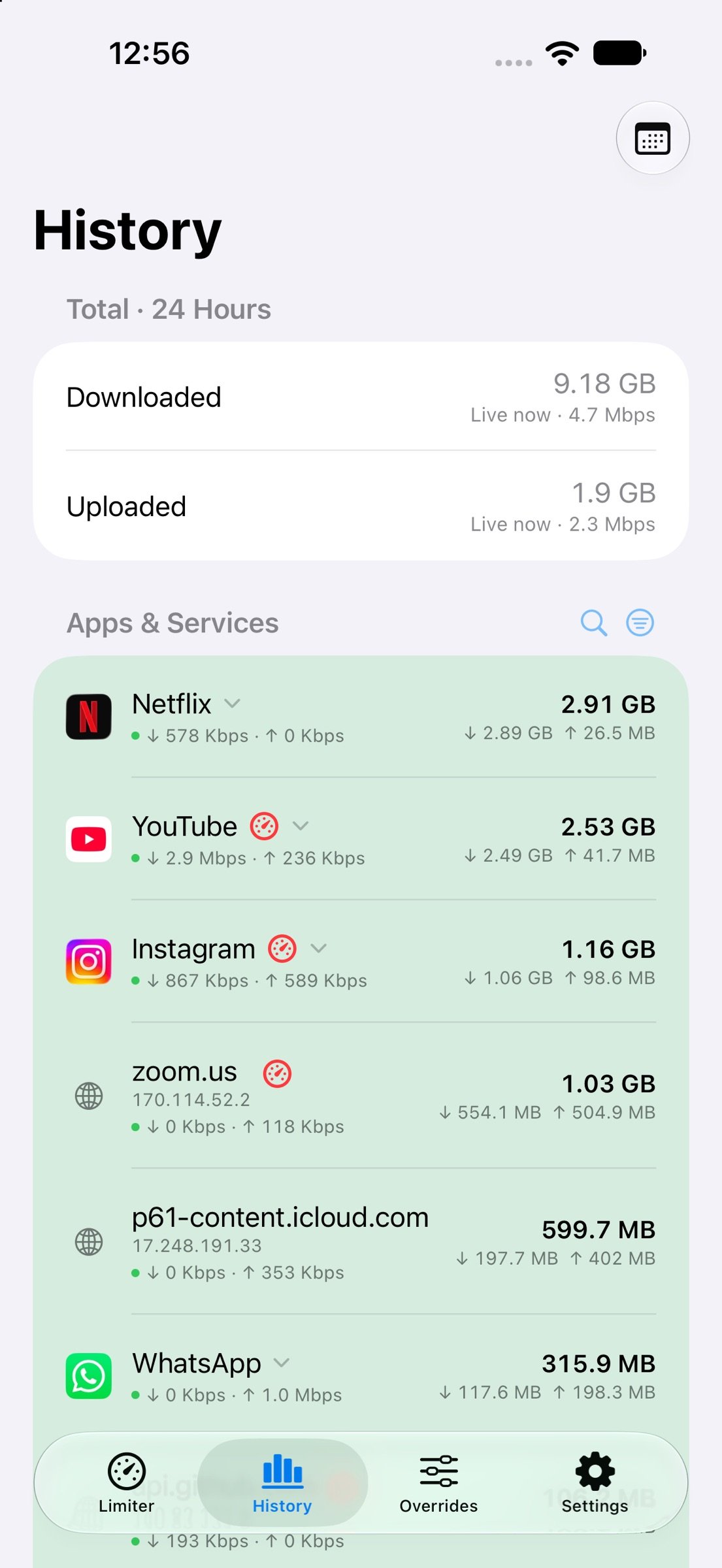
* Real Time Internet Usage
Analyse what service / IP is using more data with live history of entire Internet Traffic going through your device. Find out what are hidden services that use data in background.
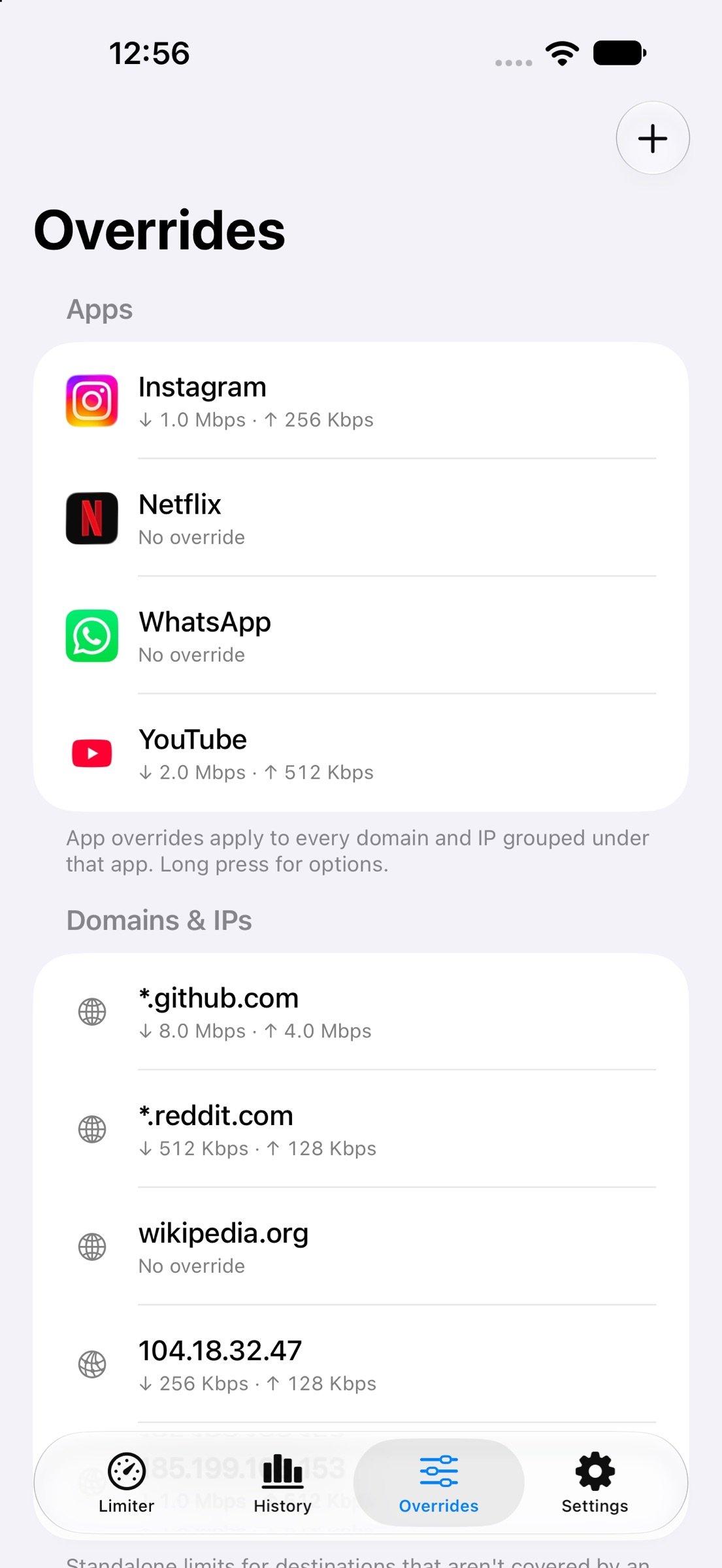
* Overrides - Per app, per website, and per IP limits
Identify domains / services / IP address used by certain App from real time history and group them together into one app. Then put override on that entire app for limiting its upload or download speed.
* Restrict - Stop an app, website or IP completely
* Advance Data Saving Options - Track data usage and switch to slower speed or completely restrict internet on device after data allowance is used up. Get reminders about data usage.
* Shortcuts, Control Centre and Automations
Start or stop a speed profile from Control Centre, or start, stop, and switch profiles using the Shortcuts app. Trigger automatically by location (office, home, port, vessel), by time of day, or by any other Shortcut automation you already use. No need to open the app every time the network or other conditions should change. Use speed limiter smartly with complex shortcuts and automations to save even more data seamlessly.
There is also a shortcut to trigger Live Activity that shows real time speed usage.
* Live Activity on Dynamic Island and Lock Screen
Live Activity puts your real-time download and upload speed on Dynamic Island and the Lock Screen.
iOS has no built-in place that shows current internet speed while you use other apps. Only this app can pin that live rate on the Island and the lock screen, so you see usage without unlocking or opening Settings.
Glance once, know how fast the phone is running, and catch a spike before it burns through your data.
* Use Cases
Developers can use it to simulate how real word speeds affect their apps, websites and services for iOS. They can also add latency to packets to simulate users.
Seafarers, Mariners and other users for whom data is expensive and limited.
Set a download and upload cap so streaming apps, social apps, and background updates uses less data instead of burning a prepaid SIM, roaming pack, shared hotspot, or shipboard allotment. For seafarers, mariners and anyone else on metered connection, crew WiFi, or a tight monthly plan - this limiter keeps email, messaging, and essential tools usable while one video stream no longer finishes the quota.
Useful for Developers who want to Simulate and test their app or service under real speeds on iPhone or iPad itself without Mac, proxy or Network Link Conditioner. Choose any Data Speed, add latency and watch live throughput while every service on the device runs through that pipe. It’s useful for testing application behaviour under limited throughput, and getting a clearer picture of per-device or per-app bandwidth use.
Developers and QA can troubleshoot timeouts, broken loaders, and poor offline behaviour on a physical iPhone, then turn the limiter off in one tap.
License: Commercial
* It's simple to use and activate in one click. You can also add and manage different speed profiles and switch between them seamlessly.
* Internet Speed Limiter lets you throttle the bandwidth of your Apple Device. Finely control download and upload speed on your device.
* It works by creating a local VPN that intelligently throttles all your internet traffic right on the device. Because the VPN is created and runs entirely locally, no data is ever sent to any third-party server. Your connection stays completely private. 100% safe and 100% under your control.
* Real Time Internet Usage
Analyse what service / IP is using more data with live history of entire Internet Traffic going through your device. Find out what are hidden services that use data in background.
* Overrides - Per app, per website, and per IP limits
Identify domains / services / IP address used by certain App from real time history and group them together into one app. Then put override on that entire app for limiting its upload or download speed.
* Restrict - Stop an app, website or IP completely
* Advance Data Saving Options - Track data usage and switch to slower speed or completely restrict internet on device after data allowance is used up. Get reminders about data usage.
* Shortcuts, Control Centre and Automations
Start or stop a speed profile from Control Centre, or start, stop, and switch profiles using the Shortcuts app. Trigger automatically by location (office, home, port, vessel), by time of day, or by any other Shortcut automation you already use. No need to open the app every time the network or other conditions should change. Use speed limiter smartly with complex shortcuts and automations to save even more data seamlessly.
There is also a shortcut to trigger Live Activity that shows real time speed usage.
* Live Activity on Dynamic Island and Lock Screen
Live Activity puts your real-time download and upload speed on Dynamic Island and the Lock Screen.
iOS has no built-in place that shows current internet speed while you use other apps. Only this app can pin that live rate on the Island and the lock screen, so you see usage without unlocking or opening Settings.
Glance once, know how fast the phone is running, and catch a spike before it burns through your data.
* Use Cases
Developers can use it to simulate how real word speeds affect their apps, websites and services for iOS. They can also add latency to packets to simulate users.
Seafarers, Mariners and other users for whom data is expensive and limited.
Set a download and upload cap so streaming apps, social apps, and background updates uses less data instead of burning a prepaid SIM, roaming pack, shared hotspot, or shipboard allotment. For seafarers, mariners and anyone else on metered connection, crew WiFi, or a tight monthly plan - this limiter keeps email, messaging, and essential tools usable while one video stream no longer finishes the quota.
Useful for Developers who want to Simulate and test their app or service under real speeds on iPhone or iPad itself without Mac, proxy or Network Link Conditioner. Choose any Data Speed, add latency and watch live throughput while every service on the device runs through that pipe. It’s useful for testing application behaviour under limited throughput, and getting a clearer picture of per-device or per-app bandwidth use.
Developers and QA can troubleshoot timeouts, broken loaders, and poor offline behaviour on a physical iPhone, then turn the limiter off in one tap.
License: Commercial
| Release info | New Release on Nov 04, 2026 |
|---|---|
| Release notes | Restrict - Stop an app, website or IP completely. Advance Data Saving Options - Track data usage and switch to slower speed or completely restrict internet on device after data allowance is used up. Get reminders about data usage. |
| Listing data | App Store |
Reviews
No reviews yet. Be the first to review Internet Speed Limiter.
Used Internet Speed Limiter? Tell other visitors what you thought.
Log in to write a reviewOther products by this publisher
- "No Distractions" for YouTube 4.10 ----
- #Bible 11.6.1 "Incredible App - My sister shared this app with me a few weeks ago and it is truly incredible.
- #filmphotography 1.4.2 So, you decided to shoot on film?
- #LookBusy Fake Calendar Events 1.0.6 Look Busy scans your work calendar for open time slots and fills them with realistic-looking (but secretly fake) work events.
- #Small Talk Is Canceled 1.0.2 #Small Talk Is Canceled — Conversations That Matter
Most viewed iOS Developer Tools
-
1
 ZScripter 14.1.0
ZScripter plays compatible Ren'Py, RealLive, NScripter, (PONS)ONScripter-EN/RU/JH/Yuri, Artemis, Siglus, CatSystem2, Ethornell BGI, N2System (Nitro+), AI5 and UK2 games as well as KiriKiri (+Kirikiroid2 patches), TyranoScript, RPG Maker MV/MZ & XP, …
-
2
 GitHub 1.285.0
There’s a lot you can do on GitHub that doesn’t require a complex development environment – like sharing feedback on a design discussion, or reviewing a few lines of code.
-
3
 Agents Anywhere 2.1.0
Agents Anywhere is a developer tools mobile application for remotely controlling your local computer to complete coding tasks.
-
4
 LocalDevVPN 1.3.0
LocalDevVPN is a developer tool for creating and managing local network tunnels directly on iOS.
-
5
 Shader Playground 1.0
Shader Playground is a powerful real-time shader editor built for iPhone and iPad.
-
6
 Code Workspace 0.9.1
Code Workspace is a free, agent-first development environment for iPad and iPhone.
-
7
 Termius 8.2.0
Termius is a modern SSH client designed for productivity and collaboration.
-
8
 Andarium 1.0
Andarium lets you run an Android virtual machine on your iPhone and iPad—no computer setup, extra downloads, or complicated configuration required.
-
9
 Rulify 1.0.7
Rulify ????? iOS App ????,???????? App ????,???????????????
-
10
 TestFlight 4.4.1
TestFlight makes it easy to test beta versions of apps and App Clips to provide valuable feedback to developers before they release their apps on the App Store.
Most downloaded iOS Developer Tools
-
1
Agents Anywhere 2.1.0
Agents Anywhere is a developer tools mobile application for remotely controlling your local computer to complete coding tasks.
-
2
Rulify 1.0.7
Rulify ????? iOS App ????,???????? App ????,???????????????
-
3
 a-Shell mini 2.3.2
a-Shell mini is a complete local terminal emulator, allowing to run most Unix commands on you iOS device.
-
4
 LadderTouch 2.1.5
LadderTouch is an app to learn the basics of ladder logic, which is a graphical programming language.
-
5
 FSNotes 7.6.1
FSNotes is a fast, modern notes manager for macOS and iOS.
-
6
 Herdy 1.5.1
Herdy puts your remote terminal and long-running coding-agent sessions in your pocket.
-
7
Andarium 1.0
Andarium lets you run an Android virtual machine on your iPhone and iPad—no computer setup, extra downloads, or complicated configuration required.
-
8
 C/C++$-LLVM Clang 2.7
This is a learning tool for efficient C/C++ learning, fast programming, ?(LLVM+Clang)offline compilation and local execution?, Git fetching, iCloud storage, and efficient transfer and sharing via LAN HTTP/FTP multi-point connections.
-
9
 Markdown2PDF 1.0
Easily Convert Markdown to PDF with Markdown2PDF
-
10
LocalDevVPN 1.3.0
LocalDevVPN is a developer tool for creating and managing local network tunnels directly on iOS.