Ingenious Search 9.89
Find hard-to-locate files and emails, narrow results with exclusions, organize copies by content, and fill PDFs with locally remembered answers. Voice search and PDF preview/print included. Start Free without registration.
Download
86.51 MB
0downloads
0this week
FreeFreeware
0reviews
Screenshots
About Ingenious Search
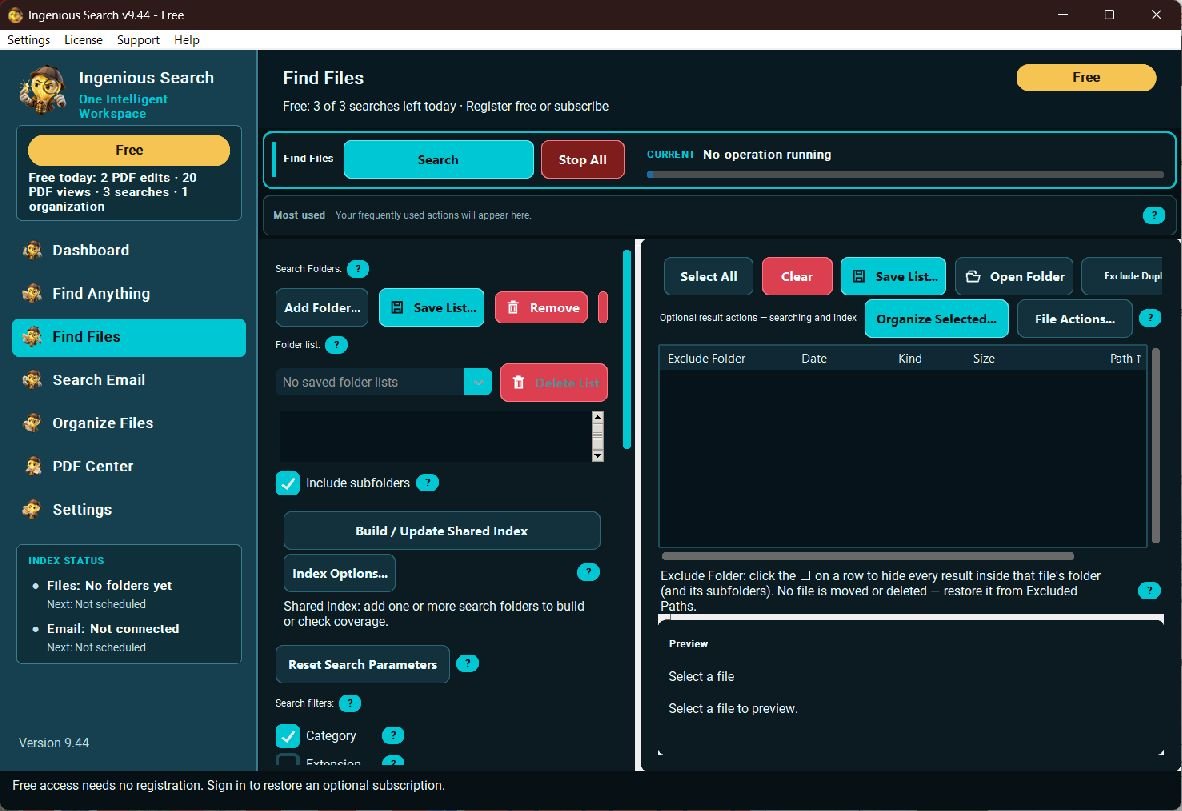
Find what you remember, even when you cannot remember the filename. Ingenious Search combines file and email search, content-aware organization and PDF tools for Windows 10/11 x64.
Narrow crowded results with detailed criteria, sorting and exclusions. Search supported contents, describe requests by voice and inspect previews. Index on demand or on a schedule; processing depends on content and hardware.
Organize photos, documents and spreadsheets by their actual content. Suggest meaningful filenames and nested folders, review the plan and organize copies while preserving originals.
Ingenious PDF Editor remembers approved answers locally for personal and business forms. Reuse answers and create fillable fields from scanned or graphic PDFs. A lightweight PDF viewer previews and prints without opening the editor.
Search indexed classic Outlook with complex criteria. Compatible installed Outlook is required; new Outlook is not supported. Gmail is disabled in this public release.
Local AI, indexes and saved form answers stay on your PC. Optional Premium uses advanced cloud models for selected tasks with content and action-cost approval. No automatic library upload. Optional installation activity reporting excludes filenames, searches and email/document contents and can be disabled in Customer Preferences.
Start Free without registration: 12 searches, 2 organizations, 3 PDF editing sessions and 20 PDF views daily. Premium activation unlocks unlimited local workflows; active Premium includes 200 monthly cloud actions. Current prices are on the official site. Regular updates and suggestion-friendly support are included.
Desktop tools need 4 GB RAM; smaller local AI needs 8 GB, with 16 GB+ recommended. Allow about 1 GB for the app and 3.4/5.2 GB for a separate local model, plus indexes and copies. Review AI output before use.
Narrow crowded results with detailed criteria, sorting and exclusions. Search supported contents, describe requests by voice and inspect previews. Index on demand or on a schedule; processing depends on content and hardware.
Organize photos, documents and spreadsheets by their actual content. Suggest meaningful filenames and nested folders, review the plan and organize copies while preserving originals.
Ingenious PDF Editor remembers approved answers locally for personal and business forms. Reuse answers and create fillable fields from scanned or graphic PDFs. A lightweight PDF viewer previews and prints without opening the editor.
Search indexed classic Outlook with complex criteria. Compatible installed Outlook is required; new Outlook is not supported. Gmail is disabled in this public release.
Local AI, indexes and saved form answers stay on your PC. Optional Premium uses advanced cloud models for selected tasks with content and action-cost approval. No automatic library upload. Optional installation activity reporting excludes filenames, searches and email/document contents and can be disabled in Customer Preferences.
Start Free without registration: 12 searches, 2 organizations, 3 PDF editing sessions and 20 PDF views daily. Premium activation unlocks unlimited local workflows; active Premium includes 200 monthly cloud actions. Current prices are on the official site. Regular updates and suggestion-friendly support are included.
Desktop tools need 4 GB RAM; smaller local AI needs 8 GB, with 16 GB+ recommended. Allow about 1 GB for the app and 3.4/5.2 GB for a separate local model, plus indexes and copies. Review AI output before use.
| Requirements | 64-bit Windows 10/11; 4 GB RAM for desktop tools, 8 GB for the smaller local AI model, 16 GB+ recommended. App about 1 GB; local model 3.4 GB or 5.2 GB plus temporary space. SSD with 10 GB free and modern quad-core CPU recommended; allow more for indexes and copies. Optional compatible Vulkan GPU; CPU fallback. Internet for setup, updates, connected email and optional Premium services. Compatible classic Outlook supported; new Outlook is not supported. Gmail is disabled in this public release. |
|---|---|
| Release info | New Release on Oct 28, 2026 |
| Release notes | Email searches use bounded memory for large mailboxes, with responsive Stop and progress. Email action buttons wrap in smaller windows. |
| Related tags | desktop search file search email search content organizer photo organizer |
Reviews
No reviews yet. Be the first to review Ingenious Search.
Used Ingenious Search? Tell other visitors what you thought.
Log in to write a reviewMost viewed Windows File Managers
- 1 WinNc 11.6.0.0 WinNc is a tabbed file manager developed for Windows 10. WinNc also works on the older versions of Windows. This NC clone file manager is inspired on the dual panel concept of the old file manager Norton Commander.
-
2
 SE-Explorer 1.31.1
SE-Explorer is a free portable file manager for Windows. It has clear tabbed interface with dual-panel file browser and lots of build-in tools: media player, web browser, viewers for pictures, archives, resources, documents, PDF, DjVu, fonts, hex...
- 3 EaseUS Partition Master Server Edition 9.1 All-in-one server partition solution and disk management tool for server users!
-
4
 Add PST into MS Outlook 3.1
If you need to ADD PST files in Outlook then user ADD PST software and quickly import old PST files, archive files, notes, calender, task, contacts, journals etc. The movable data can be open it in read and write mode.
-
5
 Recover My Files Data Recovery Software 5.1.0.1872
Recover My Files Data Recovery Software is a powerful data recovery, disk ecovery and file recovery tool. Recover deleted files, formatted, corrupt, missing, RAW or unallocated drives. Download and try Recover My Files free.
- 6 Easy Duplicate File Finder 5.8.0.978 Easy Duplicate Finder is an award-winning tool that will help you find and delete all sorts of duplicate files in just a few clicks. With its advanced algorithms and flexible file management options, Easy Duplicate Finder is accurate and easy to use.
-
7
 WinZip 29.0.16416
WinZip? 21 Pro delivers renowned compression and encryption, essential backup tools and new productivity-boosting features, including multiple cloud account access, more flexible file handling and enhanced MP3 compression.
-
8
 Stellar Phoenix Photo Recovery 6.0
Stellar Phoenix Photo Recovery Software is a complete do-it yourself utility that recovers photos, videos, and music files which are lost due to deletion or corruption/formatting of the storage media like hard disk of computer, memory card etc.
-
9
 DiskInternals CD and DVD Recovery 3.5
Got corrupted/inaccessible files on a CD or DVD? Power went out, during a recording session? This solution will recover files from CDs and DVDs, including multi-session ones. CD-R, CD-RW, DVD-R, DVR+R, DVD-RW, DVR+RW and DVD-RAM. 100% Success Rate
-
10
 BKF Repair 6.0
BKF repair software is safe and effective BKF file recovery program to repair BKF file together with recover BKF file from corrupted backup database and restore BKF file effortlessly.
Most downloaded Windows File Managers
-
1
SE-Explorer 1.31.1
SE-Explorer is a free portable file manager for Windows. It has clear tabbed interface with dual-panel file browser and lots of build-in tools: media player, web browser, viewers for pictures, archives, resources, documents, PDF, DjVu, fonts, hex...
- 2 WinNc 11.6.0.0 WinNc is a tabbed file manager developed for Windows 10. WinNc also works on the older versions of Windows. This NC clone file manager is inspired on the dual panel concept of the old file manager Norton Commander.
-
3
Recover My Files Data Recovery Software 5.1.0.1872
Recover My Files Data Recovery Software is a powerful data recovery, disk ecovery and file recovery tool. Recover deleted files, formatted, corrupt, missing, RAW or unallocated drives. Download and try Recover My Files free.
- 4 DriveScan Bulk File Manager 1.3 Search drives & network shares to find every file or folder. Visually sort, group, filter and to locate what you need. Perform bulk rename, copy, move, recycle, delete, open, ZIP and find duplicates. Print or export file lists and folder structures.
-
5
DiskInternals CD and DVD Recovery 3.5
Got corrupted/inaccessible files on a CD or DVD? Power went out, during a recording session? This solution will recover files from CDs and DVDs, including multi-session ones. CD-R, CD-RW, DVD-R, DVR+R, DVD-RW, DVR+RW and DVD-RAM. 100% Success Rate
-
6
Stellar Phoenix Photo Recovery 6.0
Stellar Phoenix Photo Recovery Software is a complete do-it yourself utility that recovers photos, videos, and music files which are lost due to deletion or corruption/formatting of the storage media like hard disk of computer, memory card etc.
-
7
 AB Commander 7.5.5
A powerful yet simple to use dual-panel file manager with a built-in file splitter, folder synchronizer, image viewer, full-featured text editor and more. Supports Space Investigator. Evaluation version is fully functional. Free for 30 days.
-
8
 Auslogics File Recovery 12.2.0.6
Easy to use High quality file recovery software that recovers documents, photos, videos and every other file type you can think of. From any type of storage device - (external) Hard Disk, SD Card, Flash Card or USB Stick. Even after a quick format.
-
9
WinZip 29.0.16416
WinZip? 21 Pro delivers renowned compression and encryption, essential backup tools and new productivity-boosting features, including multiple cloud account access, more flexible file handling and enhanced MP3 compression.
-
10
BKF Repair 6.0
BKF repair software is safe and effective BKF file recovery program to repair BKF file together with recover BKF file from corrupted backup database and restore BKF file effortlessly.