
iLinux 1.6.0
iLinux is a shell command reference and learning app for developers, operators, and terminal enthusiasts.
Download
71.87 MB
8downloads
2this week
FreeCommercial
0reviews
Screenshots
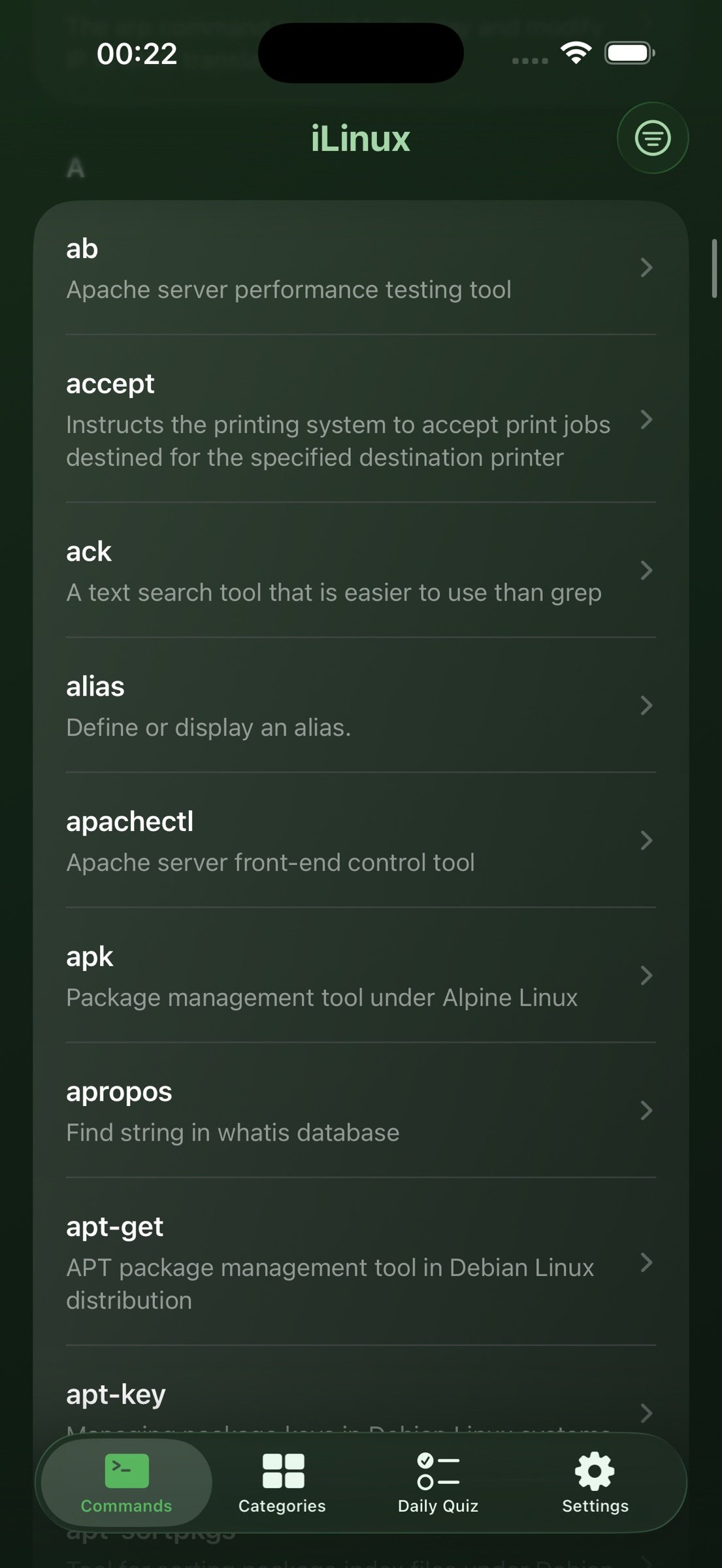
About iLinux
iLinux is a shell command reference and learning app for developers, operators, and terminal enthusiasts. It covers Linux, Windows CMD Batch, and PowerShell. Fully offline, no ads, no tracking. Carry a complete command handbook in your pocket.
Core Features
Command Library
1. 1650+ offline entries: 1050+ Linux CLIs, 300 CMD Batch commands, and 300 PowerShell cmdlets. Topics include filesystem, text, processes, networking, containers (docker, kubectl, helm), version control (git, gh), build tools (cargo, go, cmake), and Windows essentials such as dir, robocopy, netsh, winget, Get-ChildItem, and Get-Process.
2. Linux uses 14 categories; CMD and PowerShell each have their own layout for clearer cross-platform study.
3. Every command includes a concise summary and a Markdown article with syntax, flags, examples, and notes.
Cross-Platform Equivalents
1. 100+ mapped groups across Linux, CMD, and PowerShell. Jump between ls, dir, and Get-ChildItem from the detail screen in one tap.
2. Learn the Windows counterpart while studying Linux, or the Linux side while on Windows.
3. Favorites can link across platforms so your study stays connected.
Shell Platform Switcher
1. Switch among Linux, CMD Batch, or PowerShell from Commands, Categories, or Daily Quiz without extra tabs.
2. Search and browse stay scoped to the active platform.
3. Show all favorites or only favorites from the current platform in Settings.
Fast Lookup
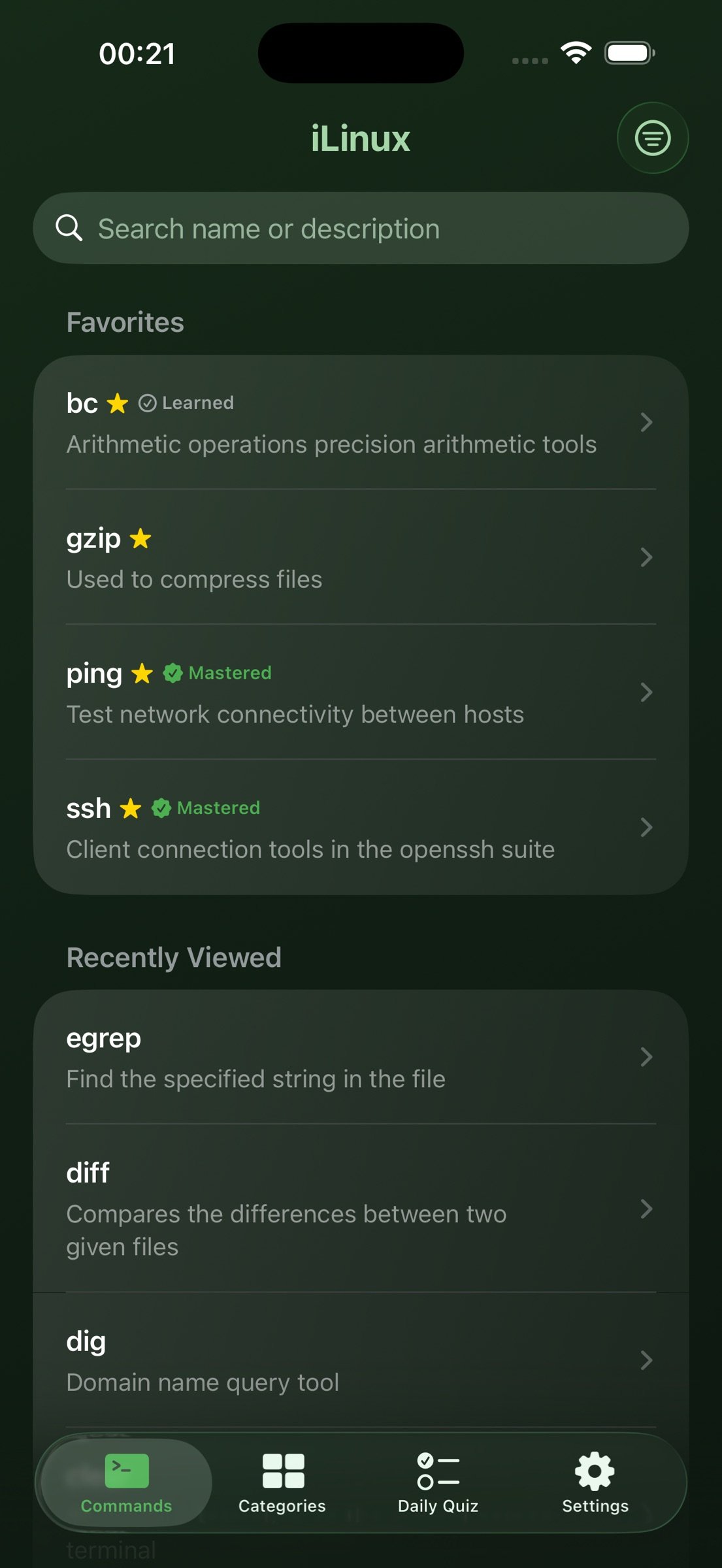
1. A to Z index and category browsing.
2. Global search across names, summaries, and article text.
3. List or grid layouts with adjustable columns on iPhone and iPad.
4. Copy commands and share polished command cards. An equivalents bar jumps to mapped commands on other platforms.
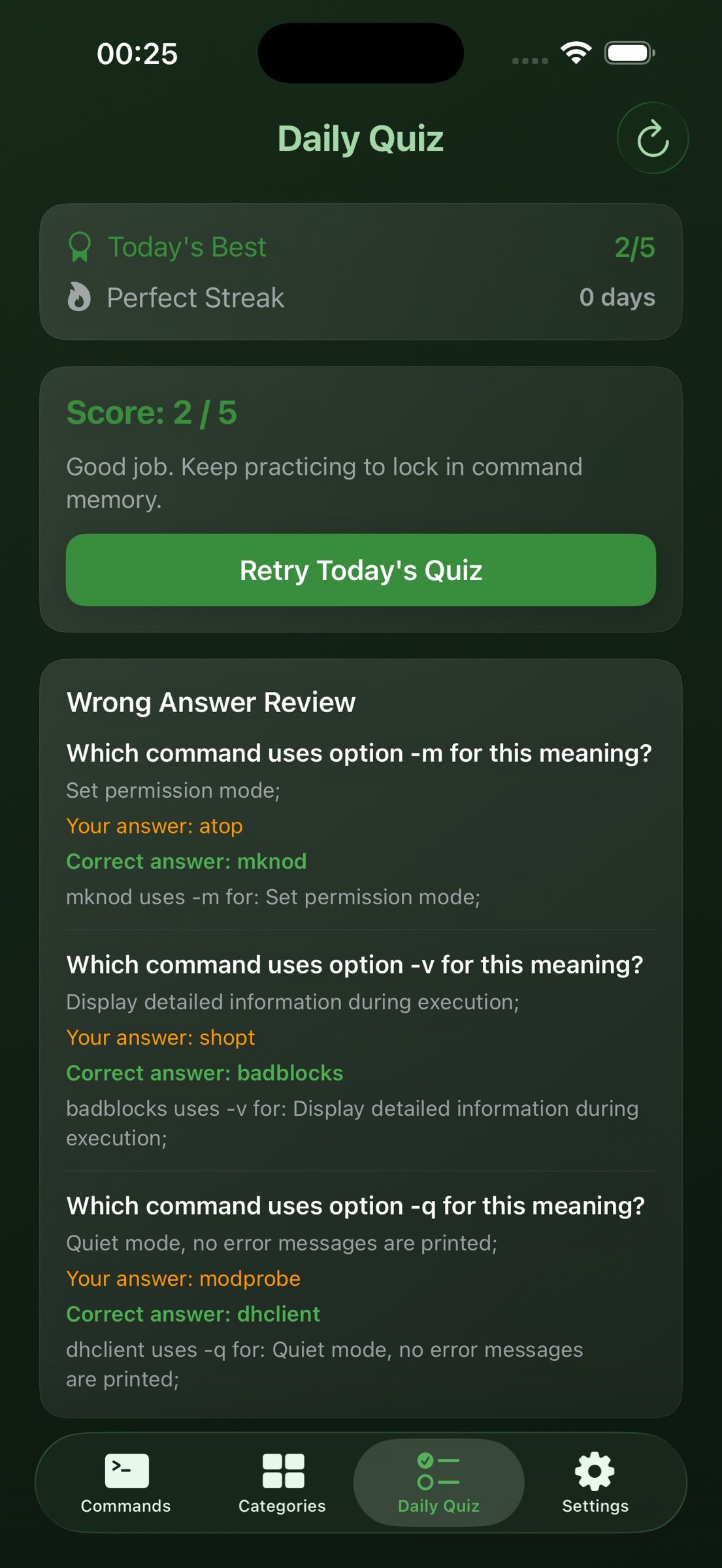
Daily Quiz and Learning Progress
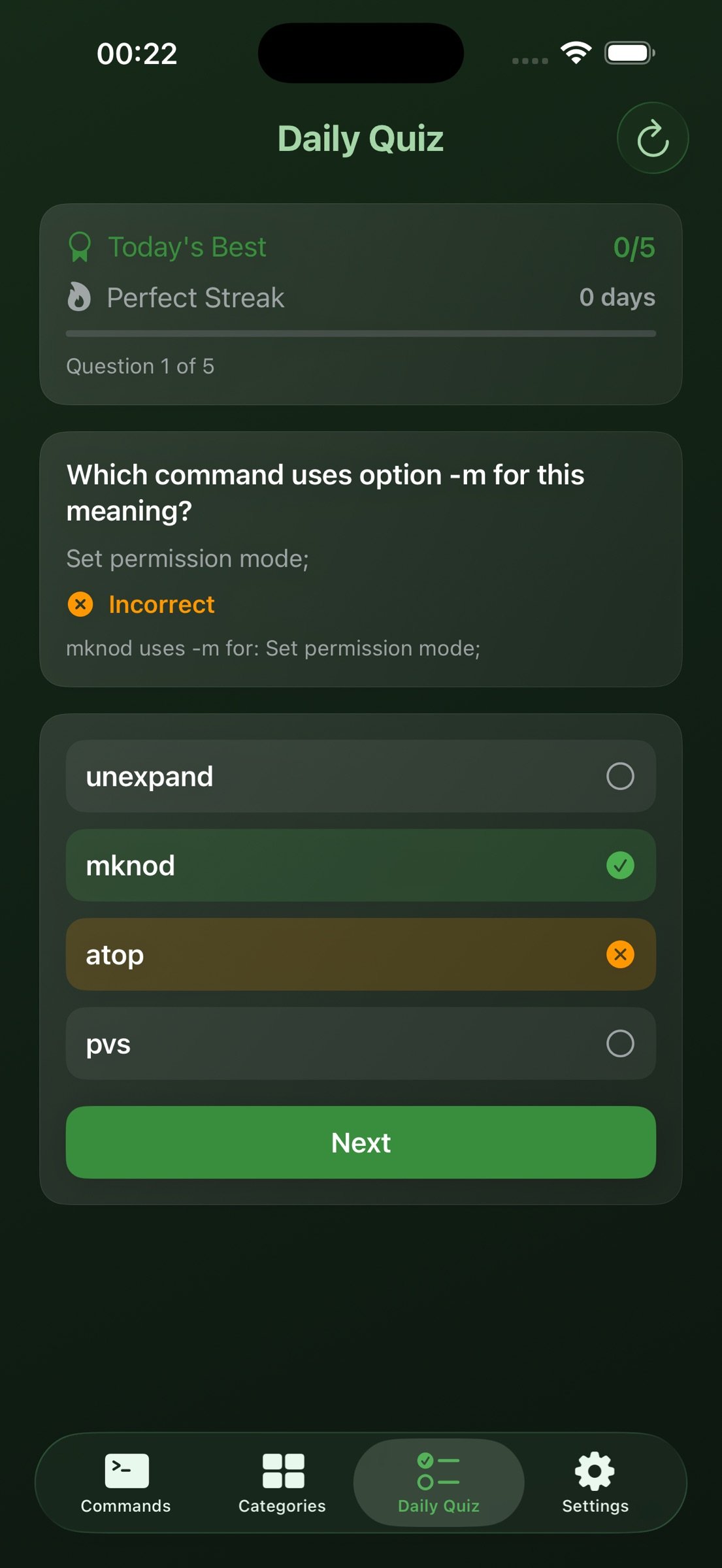
1. Daily quiz with option-meaning questions. Generic flags such as -h and --help are filtered out.
2. Quiz sets and scores are tracked separately per shell platform.
3. Reshuffle, streak tracking, and one-tap review from wrong answers back to command detail.
4. Favorites, recents, and a wrong-answer notebook. All progress stays on device.
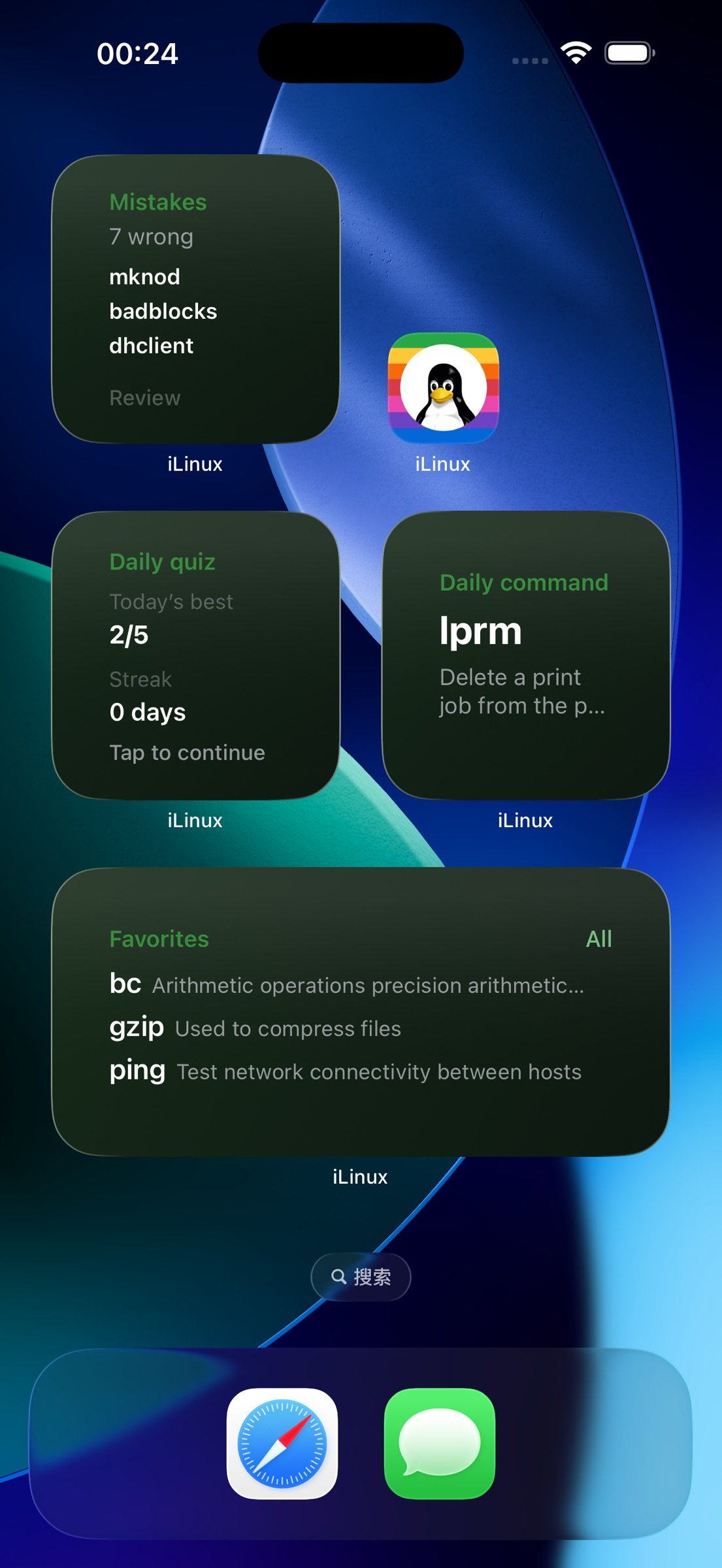
Home Screen Widgets, All Five
1. Daily command with manual shuffle.
2. Category spotlight, quiz glance, favorites glance, and wrong-book glance.
3. Pick the widget command library in Settings: Linux, CMD Batch, or PowerShell.
Themes and Appearance
1. Fifteen curated accent presets, including Mountain Mist, Celadon Jade, Moonlit Blue, Misty Violet, Amber Glow, Aloeswood, and Jade Cream.
2. Custom accent color, light or dark mode, and alternate app icons on iPhone and iPad.
3. Widget titles and icons follow your accent color, with optional theme-matched gradient backgrounds.
Languages
1. UI and command content in Simplified Chinese, Traditional Chinese, and English.
2. Content language can differ from UI language. All three shell libraries include trilingual summaries and articles.
Productivity Shortcuts
1. URL Scheme and Shortcuts support for commands, quiz, and favorites, with an optional platform parameter.
2. Up to four customizable Home Screen quick actions when you long-press the app icon.
3. On iPad with a keyboard, Command+F opens search and Command+1 through 4 switch tabs.
Privacy and Offline
1. The full command library works offline. No network required to read and learn.
2. No personal data collection, no ads, no third-party tracking.
3. The App Store public lookup API is used only when you manually check for updates.
Whether you are new to Linux, a terminal power user, a developer comparing Windows and Linux commands, or an operator who needs a pocket reference on iPhone and iPad, iLinux is your shell command dictionary on the go. Built to teach and reference commands, not to emulate a terminal. Feedback and App Store ratings are welcome.
License: Commercial
Core Features
Command Library
1. 1650+ offline entries: 1050+ Linux CLIs, 300 CMD Batch commands, and 300 PowerShell cmdlets. Topics include filesystem, text, processes, networking, containers (docker, kubectl, helm), version control (git, gh), build tools (cargo, go, cmake), and Windows essentials such as dir, robocopy, netsh, winget, Get-ChildItem, and Get-Process.
2. Linux uses 14 categories; CMD and PowerShell each have their own layout for clearer cross-platform study.
3. Every command includes a concise summary and a Markdown article with syntax, flags, examples, and notes.
Cross-Platform Equivalents
1. 100+ mapped groups across Linux, CMD, and PowerShell. Jump between ls, dir, and Get-ChildItem from the detail screen in one tap.
2. Learn the Windows counterpart while studying Linux, or the Linux side while on Windows.
3. Favorites can link across platforms so your study stays connected.
Shell Platform Switcher
1. Switch among Linux, CMD Batch, or PowerShell from Commands, Categories, or Daily Quiz without extra tabs.
2. Search and browse stay scoped to the active platform.
3. Show all favorites or only favorites from the current platform in Settings.
Fast Lookup
1. A to Z index and category browsing.
2. Global search across names, summaries, and article text.
3. List or grid layouts with adjustable columns on iPhone and iPad.
4. Copy commands and share polished command cards. An equivalents bar jumps to mapped commands on other platforms.
Daily Quiz and Learning Progress
1. Daily quiz with option-meaning questions. Generic flags such as -h and --help are filtered out.
2. Quiz sets and scores are tracked separately per shell platform.
3. Reshuffle, streak tracking, and one-tap review from wrong answers back to command detail.
4. Favorites, recents, and a wrong-answer notebook. All progress stays on device.
Home Screen Widgets, All Five
1. Daily command with manual shuffle.
2. Category spotlight, quiz glance, favorites glance, and wrong-book glance.
3. Pick the widget command library in Settings: Linux, CMD Batch, or PowerShell.
Themes and Appearance
1. Fifteen curated accent presets, including Mountain Mist, Celadon Jade, Moonlit Blue, Misty Violet, Amber Glow, Aloeswood, and Jade Cream.
2. Custom accent color, light or dark mode, and alternate app icons on iPhone and iPad.
3. Widget titles and icons follow your accent color, with optional theme-matched gradient backgrounds.
Languages
1. UI and command content in Simplified Chinese, Traditional Chinese, and English.
2. Content language can differ from UI language. All three shell libraries include trilingual summaries and articles.
Productivity Shortcuts
1. URL Scheme and Shortcuts support for commands, quiz, and favorites, with an optional platform parameter.
2. Up to four customizable Home Screen quick actions when you long-press the app icon.
3. On iPad with a keyboard, Command+F opens search and Command+1 through 4 switch tabs.
Privacy and Offline
1. The full command library works offline. No network required to read and learn.
2. No personal data collection, no ads, no third-party tracking.
3. The App Store public lookup API is used only when you manually check for updates.
Whether you are new to Linux, a terminal power user, a developer comparing Windows and Linux commands, or an operator who needs a pocket reference on iPhone and iPad, iLinux is your shell command dictionary on the go. Built to teach and reference commands, not to emulate a terminal. Feedback and App Store ratings are welcome.
License: Commercial
| Release info | New Release on Jun 28, 2026 |
|---|---|
| Release notes | iLinux 1.6.0 Release Notes - Library grows to 1650+ offline entries: Linux 1050, Windows CMD Batch 300, PowerShell 300, with trilingual summaries and Markdown articles - Adds modern CLIs such as pipx, atuin, mosh, nushell, and biome. Categories expand to 14, covering cloud-native, security, observability, and build tooling - List and grid layouts on Commands and Categories tabs, with adjustable columns on iPhone and iPad for faster browsing - Switch Linux, CMD, or PowerShell from Commands, Categories, or Daily Quiz. Search and browse stay scoped to your active platform - Cross-platform equivalents on the detail screen: 100+ mapped groups. Jump between ls, dir, and Get-ChildItem in one tap - Equivalent jumps no longer change your global shell platform, so your browsing context stays intact when you go back - Daily quiz tracks scores separately per shell platform, with reshuffle, streaks, and wrong-answer review linked to command detail - Favorites link across platforms, with optional all-platform or current-platform scope - One-tap clear for recently viewed commands on the Commands tab - Five Home Screen widgets can use Linux, CMD, or PowerShell libraries, with daily command shuffle - iCloud sync for favorites, quiz progress, theme, and display preferences across iPhone, iPad, and Mac. Dedicated toggle in Settings. New installs default to off - Deep links support a platform parameter to open the right command library - Updated About page and share copy reflecting the three-library catalog - Fixed equivalent links that failed to open the matching command - Fixed favorites scope labels not updating immediately after a language change - Cleaned Chinese text from 115+ English command articles - Polished Traditional Chinese summaries, categories, and articles for consistent wording Built to teach and reference commands, not to emulate a terminal. We welcome your feedback, and an App Store rating if iLinux helps you learn. |
| Listing data | App Store |
Reviews
No reviews yet. Be the first to review iLinux.
Used iLinux? Tell other visitors what you thought.
Log in to write a reviewOther products by this publisher
- "No Distractions" for YouTube 4.10 ----
- #Bible 11.5 "Incredible App - My sister shared this app with me a few weeks ago and it is truly incredible.
- #filmphotography 1.4.2 So, you decided to shoot on film?
- $quirrel 1.5.1 $quirrel Budget & Finance helps you plan each paycheck, track spending, manage debt, and see what is safe to spend before the next payday.
- % Percentage Calculator Pro 1.41 This is the Pro version of % Percentage Calculator.
Most viewed iOS Developer Tools
-
1
 ZScripter 12.2.0
ZScripter plays compatible Ren'Py, RealLive, NScripter, (PONS)ONScripter-EN/RU/JH/Yuri, Artemis, Siglus, AI5 and UK2 games as well as KiriKiri (+Kirikiroid2 patches) and RPG Maker MV/MZ & XP, VX and VX Ace support.
ZScripter 12.2.0
ZScripter plays compatible Ren'Py, RealLive, NScripter, (PONS)ONScripter-EN/RU/JH/Yuri, Artemis, Siglus, AI5 and UK2 games as well as KiriKiri (+Kirikiroid2 patches) and RPG Maker MV/MZ & XP, VX and VX Ace support.
-
2
 Shader Playground 1.0
Shader Playground is a powerful real-time shader editor built for iPhone and iPad.
Shader Playground 1.0
Shader Playground is a powerful real-time shader editor built for iPhone and iPad.
-
3
 GitHub 1.283.0
There’s a lot you can do on GitHub that doesn’t require a complex development environment – like sharing feedback on a design discussion, or reviewing a few lines of code.
GitHub 1.283.0
There’s a lot you can do on GitHub that doesn’t require a complex development environment – like sharing feedback on a design discussion, or reviewing a few lines of code.
-
4
 Agents Anywhere 2.1.0
Agents Anywhere is a developer tools mobile application for remotely controlling your local computer to complete coding tasks.
Agents Anywhere 2.1.0
Agents Anywhere is a developer tools mobile application for remotely controlling your local computer to complete coding tasks.
-
5
 Code Workspace 0.9.1
Code Workspace is a free, agent-first development environment for iPad and iPhone.
Code Workspace 0.9.1
Code Workspace is a free, agent-first development environment for iPad and iPhone.
-
6
 LocalDevVPN 1.3.0
LocalDevVPN is a developer tool for creating and managing local network tunnels directly on iOS.
LocalDevVPN 1.3.0
LocalDevVPN is a developer tool for creating and managing local network tunnels directly on iOS.
-
7
 Termius 8.0.7
Termius is a modern SSH client designed for productivity and collaboration.
Termius 8.0.7
Termius is a modern SSH client designed for productivity and collaboration.
-
8
 Cursor 1.16.0
Introducing Cursor for iOS: the best way to build, review, and ship software from anywhere.
Cursor 1.16.0
Introducing Cursor for iOS: the best way to build, review, and ship software from anywhere.
-
9
 Rulify 1.0.7
Rulify ????? iOS App ????,???????? App ????,???????????????
Rulify 1.0.7
Rulify ????? iOS App ????,???????? App ????,???????????????
-
10
 C/C++$-LLVM Clang 2.7
This is a learning tool for efficient C/C++ learning, fast programming, ?(LLVM+Clang)offline compilation and local execution?, Git fetching, iCloud storage, and efficient transfer and sharing via LAN HTTP/FTP multi-point connections.
C/C++$-LLVM Clang 2.7
This is a learning tool for efficient C/C++ learning, fast programming, ?(LLVM+Clang)offline compilation and local execution?, Git fetching, iCloud storage, and efficient transfer and sharing via LAN HTTP/FTP multi-point connections.
Most downloaded iOS Developer Tools
-
1
Agents Anywhere 2.1.0
Agents Anywhere is a developer tools mobile application for remotely controlling your local computer to complete coding tasks.
-
2
 a-Shell mini 2.3.2
a-Shell mini is a complete local terminal emulator, allowing to run most Unix commands on you iOS device.
a-Shell mini 2.3.2
a-Shell mini is a complete local terminal emulator, allowing to run most Unix commands on you iOS device.
-
3
Rulify 1.0.7
Rulify ????? iOS App ????,???????? App ????,???????????????
-
4
 LadderTouch 2.1.5
LadderTouch is an app to learn the basics of ladder logic, which is a graphical programming language.
LadderTouch 2.1.5
LadderTouch is an app to learn the basics of ladder logic, which is a graphical programming language.
-
5
 FSNotes 7.5.1
FSNotes is a fast, modern notes manager for macOS and iOS.
FSNotes 7.5.1
FSNotes is a fast, modern notes manager for macOS and iOS.
-
6
C/C++$-LLVM Clang 2.7
This is a learning tool for efficient C/C++ learning, fast programming, ?(LLVM+Clang)offline compilation and local execution?, Git fetching, iCloud storage, and efficient transfer and sharing via LAN HTTP/FTP multi-point connections.
-
7
 HTTP Debugger+ 1.2.3
HTTP Debugger+ is a professional HTTP traffic inspector designed for developers and QA engineers.
HTTP Debugger+ 1.2.3
HTTP Debugger+ is a professional HTTP traffic inspector designed for developers and QA engineers.
-
8
 Expo Go 58.0.5
Start learning to build projects using web technologies with just your iOS device.
Expo Go 58.0.5
Start learning to build projects using web technologies with just your iOS device.
-
9
 Airswitch 1.1
Airswitch is a VPN focused on connection speed and reliable server infrastructure.
Airswitch 1.1
Airswitch is a VPN focused on connection speed and reliable server infrastructure.
-
10
 Sekai 1.75.31
Don’t just watch content—play with it.
Sekai 1.75.31
Don’t just watch content—play with it.