
2downloads
0this week
FreeCommercial
0reviews
Screenshots
About Git On The Go
Real Git on your iPad and iPhone. Start a repository on the device, edit your files in the apps you already own, and see exactly what changed before you commit. Works offline. One-time purchase.
Git On The Go is a complete Git client built on libgit2, the same engine behind the desktop tools. There is no server of ours in the middle: the app talks to GitHub, and to whichever host your repositories live on, directly from the device.
YOUR FOLDERS, YOUR APPS
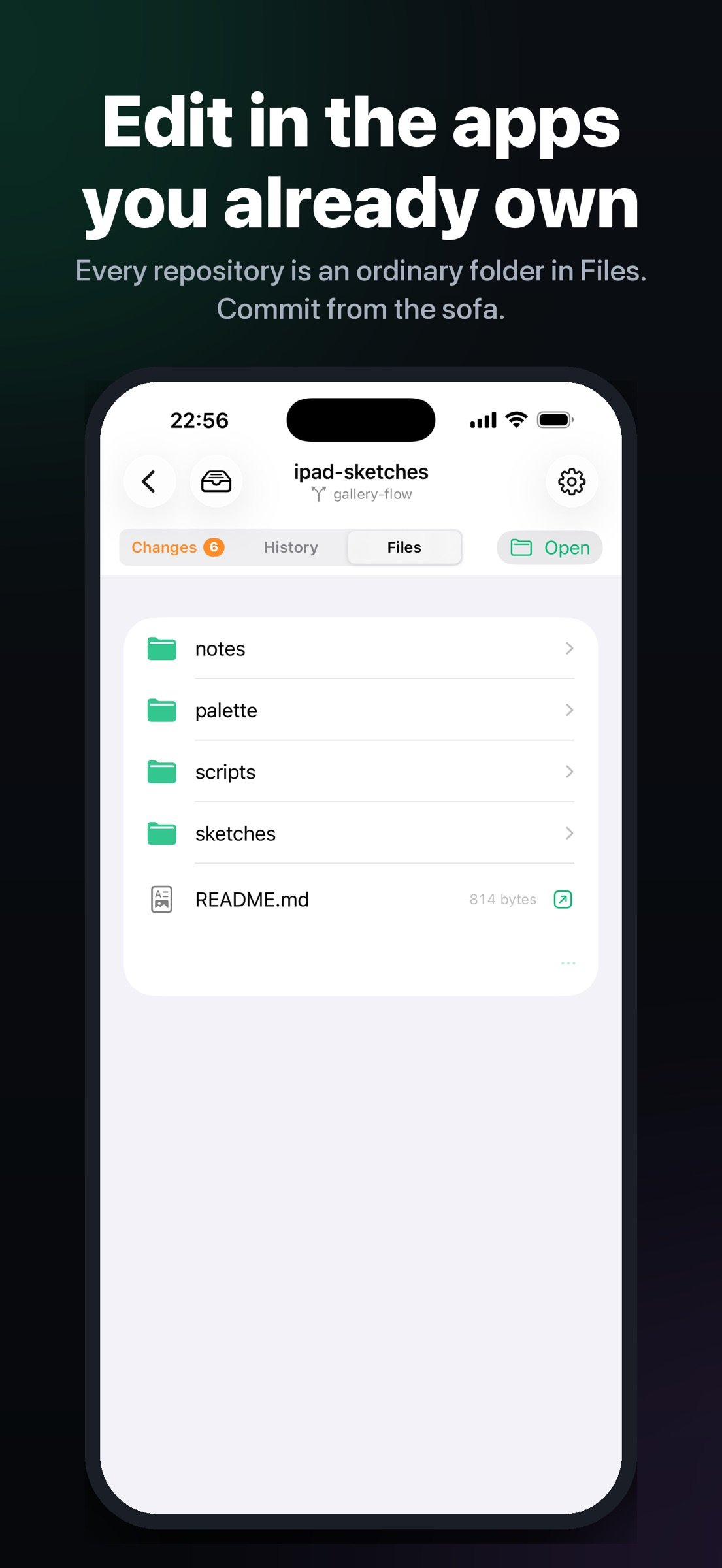
Every repository is an ordinary folder in the Files app, under On My iPad › Git On The Go. Paint in Procreate, write in whatever you already write in, drop in the logo set or the third draft. Come back, and the changes are already read and waiting. The app is read-only on purpose: editing belongs in the app you chose for it.
SEE EXACTLY WHAT YOU CHANGED
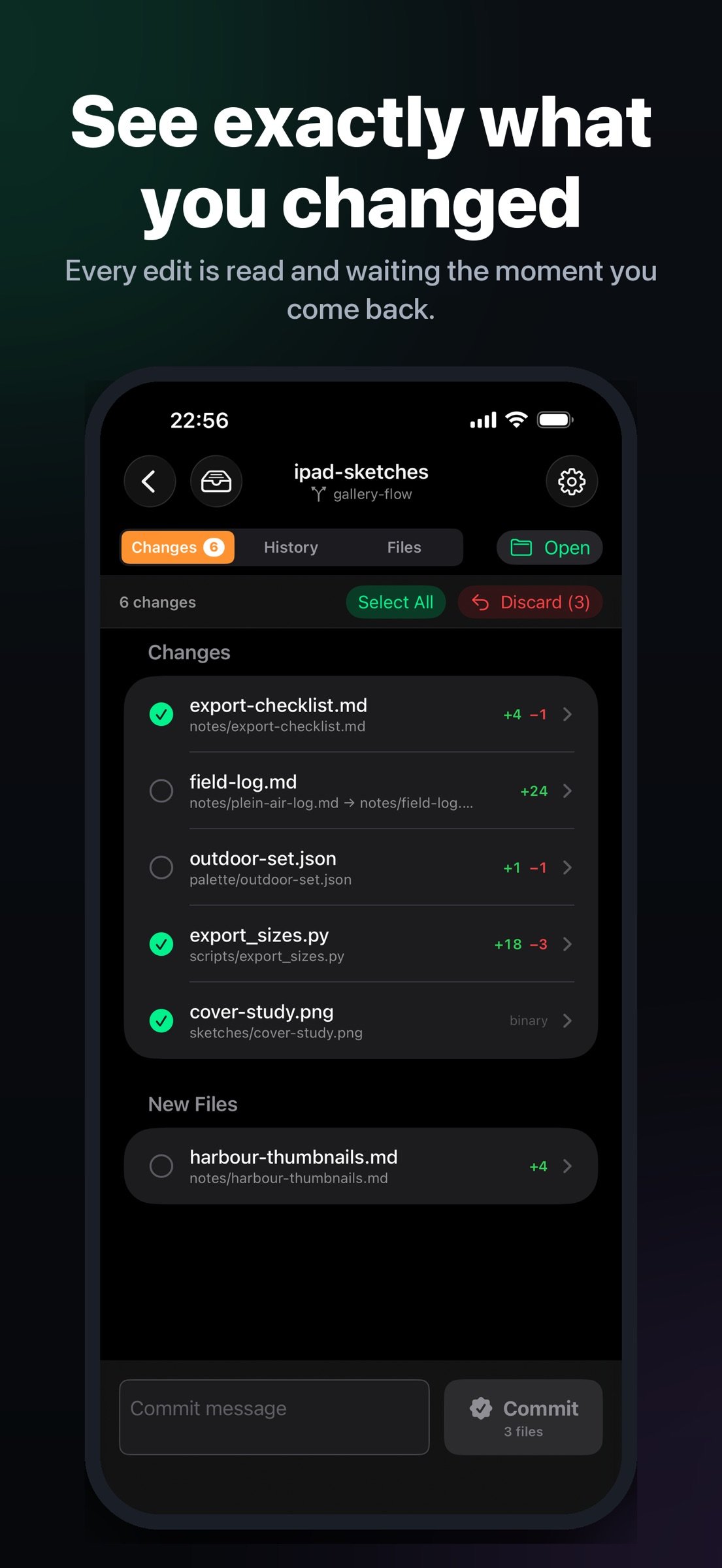
• Every modified, added, renamed and deleted file, listed before anything is recorded
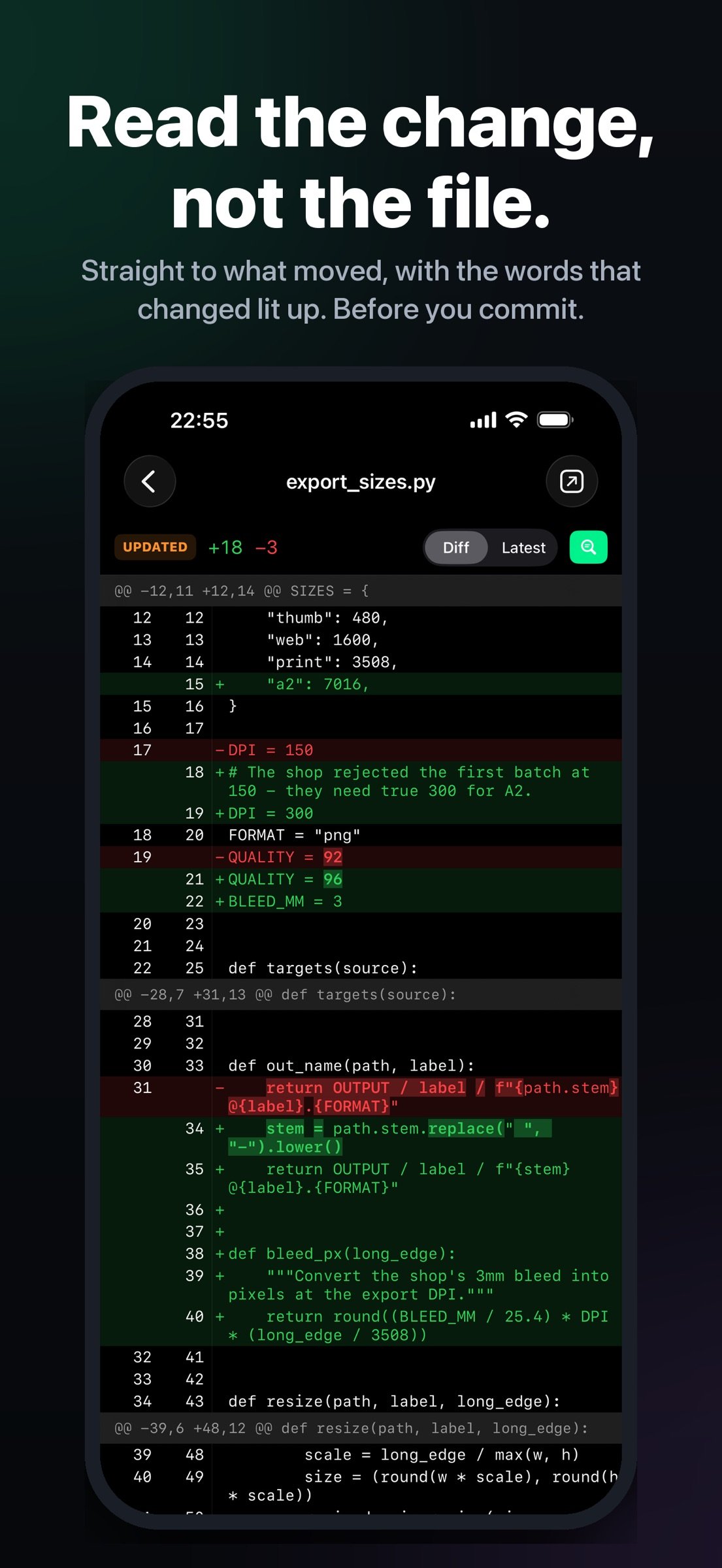
• Real diffs: line by line, hunked, with old and new line numbers, and word-level highlighting for the sentence you rewrote
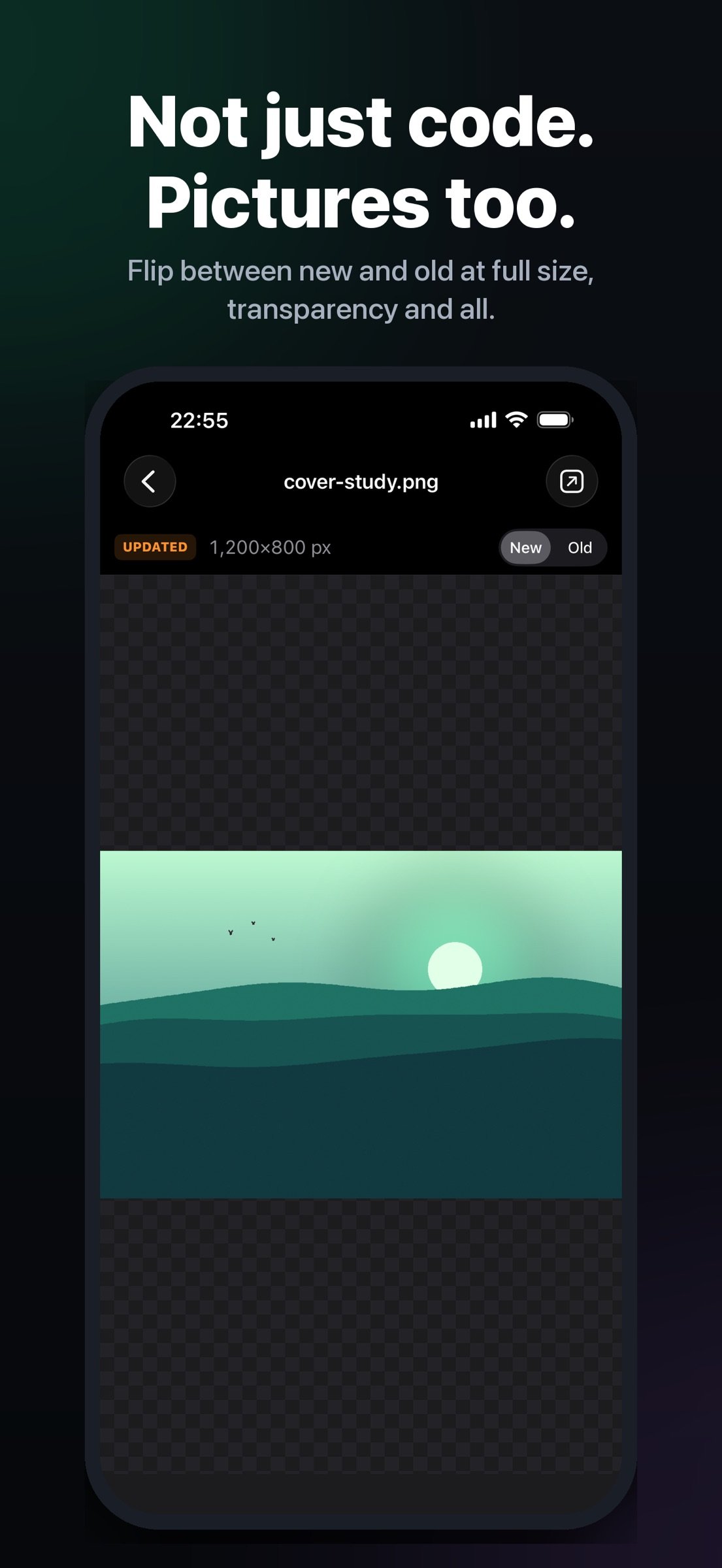
• Images too: flip between new and old at full size, transparency and all
• Or read the finished file straight through, with the new work marked where it sits
COMMIT IN TWO TAPS. LOSE NOTHING BY ACCIDENT.
• Tick the changes that belong together, write the message, commit
• Deleting a repository with uncommitted work is refused, with the count spelled out
• Discard tells you what reverts and what disappears before you tap it
• Switching branches carries your uncommitted work across, and stops if anything would be overwritten
• Git's own database lives outside the Files app, where a stray swipe can't reach it
THE WHOLE STORY
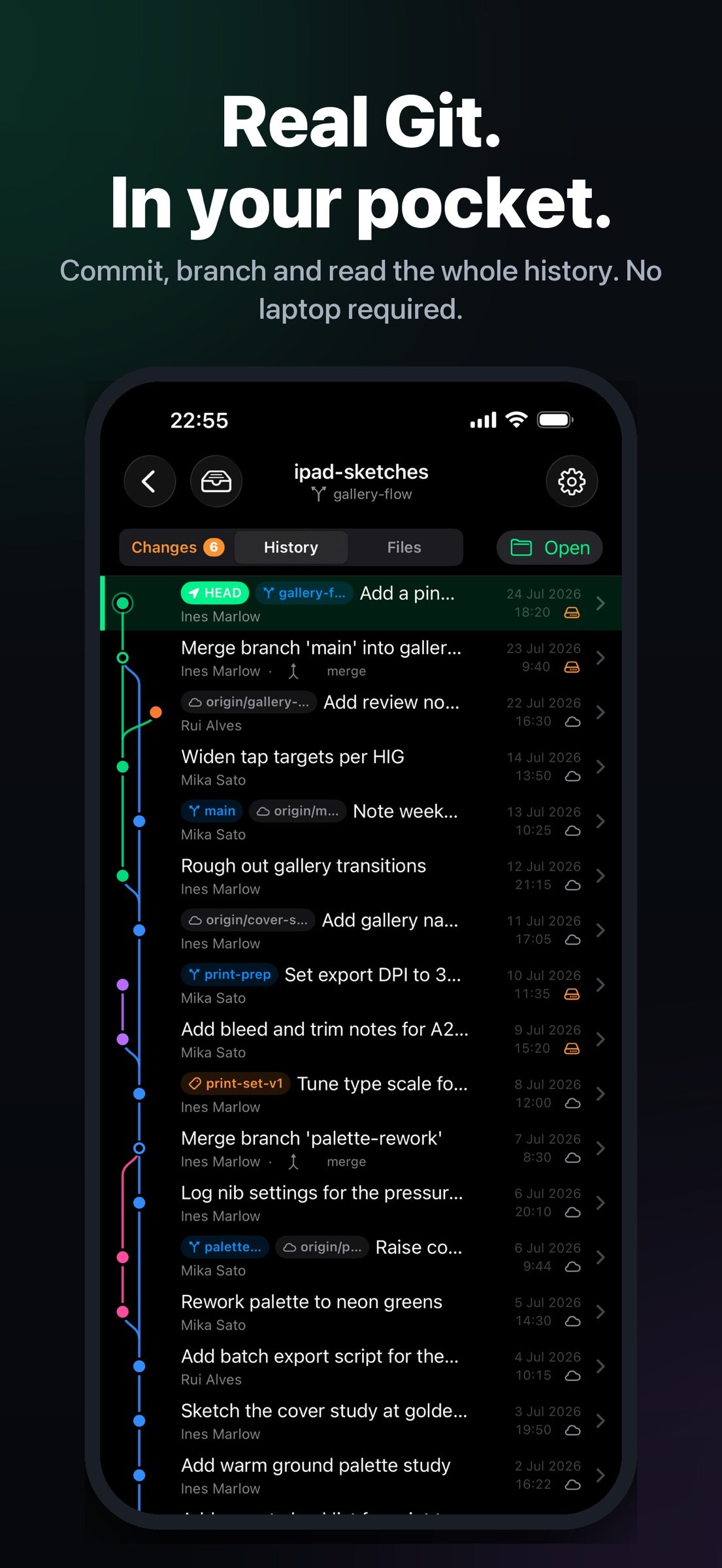
• A commit graph with a lane for every branch, drawn with real forks and merges
• Branch names and tags ride along on the commits that carry them
• Tap any commit for its message, its author and every file it touched, then open the diff
• A cloud on the commits that are safely on the remote, a drive on the ones only this device has
BRANCHES AND REMOTES
• Create, switch and delete branches, local and remote
• Live ahead and behind counts; fetch, pull and push from one bar
• Sign in with GitHub to list, clone and push your private repositories, with several accounts at once
• Any public repository can be cloned, wherever it is hosted
• Start a repository on the device and put it on GitHub without leaving the app
GIT LFS, ALL THE WAY THROUGH
Repositories using Git LFS are recognised on clone. Pointers show the real size rather than 130 bytes, content is fetched when you ask for it, and a large file you commit goes up as content and lands as a pointer, the way every other client expects. You can see what the cache is holding, and free it, per repository.
WORKS UP A MOUNTAIN
Everything except talking to the remote happens on the device. Commit, branch, switch, read the full history and see every change with no signal at all.
LIGHT AND DARK, PROPERLY
The same care in both appearances, on both devices. The iPad lays it out in two panes; the iPhone folds it into one column and badges what's pending.
PRIVATE BY CONSTRUCTION
• No account with us, no analytics, no crash reporters, nothing phones home
• Your GitHub token lives in the Keychain, behind an optional Face ID lock
• Commits are authored with your GitHub noreply address, so your real email never lands in a public repository
HONEST ABOUT WHAT'S NEXT
Pull is fast-forward only today: if a branch has diverged, the app says so plainly rather than guessing. Full merge with conflict resolution, line-level staging, stash, cherry-pick, and sign-in for GitLab, Bitbucket and self-hosted servers are on the roadmap, and every update is included.
One purchase. No subscription, no in-app purchases, no tier you find out about later.
Git On The Go is an independent app and is not affiliated with GitHub, Inc. GitHub is a trademark of GitHub, Inc. Git is a trademark of Software Freedom Conservancy.
License: Commercial
| Release info | New Release on Nov 11, 2026 |
|---|---|
| Release notes | Fixes GitHub sign-in. If you switched to Safari to enter your code and came back to "Sign-in didn't finish", that's fixed. |
| Listing data | App Store |
Reviews
No reviews yet. Be the first to review Git On The Go.
Used Git On The Go? Tell other visitors what you thought.
Log in to write a reviewOther products by this publisher
- "No Distractions" for YouTube 4.10 ----
- #Bible 11.6.1 "Incredible App - My sister shared this app with me a few weeks ago and it is truly incredible.
- #filmphotography 1.4.2 So, you decided to shoot on film?
- #LookBusy Fake Calendar Events 1.0.6 Look Busy scans your work calendar for open time slots and fills them with realistic-looking (but secretly fake) work events.
- #Small Talk Is Canceled 1.0.2 #Small Talk Is Canceled — Conversations That Matter
Most viewed iOS Developer Tools
-
1
 ZScripter 15.2.0
ZScripter plays compatible Ren'Py, RealLive, NScripter, (PONS)ONScripter-EN/RU/JH/Yuri, Artemis, Siglus, CatSystem2, Ethornell BGI, N2System (Nitro+), AI5 and UK2 games as well as KiriKiri (+Kirikiroid2 patches), TyranoScript, RPG Maker MV/MZ & XP, …
-
2
 LocalDevVPN 1.3.0
LocalDevVPN is a developer tool for creating and managing local network tunnels directly on iOS.
-
3
 GitHub 1.285.0
There’s a lot you can do on GitHub that doesn’t require a complex development environment – like sharing feedback on a design discussion, or reviewing a few lines of code.
-
4
 Andarium 1.0
Andarium lets you run an Android virtual machine on your iPhone and iPad—no computer setup, extra downloads, or complicated configuration required.
-
5
 Agents Anywhere 2.1.0
Agents Anywhere is a developer tools mobile application for remotely controlling your local computer to complete coding tasks.
-
6
 Shader Playground 1.0
Shader Playground is a powerful real-time shader editor built for iPhone and iPad.
-
7
 Code Workspace 0.9.1
Code Workspace is a free, agent-first development environment for iPad and iPhone.
-
8
 Termius 8.2.0
Termius is a modern SSH client designed for productivity and collaboration.
-
9
 Rulify 1.0.7
Rulify ????? iOS App ????,???????? App ????,???????????????
-
10
 FreeMilk 2.3.0
FreeMilk is the completely free coding agent on your phone funded by ads.
Most downloaded iOS Developer Tools
-
1
Agents Anywhere 2.1.0
Agents Anywhere is a developer tools mobile application for remotely controlling your local computer to complete coding tasks.
-
2
Rulify 1.0.7
Rulify ????? iOS App ????,???????? App ????,???????????????
-
3
 a-Shell mini 2.4.0
a-Shell mini is a complete local terminal emulator, allowing to run most Unix commands on you iOS device.
-
4
 LadderTouch 2.1.5
LadderTouch is an app to learn the basics of ladder logic, which is a graphical programming language.
-
5
 FSNotes 7.6.1
FSNotes is a fast, modern notes manager for macOS and iOS.
-
6
 Herdy 1.5.1
Herdy puts your remote terminal and long-running coding-agent sessions in your pocket.
-
7
LocalDevVPN 1.3.0
LocalDevVPN is a developer tool for creating and managing local network tunnels directly on iOS.
-
8
Andarium 1.0
Andarium lets you run an Android virtual machine on your iPhone and iPad—no computer setup, extra downloads, or complicated configuration required.
-
9
 Markdown2PDF 1.0
Easily Convert Markdown to PDF with Markdown2PDF
-
10
 C/C++$-LLVM Clang 2.7
This is a learning tool for efficient C/C++ learning, fast programming, ?(LLVM+Clang)offline compilation and local execution?, Git fetching, iCloud storage, and efficient transfer and sharing via LAN HTTP/FTP multi-point connections.