DraftCode 2.7.2
DraftCode is a private code, text and Markdown editor for Mac, iPhone and iPad.
Download
19.10 MB
10downloads
3this week
FreeCommercial
0reviews
Screenshots


About DraftCode
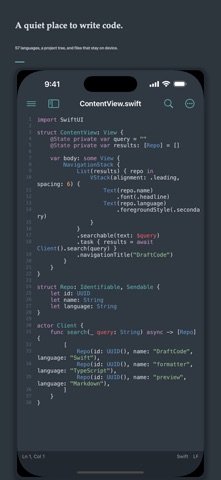
DraftCode is a private code, text and Markdown editor for Mac, iPhone and iPad. Open local files or folders, start typing immediately and keep your work in standard file formats. One-time purchase: no ads, account, tracking, subscription or in-app purchase.
EDIT CODE AND TEXT
• Syntax highlighting and language detection for 57 languages
• Tabs, split editing, line numbers, minimap, bookmarks and code snippets
• Multi-cursor editing and select next or all matching occurrences
• Auto-indent, bracket pairing, comments and a scrollable code-key toolbar
• Code folding with bracket and HTML/XML tag matching
• Open files and project folders through Apple system pickers
LANGUAGES AND THEMES
• Built-in engines for Swift, Python, JavaScript, TypeScript, Go, Rust and more
• Import TextMate grammars, language configuration, syntax themes and file-icon themes
• Enable, disable, replace or remove packs, with a safe return to built-in defaults
SEARCH AND NAVIGATE
• Plain text, escaped and regular-expression search
• Find and replace across a selected project folder
• Command palette, quick open, outline and TODO navigation
FORMAT LOCALLY
• JSON, JSON5, HTML, CSS, SVG, SQL, YAML, TOML and plist
• JavaScript, TypeScript, JSX and TSX format and compress on device
• Full file or selection, with undo, error locations and large-file protection
REMOTE WORKSPACES
• Connect to FTP, explicit FTPS and SFTP servers
• Open SSH Terminal from the start page or menus without SFTP
• Browse folders, download text files on demand and upload saved changes
• Keep passwords in Keychain, detect server-side conflicts and reconnect automatically
SOURCE CONTROL
• Clone Git repositories over HTTPS or SSH into a folder you choose
• Stage, commit, branch, merge, fetch, pull and push on this device
• Store passwords, tokens and pasted SSH private keys in Keychain; confirm the host fingerprint before saving it. On Mac, authorize local SSH files instead — those private keys are not copied into Keychain
OPTIONAL AI EDITING
• Off by default. Prefers on-device Apple models; otherwise your HTTPS endpoint receives only the current selection when you invoke it
• Failures never change the document
MARKDOWN
• Local preview with tables, task lists, code, Mermaid and math
• Side-by-side editing on supported layouts
• HTML export on Apple platforms and PDF export on Mac
Local documents are never uploaded automatically. Remote transfers go only to a server you explicitly configure. DraftCode does not collect personal data.
SSH TERMINAL
Open an interactive SSH terminal for your server with password or Ed25519 authentication, host-key verification, control keys and window-size synchronization. Commands run only on your remote server. Backgrounding disconnects the session; reconnect starts a new shell without replaying commands.
License: Commercial
EDIT CODE AND TEXT
• Syntax highlighting and language detection for 57 languages
• Tabs, split editing, line numbers, minimap, bookmarks and code snippets
• Multi-cursor editing and select next or all matching occurrences
• Auto-indent, bracket pairing, comments and a scrollable code-key toolbar
• Code folding with bracket and HTML/XML tag matching
• Open files and project folders through Apple system pickers
LANGUAGES AND THEMES
• Built-in engines for Swift, Python, JavaScript, TypeScript, Go, Rust and more
• Import TextMate grammars, language configuration, syntax themes and file-icon themes
• Enable, disable, replace or remove packs, with a safe return to built-in defaults
SEARCH AND NAVIGATE
• Plain text, escaped and regular-expression search
• Find and replace across a selected project folder
• Command palette, quick open, outline and TODO navigation
FORMAT LOCALLY
• JSON, JSON5, HTML, CSS, SVG, SQL, YAML, TOML and plist
• JavaScript, TypeScript, JSX and TSX format and compress on device
• Full file or selection, with undo, error locations and large-file protection
REMOTE WORKSPACES
• Connect to FTP, explicit FTPS and SFTP servers
• Open SSH Terminal from the start page or menus without SFTP
• Browse folders, download text files on demand and upload saved changes
• Keep passwords in Keychain, detect server-side conflicts and reconnect automatically
SOURCE CONTROL
• Clone Git repositories over HTTPS or SSH into a folder you choose
• Stage, commit, branch, merge, fetch, pull and push on this device
• Store passwords, tokens and pasted SSH private keys in Keychain; confirm the host fingerprint before saving it. On Mac, authorize local SSH files instead — those private keys are not copied into Keychain
OPTIONAL AI EDITING
• Off by default. Prefers on-device Apple models; otherwise your HTTPS endpoint receives only the current selection when you invoke it
• Failures never change the document
MARKDOWN
• Local preview with tables, task lists, code, Mermaid and math
• Side-by-side editing on supported layouts
• HTML export on Apple platforms and PDF export on Mac
Local documents are never uploaded automatically. Remote transfers go only to a server you explicitly configure. DraftCode does not collect personal data.
SSH TERMINAL
Open an interactive SSH terminal for your server with password or Ed25519 authentication, host-key verification, control keys and window-size synchronization. Commands run only on your remote server. Backgrounding disconnects the session; reconnect starts a new shell without replaying commands.
License: Commercial
| Release info | Update on Nov 04, 2026 |
|---|---|
| Release notes | This app is independently developed and maintained by an indie developer. Feedback and bug reports are always welcome. For collaboration inquiries, please contact me by email. Enjoy the app. Email: yemaozi2026@outlook.com What's New: • Stability and experience improvements |
| Listing data | App Store |
Reviews
No reviews yet. Be the first to review DraftCode.
Used DraftCode? Tell other visitors what you thought.
Log in to write a reviewOther products by this publisher
- "No Distractions" for YouTube 4.10 ----
- #Bible 11.5 "Incredible App - My sister shared this app with me a few weeks ago and it is truly incredible.
- #filmphotography 1.4.2 So, you decided to shoot on film?
- $quirrel 1.5.1 $quirrel Budget & Finance helps you plan each paycheck, track spending, manage debt, and see what is safe to spend before the next payday.
- % Percentage Calculator Pro 1.41 This is the Pro version of % Percentage Calculator.
Most viewed iOS Developer Tools
-
1
 ZScripter 12.2.0
ZScripter plays compatible Ren'Py, RealLive, NScripter, (PONS)ONScripter-EN/RU/JH/Yuri, Artemis, Siglus, AI5 and UK2 games as well as KiriKiri (+Kirikiroid2 patches) and RPG Maker MV/MZ & XP, VX and VX Ace support.
ZScripter 12.2.0
ZScripter plays compatible Ren'Py, RealLive, NScripter, (PONS)ONScripter-EN/RU/JH/Yuri, Artemis, Siglus, AI5 and UK2 games as well as KiriKiri (+Kirikiroid2 patches) and RPG Maker MV/MZ & XP, VX and VX Ace support.
-
2
 Shader Playground 1.0
Shader Playground is a powerful real-time shader editor built for iPhone and iPad.
Shader Playground 1.0
Shader Playground is a powerful real-time shader editor built for iPhone and iPad.
-
3
 GitHub 1.283.0
There’s a lot you can do on GitHub that doesn’t require a complex development environment – like sharing feedback on a design discussion, or reviewing a few lines of code.
GitHub 1.283.0
There’s a lot you can do on GitHub that doesn’t require a complex development environment – like sharing feedback on a design discussion, or reviewing a few lines of code.
-
4
 Agents Anywhere 2.1.0
Agents Anywhere is a developer tools mobile application for remotely controlling your local computer to complete coding tasks.
Agents Anywhere 2.1.0
Agents Anywhere is a developer tools mobile application for remotely controlling your local computer to complete coding tasks.
-
5
 Code Workspace 0.9.1
Code Workspace is a free, agent-first development environment for iPad and iPhone.
Code Workspace 0.9.1
Code Workspace is a free, agent-first development environment for iPad and iPhone.
-
6
 LocalDevVPN 1.3.0
LocalDevVPN is a developer tool for creating and managing local network tunnels directly on iOS.
LocalDevVPN 1.3.0
LocalDevVPN is a developer tool for creating and managing local network tunnels directly on iOS.
-
7
 Termius 8.0.7
Termius is a modern SSH client designed for productivity and collaboration.
Termius 8.0.7
Termius is a modern SSH client designed for productivity and collaboration.
-
8
 Cursor 1.16.0
Introducing Cursor for iOS: the best way to build, review, and ship software from anywhere.
Cursor 1.16.0
Introducing Cursor for iOS: the best way to build, review, and ship software from anywhere.
-
9
 Rulify 1.0.7
Rulify ????? iOS App ????,???????? App ????,???????????????
Rulify 1.0.7
Rulify ????? iOS App ????,???????? App ????,???????????????
-
10
 C/C++$-LLVM Clang 2.7
This is a learning tool for efficient C/C++ learning, fast programming, ?(LLVM+Clang)offline compilation and local execution?, Git fetching, iCloud storage, and efficient transfer and sharing via LAN HTTP/FTP multi-point connections.
C/C++$-LLVM Clang 2.7
This is a learning tool for efficient C/C++ learning, fast programming, ?(LLVM+Clang)offline compilation and local execution?, Git fetching, iCloud storage, and efficient transfer and sharing via LAN HTTP/FTP multi-point connections.
Most downloaded iOS Developer Tools
-
1
Agents Anywhere 2.1.0
Agents Anywhere is a developer tools mobile application for remotely controlling your local computer to complete coding tasks.
-
2
 a-Shell mini 2.3.2
a-Shell mini is a complete local terminal emulator, allowing to run most Unix commands on you iOS device.
a-Shell mini 2.3.2
a-Shell mini is a complete local terminal emulator, allowing to run most Unix commands on you iOS device.
-
3
Rulify 1.0.7
Rulify ????? iOS App ????,???????? App ????,???????????????
-
4
 LadderTouch 2.1.5
LadderTouch is an app to learn the basics of ladder logic, which is a graphical programming language.
LadderTouch 2.1.5
LadderTouch is an app to learn the basics of ladder logic, which is a graphical programming language.
-
5
 FSNotes 7.5.1
FSNotes is a fast, modern notes manager for macOS and iOS.
FSNotes 7.5.1
FSNotes is a fast, modern notes manager for macOS and iOS.
-
6
C/C++$-LLVM Clang 2.7
This is a learning tool for efficient C/C++ learning, fast programming, ?(LLVM+Clang)offline compilation and local execution?, Git fetching, iCloud storage, and efficient transfer and sharing via LAN HTTP/FTP multi-point connections.
-
7
 HTTP Debugger+ 1.2.3
HTTP Debugger+ is a professional HTTP traffic inspector designed for developers and QA engineers.
HTTP Debugger+ 1.2.3
HTTP Debugger+ is a professional HTTP traffic inspector designed for developers and QA engineers.
-
8
 Expo Go 58.0.5
Start learning to build projects using web technologies with just your iOS device.
Expo Go 58.0.5
Start learning to build projects using web technologies with just your iOS device.
-
9
 Airswitch 1.1
Airswitch is a VPN focused on connection speed and reliable server infrastructure.
Airswitch 1.1
Airswitch is a VPN focused on connection speed and reliable server infrastructure.
-
10
 Sekai 1.75.31
Don’t just watch content—play with it.
Sekai 1.75.31
Don’t just watch content—play with it.