
CoffeeCup Direct FTP 6.9
This drag-and-drop FTP program is the easiest way to maintain your Website.
Download
6.09 MB · CoffeeFTP69.exe
1Kdownloads
0this week
$39.00Shareware
0reviews
Screenshots
About CoffeeCup Direct FTP
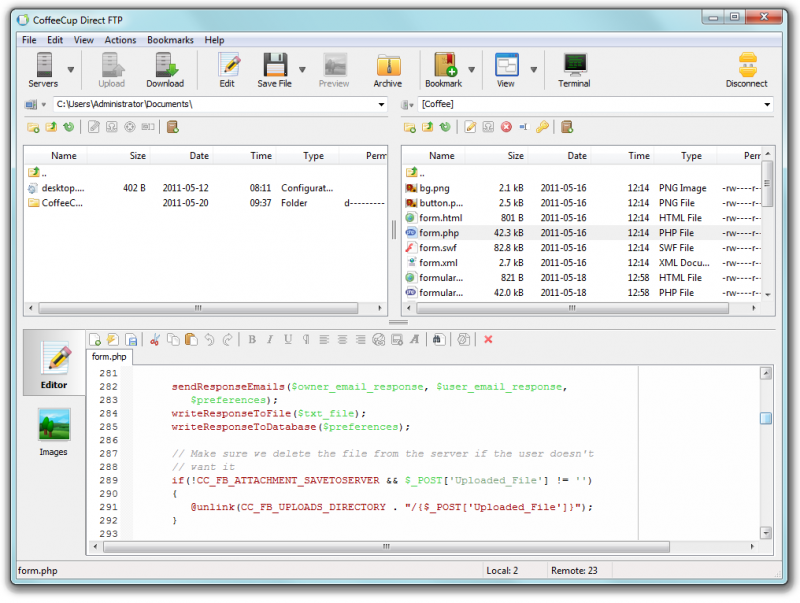
CoffeeCup Direct FTP is a dynamic piece of software that helps make the FTP process intuitive and easy. It's with you every step of the way from making last-minute edits to previewing, organizing and uploading your work, and then backing it up, just in case.
CoffeeCup Direct FTP was designed to be user friendly, but just because it's easy to use doesn't mean it's not powerful. It only takes two clicks to connect to your server, and one click to preview your Webpages and images. If you're satisfied with what you see, all you have to do is hit Save, and Direct FTP handles the rest for you, automatically saving the changes directly to your Website. It even lets you keep an eye on the whole process with the FTP Activity Pane. This neatly ordered window makes complicated FTP logs a thing of the past, giving you a clear overview of the status of your file uploads and downloads. It even lets you pause or cancel your file transfers.
Direct FTP offers full-fledged local and remote file management, so you can add, move, and launch files all with a simple double-click. And because file transfers often take place between a pair of folders, we created a neat feature we call Combo Bookmarks. This helpful tool takes you to your local and corresponding remote folder with just two clicks!
Direct FTP is the only FTP software that incorporates a full-featured HTML editor. This means you can easily create, edit, or update a new Webpage, and then save the document locally, directly to your server, or both. Just drag a file to the Edit window to make changes. HTML Code Completion helps you make edits faster, and at the same time ensures that your code is clean.
CoffeeCup Direct FTP was designed to be user friendly, but just because it's easy to use doesn't mean it's not powerful. It only takes two clicks to connect to your server, and one click to preview your Webpages and images. If you're satisfied with what you see, all you have to do is hit Save, and Direct FTP handles the rest for you, automatically saving the changes directly to your Website. It even lets you keep an eye on the whole process with the FTP Activity Pane. This neatly ordered window makes complicated FTP logs a thing of the past, giving you a clear overview of the status of your file uploads and downloads. It even lets you pause or cancel your file transfers.
Direct FTP offers full-fledged local and remote file management, so you can add, move, and launch files all with a simple double-click. And because file transfers often take place between a pair of folders, we created a neat feature we call Combo Bookmarks. This helpful tool takes you to your local and corresponding remote folder with just two clicks!
Direct FTP is the only FTP software that incorporates a full-featured HTML editor. This means you can easily create, edit, or update a new Webpage, and then save the document locally, directly to your server, or both. Just drag a file to the Edit window to make changes. HTML Code Completion helps you make edits faster, and at the same time ensures that your code is clean.
| Requirements | Pentium 133, 32MB RAM, 200mb hard drive, IE 4.0 or higher |
|---|---|
| Release info | Major Update on Dec 08, 2011 |
| Release notes | Ability to backup and restore server database. Support for S-Drive with Free FTP. Issue when deleting files and changing the column sort order causing wrong files to be deleted. Issue with deleting files with unicode characters in the file name. |
| Related tags | ftp html edit drag and drop zip |
Reviews
No reviews yet. Be the first to review CoffeeCup Direct FTP.
Used CoffeeCup Direct FTP? Tell other visitors what you thought.
Log in to write a reviewOther products by this publisher
- CoffeeCup Animation Studio 1.0 Create animated web graphics that demand attention. Build them from scratch or open existing animations to make your own adjustments. With support for a wide variety of file types and a built-in image editor, this is the animator of your dreams.
-
 CoffeeCup Flash Menu Builder 3.5
CoffeeCup Flash Menu Builder is a quick and easy way to create awesome Flash menus for your Website. Menu builder includes dozens of high-quality buttons, backgrounds, and sounds.
CoffeeCup Flash Menu Builder 3.5
CoffeeCup Flash Menu Builder is a quick and easy way to create awesome Flash menus for your Website. Menu builder includes dozens of high-quality buttons, backgrounds, and sounds.
-
 CoffeeCup HTML Editor 15.4
The HTML Editor now supports HTML5 and CSS3. With this and other great tools like code completion, a comprehensive tag reference, built-in validation, and vibrant website themes you can create gorgeous, standards-compliant sites.
CoffeeCup HTML Editor 15.4
The HTML Editor now supports HTML5 and CSS3. With this and other great tools like code completion, a comprehensive tag reference, built-in validation, and vibrant website themes you can create gorgeous, standards-compliant sites.
-
 CoffeeCup Image Mapper 5.0
CoffeeCup Image Mapper allows you to specify multiple links (or hotspots) to specific locations of an image and point them to a document or website. Create mouseover text, ALT text, links and more. Supports JPG, PNG, and GIF image formats!
CoffeeCup Image Mapper 5.0
CoffeeCup Image Mapper allows you to specify multiple links (or hotspots) to specific locations of an image and point them to a document or website. Create mouseover text, ALT text, links and more. Supports JPG, PNG, and GIF image formats!
-
 CoffeeCup PixConverter 4.0
Convert all your digital photos for use with Flickr or on your Website, sending in e-mail, posting on auction sites, and lots more. CoffeeCup PixConverter is the easy way to batch convert your digital photos for all your online needs.
CoffeeCup PixConverter 4.0
Convert all your digital photos for use with Flickr or on your Website, sending in e-mail, posting on auction sites, and lots more. CoffeeCup PixConverter is the easy way to batch convert your digital photos for all your online needs.
Most viewed Windows FTP Clients
-
1
 FlashFXP 5.4.0.3970
FlashFXP uses a familiar explorer-like interface that even the most novice user can master in minutes. It offers features such as drag-and-drop, FTP, SFTP, and SSL/TLS transfers, enterprise-friendly rollout options, firewall and proxy support.
FlashFXP 5.4.0.3970
FlashFXP uses a familiar explorer-like interface that even the most novice user can master in minutes. It offers features such as drag-and-drop, FTP, SFTP, and SSL/TLS transfers, enterprise-friendly rollout options, firewall and proxy support.
-
2
 SmartFTP 9.0.2401.0
SmartFTP allows you to transfer files across the Internet. It offers a modern look and feel and features including FTPS, SFTP, FXP, WebDAV, S3, B2, Multiple connections, and more.
SmartFTP 9.0.2401.0
SmartFTP allows you to transfer files across the Internet. It offers a modern look and feel and features including FTPS, SFTP, FXP, WebDAV, S3, B2, Multiple connections, and more.
-
3
 Bluetooth File Transfer FULL 1.70
Use your cell phone to browse, explore and manage files of any Bluetooth ready device (File Transfer Profile - OBEX FTP)!
Bluetooth File Transfer FULL 1.70
Use your cell phone to browse, explore and manage files of any Bluetooth ready device (File Transfer Profile - OBEX FTP)!
-
4
 FTP Voyager 16.0.1.3
FTP Voyager: FREE FTP client and scheduler. FTP, SFTP (SSH) and FTPS (SSL/TLS) support. "No-script" automation, drag-n-drop, multiple simultaneous transfers, folder synchronization, large file resume (checkpoint restart) and more!
FTP Voyager 16.0.1.3
FTP Voyager: FREE FTP client and scheduler. FTP, SFTP (SSH) and FTPS (SSL/TLS) support. "No-script" automation, drag-n-drop, multiple simultaneous transfers, folder synchronization, large file resume (checkpoint restart) and more!
-
5
 Bluetooth File Transfer 1.2.1.1
Manage files of your OBEX ready device that support File Transfer Profile (FTP), using a Bluetooth connection. Download, upload, explore, delete and create files on your phone, PDA, palm, notebook, and so on, using a fast and straightforward program!
Bluetooth File Transfer 1.2.1.1
Manage files of your OBEX ready device that support File Transfer Profile (FTP), using a Bluetooth connection. Download, upload, explore, delete and create files on your phone, PDA, palm, notebook, and so on, using a fast and straightforward program!
-
6
 Clever Internet Suite 8.4
Internet components - Clever Internet Suite is the native Delphi VCL for RAD Studio 10.1 Berlin, XE..XE8, .NET and ActiveX. HTTP, FTP, SMTP, POP, IMAP, SFTP (SSH), OAUTH, SOAP, WebDAV, DKIM components. Full IpV6, Unicode and 64bit support.
Clever Internet Suite 8.4
Internet components - Clever Internet Suite is the native Delphi VCL for RAD Studio 10.1 Berlin, XE..XE8, .NET and ActiveX. HTTP, FTP, SMTP, POP, IMAP, SFTP (SSH), OAUTH, SOAP, WebDAV, DKIM components. Full IpV6, Unicode and 64bit support.
-
7
 SecureFX 8.1.1
A highly configurable secure file transfer client for SFTP, FTP/TLS, SCP and FTP with advanced features like site synchronization, a scriptable command-line utility for unattended file transfers and public-key and Kerberos v5 (GSSAPI) authentication.
SecureFX 8.1.1
A highly configurable secure file transfer client for SFTP, FTP/TLS, SCP and FTP with advanced features like site synchronization, a scriptable command-line utility for unattended file transfers and public-key and Kerberos v5 (GSSAPI) authentication.
-
8
 Core FTP Pro 2.2.1960
Secure FTP Client w/SSL,TLS,SSH/SFTP, HTTPS, resume, scheduling, zip, encrypt
Core FTP Pro 2.2.1960
Secure FTP Client w/SSL,TLS,SSH/SFTP, HTTPS, resume, scheduling, zip, encrypt
- 9 Classic FTP Plus for Pocket PC 1.06 FTP client for Window CE devices including Pocket PC and Smartphone. View, edit, upload, download and delete files from a remote server with your Windows CE device. Now you can upload files to your server while on the move.
- 10 FTP Site Manager 1.0 1.0 Web site maintenance and uploading duties with drap&drop feature + XP interface
Most downloaded Windows FTP Clients
-
1
SmartFTP 9.0.2401.0
SmartFTP allows you to transfer files across the Internet. It offers a modern look and feel and features including FTPS, SFTP, FXP, WebDAV, S3, B2, Multiple connections, and more.
-
2
FlashFXP 5.4.0.3970
FlashFXP uses a familiar explorer-like interface that even the most novice user can master in minutes. It offers features such as drag-and-drop, FTP, SFTP, and SSL/TLS transfers, enterprise-friendly rollout options, firewall and proxy support.
-
3
Bluetooth File Transfer FULL 1.70
Use your cell phone to browse, explore and manage files of any Bluetooth ready device (File Transfer Profile - OBEX FTP)!
-
4
 Auto FTP Service 4.8
Auto FTP Service: automated ftp client with flexible scheduler, transfer manager, zip/unzip. Define auto recurring downloads, uploads for any future date and time. Runs as a service: background process independent of who is using the console.
Auto FTP Service 4.8
Auto FTP Service: automated ftp client with flexible scheduler, transfer manager, zip/unzip. Define auto recurring downloads, uploads for any future date and time. Runs as a service: background process independent of who is using the console.
-
5
Core FTP Pro 2.2.1960
Secure FTP Client w/SSL,TLS,SSH/SFTP, HTTPS, resume, scheduling, zip, encrypt
-
6
Clever Internet Suite 8.4
Internet components - Clever Internet Suite is the native Delphi VCL for RAD Studio 10.1 Berlin, XE..XE8, .NET and ActiveX. HTTP, FTP, SMTP, POP, IMAP, SFTP (SSH), OAUTH, SOAP, WebDAV, DKIM components. Full IpV6, Unicode and 64bit support.
-
7
 Auto FTP Premium 4.8
Auto FTP Premium: automated ftp client with flexible scheduler, transfer manager, zip/unzip. Define auto recurring downloads or uploads for any future date and time. Transfer any group of files from/to your local or server computer(s).
Auto FTP Premium 4.8
Auto FTP Premium: automated ftp client with flexible scheduler, transfer manager, zip/unzip. Define auto recurring downloads or uploads for any future date and time. Transfer any group of files from/to your local or server computer(s).
-
8
SecureFX 8.1.1
A highly configurable secure file transfer client for SFTP, FTP/TLS, SCP and FTP with advanced features like site synchronization, a scriptable command-line utility for unattended file transfers and public-key and Kerberos v5 (GSSAPI) authentication.
- 9 IceFTP 1.0 IceFTP is an incredibly user-friendly FTP client with a transfer queue that's able to download multiple files at the same time while still allowing you to browse the FTP site.
-
10
 Classic FTP Plus File Transfer Software 2.38
Easy ftp client allows you to view, edit, upload, download and delete files and synchronize files on a remote server with your local folder with a single click.
Classic FTP Plus File Transfer Software 2.38
Easy ftp client allows you to view, edit, upload, download and delete files and synchronize files on a remote server with your local folder with a single click.