0downloads
0this week
FreeCommercial
0reviews
Screenshots
About CodeIME
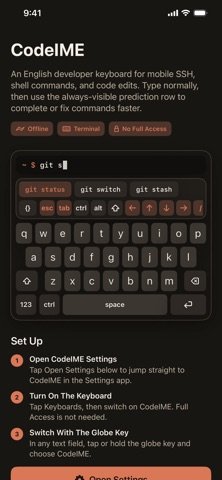
CodeIME is an iOS keyboard built for developers working from a phone. It keeps the familiar English keyboard layout, then adds fast access to terminal keys, code symbols, navigation controls, and command predictions.
Use it when connecting to servers, editing files, running shell commands, or working inside terminal apps. CodeIME includes an always-visible predictive command row, quick modes for navigation and symbols, plus sticky Ctrl, Alt, and Shift modifiers for actions like Ctrl-C and Shift-Tab.
Highlights:
English developer keyboard with compact dark interface
Terminal keys including Esc, Tab, Ctrl, Alt, Shift, arrows, slash, pipe, and tilde
Sticky Ctrl, Alt, and Shift for chords such as Ctrl-C, Ctrl-D, Shift-Tab, and Ctrl-Arrow
Always-visible predictive command row and code symbol panel
Key pop-ups, hold-to-repeat delete and arrows, input click sounds, and modifier highlighting
Privacy-friendly design with no tracking and no data collection
CodeIME does not require keyboard Full Access.
License: Commercial
Use it when connecting to servers, editing files, running shell commands, or working inside terminal apps. CodeIME includes an always-visible predictive command row, quick modes for navigation and symbols, plus sticky Ctrl, Alt, and Shift modifiers for actions like Ctrl-C and Shift-Tab.
Highlights:
English developer keyboard with compact dark interface
Terminal keys including Esc, Tab, Ctrl, Alt, Shift, arrows, slash, pipe, and tilde
Sticky Ctrl, Alt, and Shift for chords such as Ctrl-C, Ctrl-D, Shift-Tab, and Ctrl-Arrow
Always-visible predictive command row and code symbol panel
Key pop-ups, hold-to-repeat delete and arrows, input click sounds, and modifier highlighting
Privacy-friendly design with no tracking and no data collection
CodeIME does not require keyboard Full Access.
License: Commercial
| Release info | New Release on Oct 01, 2026 |
|---|---|
| Release notes | CodeIME 1.1 adds a real Shift key and a smoother typing feel. • Shift on the letter rows and in the NAV rail: tap for one capital, double-tap for caps lock, or hold while typing • Shift-Tab, plus Shift, Ctrl, and Alt with the arrow keys for word jumps and selections in terminal apps • Hold delete or an arrow key to repeat it • Key pop-ups, press highlights, and no dead zones between keys • A second symbol page that covers every ASCII symbol • Smarter command predictions that put the most likely match first • Layouts tuned for iPhone landscape and iPad • A Try It field in the app shows exactly what each key sends |
| Listing data | App Store |
Reviews
No reviews yet. Be the first to review CodeIME.
Used CodeIME? Tell other visitors what you thought.
Log in to write a reviewOther products by this publisher
- #Bible 11.5 "Incredible App - My sister shared this app with me a few weeks ago and it is truly incredible.
- % Percentage Calculator Pro 1.41 This is the Pro version of % Percentage Calculator.
- (beat) for iOS 0.5.8 An elegant Fountain screenwriting app, created by a screenwriter for screenwriters.
- (Deep) HIARCS Chess Explorer 1.14 Chess database, analysis and game playing program
- (How to) Pronounce PRO 1.5.6 This is a PRO version of (How to) Pronounce.
Most viewed iOS Developer Tools
-
1
 TestFlight 4.4.0
TestFlight makes it easy to test beta versions of apps and App Clips to provide valuable feedback to developers before they release their apps on the App Store.
TestFlight 4.4.0
TestFlight makes it easy to test beta versions of apps and App Clips to provide valuable feedback to developers before they release their apps on the App Store.
-
2
 LocalDevVPN 1.3.0
LocalDevVPN is a developer tool for creating and managing local network tunnels directly on iOS.
LocalDevVPN 1.3.0
LocalDevVPN is a developer tool for creating and managing local network tunnels directly on iOS.
-
3
 Apple Developer 11.1
Welcome to Apple Developer, your source for developer news, features, and videos — and the best place to experience WWDC.
Apple Developer 11.1
Welcome to Apple Developer, your source for developer news, features, and videos — and the best place to experience WWDC.
-
4
 App Store Connect 3.3
Manage your apps on the go with the App Store Connect app for iPhone and iPad.
App Store Connect 3.3
Manage your apps on the go with the App Store Connect app for iPhone and iPad.
-
5
 Apps Connect 2.3.1
One Click Connection v2board / SSPANEL / Xboard
Apps Connect 2.3.1
One Click Connection v2board / SSPANEL / Xboard
-
6
 a-Shell 2.2.2
a-Shell is a complete local terminal emulator, allowing to run most Unix commands on your iOS device.
a-Shell 2.2.2
a-Shell is a complete local terminal emulator, allowing to run most Unix commands on your iOS device.
-
7
 Terminal# 1.4
Terminal#: An SSH client for securely managing your servers right from your mobile device.
Terminal# 1.4
Terminal#: An SSH client for securely managing your servers right from your mobile device.
-
8
 ESP32 BLE Terminal 1.2
INTRODUCTION:
ESP32 BLE Terminal 1.2
INTRODUCTION:
-
9
 Scarlet 1.1.3
Let's face it, there are a lot of developers who like the idea of an issue tracker, but find it too much effort to use & maintain for solo, indie or hobby projects.
Scarlet 1.1.3
Let's face it, there are a lot of developers who like the idea of an issue tracker, but find it too much effort to use & maintain for solo, indie or hobby projects.
-
10
 GitHub 1.280.0
There’s a lot you can do on GitHub that doesn’t require a complex development environment – like sharing feedback on a design discussion, or reviewing a few lines of code.
GitHub 1.280.0
There’s a lot you can do on GitHub that doesn’t require a complex development environment – like sharing feedback on a design discussion, or reviewing a few lines of code.
Most downloaded iOS Developer Tools
-
1
TestFlight 4.4.0
TestFlight makes it easy to test beta versions of apps and App Clips to provide valuable feedback to developers before they release their apps on the App Store.
-
2
GitHub 1.280.0
There’s a lot you can do on GitHub that doesn’t require a complex development environment – like sharing feedback on a design discussion, or reviewing a few lines of code.
-
3
LocalDevVPN 1.3.0
LocalDevVPN is a developer tool for creating and managing local network tunnels directly on iOS.
-
4
 Sekai 1.75.25
Don’t just watch content—play with it.
Sekai 1.75.25
Don’t just watch content—play with it.
-
5
 Cursor 1.13.0
Introducing Cursor for iOS: the best way to build, review, and ship software from anywhere.
Cursor 1.13.0
Introducing Cursor for iOS: the best way to build, review, and ship software from anywhere.
-
6
 Replit 2.203.2
Describe what you want.
Replit 2.203.2
Describe what you want.
-
7
 O-KAM Pro 3.0.38
O-KAM Pro, feel home anytime, anywhere.
O-KAM Pro 3.0.38
O-KAM Pro, feel home anytime, anywhere.
-
8
Apple Developer 11.1
Welcome to Apple Developer, your source for developer news, features, and videos — and the best place to experience WWDC.
-
9
 Expo Go 57.0.9
Start learning to build projects using web technologies with just your iOS device.
Expo Go 57.0.9
Start learning to build projects using web technologies with just your iOS device.
-
10
App Store Connect 3.3
Manage your apps on the go with the App Store Connect app for iPhone and iPad.