
CapyWatcher 1.1.4
CapyWatcher records every new file in the folders you choose, with the program that created it, the program that started that one, the user and the time. Right-click a file to see the answer, or search the history. The history stays on your computer.
Download
14.61 MB · 1.1.4.exe
2downloads
2this week
$49Shareware
0reviews
Screenshots
About CapyWatcher
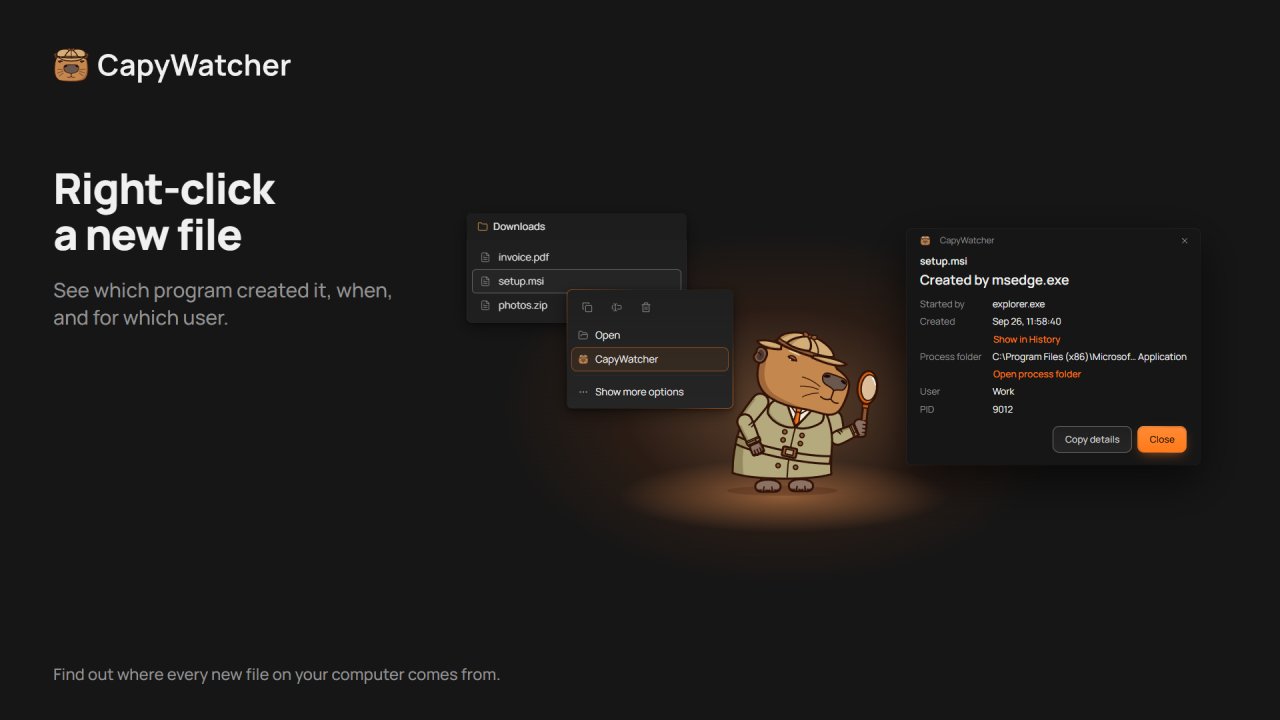
Right-click a new file in Windows and see which program created it.
Windows doesn't keep a record of which program created a file. CapyWatcher runs in the background and records every new file in the folders you choose: the program that created it, the program that started that one, the user and the time. It works on any drive, USB drives and network drives included. It's made for people who run AI coding agents such as Claude Code, Codex or Cursor, for Windows power users with mystery files, and for anyone who wants to know which installer, game, download or script put a file on their computer.
Right-click one new file or several and select "CapyWatcher: who created this file?". A file written by node.exe or cargo.exe also names the program that started it, such as claude.exe.
History: search and filter by path, program, user and time, and export to CSV. Delete alerts say which program deleted files, and a folder lock refuses deletes, moves and renames. Right-click a file in use to see which program holds it.
The history stays on your computer. No account and no analytics. CapyWatcher records new files from the moment you install it, so it can't tell you about older ones, and it doesn't record edits.
Try every feature free for 7 days, with no card and no email. Then $29 a year, renewed until you cancel, or $49 once. Each license covers up to 3 computers.
Windows doesn't keep a record of which program created a file. CapyWatcher runs in the background and records every new file in the folders you choose: the program that created it, the program that started that one, the user and the time. It works on any drive, USB drives and network drives included. It's made for people who run AI coding agents such as Claude Code, Codex or Cursor, for Windows power users with mystery files, and for anyone who wants to know which installer, game, download or script put a file on their computer.
Right-click one new file or several and select "CapyWatcher: who created this file?". A file written by node.exe or cargo.exe also names the program that started it, such as claude.exe.
History: search and filter by path, program, user and time, and export to CSV. Delete alerts say which program deleted files, and a folder lock refuses deletes, moves and renames. Right-click a file in use to see which program holds it.
The history stays on your computer. No account and no analytics. CapyWatcher records new files from the moment you install it, so it can't tell you about older ones, and it doesn't record edits.
Try every feature free for 7 days, with no card and no email. Then $29 a year, renewed until you cancel, or $49 once. Each license covers up to 3 computers.
| Requirements | Windows 11, or Windows 10 version 1803 or later, 64-bit (x64). |
|---|---|
| Release info | on Nov 02, 2026 |
| Release notes | CapyWatcher is now in Explorer's right-click menu. "What's using this file?" lists each program holding a file or folder. Network drives and shares can be tracked. |
| Related tags | file monitor folder monitor file watcher file activity file history |
Reviews
No reviews yet. Be the first to review CapyWatcher.
Used CapyWatcher? Tell other visitors what you thought.
Log in to write a reviewMost viewed Windows System Utilities
-
1
 Microsoft Teams Archiving Tool 11.0.7285
Tool to Archive Microsoft Teams, Microsoft Teams Channels and Conversations
-
2
 @SwIt Printfil 5.29
Print from DOS, Unix, Linux to Windows printers: USB, GDI, PDF, e-mail, network, IP, fax. Capture LPT1:-LPT9: & COM1:-COM9: and redirect the jobs, even to a printer physically connected to the captured port and w/out physical LPT/COM ports installed
-
3
 DosPrint 1.3
DosPrint allows you running DOS programs on modern Windows computers (64 bit too) and printing to Windows printers (including USB, GDI and PDF) by installing specialist third party programs specifically designed to solve these common DOS problems.
-
4
 Serial Port Tester 7.0
Monitor, display, log and analyze all of your system's serial port activity using Serial Port Monitor. This professional serial port tester allows you to test any RS232/422/485 COM port on your system and log transmission data for further analysis.
- 5 SurfbIocker 5.8 Restrict Internet access at specified times or on demand. Block harmful content, disable connection completely or limit Internet to work with allowed programs and services only. Keep kids away from Internet harms and employees focused on work!
-
6
 Batch Rename Pro 3.3.0
Batch Rename Pro is a software that can rename a number of files and folders at the one time, renaming actions are executed by one or more ordered tasks. The project can be saved as a file for later use.
-
7
 Apeaksoft Data Recovery 2.1.16
This powerful and safe data recovery tool can help you get back deleted/lost data with ease. It is able to recover data lost due to computer crash, hard drive problem, mistakenly deletion, etc.
-
8
 Driver Talent 7.1.6.26
Download and install best-matched drivers for computer hardware and all connected peripheral devices, One-click repair & fix all driver problems.
-
9
 Driver Talent for Network Card 7.0.1.8
Driver Talent for Network Card is specially designed to fix network driver problems. It is especially helpful when you have no internet connection and no network drivers because it enables to download and install network drivers without internet.
-
10
 BitCopy by MollieSoft 1.1.8.0
** File copy program for Windows; control files using AND/OR/NOT filter expressions containing file name/path/date/size. ** Try It! mode. ** Verify files after copying. ** Use schedules to run copy jobs automatically daily/weekly/monthly.
Most downloaded Windows System Utilities
- 1 SurfbIocker 5.8 Restrict Internet access at specified times or on demand. Block harmful content, disable connection completely or limit Internet to work with allowed programs and services only. Keep kids away from Internet harms and employees focused on work!
-
2
Serial Port Tester 7.0
Monitor, display, log and analyze all of your system's serial port activity using Serial Port Monitor. This professional serial port tester allows you to test any RS232/422/485 COM port on your system and log transmission data for further analysis.
-
3
Microsoft Teams Archiving Tool 11.0.7285
Tool to Archive Microsoft Teams, Microsoft Teams Channels and Conversations
-
4
@SwIt Printfil 5.29
Print from DOS, Unix, Linux to Windows printers: USB, GDI, PDF, e-mail, network, IP, fax. Capture LPT1:-LPT9: & COM1:-COM9: and redirect the jobs, even to a printer physically connected to the captured port and w/out physical LPT/COM ports installed
-
5
DosPrint 1.3
DosPrint allows you running DOS programs on modern Windows computers (64 bit too) and printing to Windows printers (including USB, GDI and PDF) by installing specialist third party programs specifically designed to solve these common DOS problems.
-
6
Driver Talent for Network Card 7.0.1.8
Driver Talent for Network Card is specially designed to fix network driver problems. It is especially helpful when you have no internet connection and no network drivers because it enables to download and install network drivers without internet.
-
7
Batch Rename Pro 3.3.0
Batch Rename Pro is a software that can rename a number of files and folders at the one time, renaming actions are executed by one or more ordered tasks. The project can be saved as a file for later use.
-
8
BitCopy by MollieSoft 1.1.8.0
** File copy program for Windows; control files using AND/OR/NOT filter expressions containing file name/path/date/size. ** Try It! mode. ** Verify files after copying. ** Use schedules to run copy jobs automatically daily/weekly/monthly.
-
9
Driver Talent 7.1.6.26
Download and install best-matched drivers for computer hardware and all connected peripheral devices, One-click repair & fix all driver problems.
- 10 ArchiverFS 3.460 Initially released in 2002, Archiver.FS is a one of a kind file server archiving solution for content stored in network file shares. There really is nothing else like it.