115downloads
25this week
FreeFreeware
0reviews
Screenshots
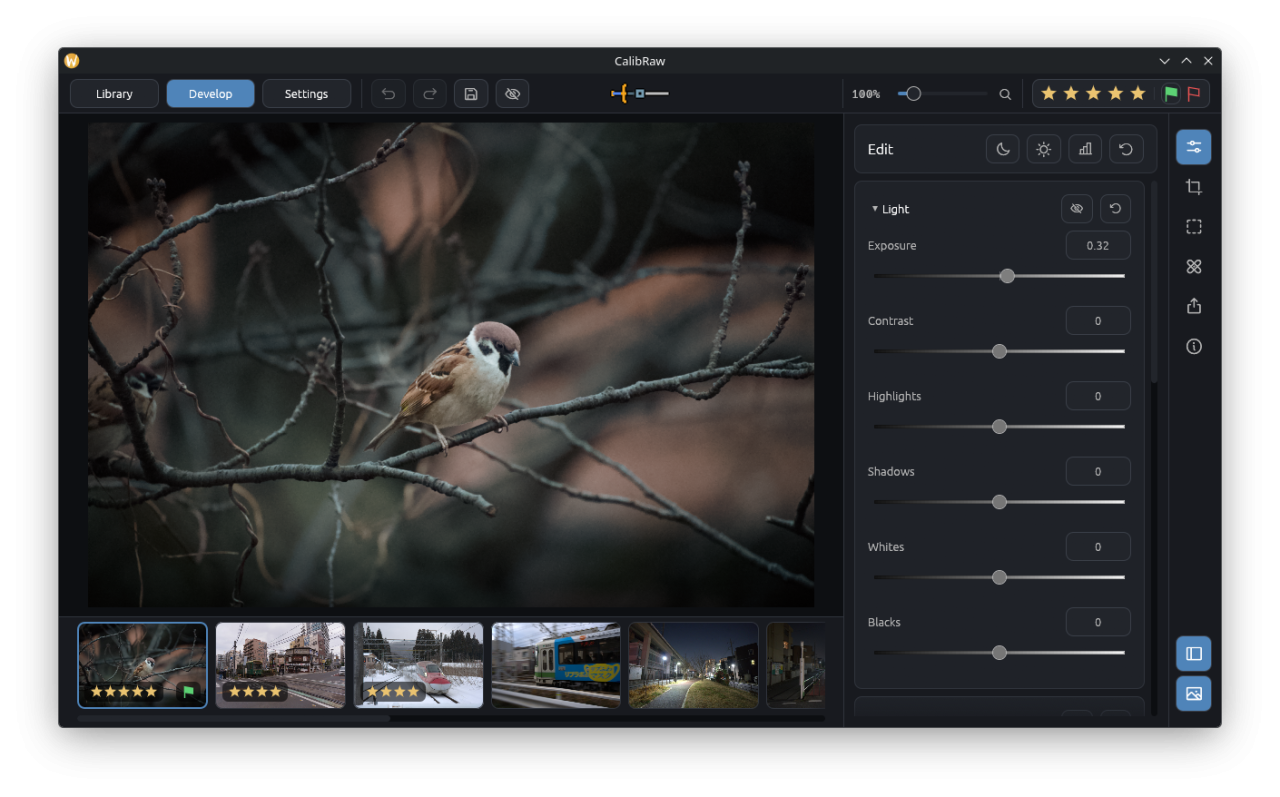
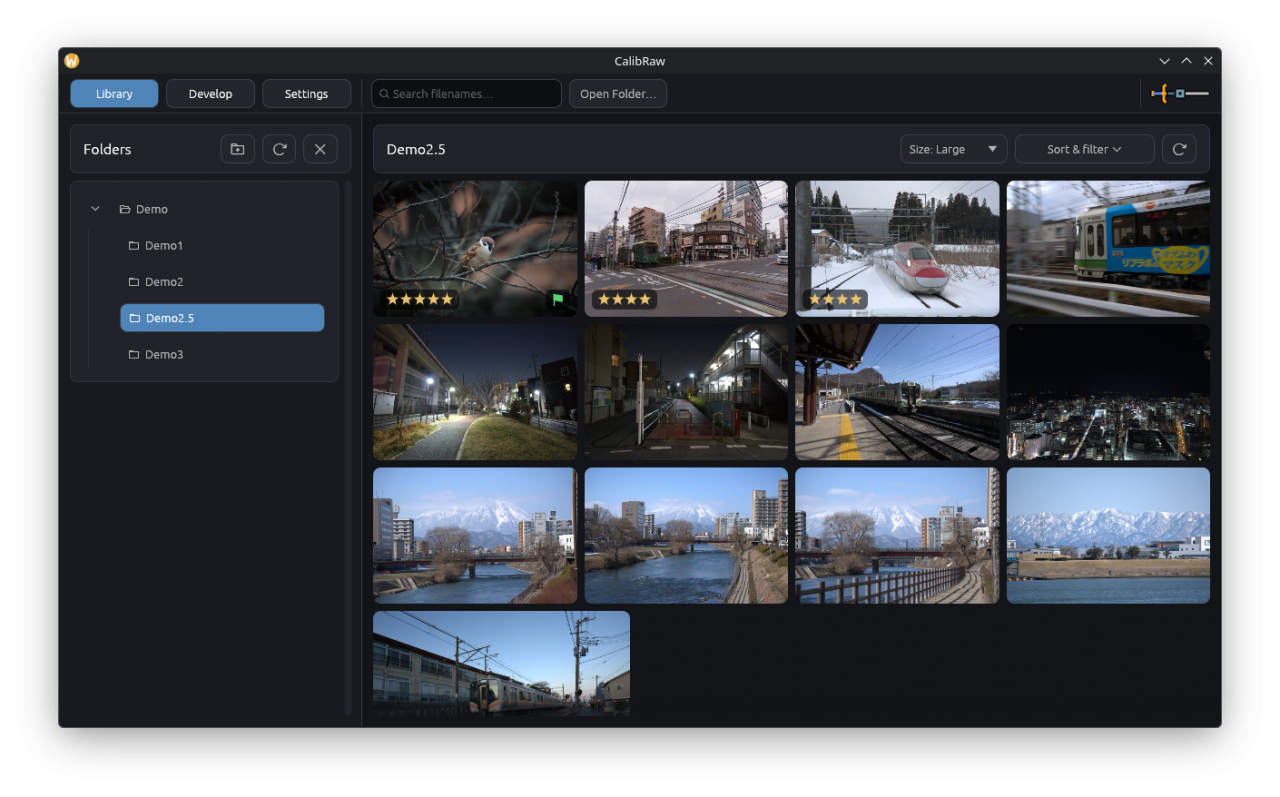
About CalibRaw
CalibRaw is a GPU-accelerated RAW photo editor. Browse your photo library, develop camera RAW
files, and fine-tune color, tone, and detail in one workflow. Adjustments are saved in sidecar
files so your original photos remain intact.
Shape your images with tone curves, color wheels, and targeted color adjustments. Apply lens
corrections, recover highlights, and combine bracketed exposures with HDR merge. Brush, gradient,
and shape masks let you make local adjustments, while optional AI tools process masks, noise reduction,
and object removal on your device after downloading their models.
• Develop RAW files from a wide range of cameras, including Fujifilm X-Trans sensors
• Adjust exposure, white balance, tone curves, and individual color ranges
• Correct lens distortion, chromatic aberration, and vignetting
• Apply local masks and creative effects with independent adjustments
• Export finished photos, including lossless JPEG XL images
License: GPL-3.0-or-later
files, and fine-tune color, tone, and detail in one workflow. Adjustments are saved in sidecar
files so your original photos remain intact.
Shape your images with tone curves, color wheels, and targeted color adjustments. Apply lens
corrections, recover highlights, and combine bracketed exposures with HDR merge. Brush, gradient,
and shape masks let you make local adjustments, while optional AI tools process masks, noise reduction,
and object removal on your device after downloading their models.
• Develop RAW files from a wide range of cameras, including Fujifilm X-Trans sensors
• Adjust exposure, white balance, tone curves, and individual color ranges
• Correct lens distortion, chromatic aberration, and vignetting
• Apply local masks and creative effects with independent adjustments
• Export finished photos, including lossless JPEG XL images
License: GPL-3.0-or-later
| Release info | Update on Nov 08, 2026 |
|---|---|
| Release notes | This is the eighth release of CalibRaw. It brings reworked effects, colour calibration, linked folders on Android, AI denoise and six new languages (Danish, Italian, Spanish, Romanian, Ukrainian and Russian) CalibRaw is now available on the Google Play Store. You can now export as a carousel for social media. What's new in Adachi V1.4.1 New features • Color calibration. • AI denoise, next to the normal denoise. • Linked folders on Android, including subfolders. • Recursive library view with square thumbnails. • Edited photos are marked with an icon in the library. • Carousel export. • Choose which adjustments to copy and paste. • Brightness slider. • Temperature slider for non-RAW files. • More than one Relight in a single photo. • Translations in Spanish, Italian, Danish, Ukrainian, Russian and Romanian. • .deb package for Linux. Improvements • Reworked effects with higher quality. • Light Rays stay inside their masks. • Faster export through GPU acceleration. • Faster library thumbnails. • Redesigned mask tab. • Undo and redo for mask refine. Fixes • Wrong rotation on some RAW files. • White balance picker and several features on some DNG files. • Remove on DNG files. • Rating bug on Android. • Denoise bug. • Show in file explorer. • Outline artifacts at tile edges. • Card layout and base sub-mask bugs. Downloads Linux: Flathub | x86_64 | aarch64 (ARM) Android: Play Store | F-Droid | APK Windows installer: x86_64 | ARM64 Windows ZIP: x86_64 | ARM64 macOS: Apple Silicon (ARM64) | Intel (x86_64) How to install? Notice: If you want to switch to the Google Play Version, you will have to uninstall CalibRaw to be able to install it via Google Play. Before doing that, back up all your edits and RAWs by copying Internal Storage>Android>media>de.duecki.calibraw>.library somewhere safe (like your downloads folder). After reinstalling you can move it back and will get your edits back. --- Community & Feedback • Discord: Join the conversation on our… |
| Related tags | RAW Photo Editor |
| Listing data | Flathub |
Reviews
No reviews yet. Be the first to review CalibRaw.
Used CalibRaw? Tell other visitors what you thought.
Log in to write a reviewOther products by this publisher
- "No Distractions" for YouTube 4.10 ----
- #Bible 11.6 "Incredible App - My sister shared this app with me a few weeks ago and it is truly incredible.
- #filmphotography 1.4.2 So, you decided to shoot on film?
- $quirrel 1.5.1 $quirrel Budget & Finance helps you plan each paycheck, track spending, manage debt, and see what is safe to spend before the next payday.
- % Percentage Calculator Pro 1.41 This is the Pro version of % Percentage Calculator.
Most viewed Linux Graphics
- 1 Geotagging 0.7.8 Geo-sync your photos easily
-
2
 CalibRaw 1.4.1
Develop RAW photos with non-destructive editing
- 3 LibreSprite 1.3 Animated sprite editor and pixel art tool
-
4
 LibreCAD 2.2.1.6
2D Computer Aided Design (CAD)
-
5
 Bambu Studio 02.09.01.70
Get perfect 3D prints!
-
6
 PpdEditor 0.1.2_1
2D paper doll editor
-
7
 Geeqie 3.4
A lightweight image viewer
-
8
 GrafX2 2.7
A bitmap paint program specialized in 256 color drawing
- 9 Cosmic Comics 3.2.0 Read Comics, Manga and Ebooks the easy way
-
10
 Fotema 2.5.2
Admire your photos
Most downloaded Linux Graphics
-
1
CalibRaw 1.4.1
Develop RAW photos with non-destructive editing
- 2 Cosmic Comics 3.2.0 Read Comics, Manga and Ebooks the easy way
-
3
 4KWALL 2026.11.3
Set 4K, HD and live wallpapers for your desktop background
- 4 Mapollage 26.03 Create KML files from geotagged photos
- 5 Mapiah 1.0.2 User friendly multiplatform Therion map editor
-
6
PpdEditor 0.1.2_1
2D paper doll editor
-
7
 RapidRAW v1.6.9
A non-destructive, and GPU-accelerated RAW image editor built with performance in mind
-
8
 Oculante 0.9.6
A fast and simple image viewer/editor
-
9
 Seamly2D 2026.11.9.131
Sewing pattern design software
- 10 LibreSprite 1.3 Animated sprite editor and pixel art tool