
BetaSuite 1.3.7
Beta-testing a robot lawn mower, robot vacuum, e-bike, drone or 3D printer?
Download
104.46 MB
0downloads
0this week
FreeCommercial
0reviews
Screenshots
About BetaSuite
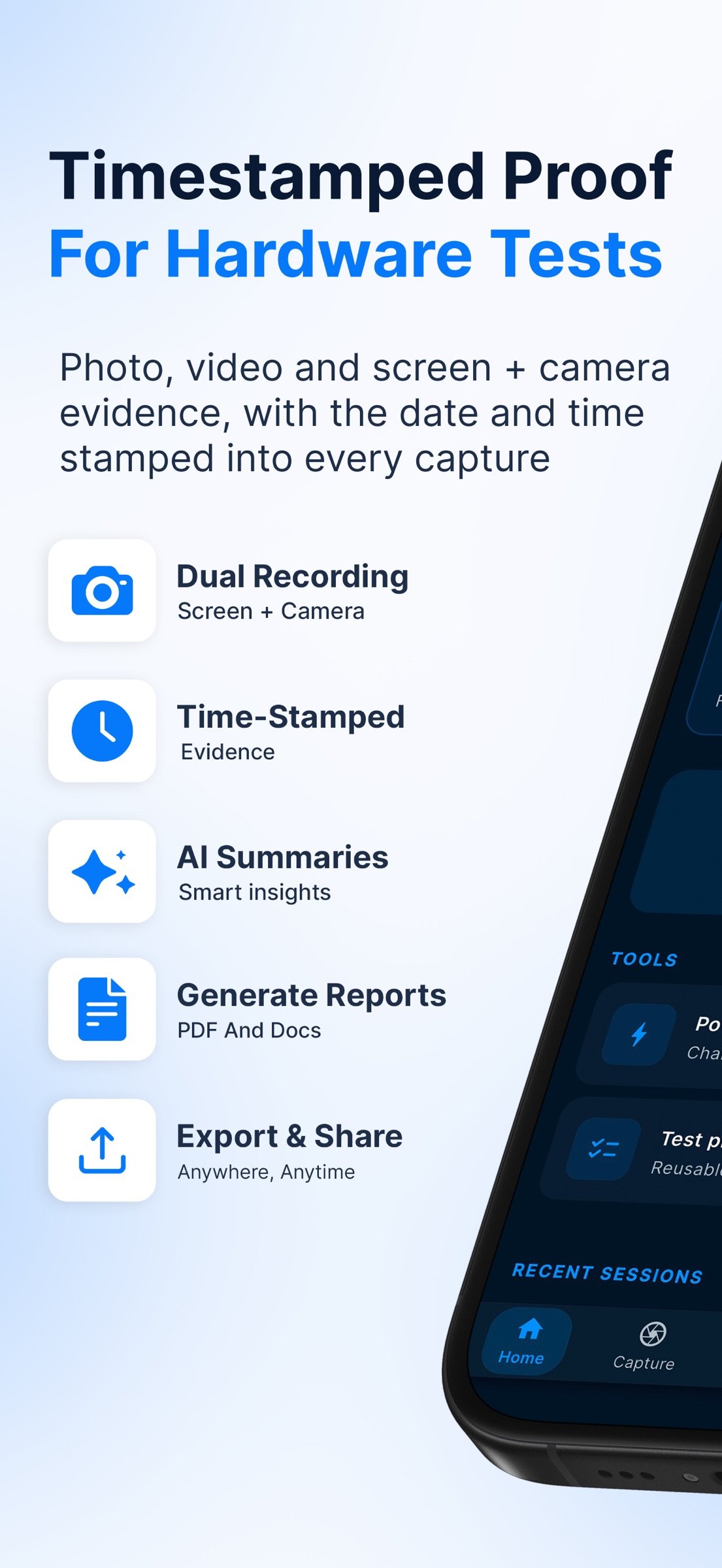
Beta-testing a robot lawn mower, robot vacuum, e-bike, drone or 3D printer? BetaSuite: Tester's Toolkit captures photo and video evidence with the date and time burned into every frame, then turns your field notes into a clear PDF or DOCX report.
It's made for people who test physical products, and the companion apps that ship with them. It is not a tool for distributing app betas. Only need a timestamp camera? Use Basic mode: capture only, with no sessions or reports.
CATCH THE MOMENT
• Photos and videos get the date and time burned in, to the second. Add GPS location, weather, season, time zone, device info and your own watermark or logo if you want them.
• Instant Capture keeps a rolling buffer, so you can save the last 15–30 seconds after something happens.
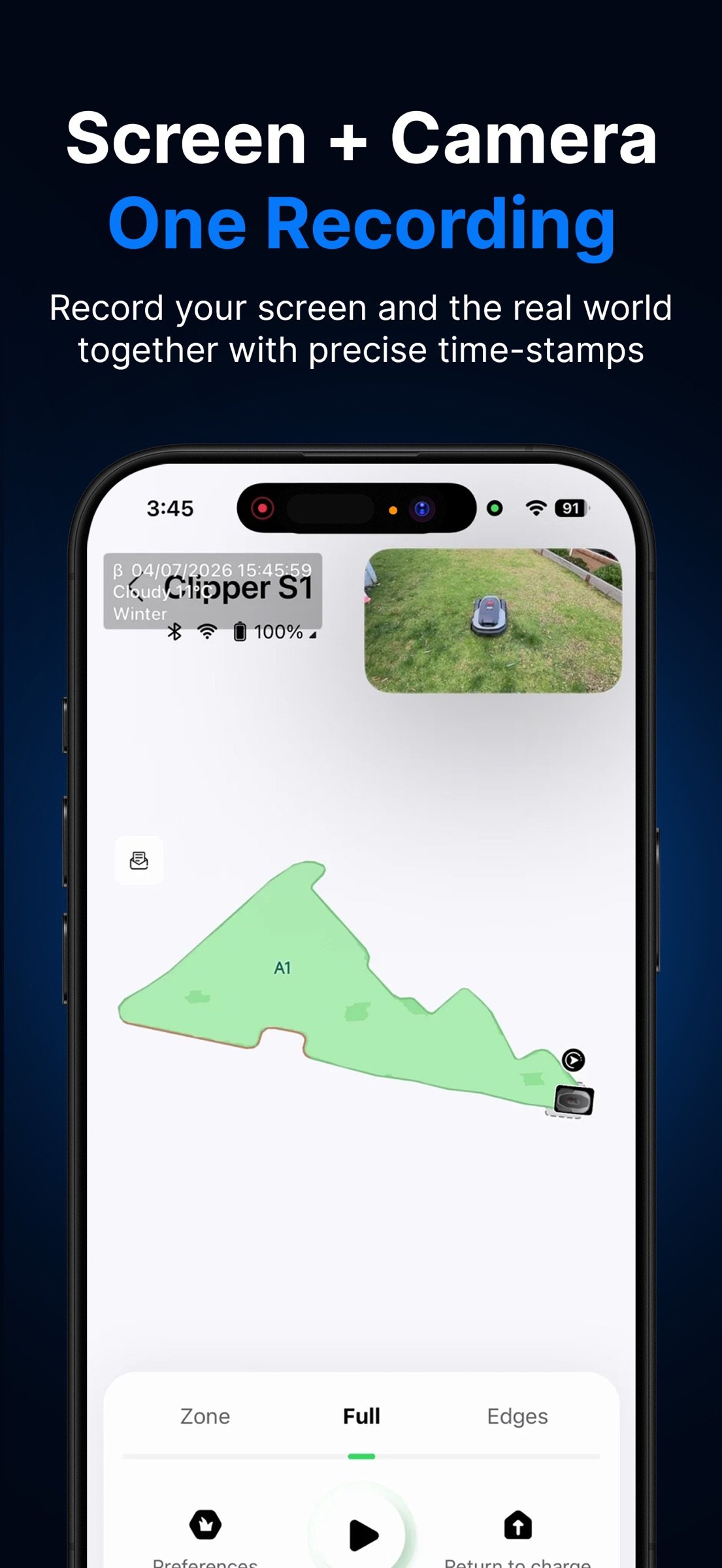
• Dual recording puts your screen and your camera in one video (picture-in-picture), so the companion app and the device are in the same clip, with the date and time burned in.
• Photos and videos you import from your library get the same stamp.
LOG WHAT HAPPENED
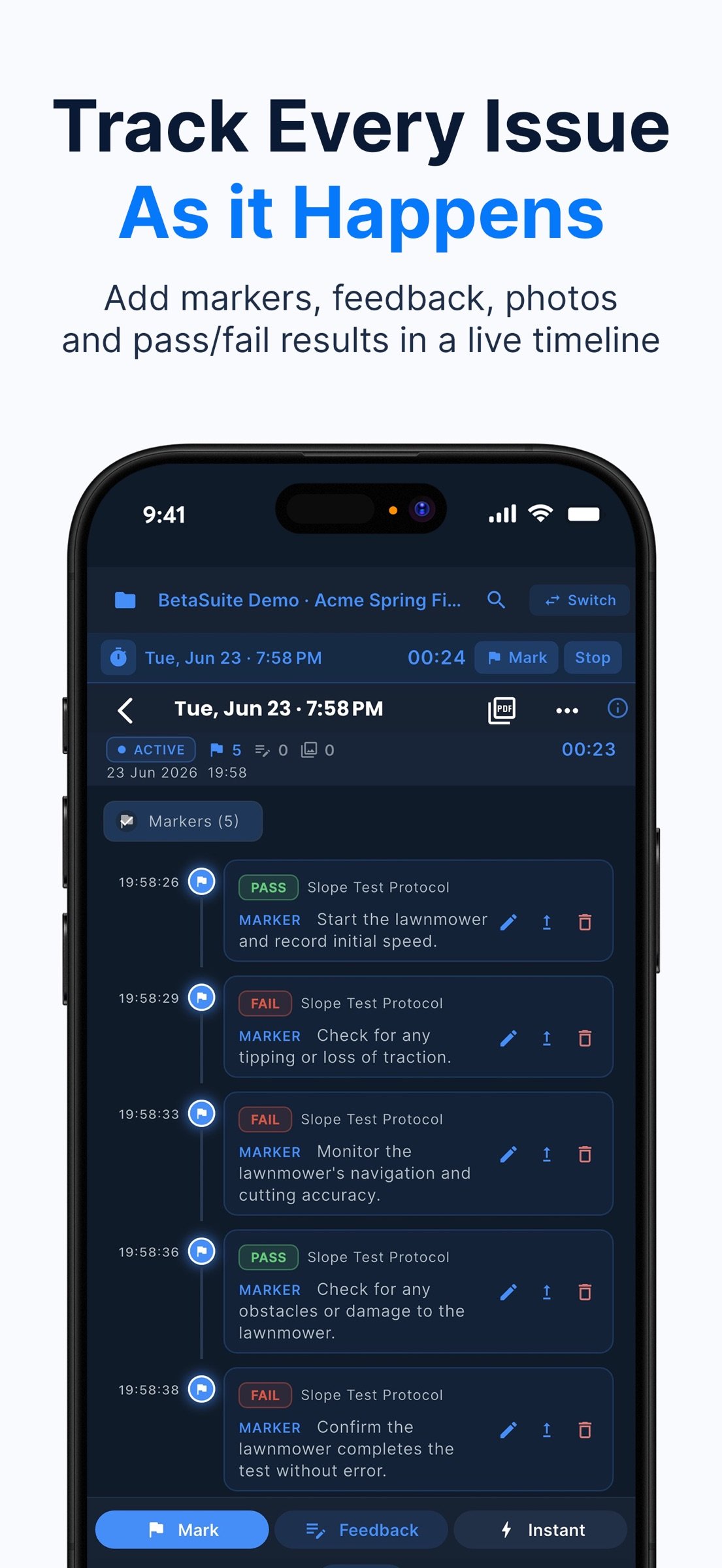
• Run each test as a session. Drop a marker the second something goes wrong: it lands on the session timeline, and you can add the detail later.
• Log findings with a severity, the expected and actual result, notes and voice notes.
• Draw on photos and video frames to point straight at the fault, and trim clips before you send them.
• Optional transcription turns voice notes and the speech in your videos into text.
• Export a clip compressed to fit Discord's upload limit in one tap.
TEST PROTOCOLS
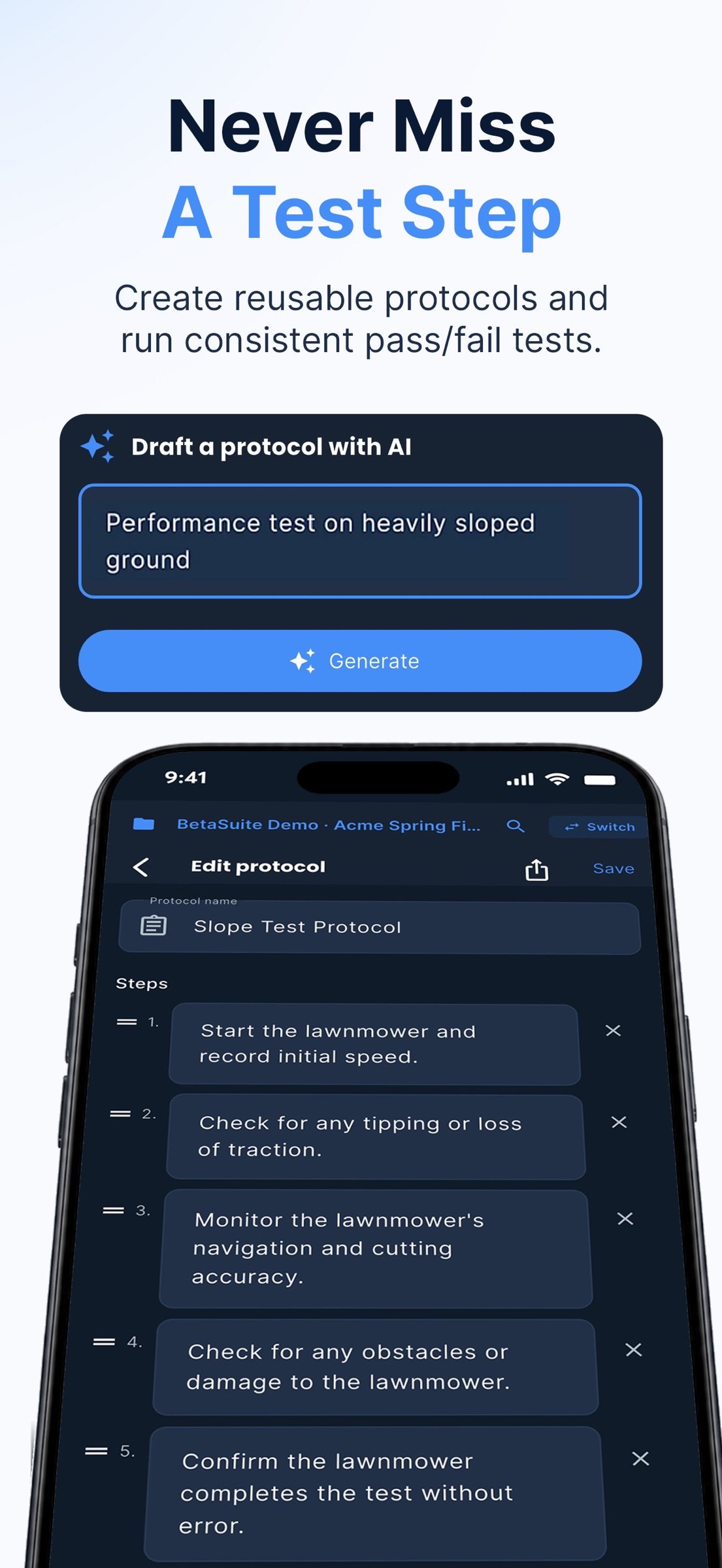
Build reusable checklists with pass/fail, rating, NPS, multiple-choice and written-answer steps. A step can ask for a photo or video, captured right in the run. Import steps from a CSV file or pasted text, or with optional AI from a photo or PDF, and share a protocol as a code. Program managers can build one in a web browser at betasuite.app/tools/protocol-builder, with no app or account, and testers import it with the code.
REPORTS READY TO SEND
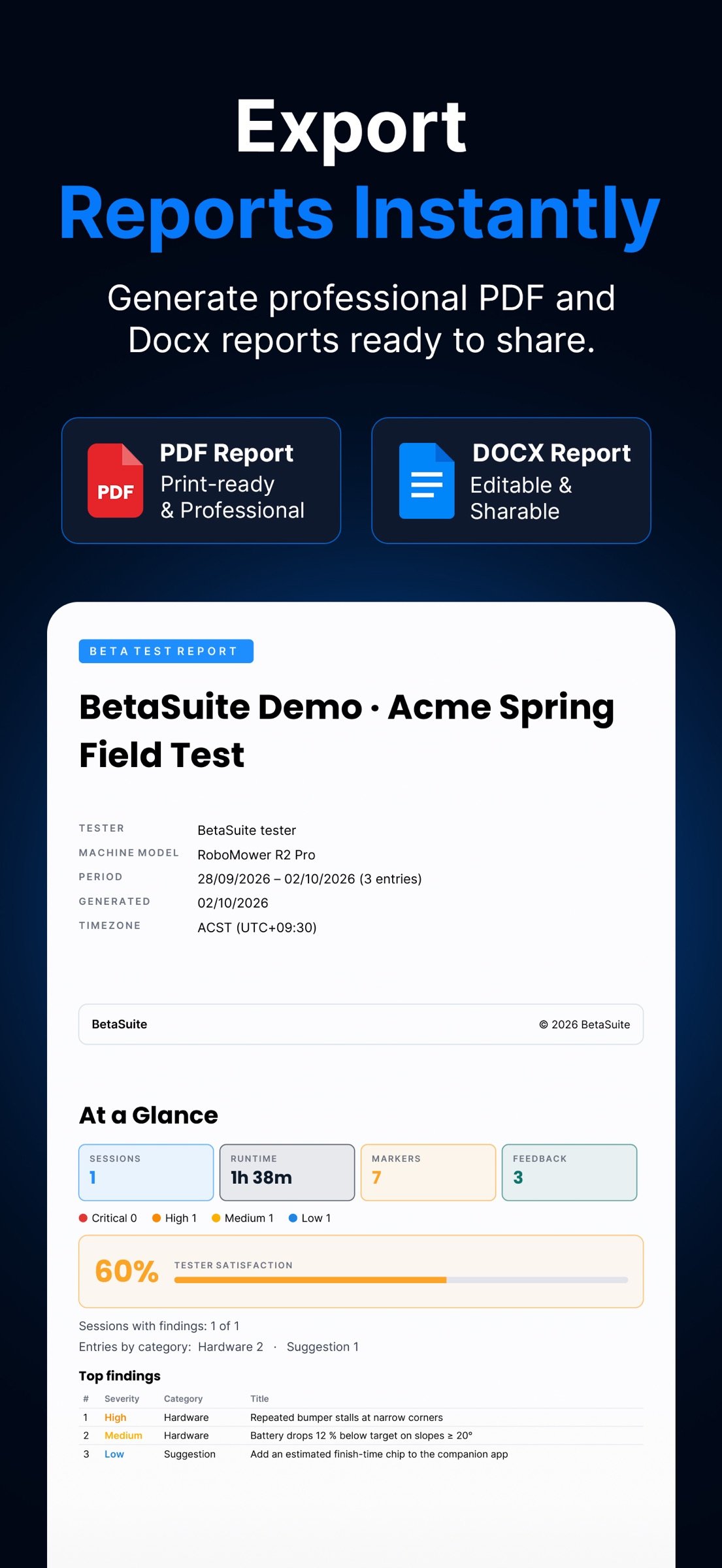
• PDF and DOCX reports open with an "At a Glance" summary, then list findings by severity, worst first, with your photos included.
• Session ratings add up to a satisfaction score, with a trend across your reports.
• The cover shows the time zone, so readers in other regions know when things happened.
• Optional JSON and CSV evidence files sit alongside the report for spreadsheets or your own tools.
• Send by email or the share sheet.
AI IS OPTIONAL AND OPT-IN
AI summaries, transcription and protocol help stay off until you agree to each feature, and the consent screen names who processes the data. Use on-device Apple Intelligence where your iPhone or iPad supports it, the built-in cloud options, or your own API key.
CONFIDENTIAL MODE FOR NDA UNITS
Testing pre-release hardware under NDA? Confidential Mode blocks cloud AI and cloud uploads, allows only on-device Apple Intelligence, and warns you before you share or export anything.
PRIVATE BY DESIGN
• No account and no BetaSuite cloud. Your work stays on your device unless you share it.
• Your project records are encrypted on the device. Photos and videos are saved as normal files in the app's folder and, by default, your camera roll, or a folder you choose.
• No ads and no tracking. Crash reporting stays off unless you turn it on.
• Capturing, logging and building reports work offline. Weather, cloud AI and sending need a connection.
PAY ONCE
One purchase unlocks every feature on iPhone and iPad: no subscription, no ads and no in-app purchases.
GOOD TO KNOW
BetaSuite doesn't detect faults or test the product for you. You capture the moment; BetaSuite stamps it, keeps it in order and builds the report.
28 languages. iPhone and iPad.
BetaSuite: Tester's Toolkit is made by Goodfield Studio. Learn more at betasuite.app.
© 2026 BetaSuite. All rights reserved.
License: Commercial
It's made for people who test physical products, and the companion apps that ship with them. It is not a tool for distributing app betas. Only need a timestamp camera? Use Basic mode: capture only, with no sessions or reports.
CATCH THE MOMENT
• Photos and videos get the date and time burned in, to the second. Add GPS location, weather, season, time zone, device info and your own watermark or logo if you want them.
• Instant Capture keeps a rolling buffer, so you can save the last 15–30 seconds after something happens.
• Dual recording puts your screen and your camera in one video (picture-in-picture), so the companion app and the device are in the same clip, with the date and time burned in.
• Photos and videos you import from your library get the same stamp.
LOG WHAT HAPPENED
• Run each test as a session. Drop a marker the second something goes wrong: it lands on the session timeline, and you can add the detail later.
• Log findings with a severity, the expected and actual result, notes and voice notes.
• Draw on photos and video frames to point straight at the fault, and trim clips before you send them.
• Optional transcription turns voice notes and the speech in your videos into text.
• Export a clip compressed to fit Discord's upload limit in one tap.
TEST PROTOCOLS
Build reusable checklists with pass/fail, rating, NPS, multiple-choice and written-answer steps. A step can ask for a photo or video, captured right in the run. Import steps from a CSV file or pasted text, or with optional AI from a photo or PDF, and share a protocol as a code. Program managers can build one in a web browser at betasuite.app/tools/protocol-builder, with no app or account, and testers import it with the code.
REPORTS READY TO SEND
• PDF and DOCX reports open with an "At a Glance" summary, then list findings by severity, worst first, with your photos included.
• Session ratings add up to a satisfaction score, with a trend across your reports.
• The cover shows the time zone, so readers in other regions know when things happened.
• Optional JSON and CSV evidence files sit alongside the report for spreadsheets or your own tools.
• Send by email or the share sheet.
AI IS OPTIONAL AND OPT-IN
AI summaries, transcription and protocol help stay off until you agree to each feature, and the consent screen names who processes the data. Use on-device Apple Intelligence where your iPhone or iPad supports it, the built-in cloud options, or your own API key.
CONFIDENTIAL MODE FOR NDA UNITS
Testing pre-release hardware under NDA? Confidential Mode blocks cloud AI and cloud uploads, allows only on-device Apple Intelligence, and warns you before you share or export anything.
PRIVATE BY DESIGN
• No account and no BetaSuite cloud. Your work stays on your device unless you share it.
• Your project records are encrypted on the device. Photos and videos are saved as normal files in the app's folder and, by default, your camera roll, or a folder you choose.
• No ads and no tracking. Crash reporting stays off unless you turn it on.
• Capturing, logging and building reports work offline. Weather, cloud AI and sending need a connection.
PAY ONCE
One purchase unlocks every feature on iPhone and iPad: no subscription, no ads and no in-app purchases.
GOOD TO KNOW
BetaSuite doesn't detect faults or test the product for you. You capture the moment; BetaSuite stamps it, keeps it in order and builds the report.
28 languages. iPhone and iPad.
BetaSuite: Tester's Toolkit is made by Goodfield Studio. Learn more at betasuite.app.
© 2026 BetaSuite. All rights reserved.
License: Commercial
| Release info | New Release on Nov 05, 2026 |
|---|---|
| Release notes | What's new: • Fixed an issue where BetaSuite Assist (AI) could be unavailable for polishing text, summaries and transcription. • Clearer Light, Dark and Black (OLED) themes: easier-to-read text, visible edges and matching status bars. • Report photos, including the guided photo checklist, now open the camera full screen. |
| Listing data | App Store |
Reviews
No reviews yet. Be the first to review BetaSuite.
Used BetaSuite? Tell other visitors what you thought.
Log in to write a reviewOther products by this publisher
- "No Distractions" for YouTube 4.10 ----
- #Bible 11.6 "Incredible App - My sister shared this app with me a few weeks ago and it is truly incredible.
- #filmphotography 1.4.2 So, you decided to shoot on film?
- $quirrel 1.5.1 $quirrel Budget & Finance helps you plan each paycheck, track spending, manage debt, and see what is safe to spend before the next payday.
- % Percentage Calculator Pro 1.41 This is the Pro version of % Percentage Calculator.
Most viewed iOS Developer Tools
-
1
 ZScripter 13.1.0
ZScripter plays compatible Ren'Py, RealLive, NScripter, (PONS)ONScripter-EN/RU/JH/Yuri, Artemis, Siglus, AI5 and UK2 games as well as KiriKiri (+Kirikiroid2 patches) and RPG Maker MV/MZ & XP, VX and VX Ace support.
-
2
 GitHub 1.284.0
There’s a lot you can do on GitHub that doesn’t require a complex development environment – like sharing feedback on a design discussion, or reviewing a few lines of code.
-
3
 Agents Anywhere 2.1.0
Agents Anywhere is a developer tools mobile application for remotely controlling your local computer to complete coding tasks.
-
4
 Shader Playground 1.0
Shader Playground is a powerful real-time shader editor built for iPhone and iPad.
-
5
 LocalDevVPN 1.3.0
LocalDevVPN is a developer tool for creating and managing local network tunnels directly on iOS.
-
6
 Code Workspace 0.9.1
Code Workspace is a free, agent-first development environment for iPad and iPhone.
-
7
 Termius 8.2.0
Termius is a modern SSH client designed for productivity and collaboration.
-
8
 TestFlight 4.4.1
TestFlight makes it easy to test beta versions of apps and App Clips to provide valuable feedback to developers before they release their apps on the App Store.
-
9
 Cursor 1.18.0
Introducing Cursor for iOS: the best way to build, review, and ship software from anywhere.
-
10
 Rulify 1.0.7
Rulify ????? iOS App ????,???????? App ????,???????????????
Most downloaded iOS Developer Tools
-
1
Agents Anywhere 2.1.0
Agents Anywhere is a developer tools mobile application for remotely controlling your local computer to complete coding tasks.
-
2
Rulify 1.0.7
Rulify ????? iOS App ????,???????? App ????,???????????????
-
3
 a-Shell mini 2.3.2
a-Shell mini is a complete local terminal emulator, allowing to run most Unix commands on you iOS device.
-
4
 LadderTouch 2.1.5
LadderTouch is an app to learn the basics of ladder logic, which is a graphical programming language.
-
5
 FSNotes 7.6.0
FSNotes is a fast, modern notes manager for macOS and iOS.
-
6
 C/C++$-LLVM Clang 2.7
This is a learning tool for efficient C/C++ learning, fast programming, ?(LLVM+Clang)offline compilation and local execution?, Git fetching, iCloud storage, and efficient transfer and sharing via LAN HTTP/FTP multi-point connections.
-
7
 Herdy 1.4.1
Herdy puts your remote terminal and long-running coding-agent sessions in your pocket.
-
8
 python3$ 6.6
This is a Python 3.13 learning tool for efficient learning, fast programming, local execution, breakpoint debugging, precise error reporting, Git fetching, iCloud access, and efficient transfer and sharing via LAN HTTP/FTP multi-point connections.
-
9
 Markdown2PDF 1.0
Easily Convert Markdown to PDF with Markdown2PDF
-
10
 websta$-learn html css and js 3.2
This is a learning tool for efficient HTML, CSS, and JS learning, fast programming, local execution, Git retrieval, iCloud storage, efficient transfer and sharing via LAN HTTP/FTP multi-point connections.