BatchPhoto 4.1
BatchPhoto is a powerful photo manipulation program that makes it easy to touch-up, annotate, transform, apply effects, and rename hundreds of photos in a single operation. Try it free!
Product Specifications
| User Rating: | item has less then 1 vote |
|
| FileCart Rating | ||
| Submitted by: | BatchPhoto | |
| Homepage | Visit Homepage | |
| License | Shareware | |
| Expires | 30 Days | |
| Price | $29.95 | |
| Downloads | 1,759 | |
| OS Support | Windows Install and Uninstall | |
| File Name | batchphoto-ds.exe | |
| File Size | 32.66 MB ( 33,446 KB ) | |
| Published | Dec 09, 2005 (21 years ago) | |
| Updated | Jan 10, 2017 (10 years ago) | |
Follow Us!
Latest Searches
BAJRA PRANA MAJAPAHIT Sidotemu, Jl. Bypass Krian No.15, Sidotemo, Sidomulyo, Kec. Krian, Kabupaten Sidoarjo, Jawa Timur 61262, Indonesia 22 seconds ago
alameddine crime family 2 minutes ago
From ages 3 to 6, the typical American child grows ____ inches per year and adds ____ pounds.Group of answer choices1–3; 1–52–3; 5–76–9; 7–109–12; 9–12 2 minutes ago
skeleton hand sketchfab 3 minutes ago
how to enforce otp in amazon india order 5 minutes ago
Flamer 6 minutes ago
xiezhirong@gzucm.edu.cn 13 minutes ago
WWW.diaokecncom 15 minutes ago
RENTA 2025 17 minutes ago
Popular Searches
id cards 602 times
2025 495 times
2024 386 times
Gypsy 2.0 Onlyfans Leaked Photos 346 times
5g spf sonicwall compatible copper module 339 times
Softperfect 331 times
2026 314 times
ds1628 compatible 10gb sfp cards 290 times
Who is Music 283 times
Product Details
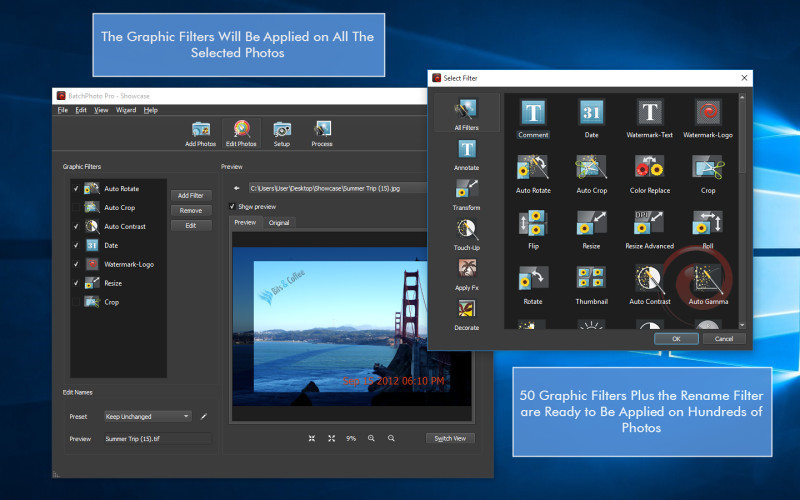
With BatchPhoto you can: Convert images (to JPEG, PDF, TIFF, GIF, PNG and 100 more); Read and convert RAW image formats; Resize pictures automatically and even adjust the DPI; Annotate photos with date/time information, comments and watermarks; Rename hundreds of images in one session; Apply special effects like: sepia, black & white, oil paint, charcoal sketch and more; Touch-up photos by adjust the brightness, sharpness, contrast, and more.
But don't take our word for it, try it for free!
| Requirements: | CPU 1 GHz, RAM 512 MB |
| Release Info: | Major Update on Dec 16, 2015 |
| Release Notes: | Completely rewritten user interface with a new Dark-theme; Drag & drop functionality for filters (Date, Watermark, Crop, Resize, Comment); Universal version for Win & Mac and much more |
| Related Tags: | image resizer photo resizer image converter graphic converter photo watermarker |
Reviews
You must be logged in to write a review
Reviews of BatchPhoto 4.1
You can be the first to write a review of BatchPhoto!Other products submitted by this publisher
Edit and convert your photos in batch mode, automate editing with profiles & scripts. Try it free!
ImageConverterProPowerful image processing application with more than three dozen operations that can be applied on images in batch mode. The program can Convert, Resize, Watermark, Annotate, and Rename, hundreds of pictures in just one session. Try it for Free!