
Apeaksoft Video Editor for Mac 1.0.32
As a professional all-in-one video editing program, Apeaksoft Video Editor for Mac could rotate/crop/clip videos. In addition, you are able to enhance videos or add watermark to videos.
Download
44.20 MB · video-editor-for-mac.dmg
443downloads
1this week
$19.96Shareware
0reviews
Screenshots
About Apeaksoft Video Editor for Mac
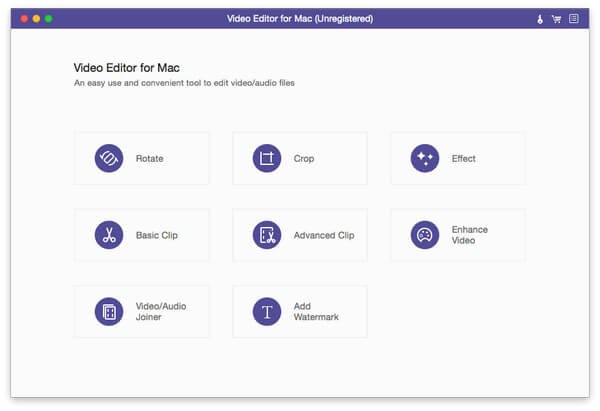
Apeaksoft Video Editor for Mac is powerful for you to deal with video editing. With it, you are able to easily crop, clip, merge or watermark videos as you like. If you want to remove the annoying letterbox from your favorite videos, its crop feature can do you a good favor.
Key functions:
1. Rotate and crop videos
With Apeaksoft Video Editor for Mac, you could rotate or flip your videos vertically or horizontally according to your need. If you want to cut off the unwanted part of your videos, the crop function could do you a favor. After selecting the crop size, you can get the part you want simply.
2. Clip your videos and add watermark to videos
Apeaksoft Video Editor for Mac allows you to clip your videos easily. It provides Basic Clip and Advanced Clip function. With the Basic Clip function, you could keep or remove the selected part from one video. Via the Advanced Clip function, you could clip the video into several parts and merge them together. Moreover, you are able to add watermark to your own videos.
3. Join video and audio files
With the Video/Audio Joiner function, you could merge several video and audio clips into one media file. Just in few minutes, you could finish this process.
4. Add video effects and enhance videos
After loading your source files, you could adjust brightness, contrast, saturation, hue as well as audio volume according to your need. Its Video Enhance function lets you remove image noise of videos, reduce video shaking, etc.
| Requirements | Processor: 1GHz Intel® processor and Apple M1 chip , RAM: 512 MB or more (1024MB Recommended) |
|---|---|
| Release info | Major Update on Nov 08, 2022 |
| Release notes | Fix some bugs and optimize the program |
| Related tags | Video editor edit video convert video |
Reviews
No reviews yet. Be the first to review Apeaksoft Video Editor for Mac.
Used Apeaksoft Video Editor for Mac? Tell other visitors what you thought.
Log in to write a reviewOther products by this publisher
-
 Apeaksoft Android Data Recovery 2.1.36
Apeaksoft Android Data Recovery dedicates to recover lost data (contacts, text messages, photos, videos, etc.) from Android devices for users, and it is compatible with almost all Android portable devices.
-
 Apeaksoft Android Data Recovery for Mac 1.2.26
Apeaksoft Android Data Recovery for Mac can recover messages, contacts, photos, videos and more lost files from Android devices. It supports Samsung Galaxy Note, Samsung Galaxy S, HTC, ZET, Huawei, etc.
-
 Apeaksoft Blu-ray Player 1.1.30
Apeaksoft Blu-ray Player enables you to play DVD/Blu-ray disc/folder/ISO files. It can also play 4K/1080p HD videos and general videos like MP4, MOV, AVI and more. It can provide high-definition images for you.
-
 Apeaksoft Blu-ray Player for Mac 1.1.70
Apeaksoft Blu-ray Player for Mac can easily help you enjoy Blu-ray disc/folder/ISO files on Mac. Meanwhile, it can also play 4K UHD, 1080p/720p HD and SD videos in any format.
-
 Apeaksoft Data Recovery 2.1.16
This powerful and safe data recovery tool can help you get back deleted/lost data with ease. It is able to recover data lost due to computer crash, hard drive problem, mistakenly deletion, etc.
Most viewed Mac Editors & Managers
-
1
Apeaksoft Video Editor for Mac 1.0.32
As a professional all-in-one video editing program, Apeaksoft Video Editor for Mac could rotate/crop/clip videos. In addition, you are able to enhance videos or add watermark to videos.
-
2
 ThunderSoft Video Editor Pro for Mac 13.0
ThunderSoft Video Editor Pro for Mac is the easiest video editing software for all content creators. Just import your footages, pictures, audio files and other resource to start video creation, also contains many useful features for basic editing.
- 3 Textus 1.4.7 WYSIWYG Markdown editor with built-in AI writing tools
- 4 Ableton Live Intro 12.4.16 Sound and music editor
- 5 FilmCraft 0.20.1 Video editor
- 6 HDFView 3.5.0 Tool for browsing and editing HDF files
- 7 Writer 0.8.0 Local-first Markdown editor
- 8 MarkRight 1.0.0 Markdown editor with live preview
- 9 Amazon Music 9.5.2.2478 Desktop client for Amazon Music
- 10 Neon Vision Editor 2.2.7 Native code and text editor
Most downloaded Mac Editors & Managers
-
1
Apeaksoft Video Editor for Mac 1.0.32
As a professional all-in-one video editing program, Apeaksoft Video Editor for Mac could rotate/crop/clip videos. In addition, you are able to enhance videos or add watermark to videos.
-
2
ThunderSoft Video Editor Pro for Mac 13.0
ThunderSoft Video Editor Pro for Mac is the easiest video editing software for all content creators. Just import your footages, pictures, audio files and other resource to start video creation, also contains many useful features for basic editing.
- 3 Open Data Editor 1.8.0 No-code application to explore, validate and publish data in a simple way
- 4 Color Studio 1.0.4 Coherent colour scheme creator
- 5 Nota 0.41.0 Markdown files editor
- 6 Clearance 1.3.5 Markdown viewer and editor
- 7 Beutl 2.0.0-preview.11 Video editor
- 8 Mixed In Key Live 11.0.5.581 Get the Key and BPM of any audio, instantly
- 9 Yandex Music Unofficial 1.8.1 Unofficial app for Yandex Music
- 10 Neon Vision Editor 2.2.7 Native code and text editor