
Apeaksoft Phone Mirror 1.0.10
Apeaksoft Phone Mirror enables you to mirror iPhone/Android phone to computer in real time with no lag. In addition, it allows you to record the phone screen and audio with high output quality.
Download
2.05 MB · phone-mirror.exe
325downloads
0this week
$15.96Shareware
0reviews
Screenshots
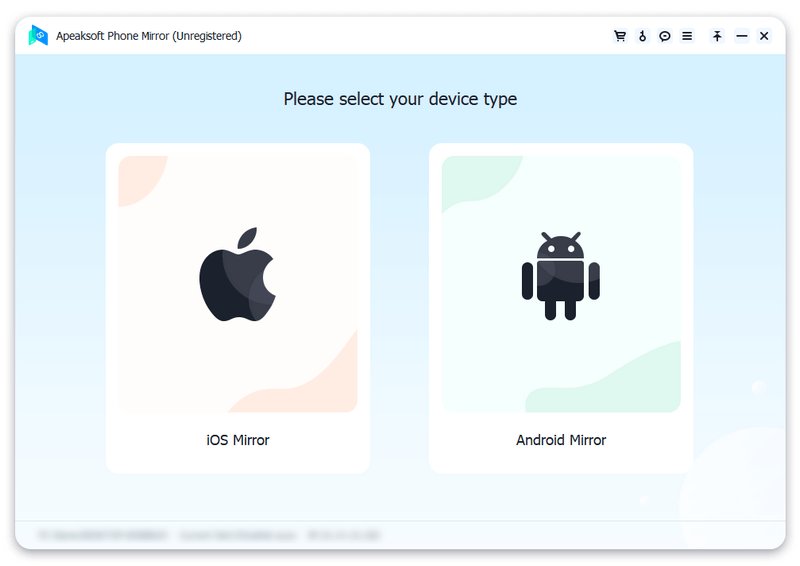
About Apeaksoft Phone Mirror
Do you want to mirror gameplay from phone screen to PC for better visual experience? Do you want to share the movies/music on your phone to computer for home entertainment with your family? Do you want to do conference presentation on bigger screen to share ideas with colleagues? If your answer is yes, you should have a try with Apeaksoft Phone Mirror.
Key functions:
1. Cast phone screen to PC
As a powerful screen mirroring program, Apeaksoft Phone Mirror is able to mirror your iPhone/Android phone to computer. You could enjoy the bigger screen of your phone or share the content on your phone to your family. In addition, you can choose to show your phone screen on computer in full or half size as per your need.
2. Record phone screen and audio
After casting your phone to computer, you could record the screen and audio of your phone without quality loss. You can also take screenshots to save some beautiful pictures on your computer to release phone storage. Moreover, you are able to draw or input text on the phone screen that is cast to the computer.
3. Support various devices
Apeaksoft Phone Mirror is compatible with various popular devices, such as iPhone, iPad, Samsung, Sony, HTC, LG, Motorola, HUAWEI, Xiaomi, OPPO and more. You are able to mirror more than one phone to your computer at the same time to save time.
4. User friendly
Apeaksoft Phone Mirror is easy to use, it provides different methods to mirror your phone. You could connect your phone via WiFi, QR code, PIN code or USB cable. In addition, it is stable and safe enough, so you do not need to worry about privacy leakage.
Key functions:
1. Cast phone screen to PC
As a powerful screen mirroring program, Apeaksoft Phone Mirror is able to mirror your iPhone/Android phone to computer. You could enjoy the bigger screen of your phone or share the content on your phone to your family. In addition, you can choose to show your phone screen on computer in full or half size as per your need.
2. Record phone screen and audio
After casting your phone to computer, you could record the screen and audio of your phone without quality loss. You can also take screenshots to save some beautiful pictures on your computer to release phone storage. Moreover, you are able to draw or input text on the phone screen that is cast to the computer.
3. Support various devices
Apeaksoft Phone Mirror is compatible with various popular devices, such as iPhone, iPad, Samsung, Sony, HTC, LG, Motorola, HUAWEI, Xiaomi, OPPO and more. You are able to mirror more than one phone to your computer at the same time to save time.
4. User friendly
Apeaksoft Phone Mirror is easy to use, it provides different methods to mirror your phone. You could connect your phone via WiFi, QR code, PIN code or USB cable. In addition, it is stable and safe enough, so you do not need to worry about privacy leakage.
| Requirements | CPU: At least dual-core CPU, clocked at 2.0GHz above, RAM: 1G RAM or more |
|---|---|
| Release info | New Release |
| Release notes | New release |
| Related tags | Apeaksoft Phone Mirror enables you to mirror iPhone/Android phone to computer in real time with no lag. In addition it allows you to record the phone screen and audio with high output quality. |
Reviews
No reviews yet. Be the first to review Apeaksoft Phone Mirror.
Used Apeaksoft Phone Mirror? Tell other visitors what you thought.
Log in to write a reviewOther products by this publisher
-
 Apeaksoft Android Data Recovery 2.1.36
Apeaksoft Android Data Recovery dedicates to recover lost data (contacts, text messages, photos, videos, etc.) from Android devices for users, and it is compatible with almost all Android portable devices.
-
 Apeaksoft Android Data Recovery for Mac 1.2.26
Apeaksoft Android Data Recovery for Mac can recover messages, contacts, photos, videos and more lost files from Android devices. It supports Samsung Galaxy Note, Samsung Galaxy S, HTC, ZET, Huawei, etc.
-
 Apeaksoft Blu-ray Player 1.1.30
Apeaksoft Blu-ray Player enables you to play DVD/Blu-ray disc/folder/ISO files. It can also play 4K/1080p HD videos and general videos like MP4, MOV, AVI and more. It can provide high-definition images for you.
-
 Apeaksoft Blu-ray Player for Mac 1.1.70
Apeaksoft Blu-ray Player for Mac can easily help you enjoy Blu-ray disc/folder/ISO files on Mac. Meanwhile, it can also play 4K UHD, 1080p/720p HD and SD videos in any format.
-
 Apeaksoft Data Recovery 2.1.16
This powerful and safe data recovery tool can help you get back deleted/lost data with ease. It is able to recover data lost due to computer crash, hard drive problem, mistakenly deletion, etc.
Most viewed Windows Screen Capture
-
1
 Super Screen Capture 6.1
Super Screen Capture is a screen capture, screen record and audio record software. You can capture screen to image, recording screen to video, record audio from microphone. Please visit zeallsoft.com to learn more.
-
2
 Movavi Screen Capture Studio 6.1.0
Record screencasts, video chats, online video, or webcam. Capture screenshots. Edit screencasts using the built-in video editor: apply special effects, insert captions, change audio tracks. Save files in any media format, and burn them to DVDs
- 3 Capture Solution XE 12.9 Using Capture Solution XE you can perform professional capture screen immediately with just one. Capture videos from anything on the screen, saving as AVI, WMV, MP4, MOV. Record audios from the audio device, saving as Wav, WMA, M4A, AAC, MP3, Ogg.
-
4
 liteCam 5.0
liteCam HD is High Quality screen recorder that captures Videos, Screen Activities and Screenshots. Also, it can extract audio from videos to MP3, WMA or WAV format. Create professional tutorials, presentations, and video training and software demos.
-
5
 HardCopy Pro 4.18.0
HardCopy Pro is the professional, easy to use screen capture tool!
-
6
 Direct Stream Recorder 3.2
Direct Stream Recorder is a handy tool for capturing all kinds of video and audio streams, including video chats, Skype and DRM protected streams. Just select the area to capture, set the audio source, choose video/audio codecs and create a record.
-
7
 Solid Capture 3.0
Solid Capture is the ultimate screen capture and image sharing toolkit. Easily capture anything on your screen using our simple interface or a hotkey. You can also easily edit, format, and share your captures. Capture and collaborate with ease!
-
8
 ScreenVirtuoso PRO 4.61
Records screen activity as AVI video file. Can optionally record sound and synchronize it with video. Allows you to convert AVI files to MPEG-1/2/4,VCD/SVCD/DVD,FLV/SWF,WMV video formats. Supports hotkeys, annotation, timer, screenshots and more.
-
9
 ACA Screen Recorder 4.00
ACA Screen Recorder captures the Windows screen actions and sound, saves it as a standard, easily edited, AVI(Audio-Video Interleaved) movie file. This format can be played under Windows, as well as the Internet. More Info: http://www.acasystems.com
-
10
 Super Webcam Recorder 4.2002
Super Webcam Recorder is a simple and professional webcam video recording software. the webcam tool designed to help you capture streaming video and audio or snapshots with the hotkey. You can save video to avi, wmv, mp4, divx, xvid format.
Most downloaded Windows Screen Capture
- 1 Capture Solution XE 12.9 Using Capture Solution XE you can perform professional capture screen immediately with just one. Capture videos from anything on the screen, saving as AVI, WMV, MP4, MOV. Record audios from the audio device, saving as Wav, WMA, M4A, AAC, MP3, Ogg.
-
2
Movavi Screen Capture Studio 6.1.0
Record screencasts, video chats, online video, or webcam. Capture screenshots. Edit screencasts using the built-in video editor: apply special effects, insert captions, change audio tracks. Save files in any media format, and burn them to DVDs
-
3
liteCam 5.0
liteCam HD is High Quality screen recorder that captures Videos, Screen Activities and Screenshots. Also, it can extract audio from videos to MP3, WMA or WAV format. Create professional tutorials, presentations, and video training and software demos.
-
4
Super Screen Capture 6.1
Super Screen Capture is a screen capture, screen record and audio record software. You can capture screen to image, recording screen to video, record audio from microphone. Please visit zeallsoft.com to learn more.
-
5
 Growler Guncam 3.1.9.0
Growler Guncam is a game recorder and video capture tool.
-
6
ScreenVirtuoso PRO 4.61
Records screen activity as AVI video file. Can optionally record sound and synchronize it with video. Allows you to convert AVI files to MPEG-1/2/4,VCD/SVCD/DVD,FLV/SWF,WMV video formats. Supports hotkeys, annotation, timer, screenshots and more.
-
7
Super Webcam Recorder 4.2002
Super Webcam Recorder is a simple and professional webcam video recording software. the webcam tool designed to help you capture streaming video and audio or snapshots with the hotkey. You can save video to avi, wmv, mp4, divx, xvid format.
-
8
Direct Stream Recorder 3.2
Direct Stream Recorder is a handy tool for capturing all kinds of video and audio streams, including video chats, Skype and DRM protected streams. Just select the area to capture, set the audio source, choose video/audio codecs and create a record.
-
9
Solid Capture 3.0
Solid Capture is the ultimate screen capture and image sharing toolkit. Easily capture anything on your screen using our simple interface or a hotkey. You can also easily edit, format, and share your captures. Capture and collaborate with ease!
-
10
HardCopy Pro 4.18.0
HardCopy Pro is the professional, easy to use screen capture tool!