
AI-HUB Desktop 1.13
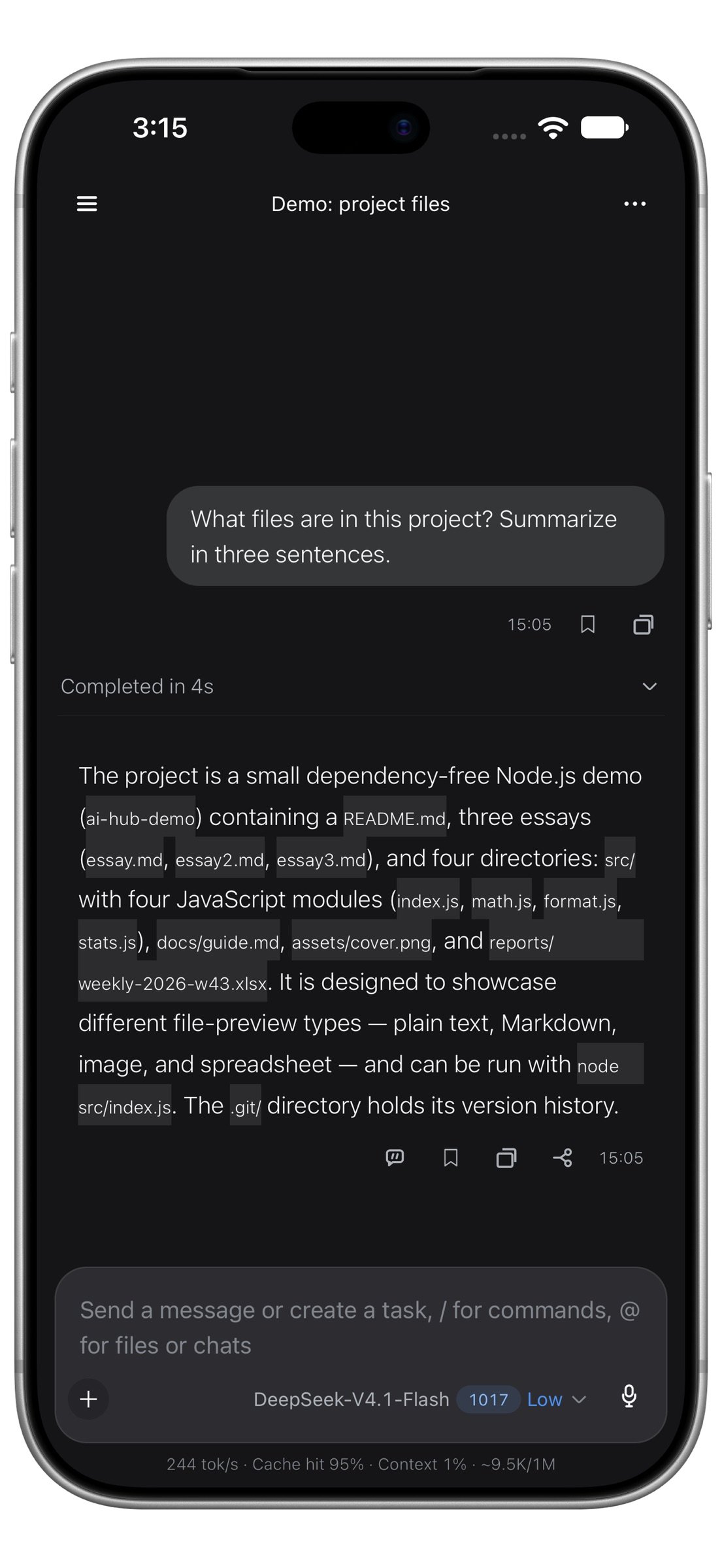
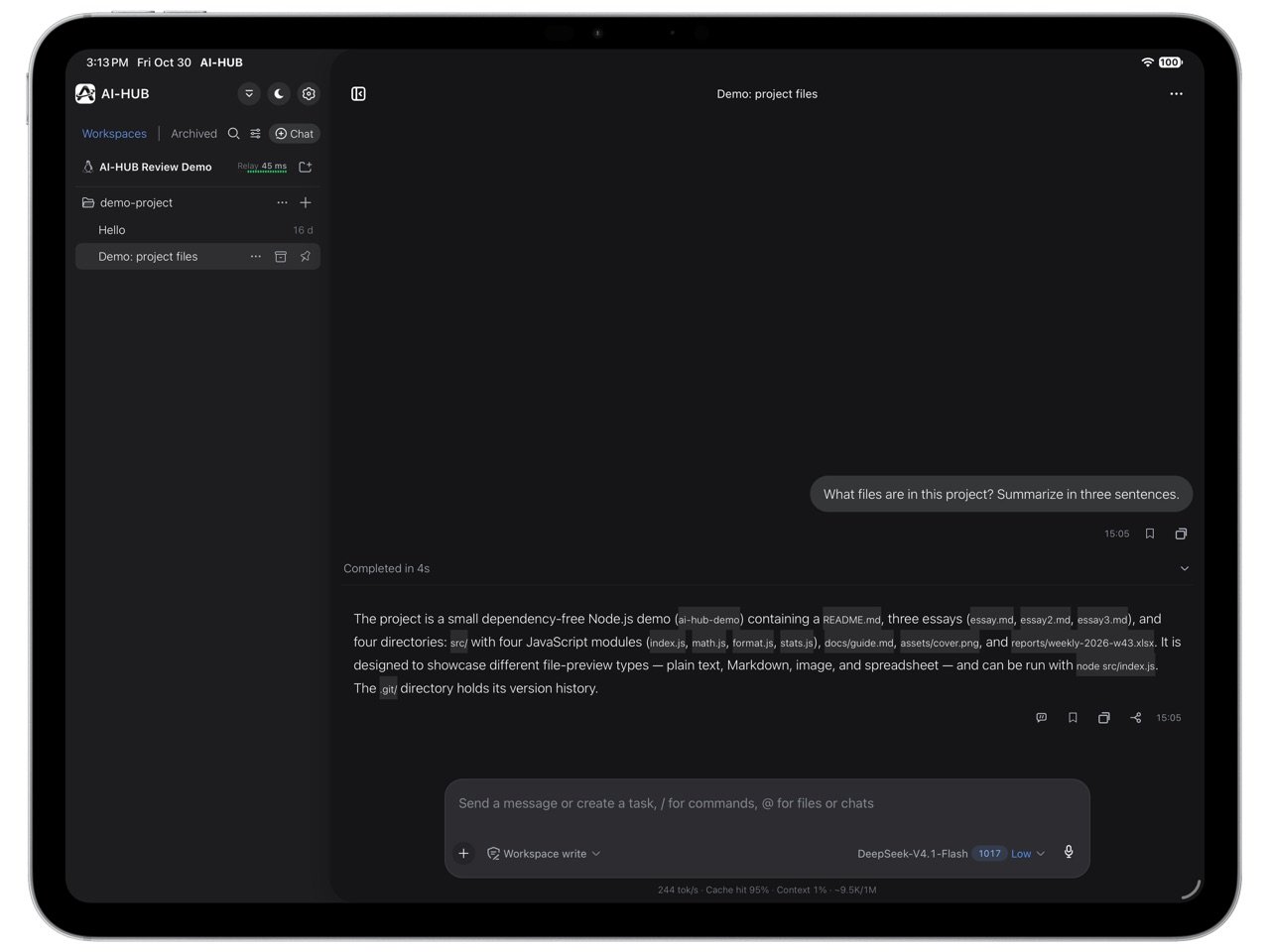
AI-HUB is the mobile client for your desktop AI coding sessions (DeepSeek Harness): the Harness keeps running on your computer, while the phone shows where the code is, where the agent got stuck and what it just changed — and lets you keep talking t…
Download
93.27 MB
0downloads
0this week
FreeFreeware
0reviews
Screenshots
About AI-HUB Desktop
AI-HUB is the mobile client for your desktop AI coding sessions (DeepSeek Harness): the Harness keeps running on your computer, while the phone shows where the code is, where the agent got stuck and what it just changed — and lets you keep talking to it. AI-HUB is a third-party client and is not affiliated with DeepSeek.
When it helps
Checking on the way to work whether that fix landed; waiting somewhere for a result while the agent stops to ask you something; finishing before bed the conversation you left open.
Devices
Works on iPhone, iPhone Duo, and iPad. On the foldable's inner display, or any window as wide as an iPad's, the layout switches to side by side on its own.
Scan to pair
Open the plugin panel on your computer and scan the QR code with your phone. No IP addresses, no ports, no tunneling to set up.
Every session in one list
Grouped by computer and project, with the status visible at a glance: running, waiting for you, or just finished.
Keep the conversation going
Carry on the conversation from your phone: watch the agent call tools, run commands and edit files, and step in to change direction at any time. Send images, quote files, or dictate with voice input.
Tool calls you can read
Every command, every file change and every piece of output expands into details, so long output no longer turns into a wall of text.
Files and previews
Open files a session produced; if you started a local service on your computer, view it in the built-in browser.
Several computers at once
One phone can be paired with several computers, and switching devices feels like switching projects.
Home screen and the pet
A widget shows a running conversation and its status on the Home Screen, without opening the app. A floating pet comes along, sized on a continuous slider, with the conversation title in its bubble.
Settings and entry points
An image behind a conversation, with scope and strength adjustable and a long-press preview; the canvas follows day and night mode. Pairings for several phones export as a QR code, and the right sidebar groups its entries by category.
Languages
The interface speaks eleven languages — Simplified Chinese, Traditional Chinese, English, Japanese, Korean, German, Spanish, French, Portuguese, Russian and Turkish — switchable in Settings at any time.
How it connects
· Same local network: the phone connects to your computer directly, and data does not pass through any third-party server.
· Across networks: forwarded through our own relay server, which only forwards traffic and never stores conversation content.
Before you start
You need the open-source desktop plugin dsh-mobile-plugin (used with DeepSeek Harness) running on your computer, with a pairing QR code shown in its panel.
Price
Free for the first 7 days. After that, continue with a monthly subscription or a one-time purchase. Pricing and renewal are as shown in the app; cancel the subscription in your App Store subscription settings. Ending the trial does not affect any data on your computer.
Privacy
No account, no ads, no third-party analytics SDK. We do not collect contacts, location or other system data, and we do not upload your conversation content. See the privacy policy for details.
Terms of Use
This app uses the standard Apple End User License Agreement (EULA): [link removed]
Privacy Policy: [link removed]
When it helps
Checking on the way to work whether that fix landed; waiting somewhere for a result while the agent stops to ask you something; finishing before bed the conversation you left open.
Devices
Works on iPhone, iPhone Duo, and iPad. On the foldable's inner display, or any window as wide as an iPad's, the layout switches to side by side on its own.
Scan to pair
Open the plugin panel on your computer and scan the QR code with your phone. No IP addresses, no ports, no tunneling to set up.
Every session in one list
Grouped by computer and project, with the status visible at a glance: running, waiting for you, or just finished.
Keep the conversation going
Carry on the conversation from your phone: watch the agent call tools, run commands and edit files, and step in to change direction at any time. Send images, quote files, or dictate with voice input.
Tool calls you can read
Every command, every file change and every piece of output expands into details, so long output no longer turns into a wall of text.
Files and previews
Open files a session produced; if you started a local service on your computer, view it in the built-in browser.
Several computers at once
One phone can be paired with several computers, and switching devices feels like switching projects.
Home screen and the pet
A widget shows a running conversation and its status on the Home Screen, without opening the app. A floating pet comes along, sized on a continuous slider, with the conversation title in its bubble.
Settings and entry points
An image behind a conversation, with scope and strength adjustable and a long-press preview; the canvas follows day and night mode. Pairings for several phones export as a QR code, and the right sidebar groups its entries by category.
Languages
The interface speaks eleven languages — Simplified Chinese, Traditional Chinese, English, Japanese, Korean, German, Spanish, French, Portuguese, Russian and Turkish — switchable in Settings at any time.
How it connects
· Same local network: the phone connects to your computer directly, and data does not pass through any third-party server.
· Across networks: forwarded through our own relay server, which only forwards traffic and never stores conversation content.
Before you start
You need the open-source desktop plugin dsh-mobile-plugin (used with DeepSeek Harness) running on your computer, with a pairing QR code shown in its panel.
Price
Free for the first 7 days. After that, continue with a monthly subscription or a one-time purchase. Pricing and renewal are as shown in the app; cancel the subscription in your App Store subscription settings. Ending the trial does not affect any data on your computer.
Privacy
No account, no ads, no third-party analytics SDK. We do not collect contacts, location or other system data, and we do not upload your conversation content. See the privacy policy for details.
Terms of Use
This app uses the standard Apple End User License Agreement (EULA): [link removed]
Privacy Policy: [link removed]
| Release info | New Release on Nov 16, 2026 |
|---|---|
| Release notes | - New Turkish interface: it switches automatically when the system language is Turkish, and the Android and iOS system strings are covered too. - After your computer changes network or address, the phone can automatically find your paired computer again on the same local network, no need to scan the code again (takes effect after the computer side is updated). - The background-task bar now lists only running tasks and adds a stop button; the forwarded-files bar has moved inside the input card. - The turn-tail deliverable card is rebuilt to match the desktop version: tap anywhere on the card to open it, the row action is now a Save button plus a dropdown menu (Share, Copy path), and the second line shows only the model's description. - File-type icons are split by extension: code files show a code mark, only markdown shows MD, and plain text shows a blank page; the card also lists only the files the model explicitly delivered, no longer adding files that were merely changed along the way. - Forwarded files no longer take a whole attachment bar above the composer; they appear as filename mentions in the input row. While uploading, each name tints from gray to brand blue one character at a time from left to right, stays blue when done, and turns warning-colored on failure or cancel. Tap to remove, cancel, or retry; Backspace on an empty message removes the last mention. - Reading position stays put during streamed replies: temporary navigation ownership is released once positioning finishes, long-text growth and draft handoffs are anchored consistently, and your own scrolling is never yanked back. - After an upgrade, paired devices are recovered from existing secure records if the device index is missing or damaged; a failed migration write no longer makes previously usable devices unusable. - The conversation header menu can now switch to web chat: view the official web conversation page served by your computer, switch back to native chat without reloading, and land o |
| Listing data | App Store |
Reviews
No reviews yet. Be the first to review AI-HUB Desktop.
Used AI-HUB Desktop? Tell other visitors what you thought.
Log in to write a reviewOther products by this publisher
- "No Distractions" for YouTube 4.10 ----
- #Bible 11.6 "Incredible App - My sister shared this app with me a few weeks ago and it is truly incredible.
- #filmphotography 1.4.2 So, you decided to shoot on film?
- $quirrel 1.5.1 $quirrel Budget & Finance helps you plan each paycheck, track spending, manage debt, and see what is safe to spend before the next payday.
- % Percentage Calculator Pro 1.41 This is the Pro version of % Percentage Calculator.
Most viewed iOS Developer Tools
-
1
 ZScripter 13.1.0
ZScripter plays compatible Ren'Py, RealLive, NScripter, (PONS)ONScripter-EN/RU/JH/Yuri, Artemis, Siglus, AI5 and UK2 games as well as KiriKiri (+Kirikiroid2 patches) and RPG Maker MV/MZ & XP, VX and VX Ace support.
-
2
 GitHub 1.284.0
There’s a lot you can do on GitHub that doesn’t require a complex development environment – like sharing feedback on a design discussion, or reviewing a few lines of code.
-
3
 Agents Anywhere 2.1.0
Agents Anywhere is a developer tools mobile application for remotely controlling your local computer to complete coding tasks.
-
4
 Shader Playground 1.0
Shader Playground is a powerful real-time shader editor built for iPhone and iPad.
-
5
 LocalDevVPN 1.3.0
LocalDevVPN is a developer tool for creating and managing local network tunnels directly on iOS.
-
6
 Code Workspace 0.9.1
Code Workspace is a free, agent-first development environment for iPad and iPhone.
-
7
 Termius 8.2.0
Termius is a modern SSH client designed for productivity and collaboration.
-
8
 TestFlight 4.4.1
TestFlight makes it easy to test beta versions of apps and App Clips to provide valuable feedback to developers before they release their apps on the App Store.
-
9
 Cursor 1.18.0
Introducing Cursor for iOS: the best way to build, review, and ship software from anywhere.
-
10
 Rulify 1.0.7
Rulify ????? iOS App ????,???????? App ????,???????????????
Most downloaded iOS Developer Tools
-
1
Agents Anywhere 2.1.0
Agents Anywhere is a developer tools mobile application for remotely controlling your local computer to complete coding tasks.
-
2
Rulify 1.0.7
Rulify ????? iOS App ????,???????? App ????,???????????????
-
3
 a-Shell mini 2.3.2
a-Shell mini is a complete local terminal emulator, allowing to run most Unix commands on you iOS device.
-
4
 LadderTouch 2.1.5
LadderTouch is an app to learn the basics of ladder logic, which is a graphical programming language.
-
5
 FSNotes 7.6.0
FSNotes is a fast, modern notes manager for macOS and iOS.
-
6
 C/C++$-LLVM Clang 2.7
This is a learning tool for efficient C/C++ learning, fast programming, ?(LLVM+Clang)offline compilation and local execution?, Git fetching, iCloud storage, and efficient transfer and sharing via LAN HTTP/FTP multi-point connections.
-
7
 Herdy 1.4.1
Herdy puts your remote terminal and long-running coding-agent sessions in your pocket.
-
8
 python3$ 6.6
This is a Python 3.13 learning tool for efficient learning, fast programming, local execution, breakpoint debugging, precise error reporting, Git fetching, iCloud access, and efficient transfer and sharing via LAN HTTP/FTP multi-point connections.
-
9
 Markdown2PDF 1.0
Easily Convert Markdown to PDF with Markdown2PDF
-
10
 websta$-learn html css and js 3.2
This is a learning tool for efficient HTML, CSS, and JS learning, fast programming, local execution, Git retrieval, iCloud storage, efficient transfer and sharing via LAN HTTP/FTP multi-point connections.