
XBoft Folder Lock 1.1
XBoft Folder Lock is a secure and easy-to-use file/folder encryption software. The software is simple and easy to use, powerful and convenient. The encrypted data file is protected from viewing, modifying, moving, copying, and deleting.
Download
6.34 MB · folderlock.exe
386downloads
1this week
FreeFreeware
0reviews
Screenshots
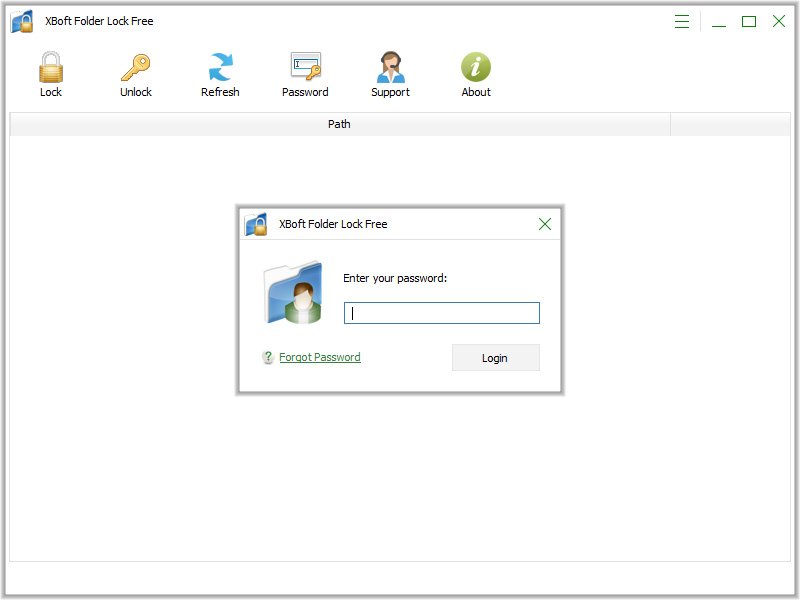
About XBoft Folder Lock
XBoft Folder Lock is a secure and easy-to-use file/folder encryption software. The software is simple and easy to use, powerful and convenient. The encrypted data file is protected from viewing, modifying, moving, copying, and deleting. The software is extremely fast and is especially suitable for encrypting large files or large folders.
Perfect windows shell integration:
The software is tightly integrated with the Windows system, whether it is locked or unlocked, it can be done directly through the right mouse button menu. The locked data file keeps the original icon of the system, and the lock symbol is added in the lower left corner of the icon, which is clear and clear.
Multiple encryption methods:
Lock File/Folder
The data files after Lock are protected from viewing, modifying, moving, copying, and deleting.
Hide File/Folder
Hide has higher security, the hidden data files will disappear completely, and can only be unlocked in the main interface of the software.
Lightning Speed:
Even large files and folders can be encrypted and decrypted in an instant. It is especially suitable for encryption and decryption of large size file and folders, such as video, music, photos, etc.
Lossless Encryption:
The software uses the features provided by Windows. When encrypting or hiding files, the contents of the files will not be modified. Therefore, no matter what the operation, the contents of the files will not be damaged, which is absolutely reliable.
Only One Password:
You only need to remember one password to encrypt and decrypt all files or folders.
Support for USB devices:
After encrypting the data on the USB flash drive and the removable hard drive, you can access it by entering the correct password on another computer.
| Requirements | 586 or Pentium-class processor, 64MB RAM (128 MB recommended), 100 MB free disk space minimally |
|---|---|
| Release info | New Release on Sep 30, 2018 |
| Release notes | Added multi-language switching; Added Japanese and Chinese support; Optimized the interface; Fixed a bug in the browse dialog; Fixed a crash caused by multiple open software; Fixed an issue where exe files could not be unlocked under Windows XP. |
| Related tags | folder encryption folder hiding file encryption file hiding video encryption |
Reviews
No reviews yet. Be the first to review XBoft Folder Lock.
Used XBoft Folder Lock? Tell other visitors what you thought.
Log in to write a reviewOther products by this publisher
- XBoft Data Recovery 2.0 XBoft Data Recovery is a wonderful data recovery tool to help you get all lost data back again.
-
 XBoft Data Recovery Free 2.5
XBoft Data Recovery is a wonderful data recovery tool to help you get all lost data back again. Recover 2 GB Data for FREE.
Most viewed Windows File Encryption Tools
-
1
 Password Cracker 4.25
A simple software that was created to ensure that you never worry about misplacing or forgetting passwords. Tool for restoring forgotten passwords (also in Internet Explorer).
-
2
 Folder Lock 7.7.6
File locking software that Encrypts your important files and lets you shred the unnecessary space consuming files. Furthermore, Clean history and create online wallets to protect banking details, ATM pin number, credit card details and more.
- 3 Keynesis Lockngo Professional / Hybrid 7.0 Hard Drive Encryption Software for External Disks. Lockngo is the perfect security protection for any external disk. Any type and size. No installation to computer required! Disk with Lockngo can be connected to any computer. For Mac and Windows.
-
4
 USB Safeguard 8.3.1
USB Safeguard is a portable software that allows you to protect your private files with a password on your removable drive using the secure AES 256 bits key. Supports USB flash drive, HDD hard drive, SSD, memory card and others.
-
5
 Office Password Remover 2.0
Office Password Remover allows you to open your password-protected documents, which have been created in Microsoft Word and Excel. In just about 15 seconds the program removes an "open" password and accurately decrypts the content of a document.
-
6
 Folder Password Protect 2.8
Folder Password Protect is a software program that lets you set a password on folders of your choice. Folder Password Protect is ideal for notebooks. If your notebook is lost or stolen, your sensitive data will not end up in the wrong hands.
-
7
 Dekart Private Disk 2.12
Powerful, reliable and flexible AES-256 disk encryption program. Hide your applications, data, and exclusively restrict access to them. Provides 100% protection of your private information across all Windows versions, including 64-bit releases.
-
8
 Disk Password Protection 5.4.3
Utility used to password protect the operating system load and hard disks (partitions). Access is restricted at the low level. The utility works directly with the hard disk, even before loading the operating system and third party software.
-
9
 EasyLock 1.0.4.8
EasyLock is an enterprise grade portable data encryption solution for every computer user, from novice to expert, helping anyone turn any mobile storage device into a portable data safe: simple, fast, very secure and convenient.
-
10
 Folder Password Expert USB 2.1.0.6
Folder Password Expert USB is security software designed to protect your folders against unwanted access to their contents. You can install the program on your PC, laptop, USB drive, external or removable drives.
Most downloaded Windows File Encryption Tools
-
1
Password Cracker 4.25
A simple software that was created to ensure that you never worry about misplacing or forgetting passwords. Tool for restoring forgotten passwords (also in Internet Explorer).
-
2
Folder Lock 7.7.6
File locking software that Encrypts your important files and lets you shred the unnecessary space consuming files. Furthermore, Clean history and create online wallets to protect banking details, ATM pin number, credit card details and more.
-
3
USB Safeguard 8.3.1
USB Safeguard is a portable software that allows you to protect your private files with a password on your removable drive using the secure AES 256 bits key. Supports USB flash drive, HDD hard drive, SSD, memory card and others.
- 4 Keynesis Lockngo Professional / Hybrid 7.0 Hard Drive Encryption Software for External Disks. Lockngo is the perfect security protection for any external disk. Any type and size. No installation to computer required! Disk with Lockngo can be connected to any computer. For Mac and Windows.
-
5
Office Password Remover 2.0
Office Password Remover allows you to open your password-protected documents, which have been created in Microsoft Word and Excel. In just about 15 seconds the program removes an "open" password and accurately decrypts the content of a document.
-
6
Folder Password Protect 2.8
Folder Password Protect is a software program that lets you set a password on folders of your choice. Folder Password Protect is ideal for notebooks. If your notebook is lost or stolen, your sensitive data will not end up in the wrong hands.
-
7
Dekart Private Disk 2.12
Powerful, reliable and flexible AES-256 disk encryption program. Hide your applications, data, and exclusively restrict access to them. Provides 100% protection of your private information across all Windows versions, including 64-bit releases.
-
8
EasyLock 1.0.4.8
EasyLock is an enterprise grade portable data encryption solution for every computer user, from novice to expert, helping anyone turn any mobile storage device into a portable data safe: simple, fast, very secure and convenient.
-
9
 Armor Tools 22.7.1
A suite of tools which ensure your privacy and keep sensitive information secure. Armor Tools will let you work on the computer without leaving traces of your activities.
-
10
 VaySoft Video to EXE Converter 6.27
VaySoft Video to EXE Converter is an application that help you convert video file to professional strongly protected self-running EXE files. Please visit www.vaysoft.com for details!