
WhisperType Keyboard 1.6.1
Offline Android keyboard with QWERTY typing and on-device speech dictation
Download
36.59 MB
45downloads
0this week
FreeFreeware
0reviews
Screenshots
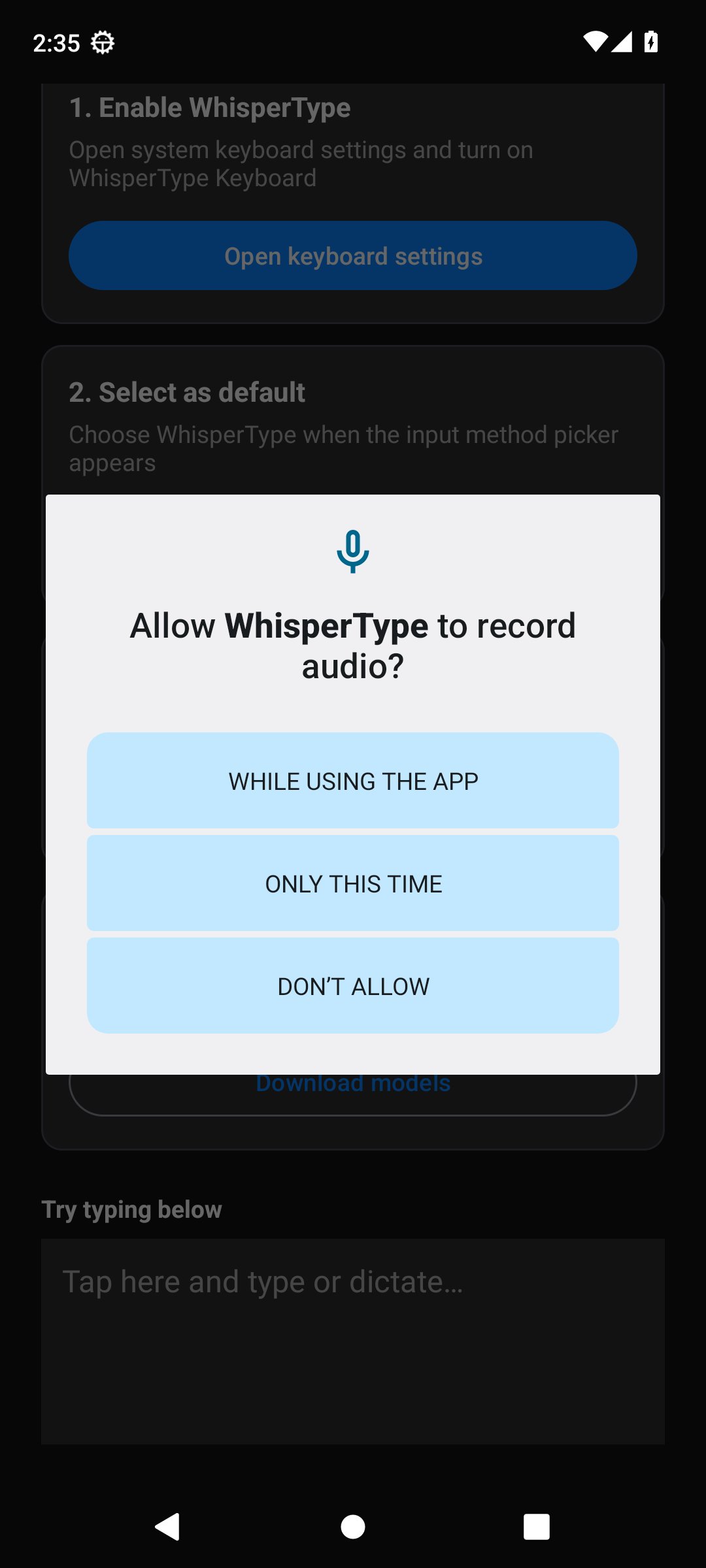
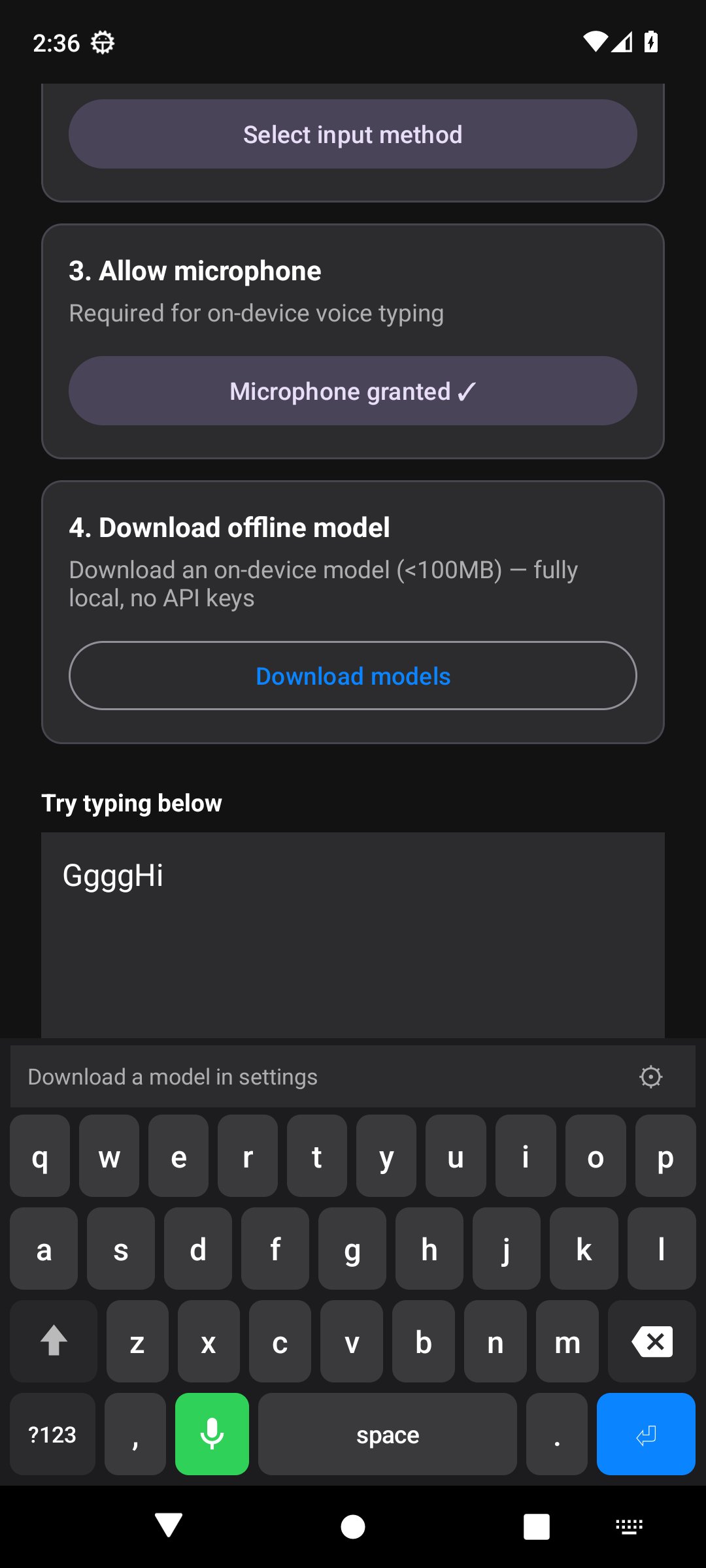
About WhisperType Keyboard
WhisperType is a full Android input method (IME) with a real QWERTY keyboard plus offline voice dictation.
Unlike dictation-only "keyboards" that only show a microphone button, WhisperType lets you type normally and use speech when you want.
Features:
- Full QWERTY layout with numbers, symbols, and a categorized emoji picker
- Shift / caps lock, sentence caps, double-space period, word-delete swipe
- On-device word suggestions and clipboard history
- Long-press accents and extra symbols
- Microphone key for offline on-device speech-to-text (25s warning, 30s auto-stop)
- Downloadable Whisper models: tiny.en, base.en (default), or small.en (int8)
- Import your own sherpa-onnx Whisper zip
- No API keys - audio, clipboard, and learned words stay on your device
- Free and open source (MIT)
Setup:
1. Install WhisperType
2. Enable it in system keyboard settings
3. Select it as the input method
4. Grant microphone permission
5. Download or import a speech model in settings
6. Type or tap the mic to dictate
On-device recognition uses sherpa-onnx (includes ONNX Runtime). Whisper models download on demand from Hugging Face when the user chooses Download; Import works offline.
Unlike dictation-only "keyboards" that only show a microphone button, WhisperType lets you type normally and use speech when you want.
Features:
- Full QWERTY layout with numbers, symbols, and a categorized emoji picker
- Shift / caps lock, sentence caps, double-space period, word-delete swipe
- On-device word suggestions and clipboard history
- Long-press accents and extra symbols
- Microphone key for offline on-device speech-to-text (25s warning, 30s auto-stop)
- Downloadable Whisper models: tiny.en, base.en (default), or small.en (int8)
- Import your own sherpa-onnx Whisper zip
- No API keys - audio, clipboard, and learned words stay on your device
- Free and open source (MIT)
Setup:
1. Install WhisperType
2. Enable it in system keyboard settings
3. Select it as the input method
4. Grant microphone permission
5. Download or import a speech model in settings
6. Type or tap the mic to dictate
On-device recognition uses sherpa-onnx (includes ONNX Runtime). Whisper models download on demand from Hugging Face when the user chooses Download; Import works offline.
| Release info | Update on Nov 09, 2026 |
|---|---|
| Release notes | WhisperType 1.6.1 • versionCode: 14 • Offline ASR: Whisper Small English (int8) • Runtime: ONNX Runtime Android + Extensions (Maven Central) Install 1. Download the APK for your device ABI from the assets below 2. Install on device (adb install -r ... or open the APK) 3. Enable keyboard, grant mic access, and download the model in settings ABI Selection | APK | ABI | Devices | |-----|-----|---------| | WhisperTypeKeyboard-1.6.1-armeabi-v7a.apk | armeabi-v7a | Older 32-bit ARM devices | | WhisperTypeKeyboard-1.6.1-arm64-v8a.apk | arm64-v8a | Most modern ARM devices | | WhisperTypeKeyboard-1.6.1-x86.apk | x86 | 32-bit x86 emulators | | WhisperTypeKeyboard-1.6.1-x86_64.apk | x86_64 | 64-bit x86 emulators | Artifacts | File | Use | |------|-----| | *-.apk | Sideload / direct install (pick your ABI) | | .aab | Play Store upload | Full Changelog: https://github.com/Trion129/WhisperTypeKeyboard/compare/v1.6.0...v1.6.1 |
| Listing data | F-Droid |
Reviews
No reviews yet. Be the first to review WhisperType Keyboard.
Used WhisperType Keyboard? Tell other visitors what you thought.
Log in to write a reviewOther products by this publisher
- "No Distractions" for YouTube 4.10 ----
- #Bible 11.6.1 "Incredible App - My sister shared this app with me a few weeks ago and it is truly incredible.
- #filmphotography 1.4.2 So, you decided to shoot on film?
- #LookBusy Fake Calendar Events 1.0.6 Look Busy scans your work calendar for open time slots and fills them with realistic-looking (but secretly fake) work events.
- #Small Talk Is Canceled 1.0.2 #Small Talk Is Canceled — Conversations That Matter
Most viewed Android Keyboard & Ime
-
1
 VocaPhone 0.2.7
Voice dictation keyboard that transcribes on hardware you control
- 2 FlorisBoard 0.5.2 An open-source keyboard which respects your privacy. Currently in beta.
- 3 Kinetica 3.0.1 Two-thumb keyboard: both thumbs swipe and tap at once. No network access.
- 4 KeliBoard 4.0.1 Customizable open-source keyboard
-
5
 Parakeetype 0.6.0
Fast on-device speech-to-text keyboard and voice input - no cloud, no tracking.
- 6 AdaptKey 1.3.18 Privacy-first Android keyboard that learns your typing style. Fully offline.
-
7
 Xime IME 3.5.0-alpha.3
A Rime-based Chinese IME for Wubi and Pinyin input
- 8 CleverKeys 1.5.0 Open-source gesture keyboard with Termux support
- 9 ICS Theme for AnySoftKeyboard 5.1.6158 Ice Cream Sandwich Theme for AnySoftKeyboard
- 10 Afrikaans for AnySoftKeyboard 5.1.6158 Afrikaans Language Pack for AnySoftKeyboard
Most downloaded Android Keyboard & Ime
- 1 Kinetica 3.0.1 Two-thumb keyboard: both thumbs swipe and tap at once. No network access.
-
2
 Ezhuthola: Malayalam Keyboard 0.6.0
Type Malayalam in Manglish. No ads, no tracking, no internet.
-
3
 Traditional T9 64.0
A T9 keyboard inspired by the classic Nokia phones of the 2000s.
- 4 Guileless Bopomofo Keyboard 5.2.1 A simple Bopomofo software keyboard (input method editor) for typing Hanyu
-
5
Xime IME 3.5.0-alpha.3
A Rime-based Chinese IME for Wubi and Pinyin input
-
6
 ReteKey 0.2.3
Hangul keyboard with Esc, Tab, Ctrl and F-keys. 470 KB, one permission.
-
7
 Voice Keyboard 1.15.2
Speech-to-text keyboard that uses your own Whisper API key
-
8
 zinna-IME 0.1.2
Offline Japanese keyboard with mozc conversion, flick and qwerty
-
9
 KeyTab 0.23
Keyboard (IME) with tabbed file manager, offline word prediction and TAB key.
-
10
Parakeetype 0.6.0
Fast on-device speech-to-text keyboard and voice input - no cloud, no tracking.