ReteKey 0.2.3
Hangul keyboard with Esc, Tab, Ctrl and F-keys. 470 KB, one permission.
Download
0.55 MB · retekey-0.2.3-legacy.apk
41downloads
13this week
FreeFreeware
0reviews
Screenshots
About ReteKey
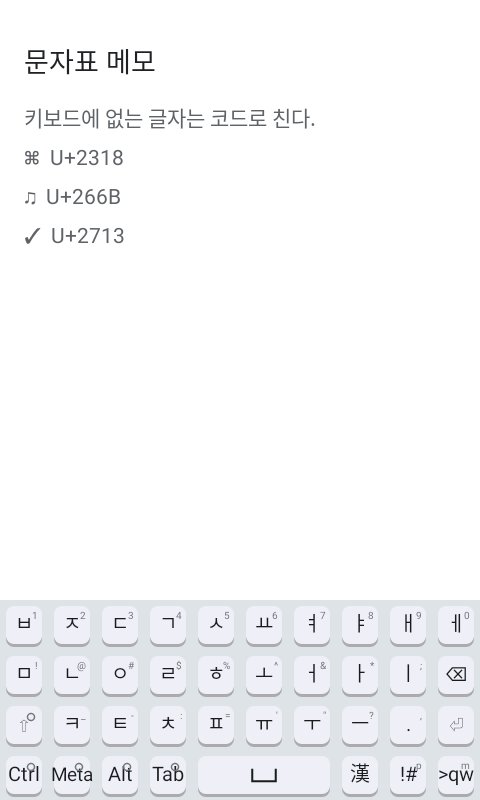
A Hangul keyboard for developers and power users -- for anyone who needs Esc, Tab, Ctrl chords, function and arrow keys on a phone, and a keyboard that behaves itself in a terminal.
It is small and asks for almost nothing. The APK is about 470 KB, most of that the Hanja tables, written in plain Java with no third-party runtime dependencies; the Hanja tables are memory-mapped straight out of the APK, so they cost storage rather than memory. It declares a single permission, VIBRATE -- an ordinary permission, never requested at runtime, driving nothing but the buzz under your finger, which you can turn down to zero. No network, no account, no analytics.
And nothing is missing for it.
The keys other keyboards leave out
Esc, Tab, Ctrl, Alt, Meta, F1-F12, the arrows, Home and End, PgUp and PgDn, Ins, forward-delete and PrtSc, sent as real key events rather than as characters that look like them. Modifier chords the keyboard has no use for are handed to the app, so an editor's own shortcuts keep working, and a soft Ctrl plus a letter sends a genuine control code to a terminal.
Layouts
* 2-beolsik, the standard full Korean keyboard.
* ??? and ???, the two 12-key phone layouts. Both compose the whole of Hangul, including every compound final -- ?, ?, ? and the rest. Two keys in the spare column turn the twelve keys into the phone keypad's digits or into the cursor cluster.
* QWERTY, Dvorak and Colemak for English; Spanish, Portuguese, Italian, Polish, German, Turkish, French AZERTY, Greek, Hebrew, Persian, Arabic, Urdu, Thai, Hindi, Russian, Ukrainian, Bulgarian, Macedonian, Serbian, Georgian and Armenian with their own letters on their own positions; Vietnamese with Telex; Japanese by romaji or on the 12-key flick pad, typed straight into hiragana.
* A symbols page, a keypad with arrows and function keys, and a menu page for edit commands.
* The globe key walks the layouts you enabled, in the order you set.
Typing on twelve keys
??? keys can be dragged instead of tapped: a consonant key gives its plain letter to the left, its aspirate to the right and its tense letter downward, and a vowel key points at the letter it makes. Hold a key instead and a guide shows what is where, with the keypad digit in the middle. Nothing has to be waited out.
Hanja
Conversion in both directions with ?? glosses, paging and number-key selection, from a candidate window the width of the keyboard.
Physical keyboards
The on-screen keyboard hides itself when a hardware keyboard is attached, and hardware typing composes Hangul through the same 2-beolsik automaton. Ctrl, Alt and Meta chords reach the app rather than being swallowed. ?/? and ?? can be bound to keys of your choosing.
Made to suit you
* The keyboard's height is set as a share of the screen, from 1% to 50%.
* Height, the layout list and its order, the floating panel and its opacity are remembered separately for a screen held upright and one held sideways.
* Keys that can be held say so: an open ring in the corner while they are not, a filled disc while they are. Shift, Ctrl, Meta and Alt each arm for one key on a tap and lock on a hold.
* A half-width floating panel you can place where you like, as see-through as you like.
* Key-press feedback -- highlight, vibration and sound -- each adjustable to zero.
* Follows the system light and dark theme, and Material You where the device has it.
Old Android
Two builds ship from one source. The one on F-Droid is for Android 9 and newer. A build for Android 4.0 and newer is on the project's releases page; everything works there, and the README says which few things behave differently.
The name
rete is Latin for net. It is meant to be said the Latin way, RAY-teh.
License: MIT
It is small and asks for almost nothing. The APK is about 470 KB, most of that the Hanja tables, written in plain Java with no third-party runtime dependencies; the Hanja tables are memory-mapped straight out of the APK, so they cost storage rather than memory. It declares a single permission, VIBRATE -- an ordinary permission, never requested at runtime, driving nothing but the buzz under your finger, which you can turn down to zero. No network, no account, no analytics.
And nothing is missing for it.
The keys other keyboards leave out
Esc, Tab, Ctrl, Alt, Meta, F1-F12, the arrows, Home and End, PgUp and PgDn, Ins, forward-delete and PrtSc, sent as real key events rather than as characters that look like them. Modifier chords the keyboard has no use for are handed to the app, so an editor's own shortcuts keep working, and a soft Ctrl plus a letter sends a genuine control code to a terminal.
Layouts
* 2-beolsik, the standard full Korean keyboard.
* ??? and ???, the two 12-key phone layouts. Both compose the whole of Hangul, including every compound final -- ?, ?, ? and the rest. Two keys in the spare column turn the twelve keys into the phone keypad's digits or into the cursor cluster.
* QWERTY, Dvorak and Colemak for English; Spanish, Portuguese, Italian, Polish, German, Turkish, French AZERTY, Greek, Hebrew, Persian, Arabic, Urdu, Thai, Hindi, Russian, Ukrainian, Bulgarian, Macedonian, Serbian, Georgian and Armenian with their own letters on their own positions; Vietnamese with Telex; Japanese by romaji or on the 12-key flick pad, typed straight into hiragana.
* A symbols page, a keypad with arrows and function keys, and a menu page for edit commands.
* The globe key walks the layouts you enabled, in the order you set.
Typing on twelve keys
??? keys can be dragged instead of tapped: a consonant key gives its plain letter to the left, its aspirate to the right and its tense letter downward, and a vowel key points at the letter it makes. Hold a key instead and a guide shows what is where, with the keypad digit in the middle. Nothing has to be waited out.
Hanja
Conversion in both directions with ?? glosses, paging and number-key selection, from a candidate window the width of the keyboard.
Physical keyboards
The on-screen keyboard hides itself when a hardware keyboard is attached, and hardware typing composes Hangul through the same 2-beolsik automaton. Ctrl, Alt and Meta chords reach the app rather than being swallowed. ?/? and ?? can be bound to keys of your choosing.
Made to suit you
* The keyboard's height is set as a share of the screen, from 1% to 50%.
* Height, the layout list and its order, the floating panel and its opacity are remembered separately for a screen held upright and one held sideways.
* Keys that can be held say so: an open ring in the corner while they are not, a filled disc while they are. Shift, Ctrl, Meta and Alt each arm for one key on a tap and lock on a hold.
* A half-width floating panel you can place where you like, as see-through as you like.
* Key-press feedback -- highlight, vibration and sound -- each adjustable to zero.
* Follows the system light and dark theme, and Material You where the device has it.
Old Android
Two builds ship from one source. The one on F-Droid is for Android 9 and newer. A build for Android 4.0 and newer is on the project's releases page; everything works there, and the README says which few things behave differently.
The name
rete is Latin for net. It is meant to be said the Latin way, RAY-teh.
License: MIT
| Release info | Update on Oct 11, 2026 |
|---|---|
| Release notes | The gap between keys no longer presses anything. A touch that lands between two key faces types nothing. This applies at the usual gap too, so it changes every keyboard on upgrade. To get the old behaviour back, where a key answered anywhere in its cell, set Gap between keys to 0% on the Portrait and Landscape settings pages. The rim outside the outermost keys still answers, and a finger already on a key keeps it while it crosses a gap. The two sizes added in 0.2.2 have new units: • Gap between keys is a percentage (0–40%) of the width of one key cell, a key one column wide. It is the whole space between two keys. • Action bar height is a percentage (2–25%) of the screen's height, the same unit as the keyboard height. The bar is still part of the keyboard's height, so a keyboard at 30% with a bar at 8% leaves the keys 22%. The bar never takes more than half the keyboard. Until you move a slider, both are what they always were. Anything you set in 0.2.2 is kept until you move the slider again, and Back to usual forgets the setting. Fixed: with a widened gap, words on the bottom row (Ctrl, Meta, Alt, Tab) ran off their keys. Two APKs: retekey-0.2.3.apk (Android 9.0+) and retekey-0.2.3-legacy.apk (Android 4.0+). |
| Listing data | F-Droid |
Reviews
No reviews yet. Be the first to review ReteKey.
Used ReteKey? Tell other visitors what you thought.
Log in to write a reviewOther products by this publisher
- "No Distractions" for YouTube 4.10 ----
- #Bible 11.6 "Incredible App - My sister shared this app with me a few weeks ago and it is truly incredible.
- #filmphotography 1.4.2 So, you decided to shoot on film?
- $quirrel 1.5.1 $quirrel Budget & Finance helps you plan each paycheck, track spending, manage debt, and see what is safe to spend before the next payday.
- % Percentage Calculator Pro 1.41 This is the Pro version of % Percentage Calculator.
Most viewed Android Keyboard & Ime
-
1
 VocaPhone 0.2.6
Voice dictation keyboard that transcribes on hardware you control
- 2 FlorisBoard 0.5.2 An open-source keyboard which respects your privacy. Currently in beta.
- 3 Kinetica 2.2.1 Two-thumb keyboard: both thumbs swipe and tap at once. No network access.
- 4 KeliBoard 4.0.1 Customizable open-source keyboard
- 5 AdaptKey 1.2.97 Privacy-first Android keyboard that learns your typing style. Fully offline.
-
6
 Xime IME 3.5.0-alpha.3
A Rime-based Chinese IME for Wubi and Pinyin input
- 7 Afrikaans for AnySoftKeyboard 5.1.6158 Afrikaans Language Pack for AnySoftKeyboard
- 8 8Vim Keyboard 0.17.5 A small screen keyboard inspired by VIM and 8Pen
- 9 Fcitx5 (Unikey Plugin) 0.1.3-0-g048f581c Unikey (Vietnamese input method) engine support for Fcitx5
- 10 Fcitx5 (Chewing Plugin) 0.1.3-0-g048f581c Chewing (Zhuyin/Bopomofo input method) engine support for Fcitx5
Most downloaded Android Keyboard & Ime
- 1 Kinetica 2.2.1 Two-thumb keyboard: both thumbs swipe and tap at once. No network access.
-
2
 zinna-IME 0.1.2
Offline Japanese keyboard with mozc conversion, flick and qwerty
-
3
 Ramblr 1.0.49
Tap, ramble, tap. Clean dictated text lands wherever your cursor is.
-
4
Xime IME 3.5.0-alpha.3
A Rime-based Chinese IME for Wubi and Pinyin input
- 5 Guileless Bopomofo Keyboard 5.2.1 A simple Bopomofo software keyboard (input method editor) for typing Hanyu
-
6
ReteKey 0.2.3
Hangul keyboard with Esc, Tab, Ctrl and F-keys. 470 KB, one permission.
-
7
 Parakeetype 0.5.0
Fast on-device speech-to-text keyboard and voice input - no cloud, no tracking.
-
8
 Traditional T9 64.0
A T9 keyboard inspired by the classic Nokia phones of the 2000s.
-
9
 Ezhuthola: Malayalam Keyboard 0.5.0
Type Malayalam in Manglish. No ads, no tracking, no internet.
- 10 Fcitx5 (Jyutping Plugin) 0.1.3-0-g048f581c Jyutping (Cantonese input method) engine support for Fcitx5