1downloads
1this week
FreeCommercial
0reviews
Screenshots


About VHS
VHS turns your iPhone into a camcorder from 1994.
Not a filter laid over your video afterward. The tape damage is recorded into the file as you shoot, the way a camcorder worked, so what you see in the viewfinder is exactly the video you get. There is no clean master hiding underneath.
WHAT MAKES IT LOOK REAL
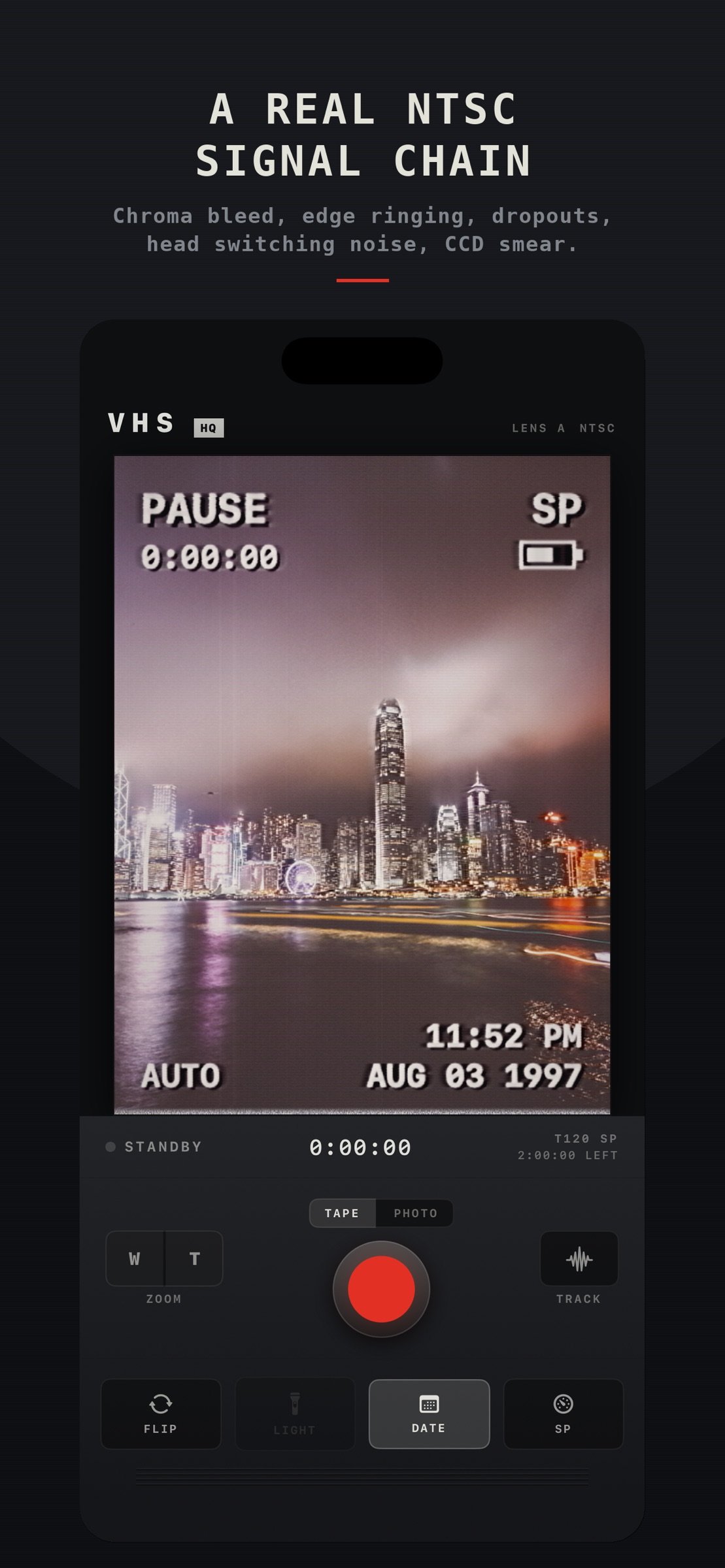
Most retro apps stack a grain overlay and a color wash on top of a modern picture. This one models what the format actually did to a signal:
Color bleeds sideways past its edges, because VHS carried color at a sixth of the detail of brightness and laid it down a moment late.
A white halo trails every hard edge, the pre emphasis overshoot that is most of why tape reads as tape.
Scan lines start early or late as the transport wanders, the picture tears into noise across the bottom band where one head handed off to the other, and dropouts flash bright streaks when the oxide fails.
Grain streaks along the scan line instead of sparkling like digital noise, and color noise arrives as banding, so reds boil while skies stay clean.
Highlights clip and bloom, blacks lift off the floor, and a bright window pulls a faint white column the full height of the frame, the interline smear of a 1990s sensor.
The camera itself is set back in time too. HDR is off and the sensor is locked to a period color space, so a window blows out to white and shadows fall away instead of being rescued.
THREE TAPE SPEEDS
SP is a fresh tape in a good deck, and it still looks expensive. LP starts to run. EP is the six hour speed everyone used to tape television, and it looks and sounds like it, right down to a 6 kHz ceiling on the audio.
Sound goes through the tape too: band limited, saturated, with bias hiss and a slow transport flutter.
A CAMCORDER, NOT A CAMERA APP
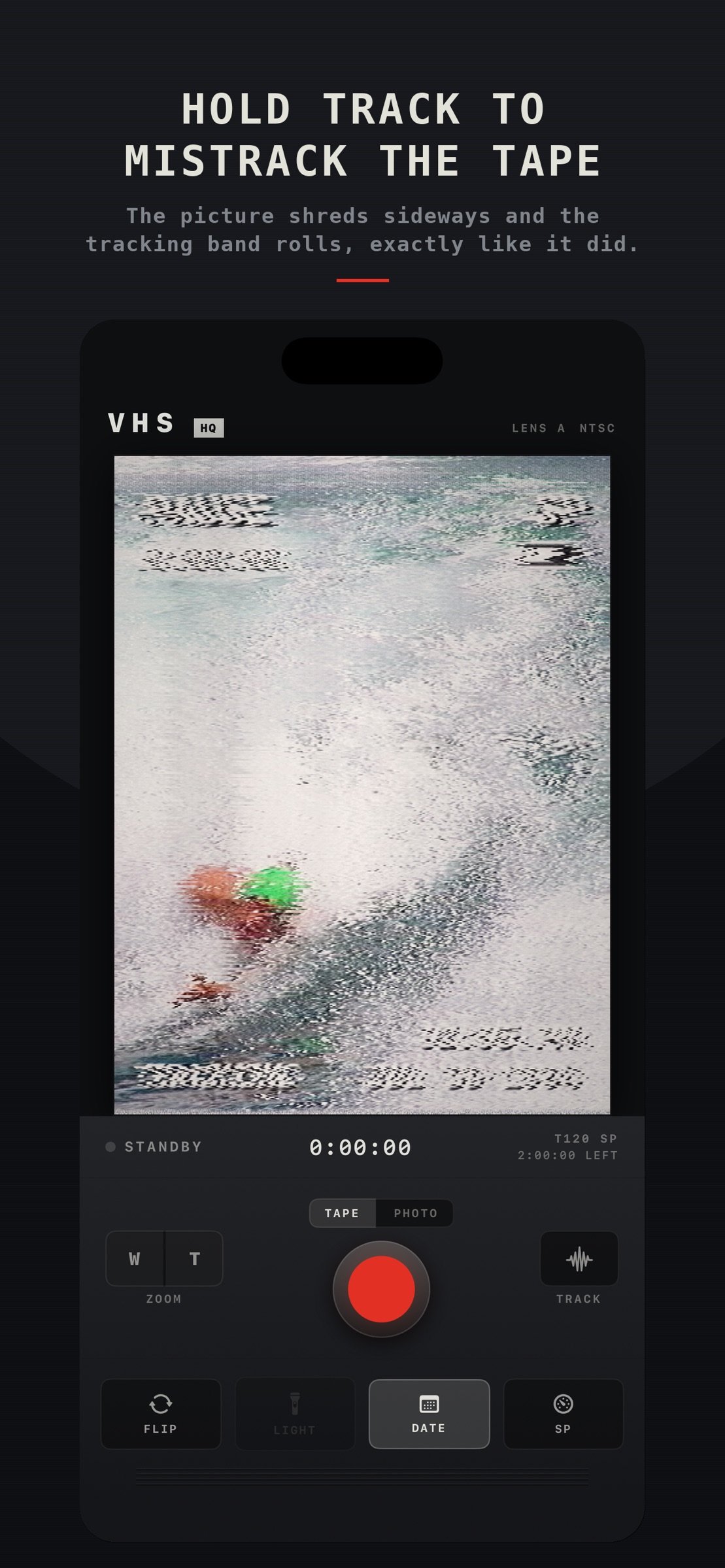
A big red REC button. A spring loaded W to T zoom rocker that ramps the real lens and stops where you let go. A momentary TRACK button that mistracks the tape while you hold it, shredding the picture sideways as the tracking band rolls up the frame. A video light, a lens flip, and a tape speed selector.
SET THE CLOCK
Tap DATE and wind the deck clock to any moment back to 1900. It keeps ticking from there, so a whole evening of tapes carries one coherent timeline. The stamp burns into video and photos alike.
STILLS TOO
Flip the selector to PHOTO and the transport button becomes a shutter. The frame on the glass is saved straight to your library, artifacts and date stamp included. No review screen, no waiting.
PRIVACY
VHS collects nothing. No account, no analytics, no advertising, no tracking, and no network requests at all. Everything is processed on your device and written straight to your photo library.
One purchase. No subscription.
License: Commercial
Not a filter laid over your video afterward. The tape damage is recorded into the file as you shoot, the way a camcorder worked, so what you see in the viewfinder is exactly the video you get. There is no clean master hiding underneath.
WHAT MAKES IT LOOK REAL
Most retro apps stack a grain overlay and a color wash on top of a modern picture. This one models what the format actually did to a signal:
Color bleeds sideways past its edges, because VHS carried color at a sixth of the detail of brightness and laid it down a moment late.
A white halo trails every hard edge, the pre emphasis overshoot that is most of why tape reads as tape.
Scan lines start early or late as the transport wanders, the picture tears into noise across the bottom band where one head handed off to the other, and dropouts flash bright streaks when the oxide fails.
Grain streaks along the scan line instead of sparkling like digital noise, and color noise arrives as banding, so reds boil while skies stay clean.
Highlights clip and bloom, blacks lift off the floor, and a bright window pulls a faint white column the full height of the frame, the interline smear of a 1990s sensor.
The camera itself is set back in time too. HDR is off and the sensor is locked to a period color space, so a window blows out to white and shadows fall away instead of being rescued.
THREE TAPE SPEEDS
SP is a fresh tape in a good deck, and it still looks expensive. LP starts to run. EP is the six hour speed everyone used to tape television, and it looks and sounds like it, right down to a 6 kHz ceiling on the audio.
Sound goes through the tape too: band limited, saturated, with bias hiss and a slow transport flutter.
A CAMCORDER, NOT A CAMERA APP
A big red REC button. A spring loaded W to T zoom rocker that ramps the real lens and stops where you let go. A momentary TRACK button that mistracks the tape while you hold it, shredding the picture sideways as the tracking band rolls up the frame. A video light, a lens flip, and a tape speed selector.
SET THE CLOCK
Tap DATE and wind the deck clock to any moment back to 1900. It keeps ticking from there, so a whole evening of tapes carries one coherent timeline. The stamp burns into video and photos alike.
STILLS TOO
Flip the selector to PHOTO and the transport button becomes a shutter. The frame on the glass is saved straight to your library, artifacts and date stamp included. No review screen, no waiting.
PRIVACY
VHS collects nothing. No account, no analytics, no advertising, no tracking, and no network requests at all. Everything is processed on your device and written straight to your photo library.
One purchase. No subscription.
License: Commercial
| Release info | New Release on Oct 01, 2026 |
|---|---|
| Listing data | App Store |
Reviews
No reviews yet. Be the first to review VHS.
Used VHS? Tell other visitors what you thought.
Log in to write a reviewOther products by this publisher
- "No Distractions" for YouTube 4.10 ----
- #Bible 11.5 "Incredible App - My sister shared this app with me a few weeks ago and it is truly incredible.
- % Percentage Calculator Pro 1.41 This is the Pro version of % Percentage Calculator.
- (beat) for iOS 0.5.9 An elegant Fountain screenwriting app, created by a screenwriter for screenwriters.
- (Deep) HIARCS Chess Explorer 1.14 Chess database, analysis and game playing program
Most viewed iOS Photo & Video
-
1
 AI Video Generator 2.0.1
Vixel – AI Video Generator
AI Video Generator 2.0.1
Vixel – AI Video Generator
-
2
 Infuse 8.5.8
Infuse: Enterprise provides the same great features as the standard version of Infuse and includes permanent access to all Pro features via a traditional paid app.
Infuse 8.5.8
Infuse: Enterprise provides the same great features as the standard version of Infuse and includes permanent access to all Pro features via a traditional paid app.
-
3
 CapCut 19.8.1
CapCut offers easy-to-use video editing functions, in-APP fonts and effects, advanced features such as keyframe animation, smooth slow-motion, chroma key, and stabilization, to help you capture and snip moments.
CapCut 19.8.1
CapCut offers easy-to-use video editing functions, in-APP fonts and effects, advanced features such as keyframe animation, smooth slow-motion, chroma key, and stabilization, to help you capture and snip moments.
-
4
 Ai Photo 1.1.2
AI Photo Retouch – BG Eraser
Ai Photo 1.1.2
AI Photo Retouch – BG Eraser
-
5
 JLab 1.4.2
Compatible Models:
JLab 1.4.2
Compatible Models:
-
6
 TouchSiren Delta 3.1
--------------------------------------------------------------
TouchSiren Delta 3.1
--------------------------------------------------------------
-
7
 Sci-Fi Keyboard 3.0
Make your keyboard a Sci-Fi input panel.
Sci-Fi Keyboard 3.0
Make your keyboard a Sci-Fi input panel.
-
8
 CNU 3.0.12
CNU?????????????????????,???????????????
CNU 3.0.12
CNU?????????????????????,???????????????
-
9
 Locket Widget 2.70.0
Locket is a widget that shows live photos from your best friends, right to your Home Screen.
Locket Widget 2.70.0
Locket is a widget that shows live photos from your best friends, right to your Home Screen.
-
10
 Emoji Maker 3.11.3
Emoji Up is an emoji maker that lets you create your own custom emojis.
Emoji Maker 3.11.3
Emoji Up is an emoji maker that lets you create your own custom emojis.
Most downloaded iOS Photo & Video
-
1
Infuse 8.5.8
Infuse: Enterprise provides the same great features as the standard version of Infuse and includes permanent access to all Pro features via a traditional paid app.
-
2
 Analog Radio 3.0
The iPhone and iPad devices don't have the FM/AM radio antenna installed.
Analog Radio 3.0
The iPhone and iPad devices don't have the FM/AM radio antenna installed.
-
3
 DJI Fly 1.21.16
DJI Fly is designed to help pilots fly drones with ease.
DJI Fly 1.21.16
DJI Fly is designed to help pilots fly drones with ease.
-
4
 ReelyGo 1.1.41
ReelyGo: Your Daily Drama Escape
ReelyGo 1.1.41
ReelyGo: Your Daily Drama Escape
-
5
 SSS IPTV, Simple, Smart Super 1.0.2
An Easiest way to watch TV Online or Movies or Series, Bring your Own list M3u,
SSS IPTV, Simple, Smart Super 1.0.2
An Easiest way to watch TV Online or Movies or Series, Bring your Own list M3u,
-
6
 Treblo 1.6.0
Make songs with the world's best AI music model.
Treblo 1.6.0
Make songs with the world's best AI music model.
-
7
 TurboCollage Automatic 1.2.4
#1 Easy automatic photo collage maker for iPhone & iPad.
TurboCollage Automatic 1.2.4
#1 Easy automatic photo collage maker for iPhone & iPad.
-
8
 Koala FX 1.0.2
*** IMPORTANT! Koala FX is an Audio Unit Effect plugin (AUv3) which requires a compatible host or DAW to work such as Garageband, Beat Maker 3, AUM etc ***
Koala FX 1.0.2
*** IMPORTANT! Koala FX is an Audio Unit Effect plugin (AUv3) which requires a compatible host or DAW to work such as Garageband, Beat Maker 3, AUM etc ***
-
9
 Rozeta Sequencer Suite 1.3.16
Rozeta is a suite of MIDI sequencers and controllers that lets you explore a new, freeform approach to sequencing and controlling mobile music apps.
Rozeta Sequencer Suite 1.3.16
Rozeta is a suite of MIDI sequencers and controllers that lets you explore a new, freeform approach to sequencing and controlling mobile music apps.
-
10
 AGAIN. Rehearsal Notes 2.0.1
AGAIN. is the rehearsal app that remembers why the band stopped — and, new in Version 2, who said what in a writing session or a table read.
AGAIN. Rehearsal Notes 2.0.1
AGAIN. is the rehearsal app that remembers why the band stopped — and, new in Version 2, who said what in a writing session or a table read.