
AGAIN. Rehearsal Notes 2.0.1
AGAIN. is the rehearsal app that remembers why the band stopped — and, new in Version 2, who said what in a writing session or a table read.
Download
23.83 MB
116downloads
5this week
FreeCommercial
0reviews
Screenshots
About AGAIN. Rehearsal Notes
AGAIN. is the rehearsal app that remembers why the band stopped -- and, new in Version 2, who said what in a writing session or a table read.
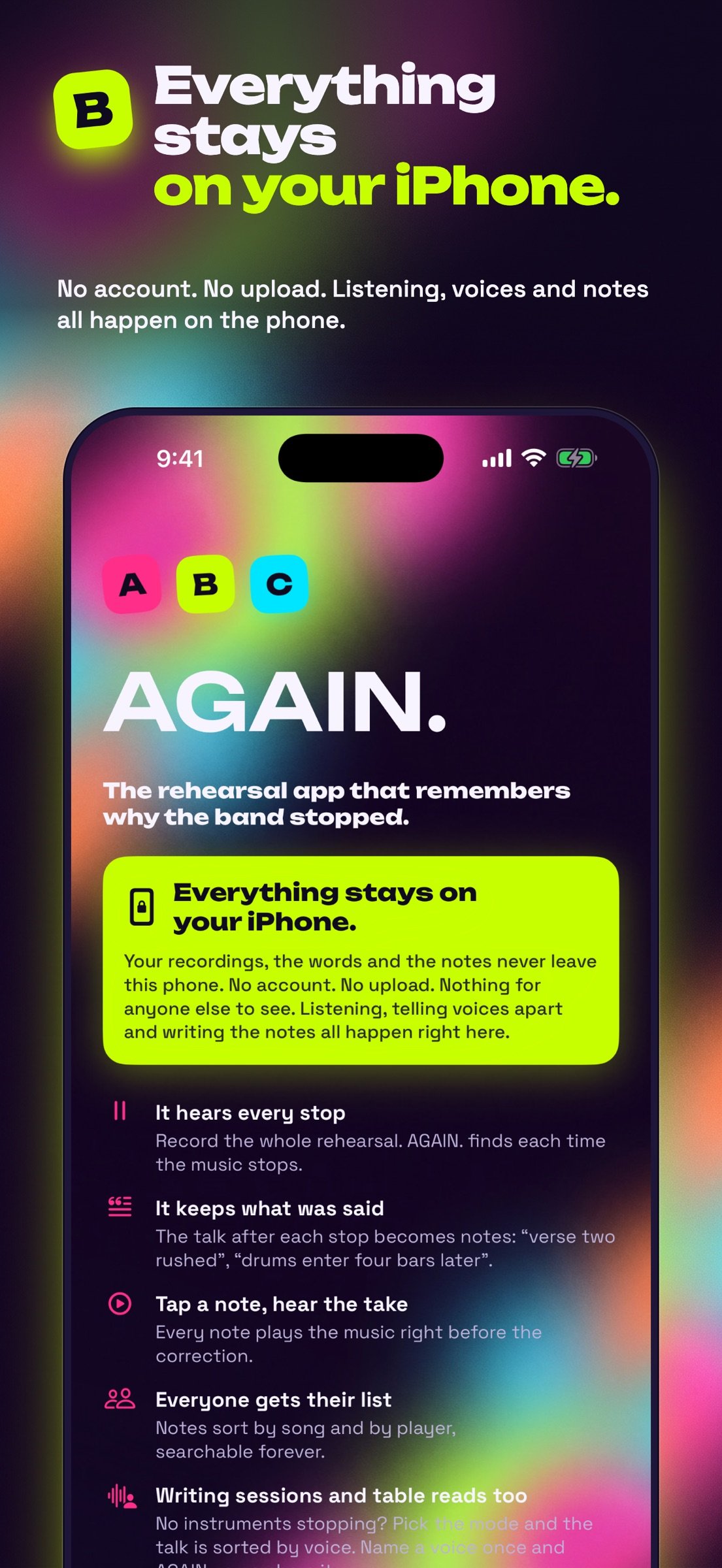
EVERYTHING STAYS ON YOUR IPHONE
No account. No ads. No servers. Your recordings, the words and the notes never leave your iPhone. Listening, telling voices apart and writing the notes all happen on the device.
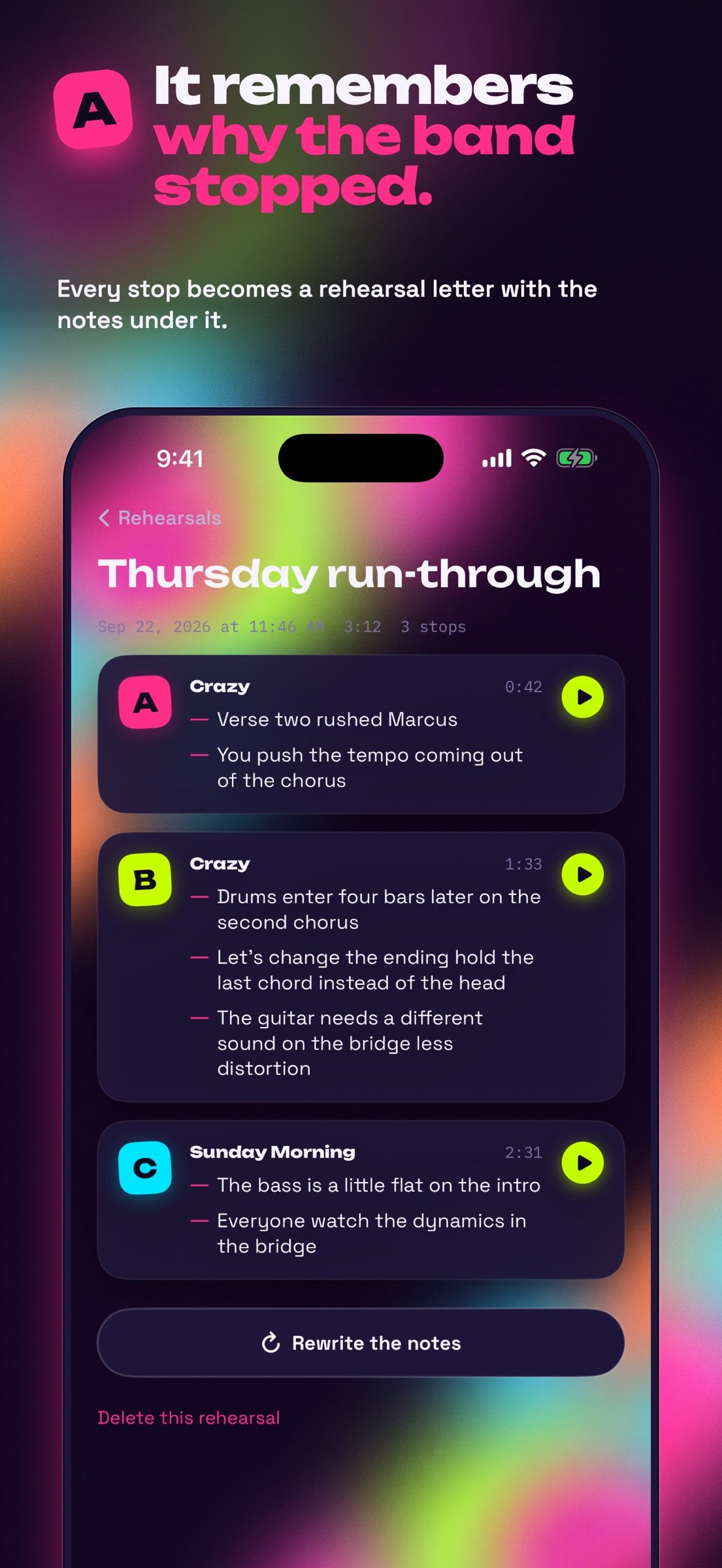
You run the tune. Somebody stops it. "Bass, you're early on the bridge -- verse two is four bars, not eight." Everyone nods. Next week nobody remembers. AGAIN. does.
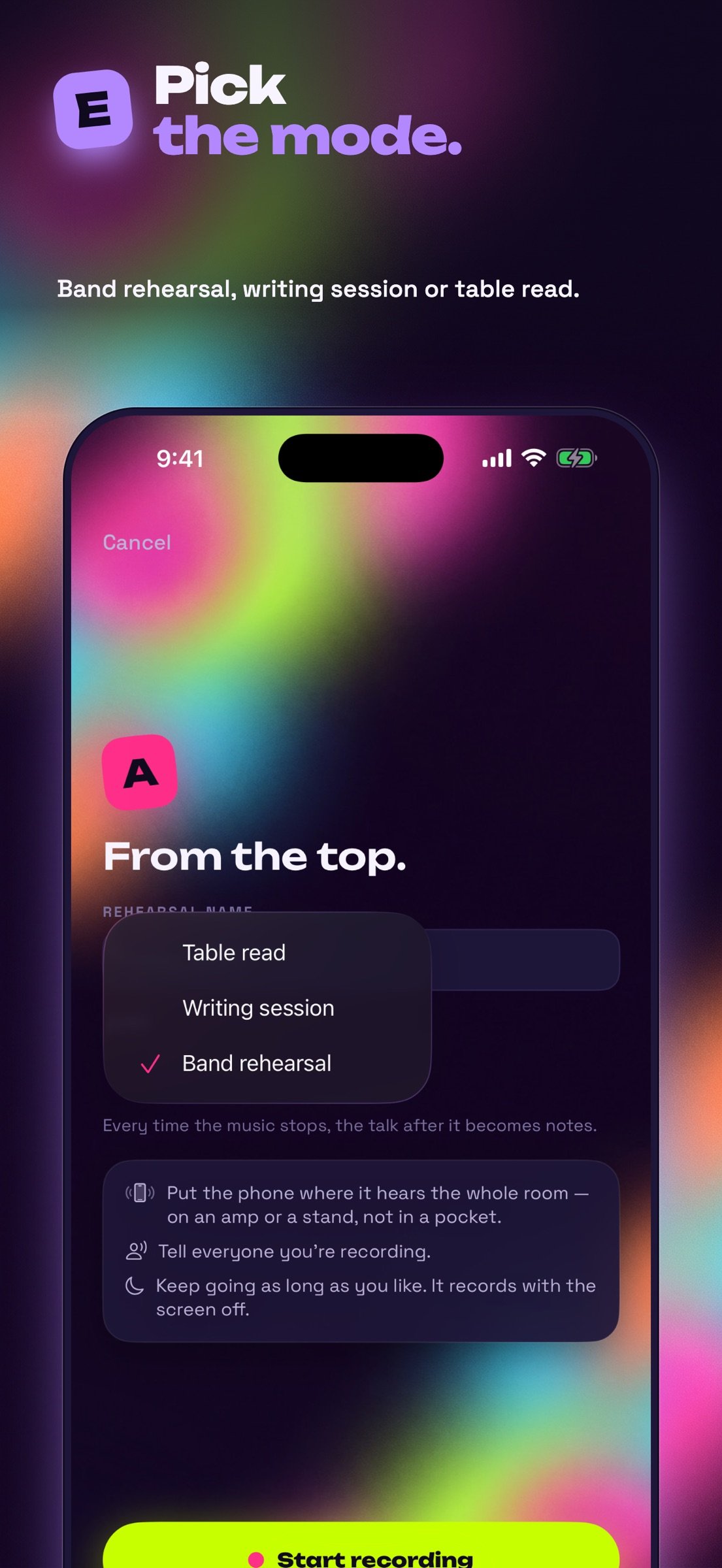
PICK THE MODE
Band rehearsal, Writing session or Table read: one dropdown on the record screen. An imported recording asks the same.
BAND REHEARSAL: IT FINDS EVERY STOP
Put the phone where it can hear the room, tap Record and play. On-device sound analysis tells music from talking. Each time the band stops to talk, that stop becomes a rehearsal letter -- A, B, C -- like the boxed letters in a score. It keeps going with the screen off, as long as the rehearsal runs.
WRITING SESSIONS AND TABLE READS: SORTED BY VOICE
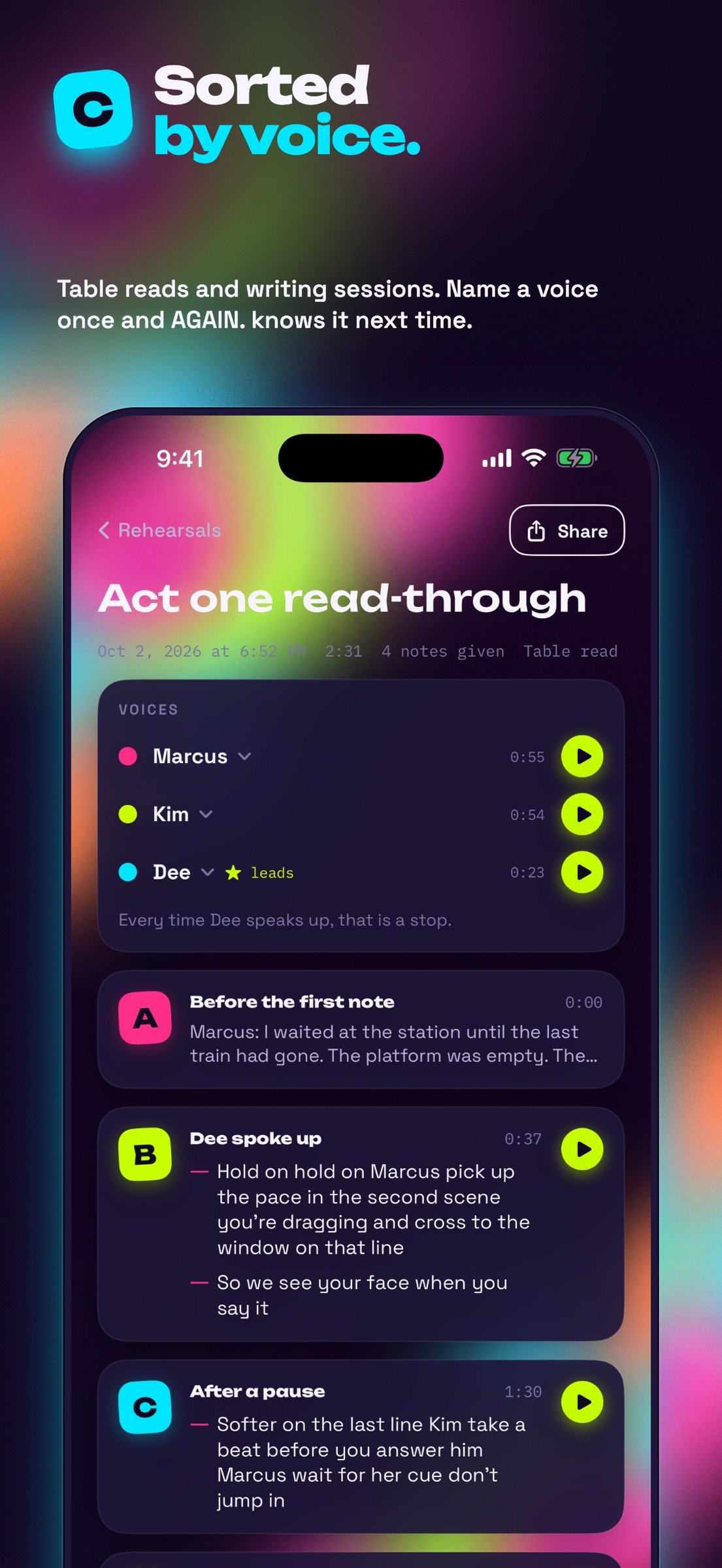
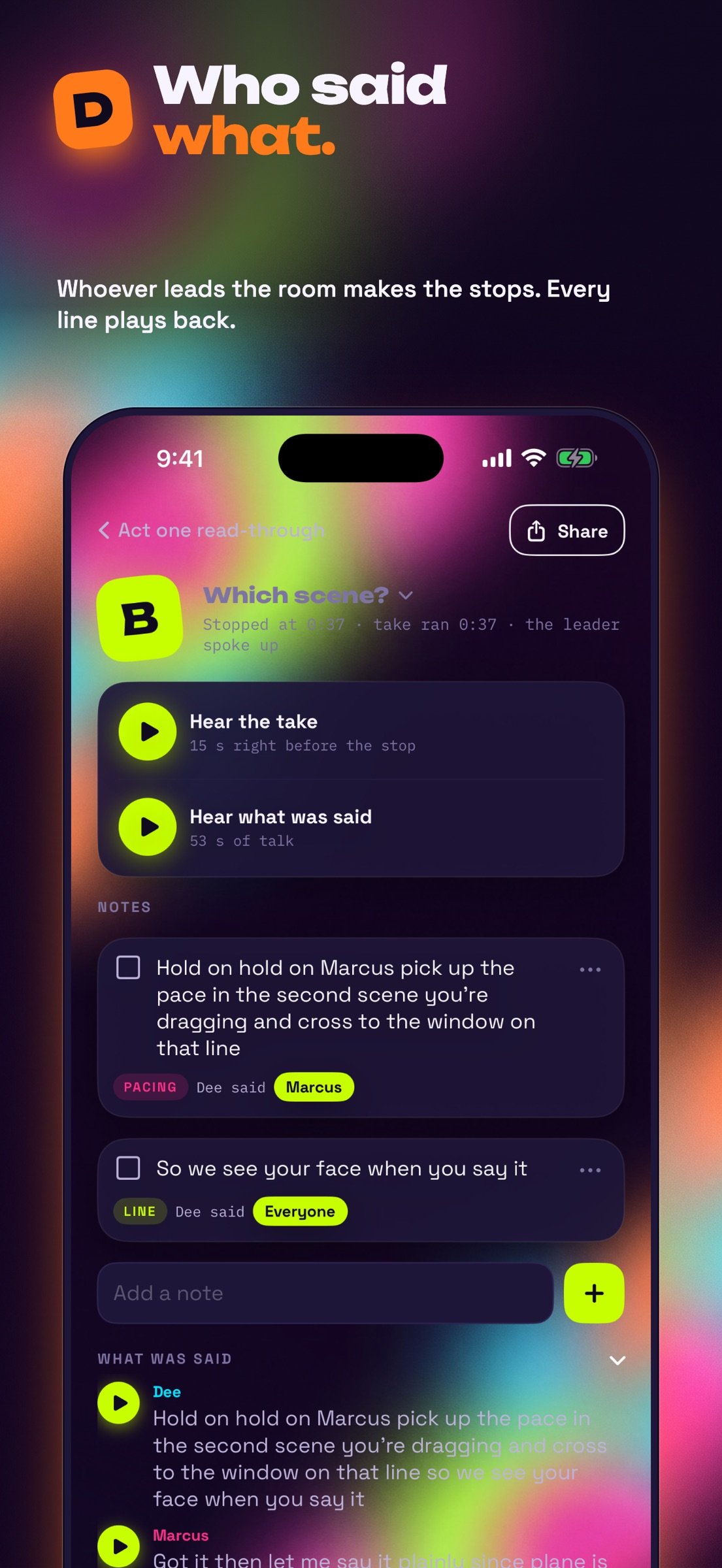
No instruments stopping? AGAIN. tells the voices in the room apart. Hear a few seconds of each, give it a name, and AGAIN. knows that voice the next time. Mark who leads the room -- the director, the lead writer -- and every time they speak up becomes a stop. Tap Mark a stop now whenever you like; long pauses and music that stops count too. Every line plays back, in the voice's own colour.
IT WRITES THE NOTES
What was said is transcribed on your iPhone and turned into short notes: who it's for, which song, what kind of fix. A band gets tempo, entrance, ending, arrangement, dynamics, sound, pitch and lyrics. A table read gets line, delivery, pacing, blocking, cue and character -- from the director's words, not the reading. A writing session gets lyric, melody, chords, structure, groove and hook. Each note says who said it. Wrong? Edit any note, or write your own.
? THE 15 SECONDS BEFORE
Every stop and every note has a play button that plays the music right before the band stopped. No scrubbing. Everyone hears the spot.
MORE THAN ONE BAND, MORE THAN ONE SETLIST
Play in a band, a choir and a trio? Tap the band's name to switch. Each band keeps its own players, setlists, rehearsals, notes and named voices. Give a band as many setlists as it needs (Sunday service, the wedding, the club set) and pick one before you record: its songs are the ones you tap while you play.
BY SONG, BY PLAYER, BY WORD
Songs: every note on each tune, across rehearsals. Players: each musician's list, ready to send. Search: notes and full transcripts.
SEND THE NOTES
Share a whole rehearsal's notes, or one stop's, to a text, an email or the group chat. Each musician's list has its own Send.
AGAIN. records other people's voices. Always tell the room you're recording and follow the recording laws where you play.
License: Commercial
EVERYTHING STAYS ON YOUR IPHONE
No account. No ads. No servers. Your recordings, the words and the notes never leave your iPhone. Listening, telling voices apart and writing the notes all happen on the device.
You run the tune. Somebody stops it. "Bass, you're early on the bridge -- verse two is four bars, not eight." Everyone nods. Next week nobody remembers. AGAIN. does.
PICK THE MODE
Band rehearsal, Writing session or Table read: one dropdown on the record screen. An imported recording asks the same.
BAND REHEARSAL: IT FINDS EVERY STOP
Put the phone where it can hear the room, tap Record and play. On-device sound analysis tells music from talking. Each time the band stops to talk, that stop becomes a rehearsal letter -- A, B, C -- like the boxed letters in a score. It keeps going with the screen off, as long as the rehearsal runs.
WRITING SESSIONS AND TABLE READS: SORTED BY VOICE
No instruments stopping? AGAIN. tells the voices in the room apart. Hear a few seconds of each, give it a name, and AGAIN. knows that voice the next time. Mark who leads the room -- the director, the lead writer -- and every time they speak up becomes a stop. Tap Mark a stop now whenever you like; long pauses and music that stops count too. Every line plays back, in the voice's own colour.
IT WRITES THE NOTES
What was said is transcribed on your iPhone and turned into short notes: who it's for, which song, what kind of fix. A band gets tempo, entrance, ending, arrangement, dynamics, sound, pitch and lyrics. A table read gets line, delivery, pacing, blocking, cue and character -- from the director's words, not the reading. A writing session gets lyric, melody, chords, structure, groove and hook. Each note says who said it. Wrong? Edit any note, or write your own.
? THE 15 SECONDS BEFORE
Every stop and every note has a play button that plays the music right before the band stopped. No scrubbing. Everyone hears the spot.
MORE THAN ONE BAND, MORE THAN ONE SETLIST
Play in a band, a choir and a trio? Tap the band's name to switch. Each band keeps its own players, setlists, rehearsals, notes and named voices. Give a band as many setlists as it needs (Sunday service, the wedding, the club set) and pick one before you record: its songs are the ones you tap while you play.
BY SONG, BY PLAYER, BY WORD
Songs: every note on each tune, across rehearsals. Players: each musician's list, ready to send. Search: notes and full transcripts.
SEND THE NOTES
Share a whole rehearsal's notes, or one stop's, to a text, an email or the group chat. Each musician's list has its own Send.
AGAIN. records other people's voices. Always tell the room you're recording and follow the recording laws where you play.
License: Commercial
| Release info | Update on Oct 22, 2026 |
|---|---|
| Release notes | SAVE THE WHOLE RECORDING Every rehearsal now has The whole recording: play it from any point and save the file to Files, AirDrop or a computer. Your recordings also show in the Files app, under On My iPhone › AGAIN. › rehearsals. LOOK FOR STOPS AGAIN A rehearsal that shows no stops has a Look for stops again button: AGAIN. reads the whole recording from the top. Long rehearsals recorded with the screen off are now read again from the recording when needed, so stops are not missed. |
| Listing data | App Store |
Reviews
No reviews yet. Be the first to review AGAIN. Rehearsal Notes.
Used AGAIN. Rehearsal Notes? Tell other visitors what you thought.
Log in to write a reviewOther products by this publisher
- "No Distractions" for YouTube 4.10 ----
- #Bible 11.6 "Incredible App - My sister shared this app with me a few weeks ago and it is truly incredible.
- #filmphotography 1.4.2 So, you decided to shoot on film?
- $quirrel 1.5.1 $quirrel Budget & Finance helps you plan each paycheck, track spending, manage debt, and see what is safe to spend before the next payday.
- % Percentage Calculator Pro 1.41 This is the Pro version of % Percentage Calculator.
Most viewed iOS Photo & Video
-
1
 ShortDiShow 2.0
Drama Quest Island — An offline interactive short-drama adventure.
-
2
 Infuse 8.5.10
Infuse: Enterprise provides the same great features as the standard version of Infuse and includes permanent access to all Pro features via a traditional paid app.
-
3
 AI Video Generator 2.0.3
Vixel – AI Video Generator
-
4
 OPlayer 4.8
Play all your videos directly without having to convert them!
-
5
 Necrometer II 1.2
Necrometer II is a paranormal investigation companion designed for ghost hunters and researchers.
-
6
 CapCut 20.1.0
CapCut offers easy-to-use video editing functions, in-APP fonts and effects, advanced features such as keyframe animation, smooth slow-motion, chroma key, and stabilization, to help you capture and snip moments.
-
7
 Ai Photo 1.1.2
AI Photo Retouch – BG Eraser
- 8 #filmphotography 1.4.2 So, you decided to shoot on film?
-
9
 Analog Radio 3.0
The iPhone and iPad devices don't have the FM/AM radio antenna installed.
-
10
 Treblo 1.6.6
Make songs with the world's best AI music model.
Most downloaded iOS Photo & Video
-
1
 DJI Fly 1.21.18
DJI Fly is designed to help pilots fly drones with ease.
-
2
Infuse 8.5.10
Infuse: Enterprise provides the same great features as the standard version of Infuse and includes permanent access to all Pro features via a traditional paid app.
-
3
Analog Radio 3.0
The iPhone and iPad devices don't have the FM/AM radio antenna installed.
-
4
 TurboCollage Automatic 1.2.4
#1 Easy automatic photo collage maker for iPhone & iPad.
-
5
 ReelyGo 1.1.42
ReelyGo: Your Daily Drama Escape
-
6
Treblo 1.6.6
Make songs with the world's best AI music model.
-
7
 Rozeta Sequencer Suite 1.3.16
Rozeta is a suite of MIDI sequencers and controllers that lets you explore a new, freeform approach to sequencing and controlling mobile music apps.
-
8
 Pop Dot Comics 1.48
Create a comic worthy of the Sunday newspaper or your favorite pulp-fiction cover.
-
9
 Sun Scout 1.5.0
If your work or play requires sunlight, Sun Scout is built for you.
-
10
AGAIN. Rehearsal Notes 2.0.1
AGAIN. is the rehearsal app that remembers why the band stopped — and, new in Version 2, who said what in a writing session or a table read.