
28downloads
11this week
FreeCommercial
0reviews
Screenshots
About Tagdawn
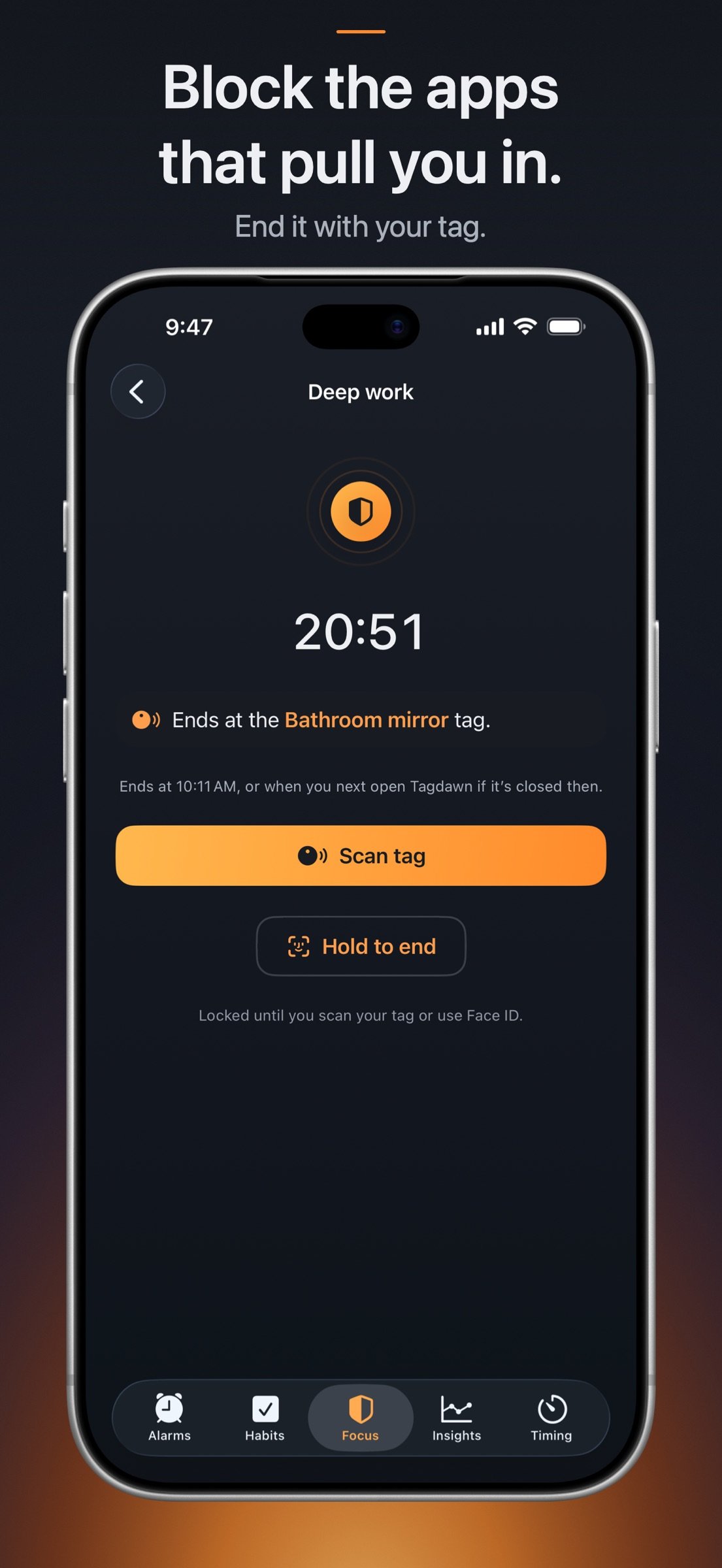
An alarm you turn off on your feet. Now with Tagdawn Focus, an app blocker you can end with your tag.
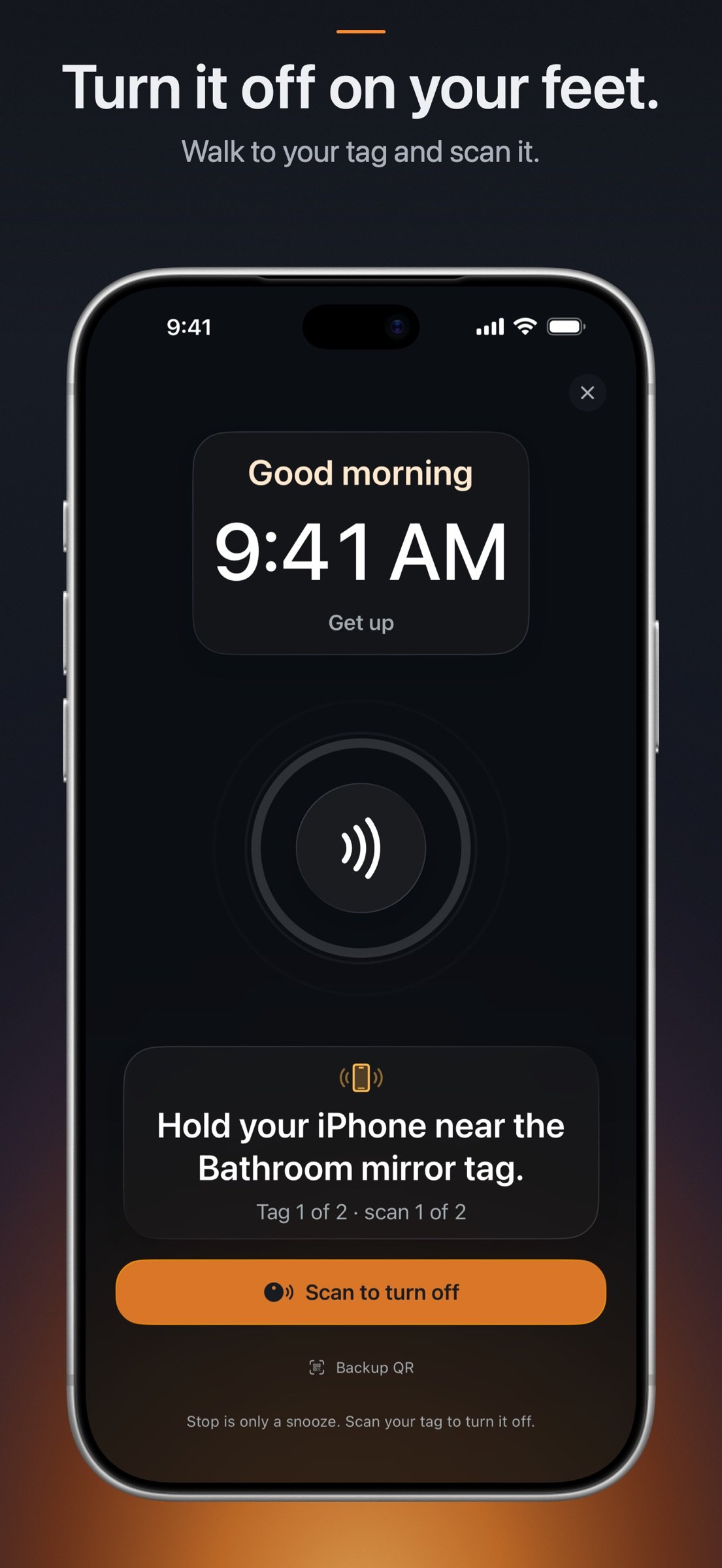
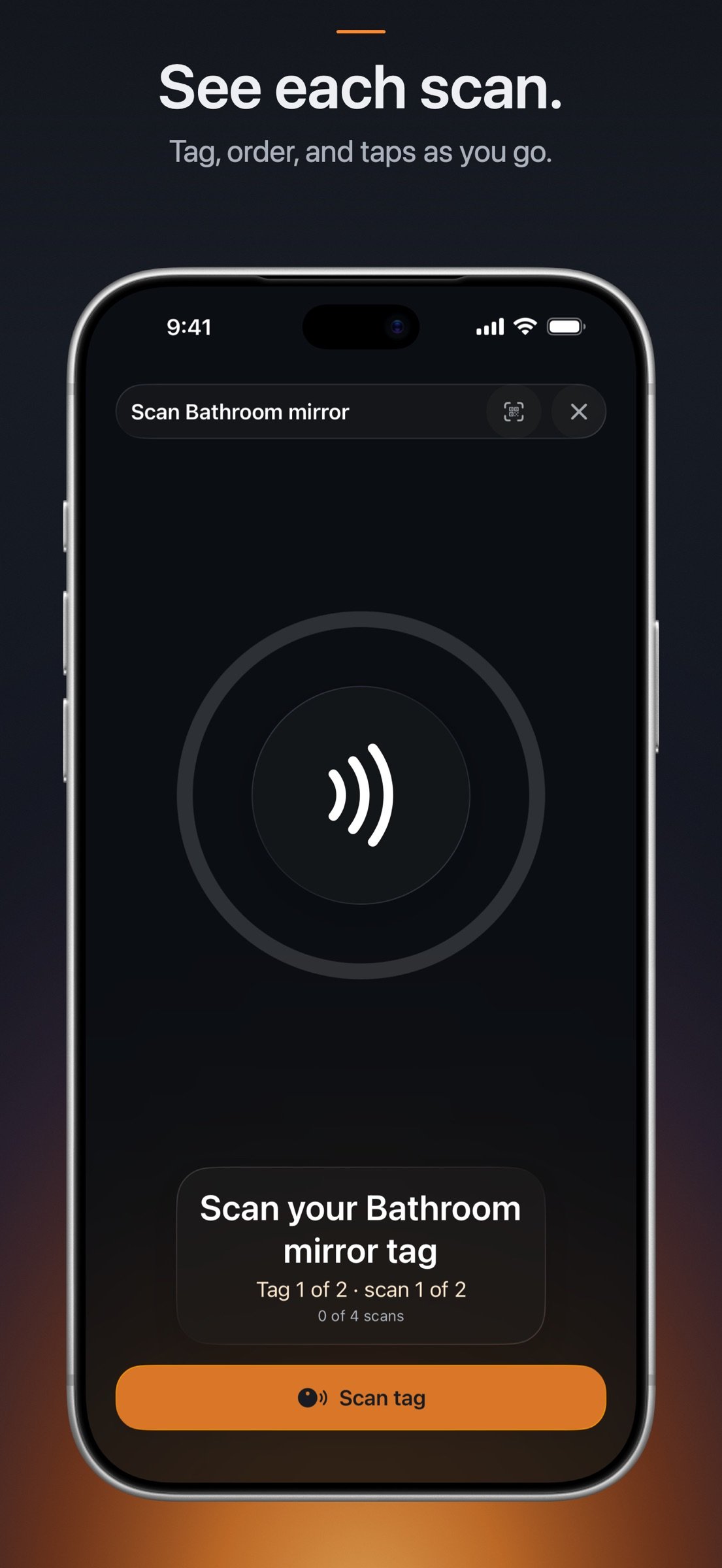
Tagdawn alarms use iPhone’s own alarm system, so they alert through Silent mode and iPhone Focus modes. Add a compatible NFC tag across the room and scan it to turn the alarm off in Tagdawn.
iPhone always shows Stop, and Tagdawn can’t remove it. On an alarm with no tag, Stop ends it. On a tag alarm, Stop is a snooze. The alarm rings again after the wait you choose, and scanning your tag turns it off. You can limit how many Stops get your chosen wait. After that, each Stop gets the shortest wait, about 10 to 15 seconds.
Side or volume buttons can quiet a ring without using Stop, and iPhone doesn’t tell Tagdawn about them. A tag alarm keeps nudging you with a vibration every 13 seconds for about 5 minutes after it starts ringing. These nudges can come even if you didn’t press anything. Exact timing and continuous sound are not guaranteed.
Make each alarm yours:
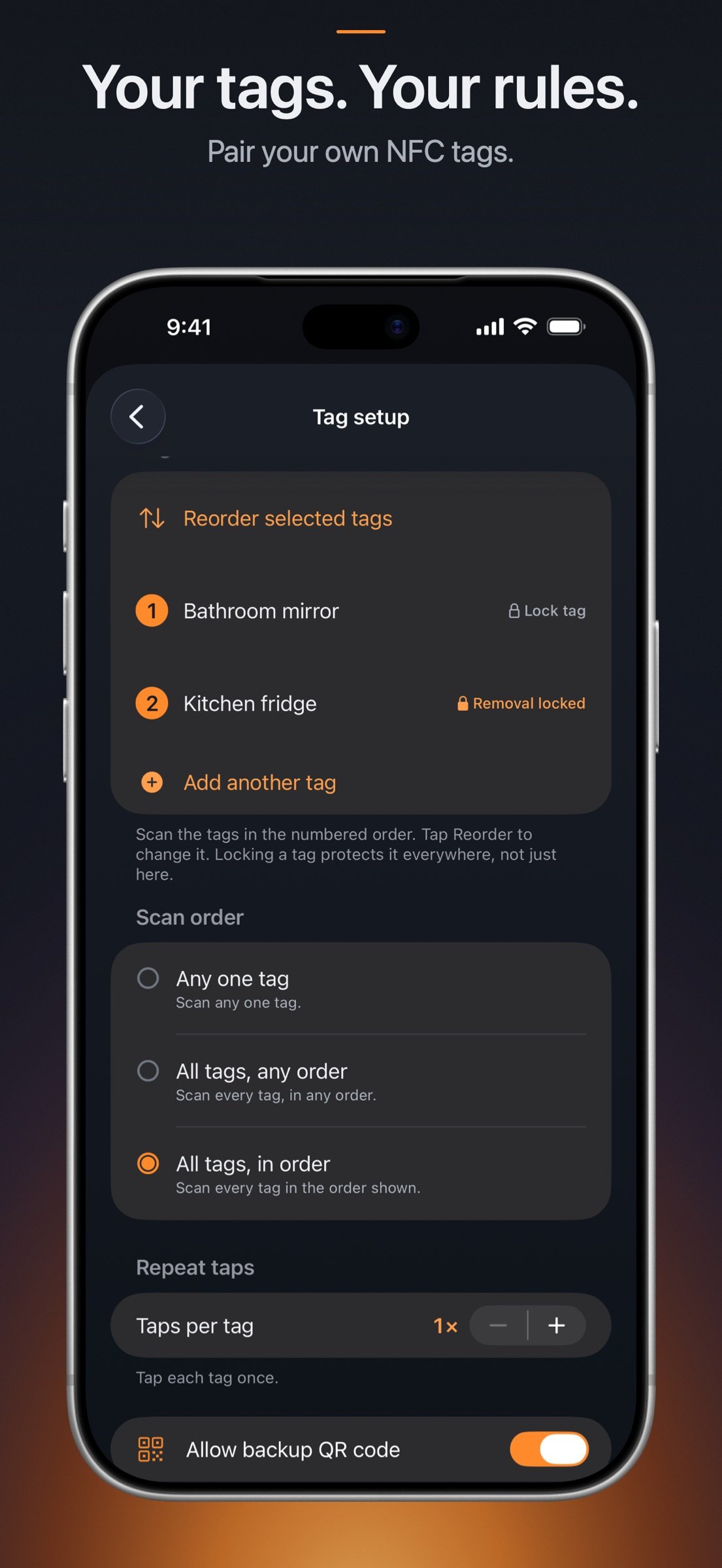
- Choose one or more tags, their order, and the number of taps per tag.
- Keep an optional private backup QR code for an eligible alarm.
- Run a test alarm with the same tag and Ring again setup before you rely on it.
- Protect alarm changes with Face ID, Touch ID, a passcode, or the alarm’s own tag.
- Choose a Tagdawn tone, the iPhone alarm sound, or a compatible imported sound.
- Use tags for timers too.
Tagdawn Focus:
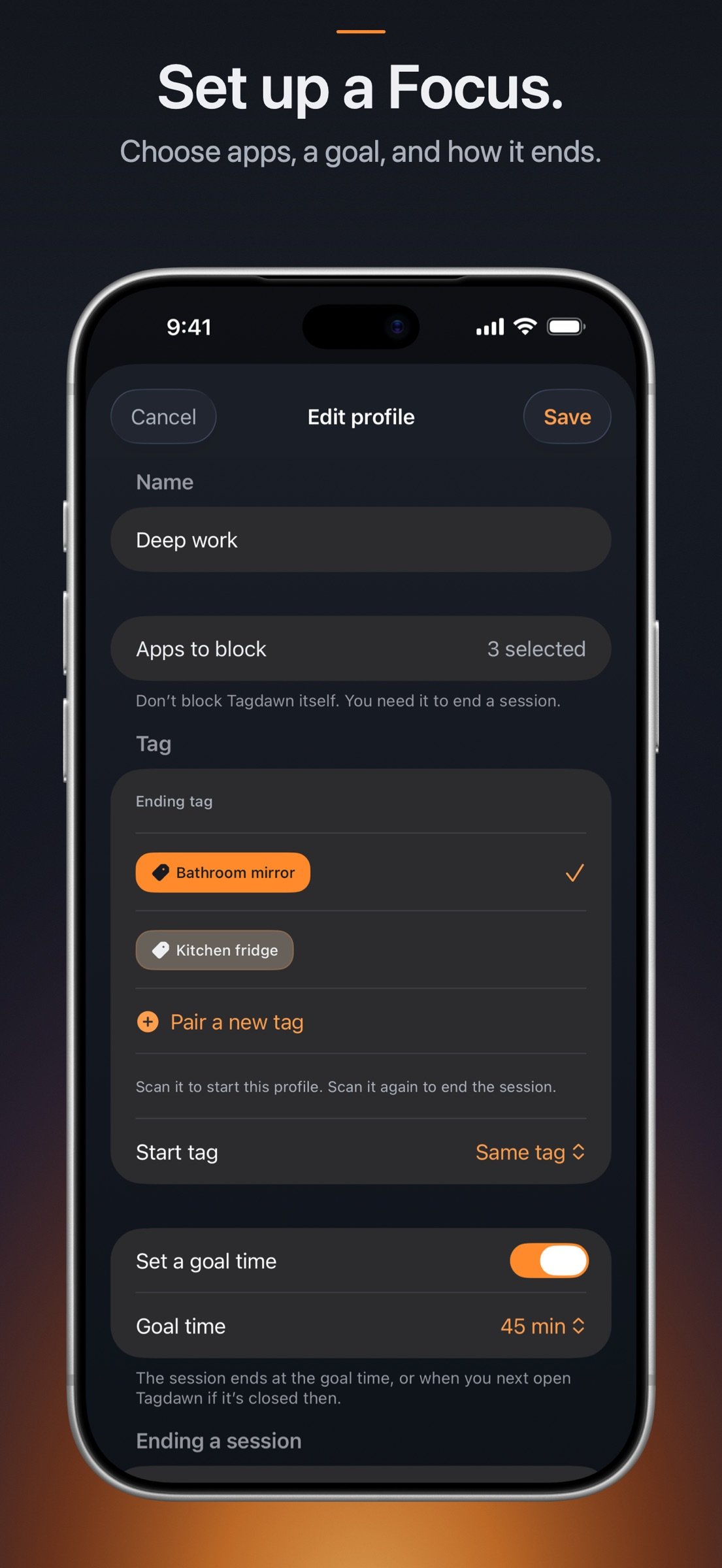
- Pick the apps and categories you want out of reach with Apple’s Screen Time picker.
- Start a Focus with a tap or a tag scan. Apple’s Screen Time screen covers the chosen apps while it runs.
- Choose how it ends: with your tag, with a held Face ID check, or with a plain End button.
- Give a Focus its own start tag, separate from the tag that ends it.
- Add a goal time if you want one.
- See your sessions, goals, and how each one ended in Insights.
- Focus is included with Tagdawn. No extra purchase.
Turning off Screen Time access for Tagdawn, or deleting Tagdawn, can always end a session early. Treat Focus as a strong nudge you set up for yourself.
Keep the rest of the morning close:
- Track check-offs, counts, amounts, limits to stay under, and habits with no daily goal.
- Add several planned times and choose a normal notification or a loud alarm.
- Optionally ask a loud habit alarm to ring again after Stop.
- Log an earlier entry with its real date and time.
- See Wake, Habits, and Focus together in Insights, with no account.
- Add the Habits widget to show chosen habits as a streak, a chart, a trend, or a number.
- Use timers, a stopwatch, widgets, and eligible Lock Screen or Dynamic Island activities.
Tag scans start only while Tagdawn is open and you choose to scan. On supported iPhones, a habit tag written by Tagdawn may also show an iPhone notification while the phone is in use. Tap it, and unlock if asked, to open Tagdawn. Nothing is logged before that. A tag linked to one habit follows its saved action. A shared tag asks what to do. If the tag ends a running Focus, it ends that Focus instead.
Tagdawn works alongside Clock. It doesn’t replace it. Alarm, tag, Wake, Habit, Focus, timer, and stopwatch records are processed on your devices. For Focus, iOS never shows Tagdawn the names of the apps you pick or how you use them. If physical-tag write protection is used, its recovery secret may sync through your iCloud Keychain. The developer can’t access it. No account, subscription, ads, or tracking.
No phone alarm can ring without power. Keep your iPhone charged and use another backup when waking is critical.
License: Commercial
Tagdawn alarms use iPhone’s own alarm system, so they alert through Silent mode and iPhone Focus modes. Add a compatible NFC tag across the room and scan it to turn the alarm off in Tagdawn.
iPhone always shows Stop, and Tagdawn can’t remove it. On an alarm with no tag, Stop ends it. On a tag alarm, Stop is a snooze. The alarm rings again after the wait you choose, and scanning your tag turns it off. You can limit how many Stops get your chosen wait. After that, each Stop gets the shortest wait, about 10 to 15 seconds.
Side or volume buttons can quiet a ring without using Stop, and iPhone doesn’t tell Tagdawn about them. A tag alarm keeps nudging you with a vibration every 13 seconds for about 5 minutes after it starts ringing. These nudges can come even if you didn’t press anything. Exact timing and continuous sound are not guaranteed.
Make each alarm yours:
- Choose one or more tags, their order, and the number of taps per tag.
- Keep an optional private backup QR code for an eligible alarm.
- Run a test alarm with the same tag and Ring again setup before you rely on it.
- Protect alarm changes with Face ID, Touch ID, a passcode, or the alarm’s own tag.
- Choose a Tagdawn tone, the iPhone alarm sound, or a compatible imported sound.
- Use tags for timers too.
Tagdawn Focus:
- Pick the apps and categories you want out of reach with Apple’s Screen Time picker.
- Start a Focus with a tap or a tag scan. Apple’s Screen Time screen covers the chosen apps while it runs.
- Choose how it ends: with your tag, with a held Face ID check, or with a plain End button.
- Give a Focus its own start tag, separate from the tag that ends it.
- Add a goal time if you want one.
- See your sessions, goals, and how each one ended in Insights.
- Focus is included with Tagdawn. No extra purchase.
Turning off Screen Time access for Tagdawn, or deleting Tagdawn, can always end a session early. Treat Focus as a strong nudge you set up for yourself.
Keep the rest of the morning close:
- Track check-offs, counts, amounts, limits to stay under, and habits with no daily goal.
- Add several planned times and choose a normal notification or a loud alarm.
- Optionally ask a loud habit alarm to ring again after Stop.
- Log an earlier entry with its real date and time.
- See Wake, Habits, and Focus together in Insights, with no account.
- Add the Habits widget to show chosen habits as a streak, a chart, a trend, or a number.
- Use timers, a stopwatch, widgets, and eligible Lock Screen or Dynamic Island activities.
Tag scans start only while Tagdawn is open and you choose to scan. On supported iPhones, a habit tag written by Tagdawn may also show an iPhone notification while the phone is in use. Tap it, and unlock if asked, to open Tagdawn. Nothing is logged before that. A tag linked to one habit follows its saved action. A shared tag asks what to do. If the tag ends a running Focus, it ends that Focus instead.
Tagdawn works alongside Clock. It doesn’t replace it. Alarm, tag, Wake, Habit, Focus, timer, and stopwatch records are processed on your devices. For Focus, iOS never shows Tagdawn the names of the apps you pick or how you use them. If physical-tag write protection is used, its recovery secret may sync through your iCloud Keychain. The developer can’t access it. No account, subscription, ads, or tracking.
No phone alarm can ring without power. Keep your iPhone charged and use another backup when waking is critical.
License: Commercial
| Release info | Update on Oct 27, 2026 |
|---|---|
| Release notes | Tagdawn Focus is here. Lock away distracting apps, then scan your tag to get them back. - Focus is included with Tagdawn. No extra purchase, never a subscription. - Give a profile its own start tag, separate from the tag that ends it, or turn off starting by tag. - A new Habits widget shows the habits you choose as a streak, a chart, a trend, or a number. - Alarms can now limit how many Stops get your chosen Ring again delay. Scan your tag, or its backup code, to turn the alarm off. - Timers and Stopwatch now share one Timing tab to make room for Focus. Both work exactly as before. - Insights now shows Wake, Habits, and Focus on one page. |
| Listing data | App Store |
Reviews
No reviews yet. Be the first to review Tagdawn.
Used Tagdawn? Tell other visitors what you thought.
Log in to write a reviewOther products by this publisher
- "No Distractions" for YouTube 4.10 ----
- #Bible 11.6.1 "Incredible App - My sister shared this app with me a few weeks ago and it is truly incredible.
- #filmphotography 1.4.2 So, you decided to shoot on film?
- $quirrel 1.5.1 $quirrel Budget & Finance helps you plan each paycheck, track spending, manage debt, and see what is safe to spend before the next payday.
- % Percentage Calculator Pro 1.41 This is the Pro version of % Percentage Calculator.
Most viewed iOS Productivity
-
1
 WordPress 27.4
Manage or create your WordPress blog or website right from your iOS device: create and edit posts and pages, upload your favorite photos and videos, view stats and reply to comments.
- 2 Voice Translator - Alive 1.6 Translation app that turns your iPhone into an interpreter instantly.
-
3
 Claude by Anthropic 1.261113.19
Meet Claude, your AI problem solver and thinking partner.
-
4
 Life360 26.44.0
Whether at home, online, or on the move, our comprehensive family safety features bring peace of mind to your loved ones AND help safeguard your personal belongings.
-
5
 WristMemo 2.0
WristMemo turns your Apple Watch into an all-day voice recorder.
- 6 "No Distractions" for YouTube 4.10 ----
-
7
 Colicine 1.3.0
Have you ever been there—
- 8 (beat) for iOS 0.5.10 An elegant Fountain screenwriting app, created by a screenwriter for screenwriters.
-
9
 DeepSeek 2.8.0
Experience seamless interaction with DeepSeek's official AI assistant for free!
-
10
 Howbout 16.7.2
The shared calendar for friends, couples, and family
Most downloaded iOS Productivity
- 1 Voice Translator - Alive 1.6 Translation app that turns your iPhone into an interpreter instantly.
-
2
DeepSeek 2.8.0
Experience seamless interaction with DeepSeek's official AI assistant for free!
-
3
 SessionsAI 1.2.1
Sessions AI is a private AI workspace that runs entirely on your iPhone, iPad, or Mac.
-
4
 Voices AI 1.16.15
Discover Voices, the premier voice transformation app designed exclusively for iOS.
-
5
 Block Distracting Websites 1.11
"It's a great way to save time, and stop browsing Reddit when you should be doing coursework."
-
6
 Plot Digitizer 1.4.1
Plot Digitizer is an app to extract numerical data from plot images.
-
7
 Google Docs 1.2026.46102
Create, edit, and collaborate on online documents with the Google Docs app.
-
8
 MyHyundai with Bluelink 5.4.5
The MyHyundai app makes getting information about your Hyundai vehicle easier than ever.
-
9
 Pixy Mood Tracker 1.110.0
Track your mood, one pixel at a time.
-
10
 Chatbot App 9.2.8
Chatbot App brings advanced AI models together in one intuitive app for writing, learning, coding, creativity, and productivity.