SqliteToMsSql 1.9
SqliteToMsSql - Import SQLite to SQL Server. Main features: 1.Easy visual configuration. 2.Converts from both table and query. 3. Displays progress through time estimation. 4. Tow mode: Wizard - step by step; Direct import - efficient.
Product Specifications
| User Rating: | item has less then 1 vote |
|
| FileCart Rating | Not yet Rated | |
| Submitted by: | panan | |
| Homepage | Visit Homepage | |
| License | Shareware | |
| Expires | 30 Days | |
| Price | $79.00 | |
| Downloads | 526 | |
| OS Support | Windows Install and Uninstall | |
| File Name | SqliteToMsSql.exe | |
| File Size | 6.94 MB ( 7,110 KB ) | |
| Published | Dec 03, 2014 (12 years ago) | |
| Updated | Jan 11, 2017 (10 years ago) | |
Follow Us!
Latest Searches
kandis dad 3 minutes ago
whats an sku 3 minutes ago
app& c 5 minutes ago
chinese idioms about versatility 8 minutes ago
SWADESH BHARAT 9 minutes ago
5g spf sonicwall compatible copper module 11 minutes ago
3Hello World 5 11 minutes ago
llama install windows powershell 12 minutes ago
kereta api sarong 16 minutes ago
Popular Searches
id cards 602 times
2025 495 times
2024 386 times
Softperfect 330 times
5g spf sonicwall compatible copper module 306 times
2026 301 times
Gypsy 2.0 Onlyfans Leaked Photos 301 times
targetamazon credit card.asp?highlight=0 273 times
ds1628 compatible 10gb sfp cards 269 times
Product Details
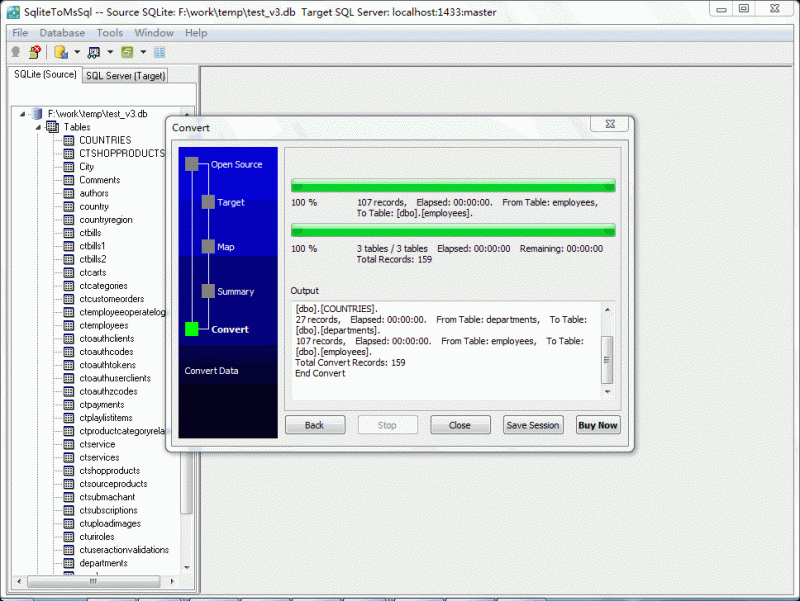
The main features are:
1. Easy visual configuration -- just click on the mouse.
2. Displays progress through time estimation.
3. Converts data quickly and smoothly.
4. Saves you a ton of time.
5. Converts from both table and query.
6. Converts multiple tables in one time.
7. Execute via command line and scheduled, this can help automate tasks.
8. Tow mode: Wizard - step by step; Direct import - efficient.
| Requirements: | Windows 2000 and above |
| Release Info: | New Release on Nov 12, 2016 |
| Release Notes: | Improve "create target table", target table name auto change to created table. Fix bug "create tables error" on "Import data from tables to tables". Improve save session, auto add folder and ext. Fix bug on list CLOB fields on exporting single table. |
| Related Tags: | SQLite to SQL Server SQL Server import SQLite SQLite migrate to SQL Server |
Reviews
Reviews of SqliteToMsSql 1.9
You can be the first to write a review of SqliteToMsSql!Other products submitted by this publisher
AccessToPostgres - Import Access to PostgreSQL. Main features: 1.Easy visual configuration. 2.Converts from both table and query. 3. Displays progress through time estimation. 4. Tow mode: Wizard - step by step; Direct import - efficient.
AccessToSqliteAccessToSqlite - Import Access to SQLite. Main features: 1.Easy visual configuration. 2.Converts from both table and query. 3. Displays progress through time estimation. 4. Tow mode: Wizard - step by step; Direct import - efficient.
DB2ToPostgresDB2ToPostgres - Import DB2 to PostgreSQL. Main features: 1.Easy visual configuration. 2.Converts from both table and query. 3. Displays progress through time estimation. 4. Tow mode: Wizard - step by step; Direct import - efficient.
MsSqlToDB2MsSqlToDB2 - Import SQL Server to DB2. Main features: 1.Easy visual configuration. 2.Converts from both table and query. 3. Displays progress through time estimation. 4. Tow mode: Wizard - step by step; Direct import - efficient.
MsSqlToOracleMsSqlToOracle - Import SQL Server to Oracle. Main features: 1.Easy visual configuration. 2.Converts from both table and query. 3. Displays progress through time estimation. 4. Tow mode: Wizard - step by step; Direct import - efficient.
Most Downloaded Windows Signature Tools
Cute FLV Player 1.1
Accent RAR Password Recovery 3.60
Weather Signature 1.50
MS Access Tables To SQLite Converter Software 7.0
abtoVNC Viewer for Windows SDK 1.3.3
SQLite Tables To MS Access Converter Software 7.0
Live Signatures 2.5.6
CodeTwo Email Signatures 1.0
GameSwift 2.3.7.2022