
Sonority for Sonos 0.8.0
Sonority configures your speakers in ways the standard controller app doesn’t allow — using only the local network connection on your home Wi-Fi.
Download
23.29 MB
0downloads
0this week
FreeCommercial
0reviews
Screenshots
About Sonority for Sonos
Sonority configures your speakers in ways the standard controller app doesn’t allow — using only the local network connection on your home Wi-Fi. It does no audio processing of its own; all the sound comes from your real speakers. The configurations it creates are standard, supported speaker bondings — just ones the official app chooses not to expose.
WHAT YOU CAN DO
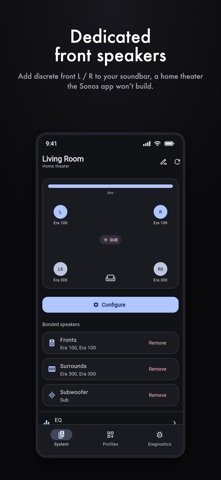
• Dedicated front speakers on a soundbar — add a discrete left/right pair so your bar becomes the center channel, for a true three-speaker front stage.
• Build a complete home theater in one guided flow — fronts, rear surrounds and one or two subs, each optional.
• Use a single amplifier to drive both passive front speakers.
• Speaker groups the standard app won’t make — full-range zones of 2–16 speakers, stereo pairs (including mismatched models), or a custom per-speaker left/right/both layout, each with an optional sub.
• Config profiles — snapshot your whole layout and rebuild it in one tap after moving speakers around. Each profile gets its own icon and colour, reorders with a drag, and opens a per-entity detail view showing exactly what it saved. A profile can also capture and restore per-speaker audio settings (bass, treble, loudness, night sound, speech enhancement, sub and surround levels, lip-sync) and, optionally, volume.
• Apply a profile without opening the app — from a home-screen widget (small, medium or large) or a long-press on the app icon.
• Rename rooms, identify which physical speaker is which by blinking its status light (or a short chime on iPhone/iPad) — right from a room or a bonded speaker — and toggle a speaker’s room-calibration tuning.
• Diagnostics — a technical, hide-nothing view of your system when something isn’t working, which you can share with support or email to the developer to get help.
• Works on iPhone, iPad and Mac, with a layout that adapts to the screen — a roomy side navigation and multi-column view on iPad and Mac, the familiar single column on phones.
Every change is made over your local network, is shown to you before it’s applied, and is fully reversible from within the app.
PRIVACY
No account. No sign-in. No analytics, no tracking, and no data collected. Sonority talks only to the speakers on your own Wi-Fi network — nothing leaves your home.
REQUIREMENTS
Compatible speakers on the same Wi-Fi network as your device. Room-calibration tuning, where supported, is measured in the manufacturer’s own app; Sonority only switches an existing tuning on or off.
—
Sonority is an independent app and is not affiliated with, authorized, maintained, sponsored, or endorsed by Sonos, Inc. “Sonos” is a trademark of Sonos, Inc., used here only to describe compatibility.
License: Commercial
WHAT YOU CAN DO
• Dedicated front speakers on a soundbar — add a discrete left/right pair so your bar becomes the center channel, for a true three-speaker front stage.
• Build a complete home theater in one guided flow — fronts, rear surrounds and one or two subs, each optional.
• Use a single amplifier to drive both passive front speakers.
• Speaker groups the standard app won’t make — full-range zones of 2–16 speakers, stereo pairs (including mismatched models), or a custom per-speaker left/right/both layout, each with an optional sub.
• Config profiles — snapshot your whole layout and rebuild it in one tap after moving speakers around. Each profile gets its own icon and colour, reorders with a drag, and opens a per-entity detail view showing exactly what it saved. A profile can also capture and restore per-speaker audio settings (bass, treble, loudness, night sound, speech enhancement, sub and surround levels, lip-sync) and, optionally, volume.
• Apply a profile without opening the app — from a home-screen widget (small, medium or large) or a long-press on the app icon.
• Rename rooms, identify which physical speaker is which by blinking its status light (or a short chime on iPhone/iPad) — right from a room or a bonded speaker — and toggle a speaker’s room-calibration tuning.
• Diagnostics — a technical, hide-nothing view of your system when something isn’t working, which you can share with support or email to the developer to get help.
• Works on iPhone, iPad and Mac, with a layout that adapts to the screen — a roomy side navigation and multi-column view on iPad and Mac, the familiar single column on phones.
Every change is made over your local network, is shown to you before it’s applied, and is fully reversible from within the app.
PRIVACY
No account. No sign-in. No analytics, no tracking, and no data collected. Sonority talks only to the speakers on your own Wi-Fi network — nothing leaves your home.
REQUIREMENTS
Compatible speakers on the same Wi-Fi network as your device. Room-calibration tuning, where supported, is measured in the manufacturer’s own app; Sonority only switches an existing tuning on or off.
—
Sonority is an independent app and is not affiliated with, authorized, maintained, sponsored, or endorsed by Sonos, Inc. “Sonos” is a trademark of Sonos, Inc., used here only to describe compatibility.
License: Commercial
| Release info | New Release on Oct 09, 2026 |
|---|---|
| Release notes | • New: a 10-band equaliser for a home theater, speaker group or single speaker. Tune the whole configuration at once, or each speaker on its own. A speaker holds one tuning, so Sonority asks first before replacing one measured in the standard app. • Speakers no longer go missing. A speaker the app failed to spot on the network is now recovered from your system's own layout, so a sub stops showing as a generic "Speaker", and the hidden half of a pair or group stays in it when you rename it. • A speaker whose address has changed is no longer filed under the wrong speaker. • Creating a speaker group keeps the navigation bar, like every other screen. • Reconfiguring a group or home theater now shows a speaker the app can't reach as part of the setup, instead of unticked with saving putting it straight back. • Shortcuts that could only dead-end on a single speaker are no longer offered. • Emailing a diagnostics report now asks what went wrong first, so a report never arrives without an explanation. |
| Listing data | App Store |
Reviews
No reviews yet. Be the first to review Sonority for Sonos.
Used Sonority for Sonos? Tell other visitors what you thought.
Log in to write a reviewOther products by this publisher
- #Bible 11.5 "Incredible App - My sister shared this app with me a few weeks ago and it is truly incredible.
- % Percentage Calculator Pro 1.41 This is the Pro version of % Percentage Calculator.
- (beat) for iOS 0.5.8 An elegant Fountain screenwriting app, created by a screenwriter for screenwriters.
- (Deep) HIARCS Chess Explorer 1.14 Chess database, analysis and game playing program
- (How to) Pronounce PRO 1.5.6 This is a PRO version of (How to) Pronounce.
Most viewed iOS Photo & Video
-
1
 AI Video Generator 1.8.2
Vixel – AI Video Generator
AI Video Generator 1.8.2
Vixel – AI Video Generator
-
2
 Dance AI 1.1.0
CREATE YOUR AI DANCE VIDEOS
Dance AI 1.1.0
CREATE YOUR AI DANCE VIDEOS
-
3
 Locket Widget 2.68.0
Locket is a widget that shows live photos from your best friends, right to your Home Screen.
Locket Widget 2.68.0
Locket is a widget that shows live photos from your best friends, right to your Home Screen.
-
4
 Letterboxd 4.12.6
Letterboxd for iOS puts the popular social network for film lovers on your iPhone or iPad, so you can log films and catch up on your friends’ activity with ease.
Letterboxd 4.12.6
Letterboxd for iOS puts the popular social network for film lovers on your iPhone or iPad, so you can log films and catch up on your friends’ activity with ease.
-
5
 BeReal 4.96.1
BeReal is the simplest photo-sharing app where you and your friends post once a day to show what you’re really up to.
BeReal 4.96.1
BeReal is the simplest photo-sharing app where you and your friends post once a day to show what you’re really up to.
-
6
 setlog 2.6.9
share everyday moments with your friends
setlog 2.6.9
share everyday moments with your friends
-
7
 Giggles 2.9
YOU'VE BEEN INVITED
Giggles 2.9
YOU'VE BEEN INVITED
-
8
 CNU 3.0.12
CNU?????????????????????,???????????????
CNU 3.0.12
CNU?????????????????????,???????????????
-
9
 Forum, a Facebook app 29.0
Facebook is great for keeping up with friends, watching videos, and staying connected.
Forum, a Facebook app 29.0
Facebook is great for keeping up with friends, watching videos, and staying connected.
-
10
 Pocket Light Meter 9.6.1
A light meter that is always in your pocket.
Pocket Light Meter 9.6.1
A light meter that is always in your pocket.
Most downloaded iOS Photo & Video
-
1
 TouchSiren Delta 3.1
--------------------------------------------------------------
TouchSiren Delta 3.1
--------------------------------------------------------------
-
2
Forum, a Facebook app 29.0
Facebook is great for keeping up with friends, watching videos, and staying connected.
-
3
Locket Widget 2.68.0
Locket is a widget that shows live photos from your best friends, right to your Home Screen.
-
4
 BIGO LIVE-Live Stream, Go Live 6.51.2
Watch great live streams, enjoy live game streaming, live chat with people worldwide, go live to be a social media influencer...All in BIGO LIVE!
BIGO LIVE-Live Stream, Go Live 6.51.2
Watch great live streams, enjoy live game streaming, live chat with people worldwide, go live to be a social media influencer...All in BIGO LIVE!
-
5
Letterboxd 4.12.6
Letterboxd for iOS puts the popular social network for film lovers on your iPhone or iPad, so you can log films and catch up on your friends’ activity with ease.
-
6
 Coverstar 15.11.3
Coverstar is the social app where you create, play, and connect in a positive community designed for fun — not drama.
Coverstar 15.11.3
Coverstar is the social app where you create, play, and connect in a positive community designed for fun — not drama.
-
7
BeReal 4.96.1
BeReal is the simplest photo-sharing app where you and your friends post once a day to show what you’re really up to.
-
8
setlog 2.6.9
share everyday moments with your friends
-
9
Giggles 2.9
YOU'VE BEEN INVITED
-
10
 FrostLink- WOS 5.4
FrostLink is the recruitment platform built for Whiteout Survival players, by Whiteout Survival players.
FrostLink- WOS 5.4
FrostLink is the recruitment platform built for Whiteout Survival players, by Whiteout Survival players.