SonoPhone for Sonos 1.8.12
Yes. There's a better way to control your Sonos system.
Download
13.16 MB
12downloads
1this week
FreeCommercial
0reviews
Screenshots
About SonoPhone for Sonos
Yes. There's a better way to control your Sonos system.
- Speeds up most common tasks (less taps)
- Cleaner, more stable and fast interface.
- Backward compatibility is king (we support Sonos S1 firmware and also iOS15 devices)
- Manage zones and music sources.
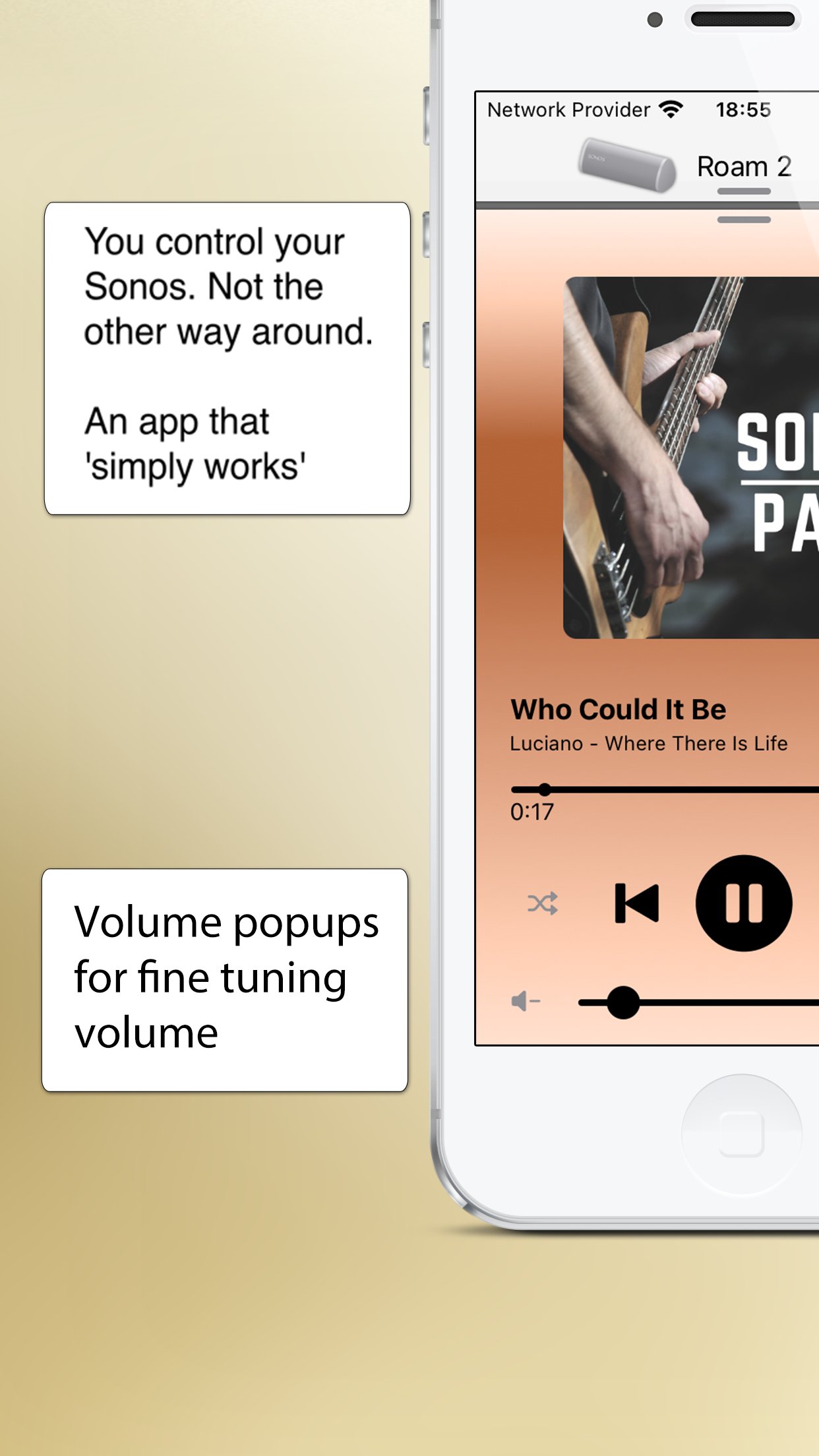
You control your Sonos. Not the other way around.
See the features in action on YouTube ([link removed]) or read more below.
This application is a third party app and not endorsed by or associated with Sonos, Inc. (which is why it is not free)
??? A new, intuitive and concise user interface ???
SonoPhone is designed to leverage the latest iOS design principles:
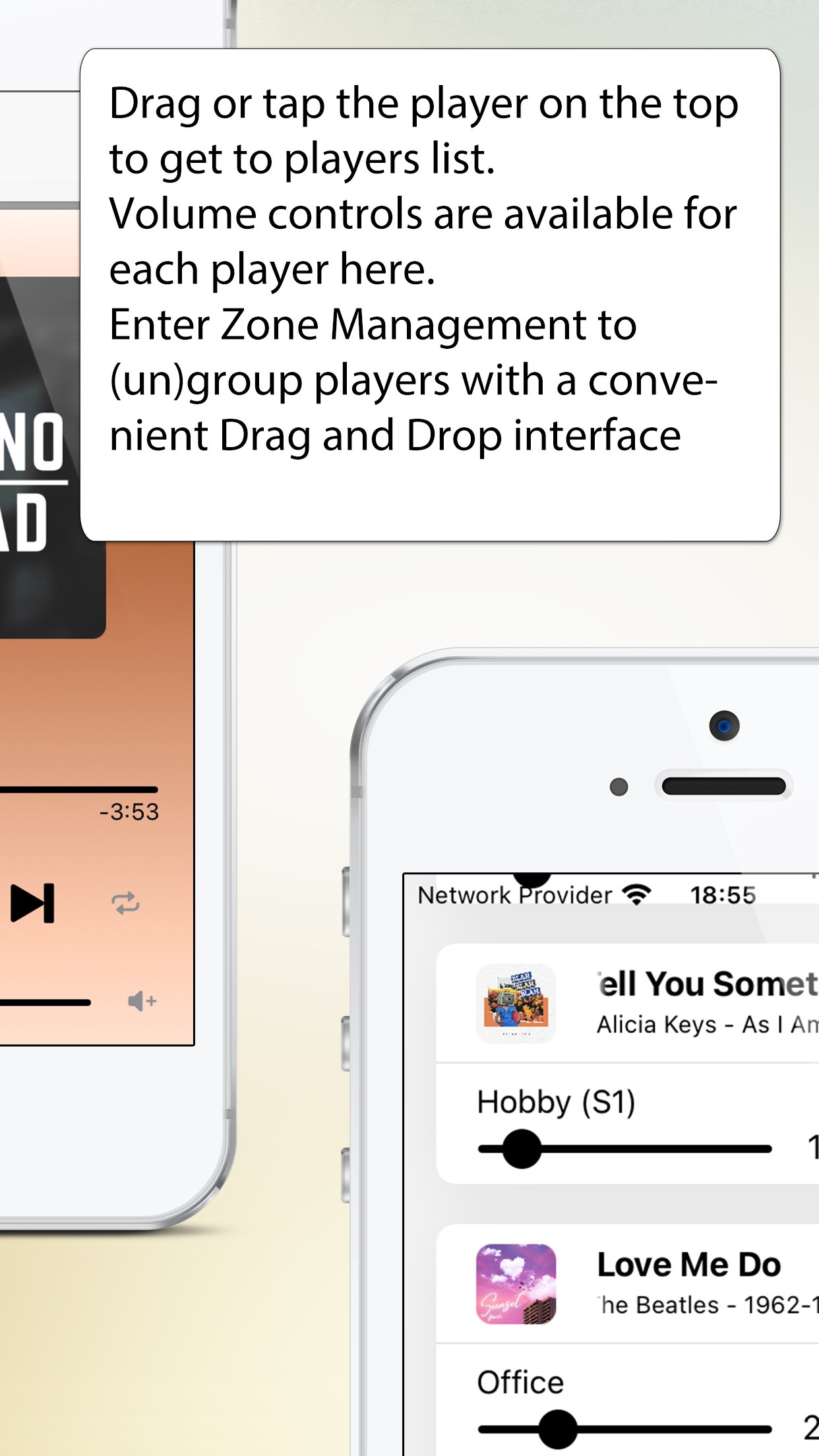
- Tap or drag the player on the top and you'll find the players view to select a new player and with volume controls for all players. From here you can also enter Zone Management, where you can group and ungroup players with drag and drop.
- Tap or drag the Track infos on the bottom and you'll be at the big covers screen
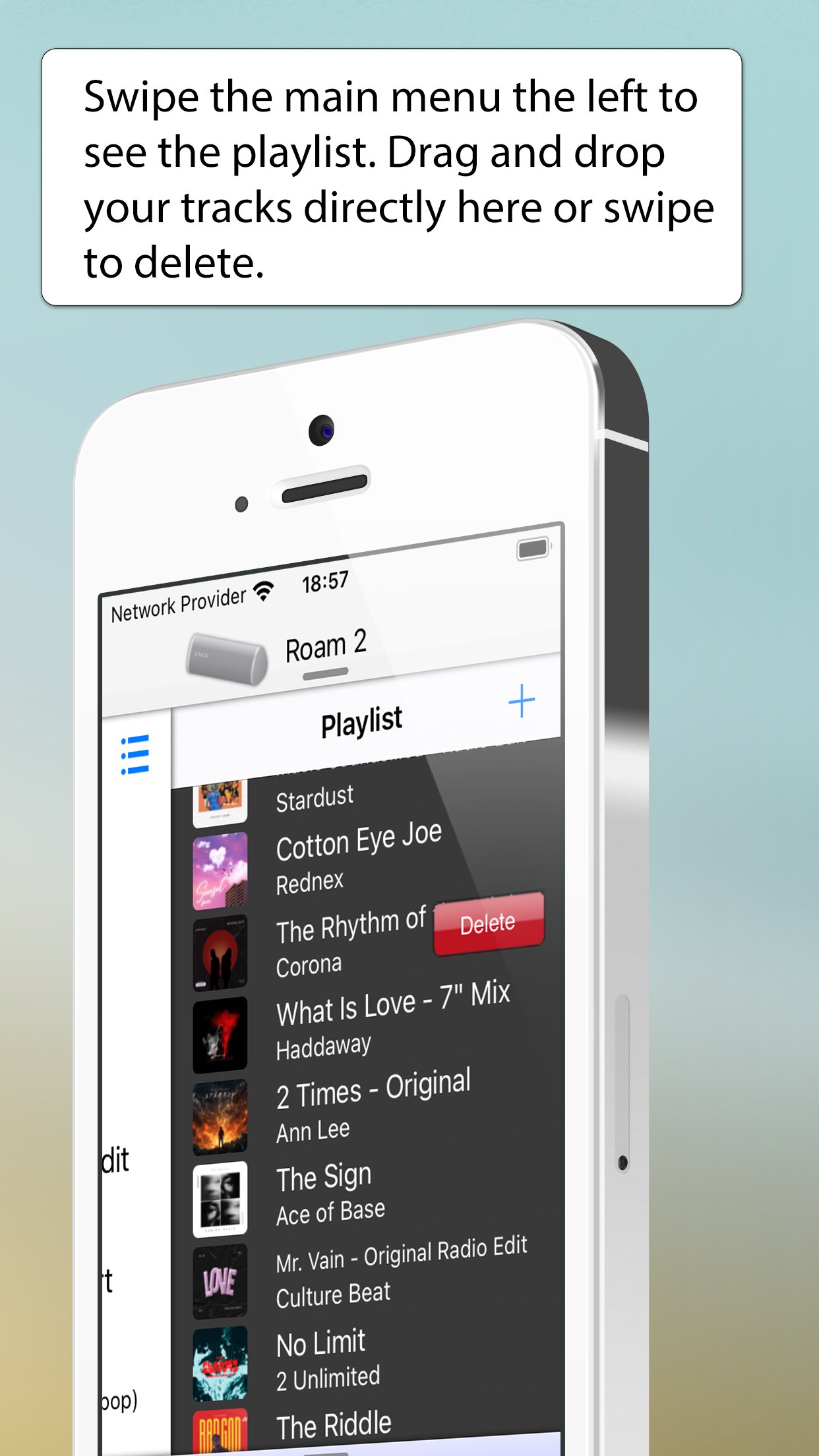
- Drag the main menu from any place to the left or right to have instant access to playlist or shortcuts
- volume + progress popups: when changing volume or progress of a song, you get popups telling you the actual values. Stop guessing your desired values today!
??? less taps for common tasks ???
SonoPad tries to optimize most often used tasks to have the least taps needed. In the end you are able to navigate and control your players much more fluently.
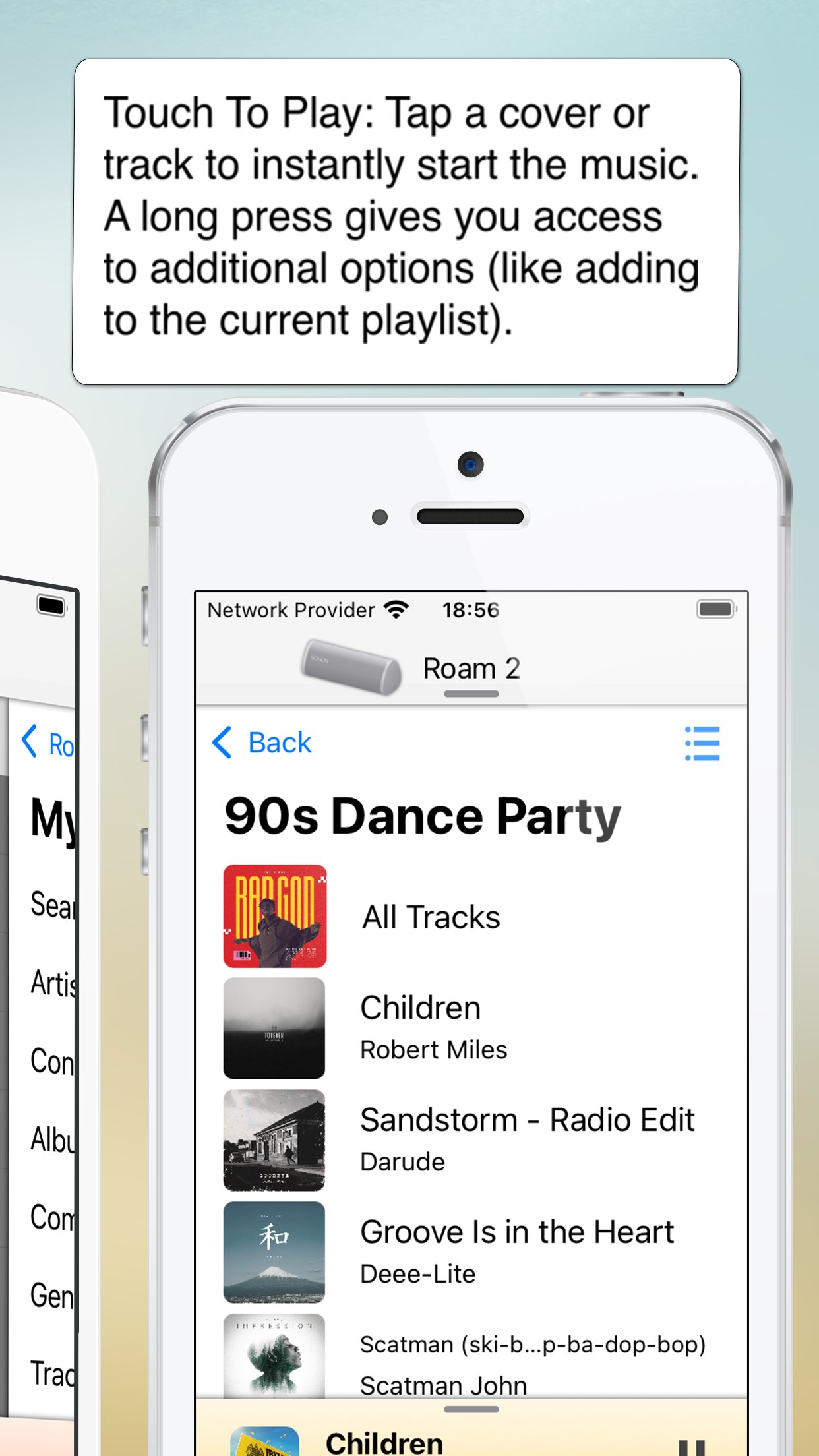
- Touch To Play: are you sick of always beeing asked what to do when you tap a track or album? SonoPhone defaults to just starting an album or song. A long press still gives you access to all options - you can also change the tap default in the settings menu. Want to build a playlist fast? Just set the default to 'always add to end' and off you go ...
- tap an album cover image and the whole album starts to play immediately
- aggregated search: search results are collapsed into one view, so you see immediately in what category you have the best results, without switching back and forth
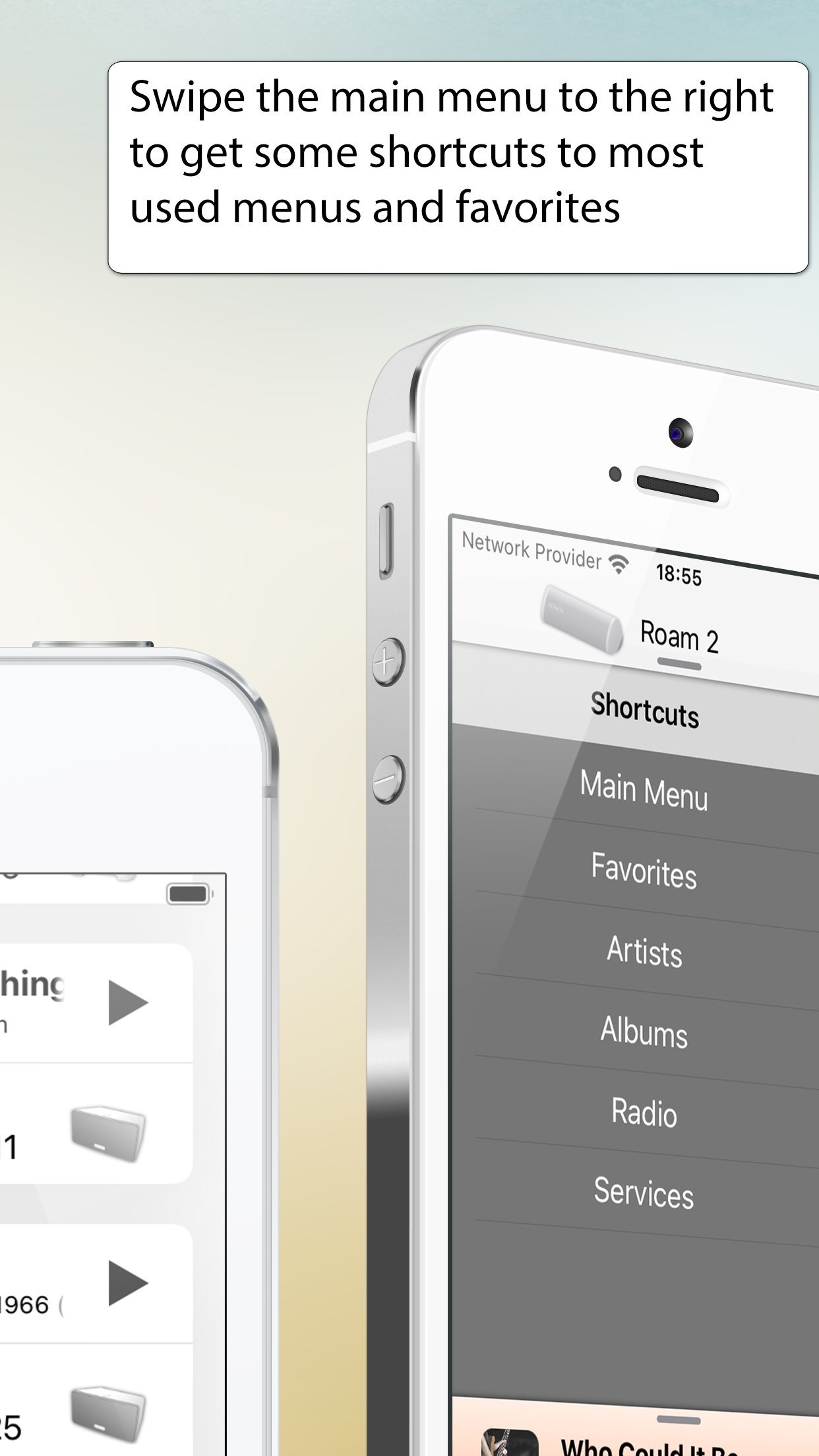
- shortcuts to most used functions: drag the main menu to the right to get shortcut buttons for artist, albums, radio and musicservices.
- you can control the volume of every player directly from the player selection screen. No need to switch players anymore.
??? S1 and S2 devices in one app ????
- If you still have old S1 devices, the time of always having to change apps is over. We simply display all existing players in the network in one list. Grouping is unfortunately not possible, this is prevented by Sonos.
??? Limitations ???
- all music services except YouTube Music are supported
- no support for administrative features (adding/removing players, music service, ...). You need the official Apps for initial setup of your system, SonoPad will pick up all changes automatically.
- no options to set alarms or sleep settings
- no playing of music stored on iPhone
- no support for discontinued WD100 dock
??? Other stuff ???
- Sonos is registered trademark of Sonos, Inc.
License: Commercial
- Speeds up most common tasks (less taps)
- Cleaner, more stable and fast interface.
- Backward compatibility is king (we support Sonos S1 firmware and also iOS15 devices)
- Manage zones and music sources.
You control your Sonos. Not the other way around.
See the features in action on YouTube ([link removed]) or read more below.
This application is a third party app and not endorsed by or associated with Sonos, Inc. (which is why it is not free)
??? A new, intuitive and concise user interface ???
SonoPhone is designed to leverage the latest iOS design principles:
- Tap or drag the player on the top and you'll find the players view to select a new player and with volume controls for all players. From here you can also enter Zone Management, where you can group and ungroup players with drag and drop.
- Tap or drag the Track infos on the bottom and you'll be at the big covers screen
- Drag the main menu from any place to the left or right to have instant access to playlist or shortcuts
- volume + progress popups: when changing volume or progress of a song, you get popups telling you the actual values. Stop guessing your desired values today!
??? less taps for common tasks ???
SonoPad tries to optimize most often used tasks to have the least taps needed. In the end you are able to navigate and control your players much more fluently.
- Touch To Play: are you sick of always beeing asked what to do when you tap a track or album? SonoPhone defaults to just starting an album or song. A long press still gives you access to all options - you can also change the tap default in the settings menu. Want to build a playlist fast? Just set the default to 'always add to end' and off you go ...
- tap an album cover image and the whole album starts to play immediately
- aggregated search: search results are collapsed into one view, so you see immediately in what category you have the best results, without switching back and forth
- shortcuts to most used functions: drag the main menu to the right to get shortcut buttons for artist, albums, radio and musicservices.
- you can control the volume of every player directly from the player selection screen. No need to switch players anymore.
??? S1 and S2 devices in one app ????
- If you still have old S1 devices, the time of always having to change apps is over. We simply display all existing players in the network in one list. Grouping is unfortunately not possible, this is prevented by Sonos.
??? Limitations ???
- all music services except YouTube Music are supported
- no support for administrative features (adding/removing players, music service, ...). You need the official Apps for initial setup of your system, SonoPad will pick up all changes automatically.
- no options to set alarms or sleep settings
- no playing of music stored on iPhone
- no support for discontinued WD100 dock
??? Other stuff ???
- Sonos is registered trademark of Sonos, Inc.
License: Commercial
| Release info | New Release on Nov 24, 2025 |
|---|---|
| Release notes | - fixes a crash on iOS 26.1 As always: If anything is not working as you expect don't hesitate to contact support@sonophone.net |
| Listing data | App Store |
Reviews
No reviews yet. Be the first to review SonoPhone for Sonos.
Used SonoPhone for Sonos? Tell other visitors what you thought.
Log in to write a reviewOther products by this publisher
- "No Distractions" for YouTube 4.10 ----
- #Bible 11.6 "Incredible App - My sister shared this app with me a few weeks ago and it is truly incredible.
- #filmphotography 1.4.2 So, you decided to shoot on film?
- $quirrel 1.5.1 $quirrel Budget & Finance helps you plan each paycheck, track spending, manage debt, and see what is safe to spend before the next payday.
- % Percentage Calculator Pro 1.41 This is the Pro version of % Percentage Calculator.
Most viewed iOS Photo & Video
-
1
 ShortDiShow 2.0
Drama Quest Island — An offline interactive short-drama adventure.
-
2
 Infuse 8.5.10
Infuse: Enterprise provides the same great features as the standard version of Infuse and includes permanent access to all Pro features via a traditional paid app.
-
3
 AI Video Generator 2.0.2
Vixel – AI Video Generator
-
4
 OPlayer 4.8
Play all your videos directly without having to convert them!
-
5
 Necrometer II 1.2
Necrometer II is a paranormal investigation companion designed for ghost hunters and researchers.
-
6
 CapCut 20.1.0
CapCut offers easy-to-use video editing functions, in-APP fonts and effects, advanced features such as keyframe animation, smooth slow-motion, chroma key, and stabilization, to help you capture and snip moments.
-
7
 Ai Photo 1.1.2
AI Photo Retouch – BG Eraser
-
8
 Treblo 1.6.0
Make songs with the world's best AI music model.
-
9
 Pop Dot Comics 1.48
Create a comic worthy of the Sunday newspaper or your favorite pulp-fiction cover.
- 10 #filmphotography 1.4.2 So, you decided to shoot on film?
Most downloaded iOS Photo & Video
-
1
Infuse 8.5.10
Infuse: Enterprise provides the same great features as the standard version of Infuse and includes permanent access to all Pro features via a traditional paid app.
-
2
 DJI Fly 1.21.18
DJI Fly is designed to help pilots fly drones with ease.
-
3
 Analog Radio 3.0
The iPhone and iPad devices don't have the FM/AM radio antenna installed.
-
4
 TurboCollage Automatic 1.2.4
#1 Easy automatic photo collage maker for iPhone & iPad.
-
5
Treblo 1.6.0
Make songs with the world's best AI music model.
-
6
 ReelyGo 1.1.42
ReelyGo: Your Daily Drama Escape
-
7
 Rozeta Sequencer Suite 1.3.16
Rozeta is a suite of MIDI sequencers and controllers that lets you explore a new, freeform approach to sequencing and controlling mobile music apps.
-
8
 AGAIN. Rehearsal Notes 2.0.1
AGAIN. is the rehearsal app that remembers why the band stopped — and, new in Version 2, who said what in a writing session or a table read.
-
9
Pop Dot Comics 1.48
Create a comic worthy of the Sunday newspaper or your favorite pulp-fiction cover.
-
10
 SSS IPTV, Simple, Smart Super 1.0.2
An Easiest way to watch TV Online or Movies or Series, Bring your Own list M3u,