
4downloads
4this week
FreeCommercial
0reviews
Screenshots
About Snapshots
Snapshots turns your iPhone into an instant camera.
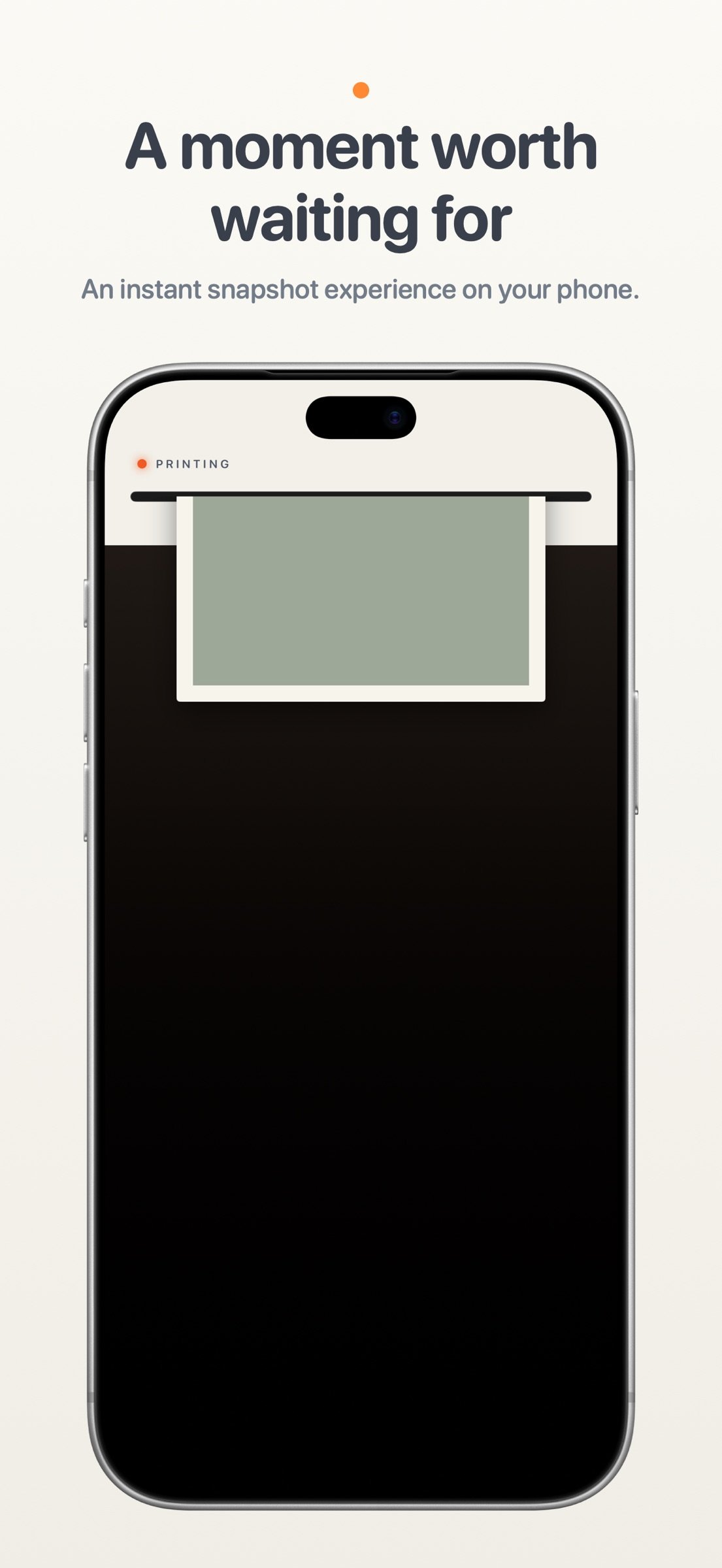
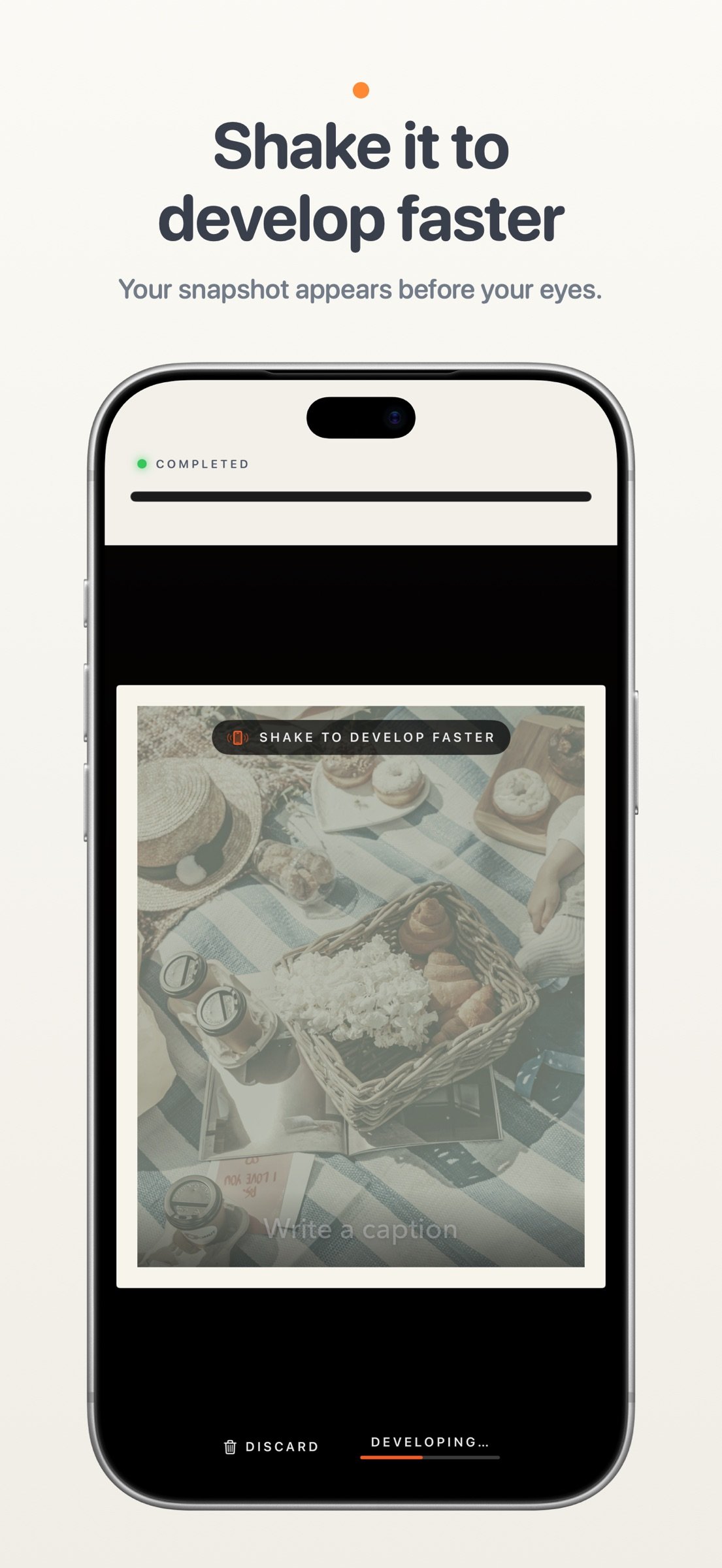
Take a snapshot and watch a little printer feed your photo onto the screen. Watch it develop, or give your phone a shake to reveal it faster. Add a handwritten-style caption to remember the story behind it.
Inspired by the instant cameras we grew up with, Snapshots captures one moment at a time. Keep your print or let it go, with a little room to enjoy the moment before taking another.
SHOOT
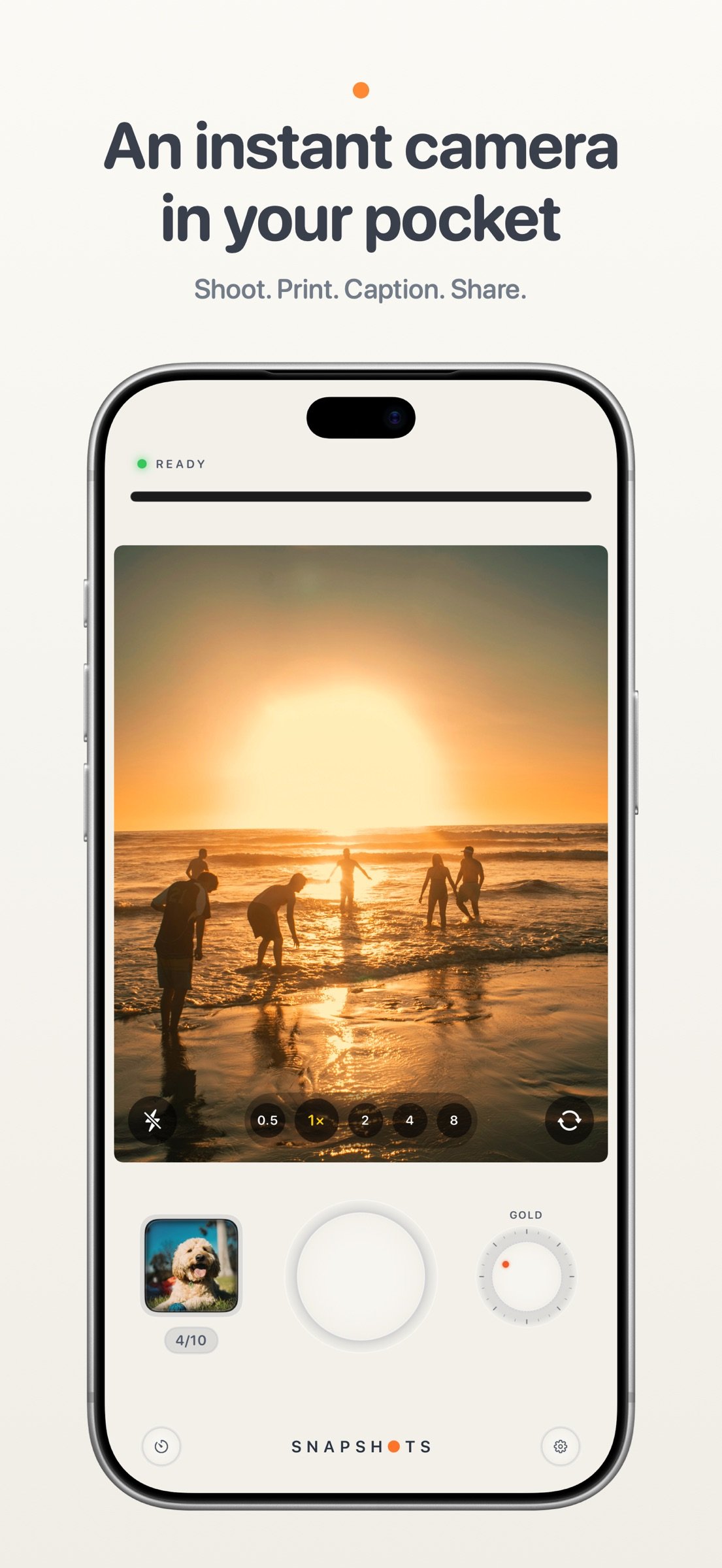
• Soft, tactile controls: a big shutter, a film-style dial and slide switches you can tap anywhere.
• Rear and front cameras, with a zoom step for every lens on the back and a wide view for selfies.
• Tap to focus. Press and hold to lock focus and exposure, then slide to brighten or darken.
• Flash: off, auto or on.
• Self-timer: 3 or 10 seconds.
BOOTH MODE
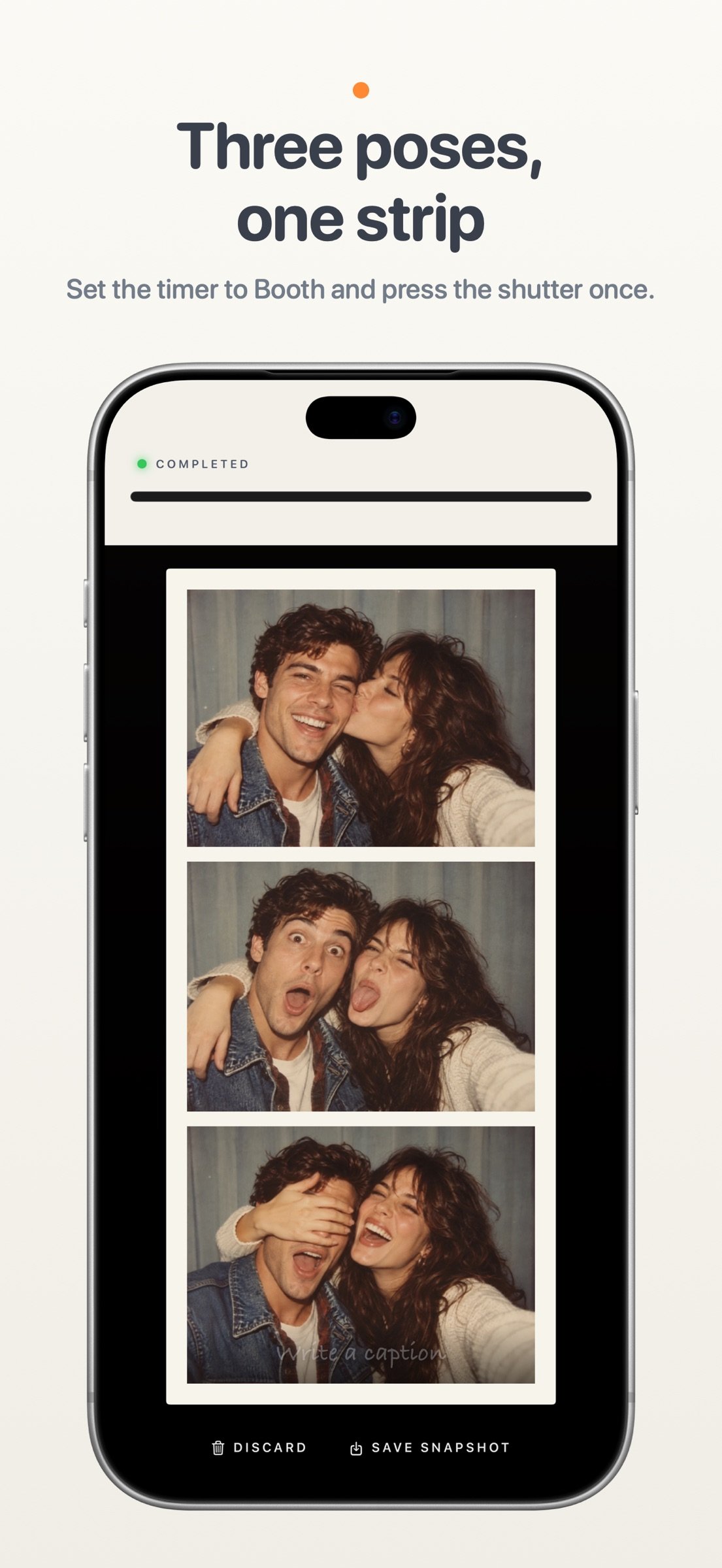
• Set the timer to Booth, press the shutter once, and strike three poses on a countdown.
• All three print together as one tall snapshot.
• Booth switches to the front camera for you.
FIVE FILM STYLES
• Classic – warm and gentle.
• Gold – rich, late-afternoon color.
• Coast – cool and crisp.
• Sepia – the brown tones of an old photograph.
• Mono – classic black and white.
You see the style live in the viewfinder before you shoot.
PRINT
• Every shot prints as a framed instant photo with an even white border.
• Shake your phone and it finishes developing at once.
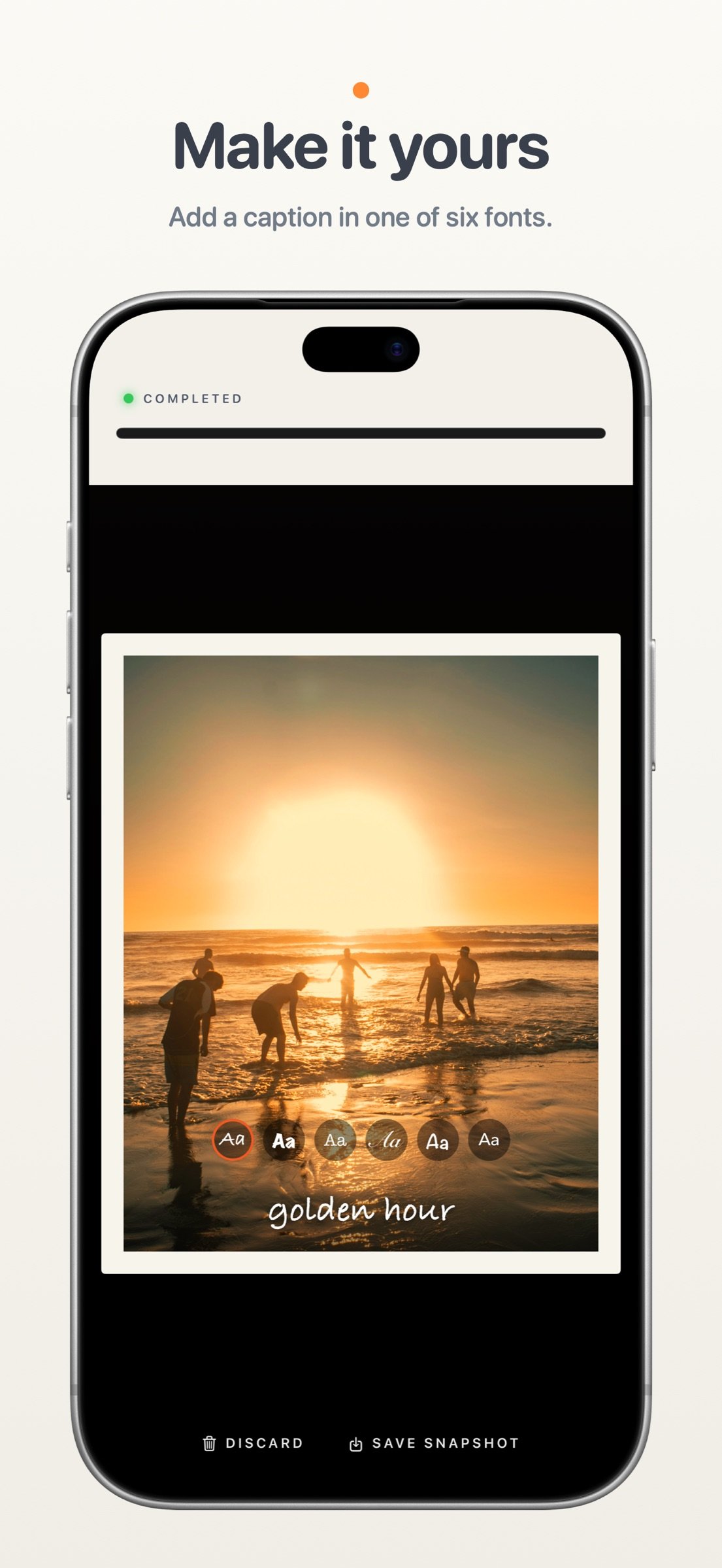
• Write a caption across the bottom in one of six fonts, from handwriting to typewriter.
• Save the snapshot or discard it.
YOUR PRINTS
• A gallery of everything you've kept. Swipe through them, share them or save them to Photos.
• Turn a print over to write a memory on the back, as long as you like. It stays private and never goes out with a shared picture.
• Took it upside down? Turn the photo inside its frame.
• Turn your phone on its side to see your prints laid out like photos on a table.
CAMERA CONTROL
• On iPhones with Camera Control, press it to take a snapshot.
• Light press to choose a film style, zoom, set the self-timer or adjust exposure, without touching the screen.
HOME SCREEN WIDGETS
• Prints: your snapshots on your Home Screen, with a different one on top every hour.
• Clock & Prints: the time beside your prints, like the nightstand clock.
NIGHTSTAND CLOCK
• Turn your iPhone on its side while it charges and Snapshots becomes a bedside clock, with your prints shuffling past beside the time.
DESIGNED FOR IPHONE DUO
• Landscape: the viewfinder on one screen and a full camera body on the other, with flash, zoom, self-timer and camera switches.
• Seated: stand your iPhone Duo half open, take the shot, then unfold it flat and the print feeds out across the whole display.
• Portrait: a large viewfinder above the controls, and a print that fills the screen.
• Closed: a pocket camera on the front display. Turn it on its side to flip through your prints.
• Standing: stand it up like a tent for a clock with your snapshots beside it.
• Star White and Night Sky themes, named after the finishes iPhone Duo comes in.
PRIVATE BY DESIGN
Your photos stay on your phone. No account, no ads, and nothing is sent anywhere.
License: Commercial
Take a snapshot and watch a little printer feed your photo onto the screen. Watch it develop, or give your phone a shake to reveal it faster. Add a handwritten-style caption to remember the story behind it.
Inspired by the instant cameras we grew up with, Snapshots captures one moment at a time. Keep your print or let it go, with a little room to enjoy the moment before taking another.
SHOOT
• Soft, tactile controls: a big shutter, a film-style dial and slide switches you can tap anywhere.
• Rear and front cameras, with a zoom step for every lens on the back and a wide view for selfies.
• Tap to focus. Press and hold to lock focus and exposure, then slide to brighten or darken.
• Flash: off, auto or on.
• Self-timer: 3 or 10 seconds.
BOOTH MODE
• Set the timer to Booth, press the shutter once, and strike three poses on a countdown.
• All three print together as one tall snapshot.
• Booth switches to the front camera for you.
FIVE FILM STYLES
• Classic – warm and gentle.
• Gold – rich, late-afternoon color.
• Coast – cool and crisp.
• Sepia – the brown tones of an old photograph.
• Mono – classic black and white.
You see the style live in the viewfinder before you shoot.
• Every shot prints as a framed instant photo with an even white border.
• Shake your phone and it finishes developing at once.
• Write a caption across the bottom in one of six fonts, from handwriting to typewriter.
• Save the snapshot or discard it.
YOUR PRINTS
• A gallery of everything you've kept. Swipe through them, share them or save them to Photos.
• Turn a print over to write a memory on the back, as long as you like. It stays private and never goes out with a shared picture.
• Took it upside down? Turn the photo inside its frame.
• Turn your phone on its side to see your prints laid out like photos on a table.
CAMERA CONTROL
• On iPhones with Camera Control, press it to take a snapshot.
• Light press to choose a film style, zoom, set the self-timer or adjust exposure, without touching the screen.
HOME SCREEN WIDGETS
• Prints: your snapshots on your Home Screen, with a different one on top every hour.
• Clock & Prints: the time beside your prints, like the nightstand clock.
NIGHTSTAND CLOCK
• Turn your iPhone on its side while it charges and Snapshots becomes a bedside clock, with your prints shuffling past beside the time.
DESIGNED FOR IPHONE DUO
• Landscape: the viewfinder on one screen and a full camera body on the other, with flash, zoom, self-timer and camera switches.
• Seated: stand your iPhone Duo half open, take the shot, then unfold it flat and the print feeds out across the whole display.
• Portrait: a large viewfinder above the controls, and a print that fills the screen.
• Closed: a pocket camera on the front display. Turn it on its side to flip through your prints.
• Standing: stand it up like a tent for a clock with your snapshots beside it.
• Star White and Night Sky themes, named after the finishes iPhone Duo comes in.
PRIVATE BY DESIGN
Your photos stay on your phone. No account, no ads, and nothing is sent anywhere.
License: Commercial
| Release info | Update on Oct 24, 2026 |
|---|---|
| Release notes | Snapshots 1.1.1 • Fix for iPhone Duo's front display - the camera controls now stay in place after you open and close your print gallery. New in 1.1: • Fixes a crash on iPhone Duo when opening or closing it. • On iPhone Duo, the camera now opens straight into the right layout when the phone is already open. • Camera Control: press it to take a snapshot, and light press to change the film, zoom, timer or exposure. • Home Screen widgets: put your prints on your Home Screen, on their own or beside the time. • Swipe from the left edge to go back from your prints. • Small fixes and improvements. |
| Listing data | App Store |
Reviews
No reviews yet. Be the first to review Snapshots.
Used Snapshots? Tell other visitors what you thought.
Log in to write a reviewOther products by this publisher
- "No Distractions" for YouTube 4.10 ----
- #Bible 11.5 "Incredible App - My sister shared this app with me a few weeks ago and it is truly incredible.
- % Percentage Calculator Pro 1.41 This is the Pro version of % Percentage Calculator.
- (beat) for iOS 0.5.9 An elegant Fountain screenwriting app, created by a screenwriter for screenwriters.
- (Deep) HIARCS Chess Explorer 1.14 Chess database, analysis and game playing program
Most viewed iOS Photo & Video
-
1
 AI Video Generator 2.0.1
Vixel – AI Video Generator
AI Video Generator 2.0.1
Vixel – AI Video Generator
-
2
 Infuse 8.5.8
Infuse: Enterprise provides the same great features as the standard version of Infuse and includes permanent access to all Pro features via a traditional paid app.
Infuse 8.5.8
Infuse: Enterprise provides the same great features as the standard version of Infuse and includes permanent access to all Pro features via a traditional paid app.
-
3
 Ai Photo 1.1.2
AI Photo Retouch – BG Eraser
Ai Photo 1.1.2
AI Photo Retouch – BG Eraser
-
4
 CapCut 19.8.1
CapCut offers easy-to-use video editing functions, in-APP fonts and effects, advanced features such as keyframe animation, smooth slow-motion, chroma key, and stabilization, to help you capture and snip moments.
CapCut 19.8.1
CapCut offers easy-to-use video editing functions, in-APP fonts and effects, advanced features such as keyframe animation, smooth slow-motion, chroma key, and stabilization, to help you capture and snip moments.
-
5
 TouchSiren Delta 3.1
--------------------------------------------------------------
TouchSiren Delta 3.1
--------------------------------------------------------------
-
6
 JLab 1.4.2
Compatible Models:
JLab 1.4.2
Compatible Models:
-
7
 Sci-Fi Keyboard 3.0
Make your keyboard a Sci-Fi input panel.
Sci-Fi Keyboard 3.0
Make your keyboard a Sci-Fi input panel.
-
8
 CNU 3.0.12
CNU?????????????????????,???????????????
CNU 3.0.12
CNU?????????????????????,???????????????
-
9
 Locket Widget 2.70.0
Locket is a widget that shows live photos from your best friends, right to your Home Screen.
Locket Widget 2.70.0
Locket is a widget that shows live photos from your best friends, right to your Home Screen.
-
10
 Emoji Maker 3.11.3
Emoji Up is an emoji maker that lets you create your own custom emojis.
Emoji Maker 3.11.3
Emoji Up is an emoji maker that lets you create your own custom emojis.
Most downloaded iOS Photo & Video
-
1
Infuse 8.5.8
Infuse: Enterprise provides the same great features as the standard version of Infuse and includes permanent access to all Pro features via a traditional paid app.
-
2
 Analog Radio 3.0
The iPhone and iPad devices don't have the FM/AM radio antenna installed.
Analog Radio 3.0
The iPhone and iPad devices don't have the FM/AM radio antenna installed.
-
3
 DJI Fly 1.21.16
DJI Fly is designed to help pilots fly drones with ease.
DJI Fly 1.21.16
DJI Fly is designed to help pilots fly drones with ease.
-
4
 ReelyGo 1.1.41
ReelyGo: Your Daily Drama Escape
ReelyGo 1.1.41
ReelyGo: Your Daily Drama Escape
-
5
 SSS IPTV, Simple, Smart Super 1.0.2
An Easiest way to watch TV Online or Movies or Series, Bring your Own list M3u,
SSS IPTV, Simple, Smart Super 1.0.2
An Easiest way to watch TV Online or Movies or Series, Bring your Own list M3u,
-
6
 Treblo 1.6.0
Make songs with the world's best AI music model.
Treblo 1.6.0
Make songs with the world's best AI music model.
-
7
 TurboCollage Automatic 1.2.4
#1 Easy automatic photo collage maker for iPhone & iPad.
TurboCollage Automatic 1.2.4
#1 Easy automatic photo collage maker for iPhone & iPad.
-
8
 Koala FX 1.0.2
*** IMPORTANT! Koala FX is an Audio Unit Effect plugin (AUv3) which requires a compatible host or DAW to work such as Garageband, Beat Maker 3, AUM etc ***
Koala FX 1.0.2
*** IMPORTANT! Koala FX is an Audio Unit Effect plugin (AUv3) which requires a compatible host or DAW to work such as Garageband, Beat Maker 3, AUM etc ***
-
9
 Rozeta Sequencer Suite 1.3.16
Rozeta is a suite of MIDI sequencers and controllers that lets you explore a new, freeform approach to sequencing and controlling mobile music apps.
Rozeta Sequencer Suite 1.3.16
Rozeta is a suite of MIDI sequencers and controllers that lets you explore a new, freeform approach to sequencing and controlling mobile music apps.
-
10
 AGAIN. Rehearsal Notes 2.0.1
AGAIN. is the rehearsal app that remembers why the band stopped — and, new in Version 2, who said what in a writing session or a table read.
AGAIN. Rehearsal Notes 2.0.1
AGAIN. is the rehearsal app that remembers why the band stopped — and, new in Version 2, who said what in a writing session or a table read.