10downloads
1this week
FreeFreeware
0reviews
Screenshots
About Sketch Steps
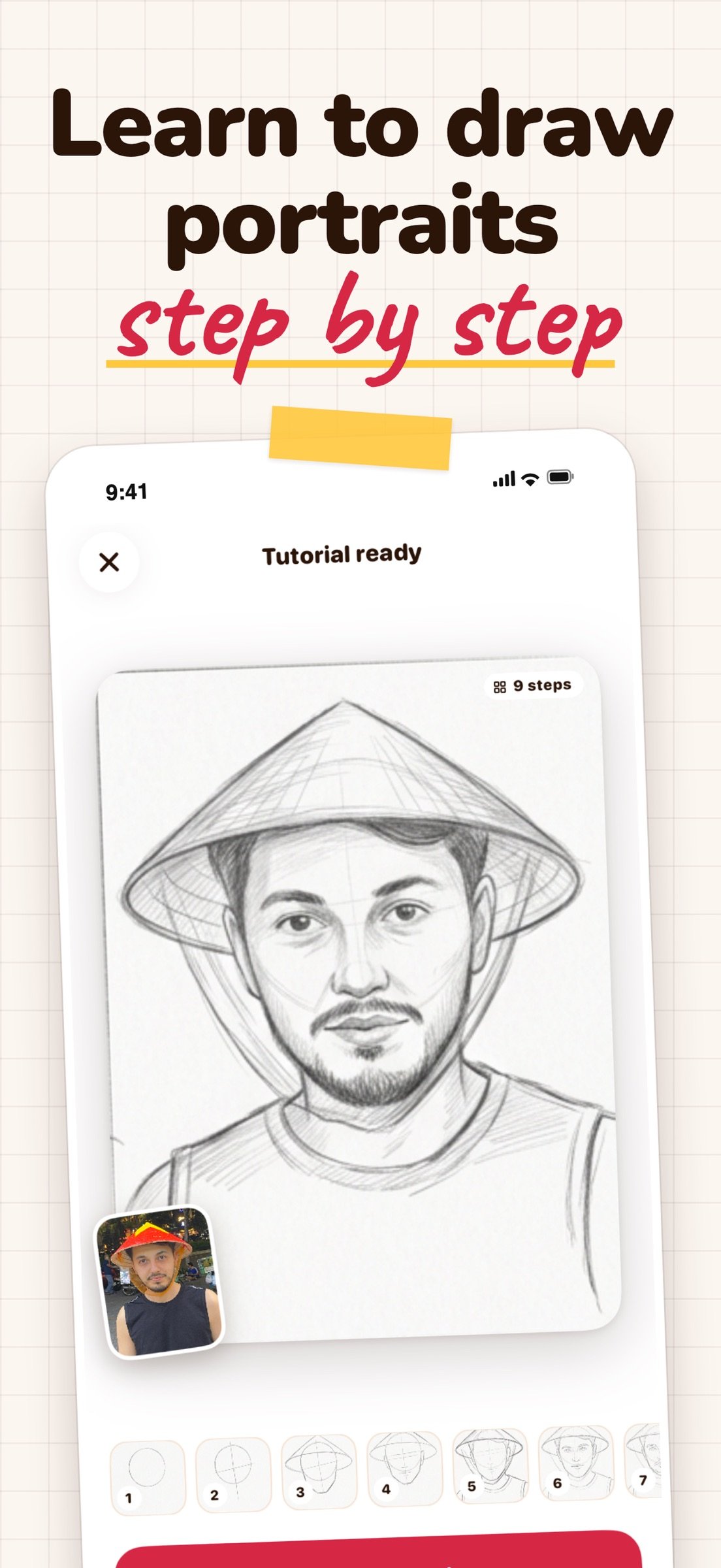
Learn to draw portraits step by step. Sketch Steps turns your photos into drawing guides based on the Loomis method, and gives you a full tracing studio for practicing on real paper.
AI LOOMIS STUDIO
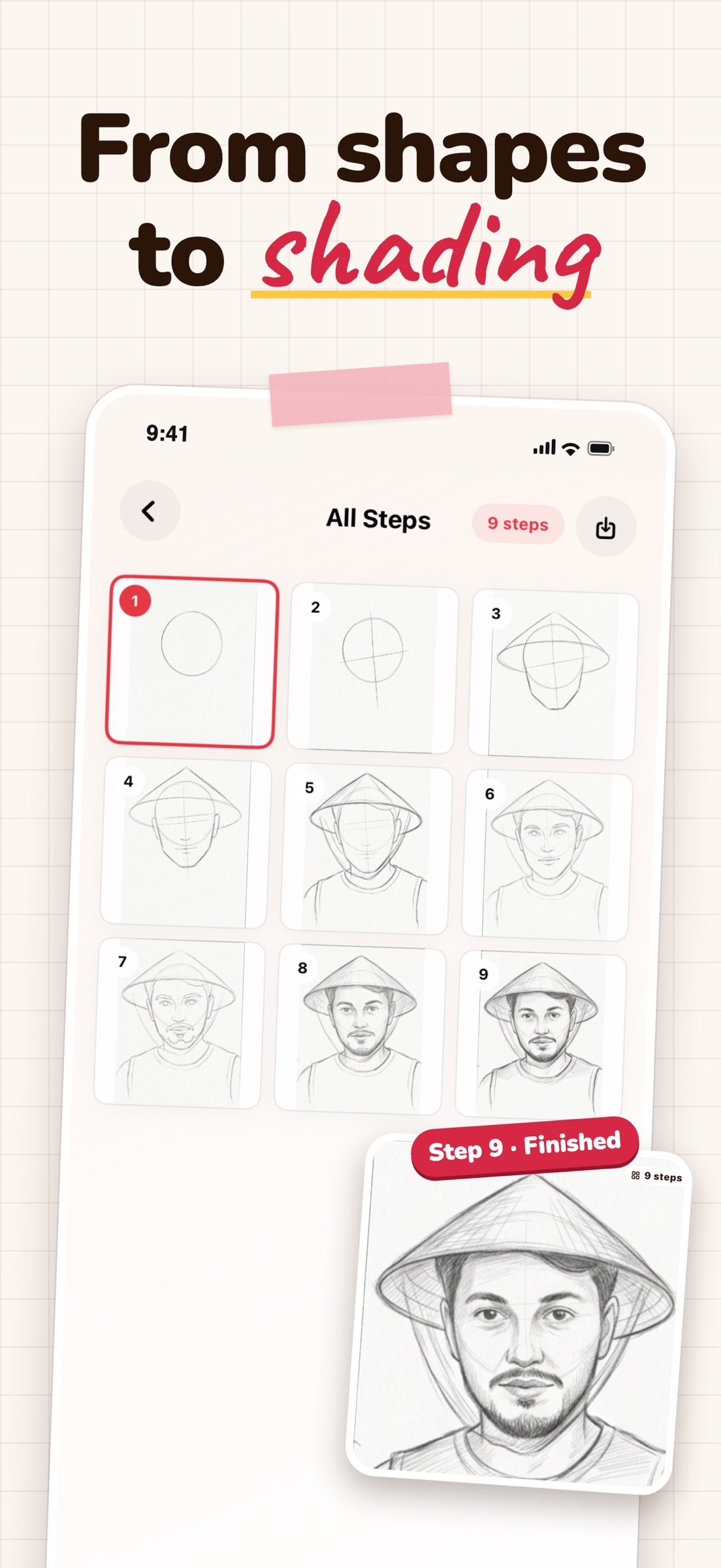
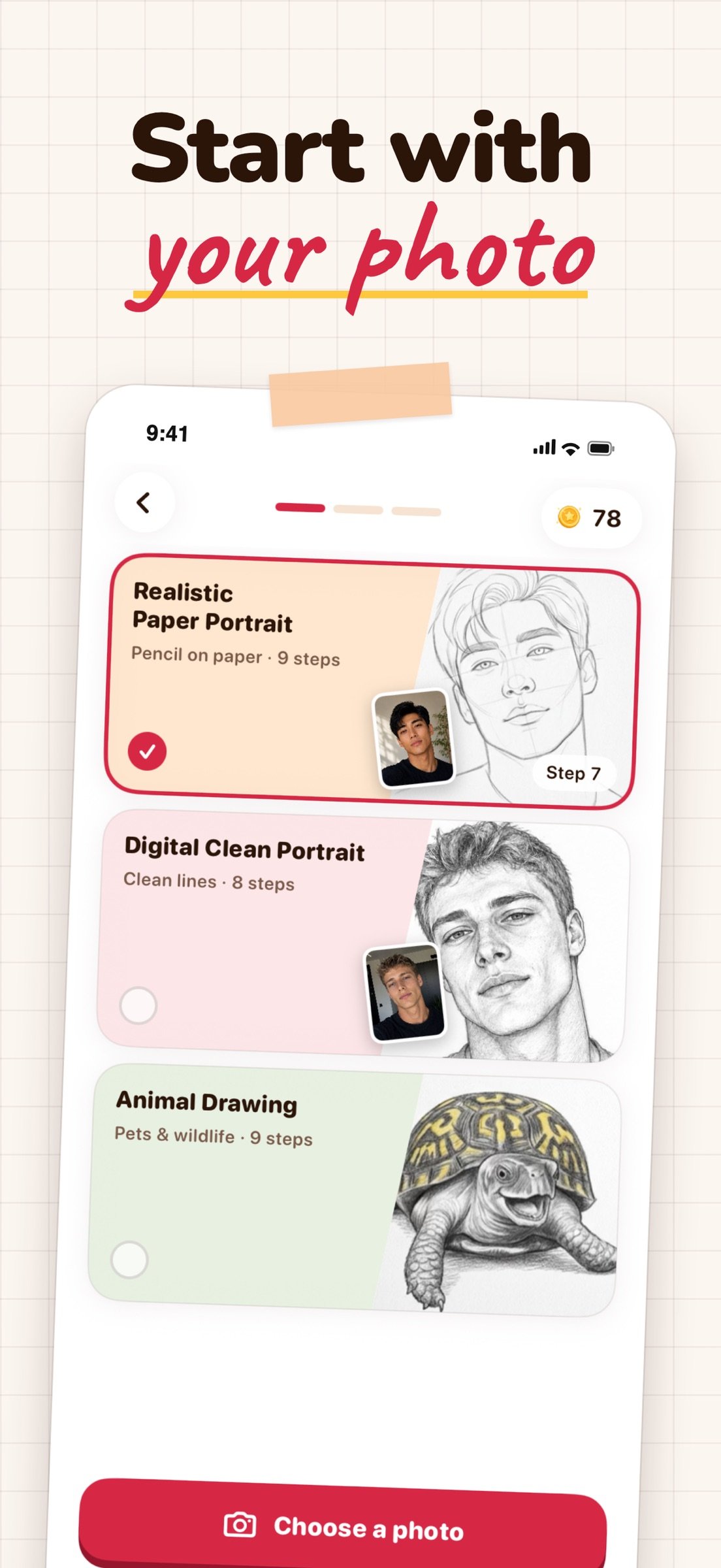
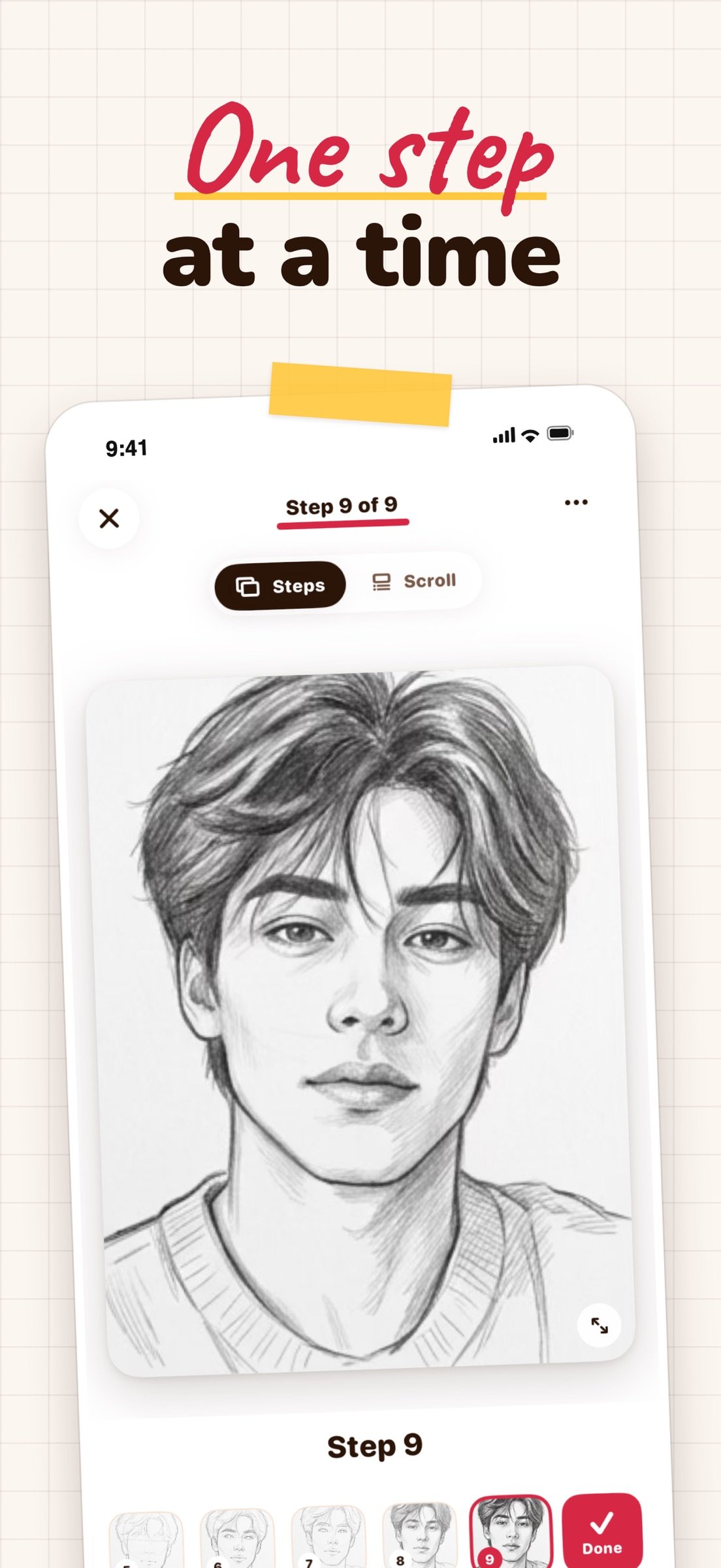
Upload a photo of a face or an animal and get a construction guide that starts with simple shapes and builds up to a finished drawing, from the first forms to the final shading. Choose from three styles: realistic paper portrait, digital clean portrait and animal drawing.
Follow one step at a time, or scroll through the whole breakdown. Zoom in to check proportions, crop your photo before you generate, and leave the screen while your guide is being created. It will be waiting in My Generations when it is ready.
FREE TUTORIALS
Start right away with ready-made step-by-step tutorials. They are free and need no coins.
TRACING STUDIO
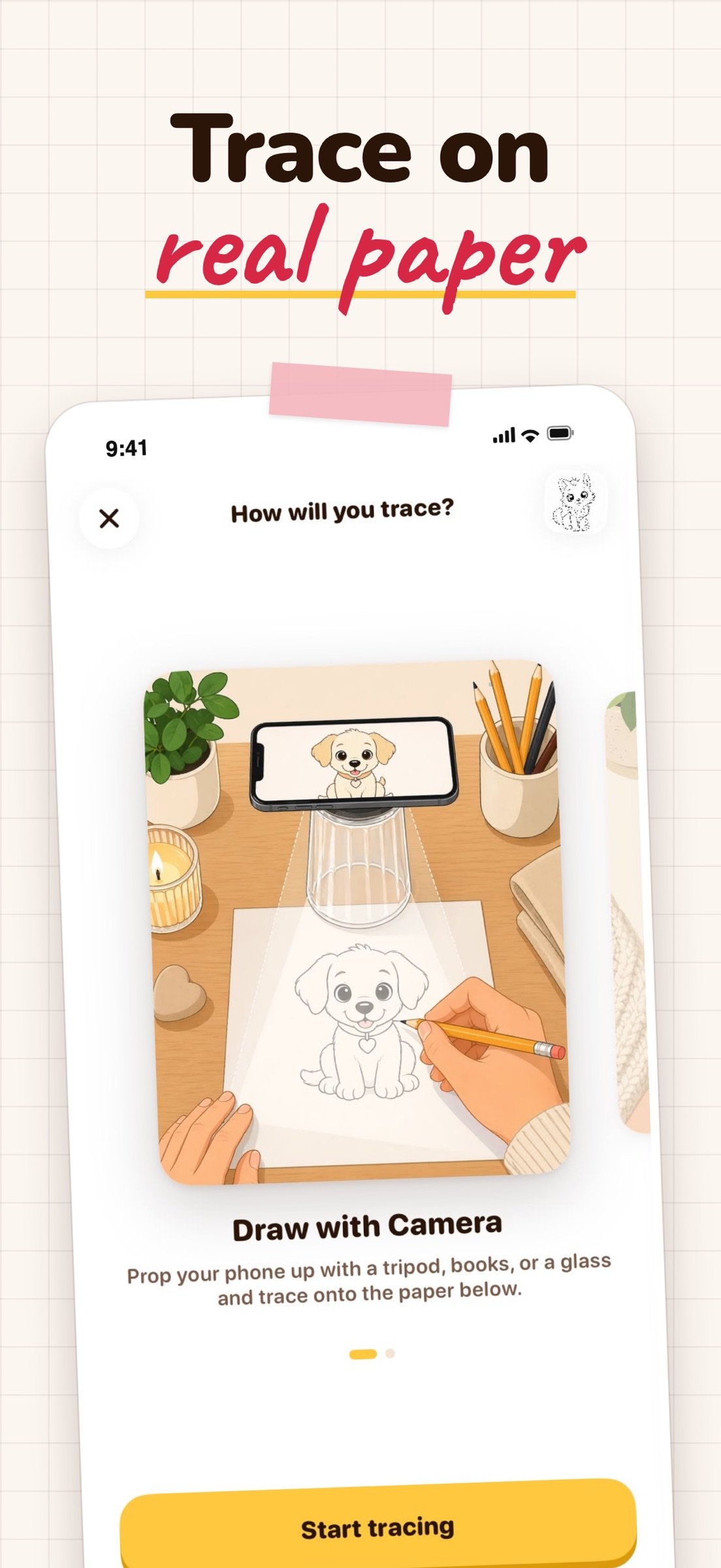
Put any reference on paper, two ways:
• Draw with Camera: prop your phone above your paper and see the reference over the live camera view while you trace
• Draw on Screen: turn the brightness up, lay paper over the screen and trace directly
Adjust opacity, size and rotation, flip the image, add a grid, or switch on the flashlight. Take a photo of your finished drawing or record a video of the session.
REFERENCES FOR EVERY MOOD
• Ready-to-trace templates: animals, anime, cars, fruits and vegetables, portraits
• Your own photos from the camera or library
• AI styles that turn a photo into a tracing reference: pencil sketch, line art, charcoal, anime ink and watercolor
SAVE AND DRAW AGAIN
Everything you create is kept in My Generations for 90 days. Save the guides you want to keep and return to them whenever you want to practice. You can favorite the templates you like, and save individual steps or the full guide to Photos.
MADE FOR LEARNING
Sketch Steps is for beginners, hobby artists and anyone who wants a more approachable way to study drawing fundamentals. No account is needed to start, and the app is available in 11 languages.
AI-generated guides can occasionally be imperfect, and results vary from photo to photo.
SUBSCRIPTION AND COINS
AI generation requires an active subscription or coins. Subscriptions renew automatically unless cancelled at least 24 hours before the end of the current period, and can be managed in your App Store account settings. Coins are offered as in-app purchases.
Privacy Policy:
[link removed]
Terms of Use:
[link removed]
AI LOOMIS STUDIO
Upload a photo of a face or an animal and get a construction guide that starts with simple shapes and builds up to a finished drawing, from the first forms to the final shading. Choose from three styles: realistic paper portrait, digital clean portrait and animal drawing.
Follow one step at a time, or scroll through the whole breakdown. Zoom in to check proportions, crop your photo before you generate, and leave the screen while your guide is being created. It will be waiting in My Generations when it is ready.
FREE TUTORIALS
Start right away with ready-made step-by-step tutorials. They are free and need no coins.
TRACING STUDIO
Put any reference on paper, two ways:
• Draw with Camera: prop your phone above your paper and see the reference over the live camera view while you trace
• Draw on Screen: turn the brightness up, lay paper over the screen and trace directly
Adjust opacity, size and rotation, flip the image, add a grid, or switch on the flashlight. Take a photo of your finished drawing or record a video of the session.
REFERENCES FOR EVERY MOOD
• Ready-to-trace templates: animals, anime, cars, fruits and vegetables, portraits
• Your own photos from the camera or library
• AI styles that turn a photo into a tracing reference: pencil sketch, line art, charcoal, anime ink and watercolor
SAVE AND DRAW AGAIN
Everything you create is kept in My Generations for 90 days. Save the guides you want to keep and return to them whenever you want to practice. You can favorite the templates you like, and save individual steps or the full guide to Photos.
MADE FOR LEARNING
Sketch Steps is for beginners, hobby artists and anyone who wants a more approachable way to study drawing fundamentals. No account is needed to start, and the app is available in 11 languages.
AI-generated guides can occasionally be imperfect, and results vary from photo to photo.
SUBSCRIPTION AND COINS
AI generation requires an active subscription or coins. Subscriptions renew automatically unless cancelled at least 24 hours before the end of the current period, and can be managed in your App Store account settings. Coins are offered as in-app purchases.
Privacy Policy:
[link removed]
Terms of Use:
[link removed]
| Release info | Update on Nov 12, 2026 |
|---|---|
| Release notes | Sketch Steps 2.0 is here: • A new look across the whole app • Free step-by-step tutorials you can start right away • My Generations: every guide and AI tracing image you create, in one place • Guides keep being created when you leave the app and wait for you when they are ready • A shorter, simpler start for new users |
| Listing data | App Store |
Reviews
No reviews yet. Be the first to review Sketch Steps.
Used Sketch Steps? Tell other visitors what you thought.
Log in to write a reviewOther products by this publisher
- "No Distractions" for YouTube 4.10 ----
- #Bible 11.6 "Incredible App - My sister shared this app with me a few weeks ago and it is truly incredible.
- #filmphotography 1.4.2 So, you decided to shoot on film?
- $quirrel 1.5.1 $quirrel Budget & Finance helps you plan each paycheck, track spending, manage debt, and see what is safe to spend before the next payday.
- % Percentage Calculator Pro 1.41 This is the Pro version of % Percentage Calculator.
Most viewed iOS Photo & Video
-
1
 ShortDiShow 2.0
Drama Quest Island — An offline interactive short-drama adventure.
-
2
 Infuse 8.5.10
Infuse: Enterprise provides the same great features as the standard version of Infuse and includes permanent access to all Pro features via a traditional paid app.
-
3
 AI Video Generator 2.0.2
Vixel – AI Video Generator
-
4
 OPlayer 4.8
Play all your videos directly without having to convert them!
-
5
 Necrometer II 1.2
Necrometer II is a paranormal investigation companion designed for ghost hunters and researchers.
-
6
 CapCut 20.1.0
CapCut offers easy-to-use video editing functions, in-APP fonts and effects, advanced features such as keyframe animation, smooth slow-motion, chroma key, and stabilization, to help you capture and snip moments.
-
7
 Ai Photo 1.1.2
AI Photo Retouch – BG Eraser
-
8
 Treblo 1.6.0
Make songs with the world's best AI music model.
-
9
 Pop Dot Comics 1.48
Create a comic worthy of the Sunday newspaper or your favorite pulp-fiction cover.
- 10 #filmphotography 1.4.2 So, you decided to shoot on film?
Most downloaded iOS Photo & Video
-
1
Infuse 8.5.10
Infuse: Enterprise provides the same great features as the standard version of Infuse and includes permanent access to all Pro features via a traditional paid app.
-
2
 DJI Fly 1.21.18
DJI Fly is designed to help pilots fly drones with ease.
-
3
 Analog Radio 3.0
The iPhone and iPad devices don't have the FM/AM radio antenna installed.
-
4
 TurboCollage Automatic 1.2.4
#1 Easy automatic photo collage maker for iPhone & iPad.
-
5
Treblo 1.6.0
Make songs with the world's best AI music model.
-
6
 ReelyGo 1.1.42
ReelyGo: Your Daily Drama Escape
-
7
 Rozeta Sequencer Suite 1.3.16
Rozeta is a suite of MIDI sequencers and controllers that lets you explore a new, freeform approach to sequencing and controlling mobile music apps.
-
8
 AGAIN. Rehearsal Notes 2.0.1
AGAIN. is the rehearsal app that remembers why the band stopped — and, new in Version 2, who said what in a writing session or a table read.
-
9
Pop Dot Comics 1.48
Create a comic worthy of the Sunday newspaper or your favorite pulp-fiction cover.
-
10
 SSS IPTV, Simple, Smart Super 1.0.2
An Easiest way to watch TV Online or Movies or Series, Bring your Own list M3u,