Sentient Synthesizer 1.1.0
Sentient is a synthesizer that learns from the sounds around you.
Download
365.12 MB
14downloads
2this week
FreeCommercial
0reviews
Screenshots
About Sentient Synthesizer
Sentient is a synthesizer that learns from the sounds around you. A self-organizing neural network listens through the microphone and grows wavetables from what it hears: street noise, voices, music, birds. You play these wavetables as notes and use them to move pitch, panning, drive and the filter. Every Sentient becomes unique to its owner and to the places it has listened to.
Sentient runs as a standalone app and as an AUv3 plugin inside your favorite host. It responds to MIDI keyboards, including MPE pitch bend, and shares its memory between the app and the plugin.
HOW IT WORKS
When a new sound is analyzed, the neuron that best matches it updates its stored waveform and swells more than the others. Nearby neurons also update, but less strongly, so similar sounds settle close together and the sound changes smoothly as you move across the network.
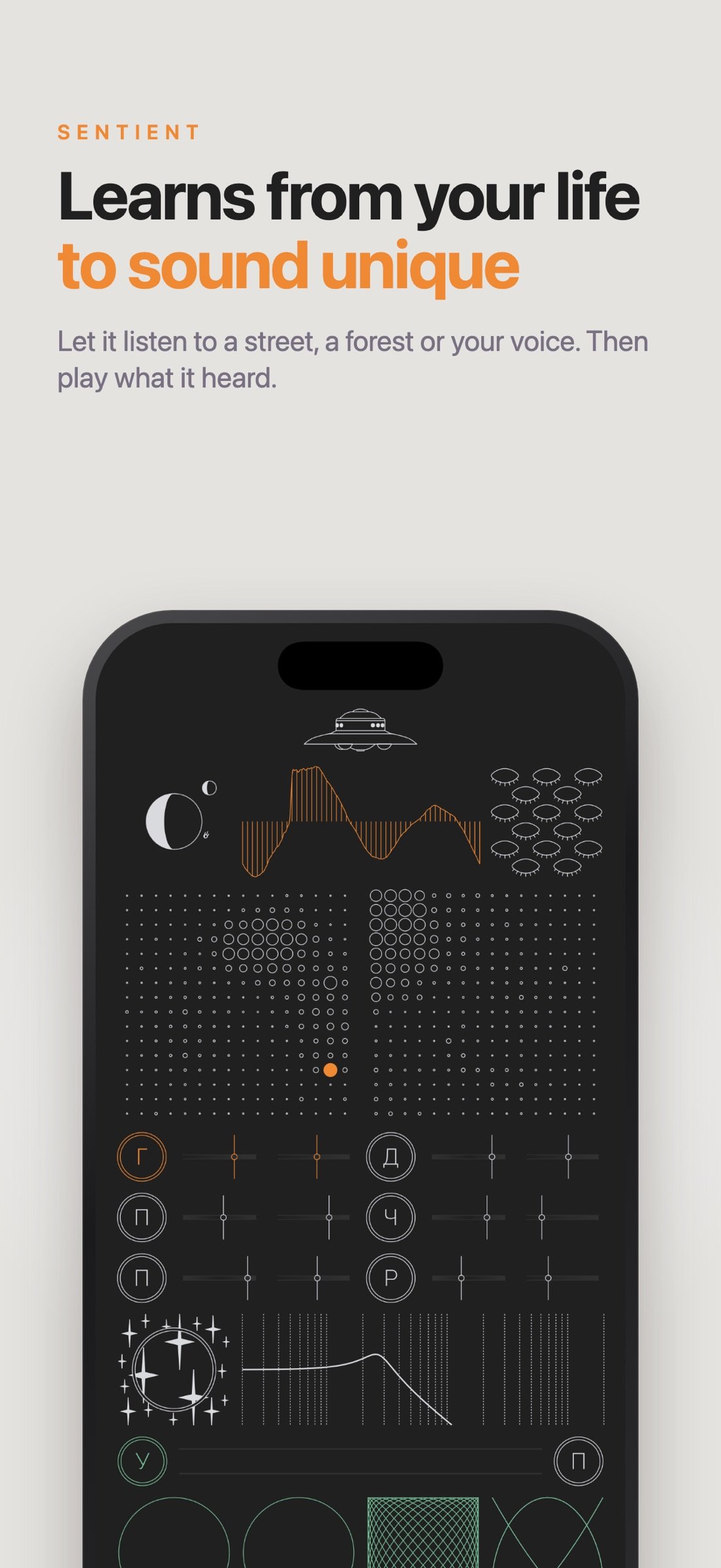
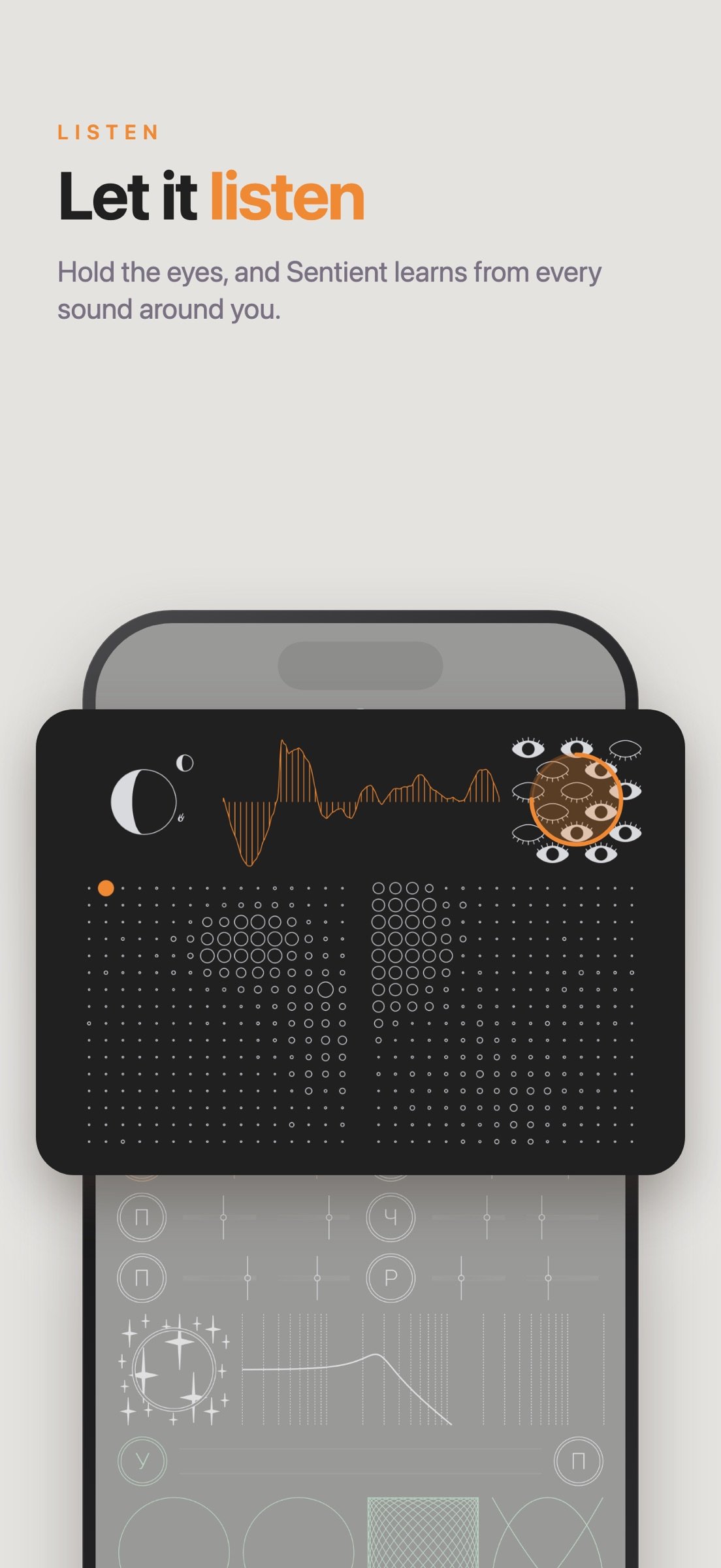
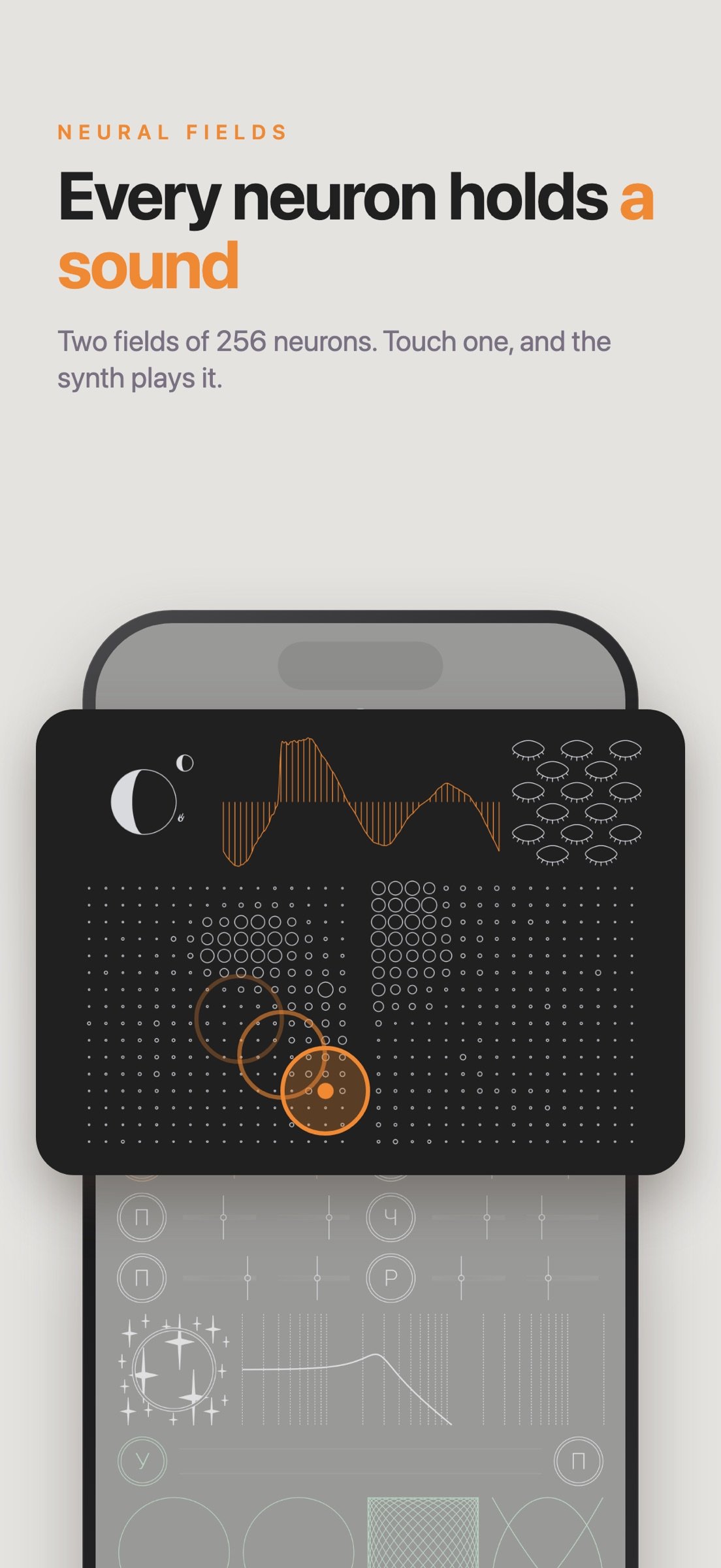
Two grids represent the two hemispheres of the network. The left one learns timbres, the shape of a single oscillation. The right one learns contours, the way loudness rises and falls. Each cell is a neuron. Tap a cell to choose the neuron whose wavetable the active row will play. An orange dot marks it, and the display above shows the wavetable exactly as it sounds.
THE INTERFACE
The controller with the eyes is the learning system. Hold it to start or stop learning: open eyes mean the network is listening. Drag vertically to change the learning rate and horizontally to change how strongly the winning neuron pulls its neighbors. You can see this in the number of open eyes and the width of the pupils. While Sentient learns, it stays silent and the network visibly swells.
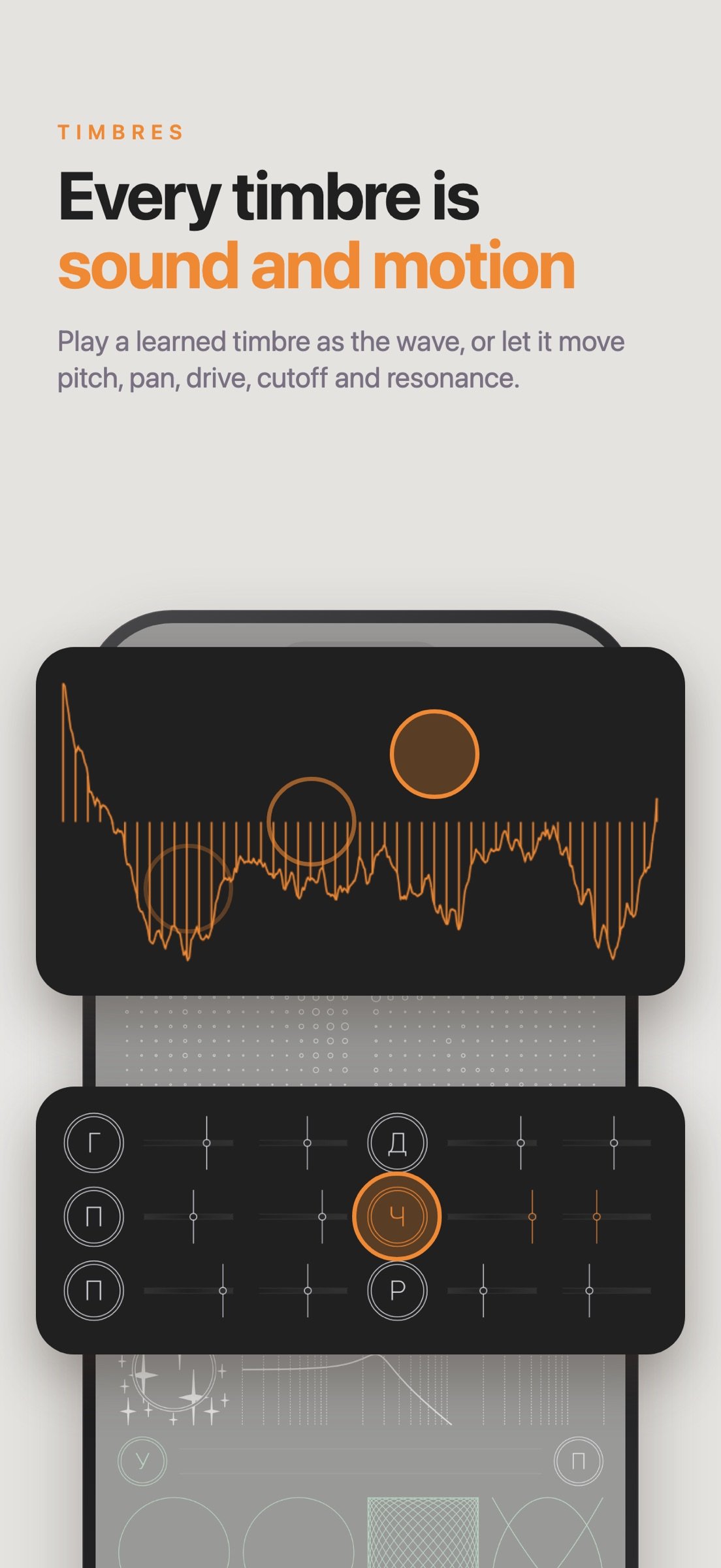
Below the grids are six rows, each marked with a Russian letter. The first, `?` from `generator`, plays the wavetable as a note; its sliders set volume and the fundamental frequency. Hold `?` to open an ADSR envelope editor. With finite sustain and hold on, notes repeat in their own rhythm and turn into melodies.
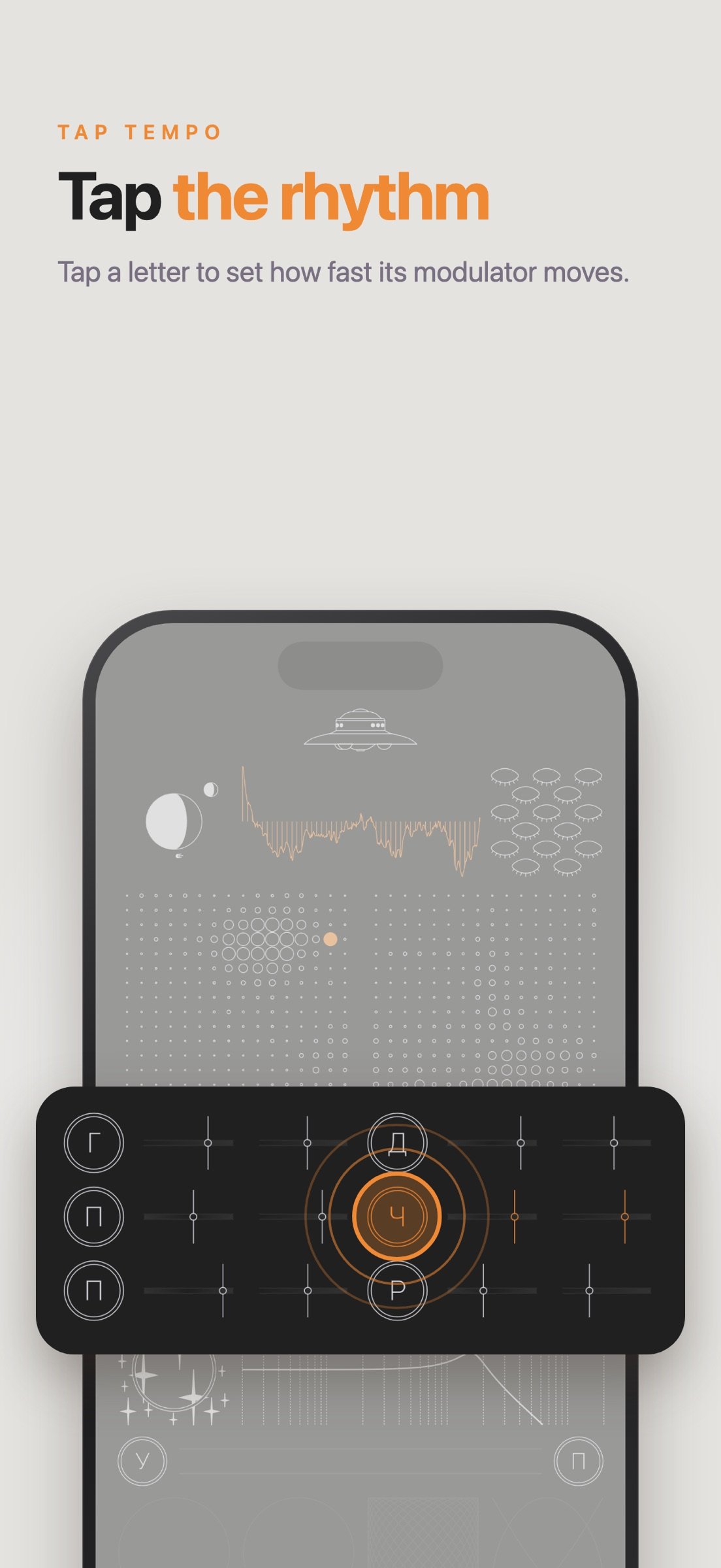
The other rows are modulators. Their sliders set depth and rate, and the letter names the destination: `?` pitch from `podstroika`, `?` pan from `panorama`, `?` drive from `drive`, `?` filter frequency from `chastota`, `?` resonance from `rezonans`. Tap a letter in rhythm to set the rate by tap tempo.
The display above the grids shapes the active row. Drag sideways to set the start phase, drag up or down to smooth the wavetable, hold it to turn antialiasing on or off.
The controller with the stars is the filter. Drag sideways for lowpass, bandpass or highpass, drag up or down for drive. Hold it to share one filter between all notes; a green ring shows the shared mode. The curve beside it sets cutoff and resonance.
At the bottom is a keyboard of eight keys drawn as Lissajous figures, curves made of two harmonic oscillations. Each figure shows the ratio of its note. The closer you touch to the center, the louder the note. Above the keys are `?` hold from `uderzhanie` and `?` tuning from `podstroika`, which lets you retune each key across 64 just-intonation steps. Hold the level meter to record what you play to a WAV file.
MEMORY
The controller with the planets moves through time. Drag it to browse saved memories; each one keeps the whole instrument, including the network, settings, tuning and playing notes. Double tap to return to the present. Hold it to open a menu marked with Russian letters: `?` save from `sokhranit`, `?` delete from `udalit`, `?` close, shaped like a cross, plus arrows to export, import and replace memories as files.
The planets tell time symbolically. The crescent shadow shows the time of day, the moon's position follows its 27-day orbit, and the satellite circles like the ISS.
Tap the UFO at the top for a quick tour of the screen.
License: Commercial
Sentient runs as a standalone app and as an AUv3 plugin inside your favorite host. It responds to MIDI keyboards, including MPE pitch bend, and shares its memory between the app and the plugin.
HOW IT WORKS
When a new sound is analyzed, the neuron that best matches it updates its stored waveform and swells more than the others. Nearby neurons also update, but less strongly, so similar sounds settle close together and the sound changes smoothly as you move across the network.
Two grids represent the two hemispheres of the network. The left one learns timbres, the shape of a single oscillation. The right one learns contours, the way loudness rises and falls. Each cell is a neuron. Tap a cell to choose the neuron whose wavetable the active row will play. An orange dot marks it, and the display above shows the wavetable exactly as it sounds.
THE INTERFACE
The controller with the eyes is the learning system. Hold it to start or stop learning: open eyes mean the network is listening. Drag vertically to change the learning rate and horizontally to change how strongly the winning neuron pulls its neighbors. You can see this in the number of open eyes and the width of the pupils. While Sentient learns, it stays silent and the network visibly swells.
Below the grids are six rows, each marked with a Russian letter. The first, `?` from `generator`, plays the wavetable as a note; its sliders set volume and the fundamental frequency. Hold `?` to open an ADSR envelope editor. With finite sustain and hold on, notes repeat in their own rhythm and turn into melodies.
The other rows are modulators. Their sliders set depth and rate, and the letter names the destination: `?` pitch from `podstroika`, `?` pan from `panorama`, `?` drive from `drive`, `?` filter frequency from `chastota`, `?` resonance from `rezonans`. Tap a letter in rhythm to set the rate by tap tempo.
The display above the grids shapes the active row. Drag sideways to set the start phase, drag up or down to smooth the wavetable, hold it to turn antialiasing on or off.
The controller with the stars is the filter. Drag sideways for lowpass, bandpass or highpass, drag up or down for drive. Hold it to share one filter between all notes; a green ring shows the shared mode. The curve beside it sets cutoff and resonance.
At the bottom is a keyboard of eight keys drawn as Lissajous figures, curves made of two harmonic oscillations. Each figure shows the ratio of its note. The closer you touch to the center, the louder the note. Above the keys are `?` hold from `uderzhanie` and `?` tuning from `podstroika`, which lets you retune each key across 64 just-intonation steps. Hold the level meter to record what you play to a WAV file.
MEMORY
The controller with the planets moves through time. Drag it to browse saved memories; each one keeps the whole instrument, including the network, settings, tuning and playing notes. Double tap to return to the present. Hold it to open a menu marked with Russian letters: `?` save from `sokhranit`, `?` delete from `udalit`, `?` close, shaped like a cross, plus arrows to export, import and replace memories as files.
The planets tell time symbolically. The crescent shadow shows the time of day, the moon's position follows its 27-day orbit, and the satellite circles like the ISS.
Tap the UFO at the top for a quick tour of the screen.
License: Commercial
| Release info | Update on Nov 05, 2026 |
|---|---|
| Release notes | New - ADSR envelope for the generator: hold "?" to open the editor. With finite sustain and hold on, notes repeat and play melodies. - Tap tempo for modulators: tap a row letter in rhythm. - Start phase of each row: drag the wavetable display left or right. - Wavetable smoothing for each row: drag the display up or down. - Antialiasing for each row: hold the display. A dashed curve means antialiasing is off. - Shared filter mode: hold the stars. By default, each note has its own filter and modulators. - The display shows the wavetable as it sounds. - Interface tour on first launch, reopened with the UFO button. - MPE pitch bend for MIDI keyboards. - Record the output to a WAV file by holding the level meter. - Memories keep hold and tune modes, playing notes and their timing. - New factory memories. Improved - New filter without clicks; filter type and mode change smoothly. - Memories from Sentient 1.0 keep their original sound. Turning on a new feature in such a memory asks before switching it to the new filter. - Output limiter with a level meter in decibels. - Memory names use UTC, so transferred memories keep their place on the timeline. - Host programs have unique names and reload on every selection. - Faster learning and smoother memory browsing. Fixed - Notes no longer play on launch. - Learning no longer starts by accident and stops cleanly. - Many fixes in memory, MIDI and the AUv3 plugin. |
| Listing data | App Store |
Reviews
No reviews yet. Be the first to review Sentient Synthesizer.
Used Sentient Synthesizer? Tell other visitors what you thought.
Log in to write a reviewOther products by this publisher
- "No Distractions" for YouTube 4.10 ----
- #Bible 11.6 "Incredible App - My sister shared this app with me a few weeks ago and it is truly incredible.
- #filmphotography 1.4.2 So, you decided to shoot on film?
- $quirrel 1.5.1 $quirrel Budget & Finance helps you plan each paycheck, track spending, manage debt, and see what is safe to spend before the next payday.
- % Percentage Calculator Pro 1.41 This is the Pro version of % Percentage Calculator.
Most viewed iOS Photo & Video
-
1
 ShortDiShow 2.0
Drama Quest Island — An offline interactive short-drama adventure.
-
2
 Infuse 8.5.10
Infuse: Enterprise provides the same great features as the standard version of Infuse and includes permanent access to all Pro features via a traditional paid app.
-
3
 AI Video Generator 2.0.2
Vixel – AI Video Generator
-
4
 OPlayer 4.8
Play all your videos directly without having to convert them!
-
5
 Necrometer II 1.2
Necrometer II is a paranormal investigation companion designed for ghost hunters and researchers.
-
6
 CapCut 20.1.0
CapCut offers easy-to-use video editing functions, in-APP fonts and effects, advanced features such as keyframe animation, smooth slow-motion, chroma key, and stabilization, to help you capture and snip moments.
-
7
 Ai Photo 1.1.2
AI Photo Retouch – BG Eraser
-
8
 Treblo 1.6.0
Make songs with the world's best AI music model.
-
9
 CNU 3.0.12
CNU?????????????????????,???????????????
-
10
 Pop Dot Comics 1.48
Create a comic worthy of the Sunday newspaper or your favorite pulp-fiction cover.
Most downloaded iOS Photo & Video
-
1
Infuse 8.5.10
Infuse: Enterprise provides the same great features as the standard version of Infuse and includes permanent access to all Pro features via a traditional paid app.
-
2
 DJI Fly 1.21.18
DJI Fly is designed to help pilots fly drones with ease.
-
3
 TurboCollage Automatic 1.2.4
#1 Easy automatic photo collage maker for iPhone & iPad.
-
4
 Analog Radio 3.0
The iPhone and iPad devices don't have the FM/AM radio antenna installed.
-
5
 ReelyGo 1.1.42
ReelyGo: Your Daily Drama Escape
-
6
 AGAIN. Rehearsal Notes 2.0.1
AGAIN. is the rehearsal app that remembers why the band stopped — and, new in Version 2, who said what in a writing session or a table read.
-
7
 Rozeta Sequencer Suite 1.3.16
Rozeta is a suite of MIDI sequencers and controllers that lets you explore a new, freeform approach to sequencing and controlling mobile music apps.
-
8
Treblo 1.6.0
Make songs with the world's best AI music model.
-
9
 SSS IPTV, Simple, Smart Super 1.0.2
An Easiest way to watch TV Online or Movies or Series, Bring your Own list M3u,
-
10
Pop Dot Comics 1.48
Create a comic worthy of the Sunday newspaper or your favorite pulp-fiction cover.