
ScreenCommand 2.1
Turn your iPad or iPhone and an external monitor or TV into a desktop browsing workstation, even on a non-M iPad, where iPadOS extended display isn't available.
Download
15.38 MB
17downloads
5this week
FreeCommercial
0reviews
Screenshots
About ScreenCommand
Turn your iPad or iPhone and an external monitor or TV into a desktop browsing workstation, even on a non-M iPad, where iPadOS extended display isn't available.
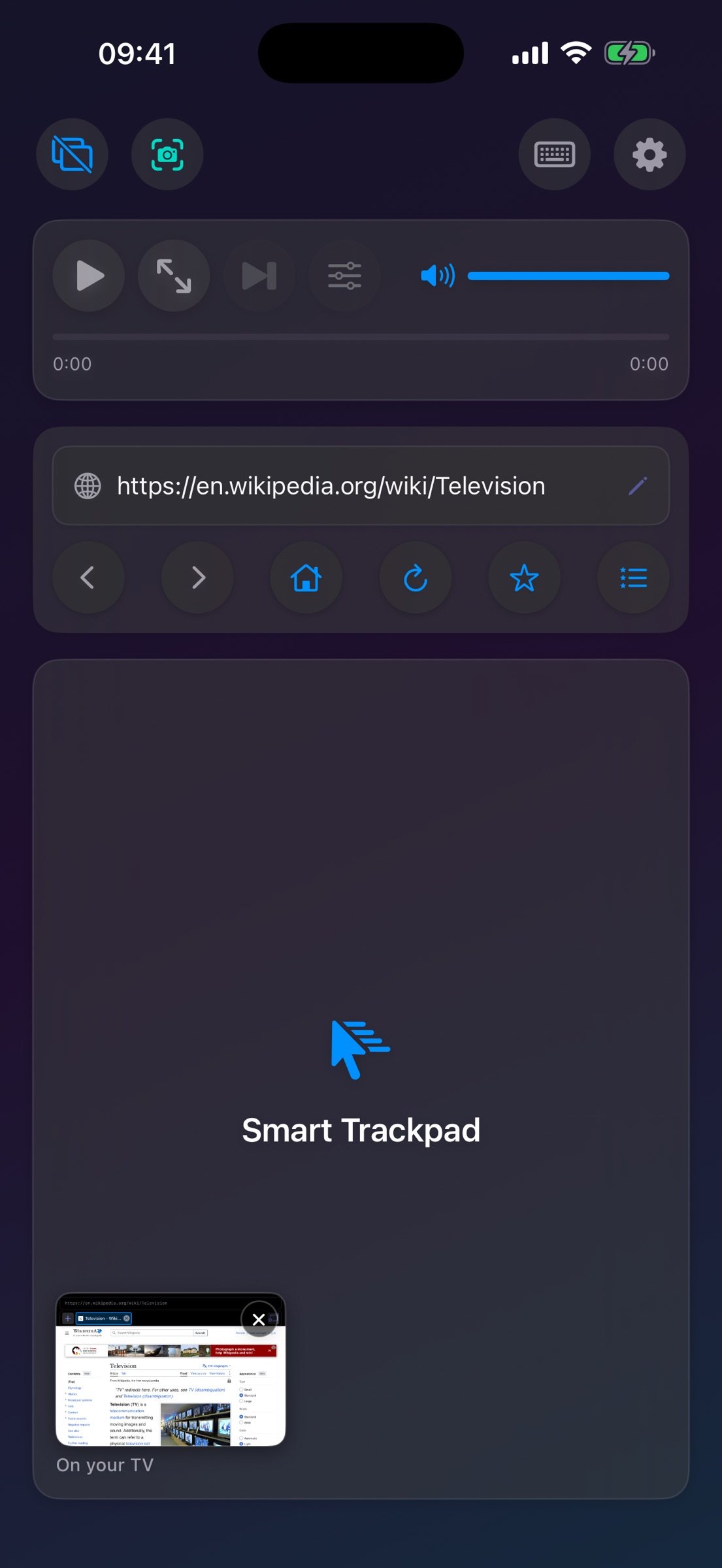
The big screen gets a full desktop-class browser. Your iPad or iPhone becomes the trackpad and keyboard: 8 cursor styles, up to 12 persistent tabs, YouTube quality up to 4K, and Netflix and other streaming over a cable. A hardware keyboard works too, and so does a mouse on iPad. Pay once, no subscription.
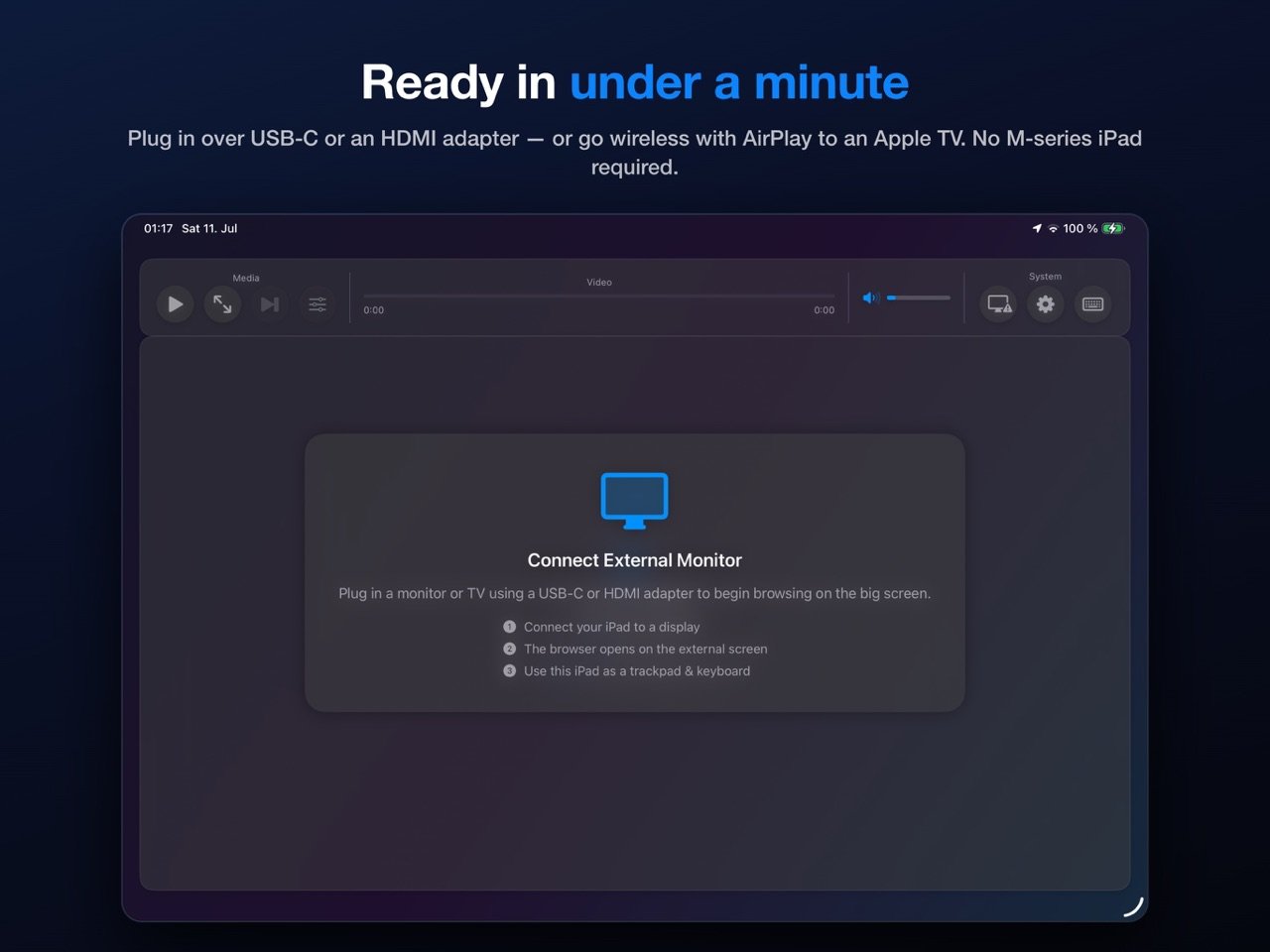
IMPORTANT: REQUIRES AN EXTERNAL MONITOR OR TV. ScreenCommand runs the browser on an external display connected over USB-C (or a USB-C-to-HDMI/DisplayPort adapter) or via AirPlay to an Apple TV, and your iPad or iPhone becomes the trackpad and control center. Without a display connected, the app opens to a "Connect External Monitor" setup screen. There is no standalone on-device browsing mode. ScreenCommand shows websites on the TV; other apps can't run there.
STREAMING ON THE BIG SCREEN: Netflix, Prime Video, Apple TV+, Paramount+, Peacock and other streaming services play on the TV over a USB-C cable. YouTube, Vimeo, and other web video play over a cable or AirPlay.
SEAMLESS EXTERNAL DISPLAY
o Full web browsing on your external monitor
o Automatic display detection - plug and play
o Optimized for 1080p, 4K, and ultrawide displays
ADVANCED CURSOR & CONTROLS
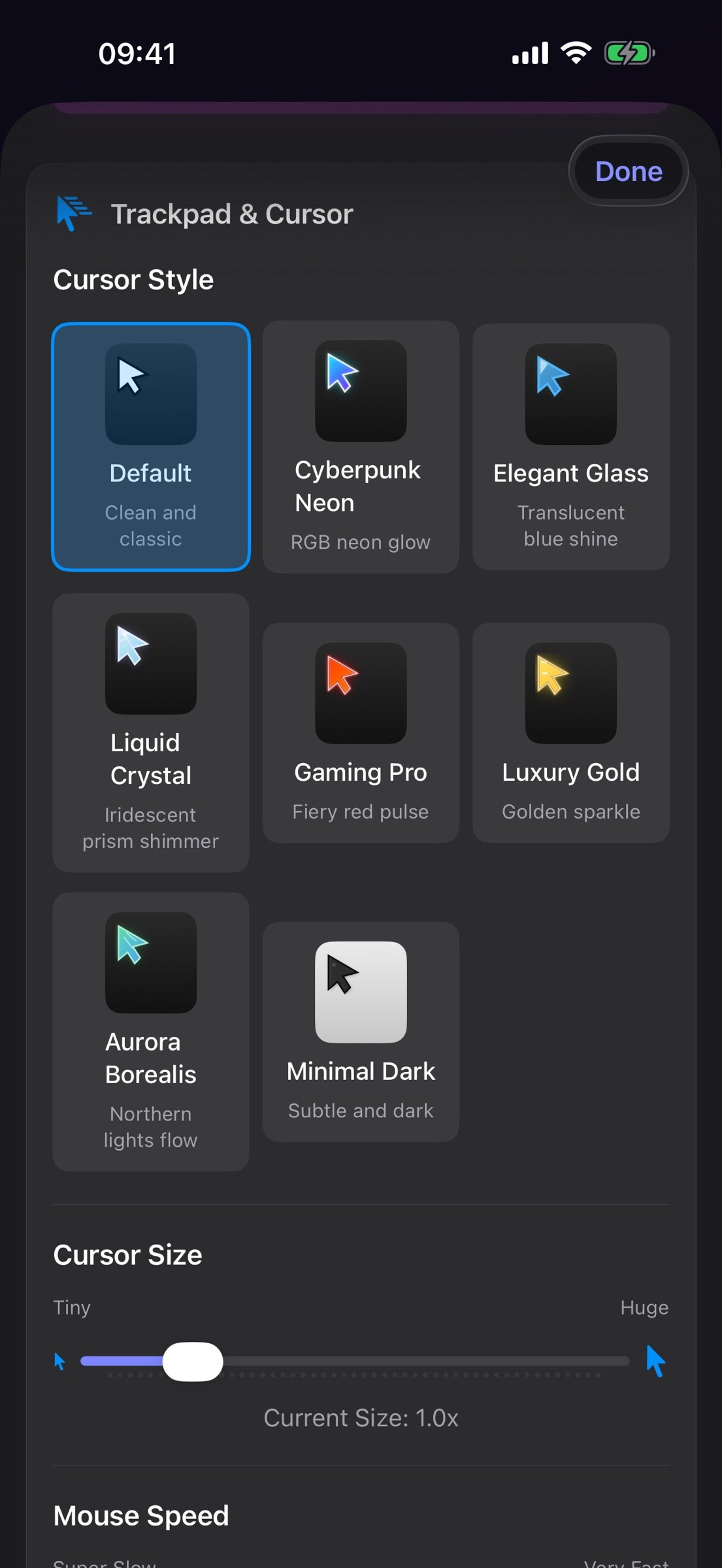
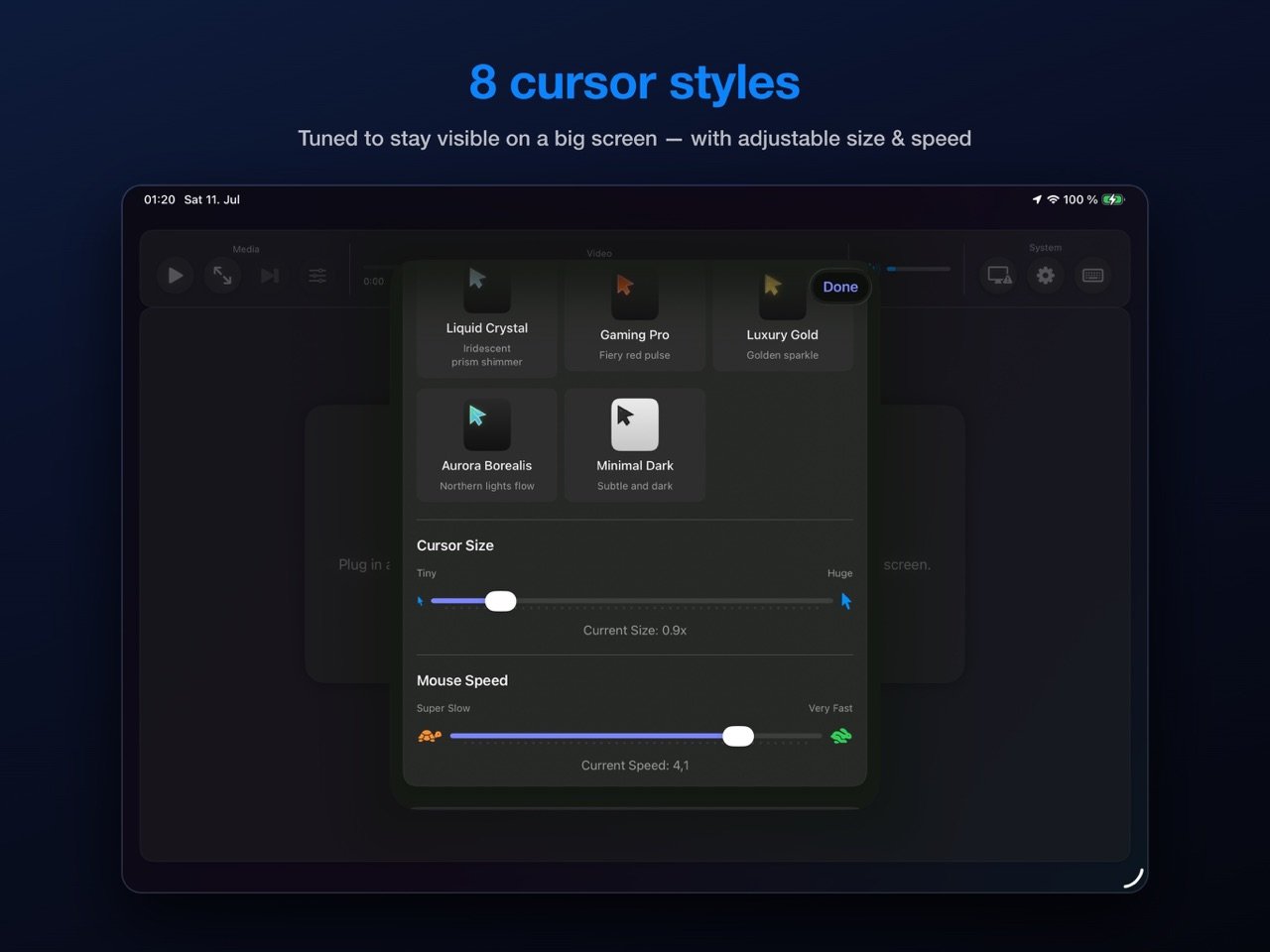
o Eight stunning cursor styles: Default, Cyberpunk Neon, Elegant Glass, Liquid Crystal, Gaming Pro, Luxury Gold, Aurora Borealis, Minimal Dark
o Smooth trackpad navigation with gesture support
o Use a Bluetooth or USB mouse or trackpad on iPad
o Natural scrolling with two-finger gestures
o Precise click, double-click, and right-click support
INTELLIGENT KEYBOARD INPUT
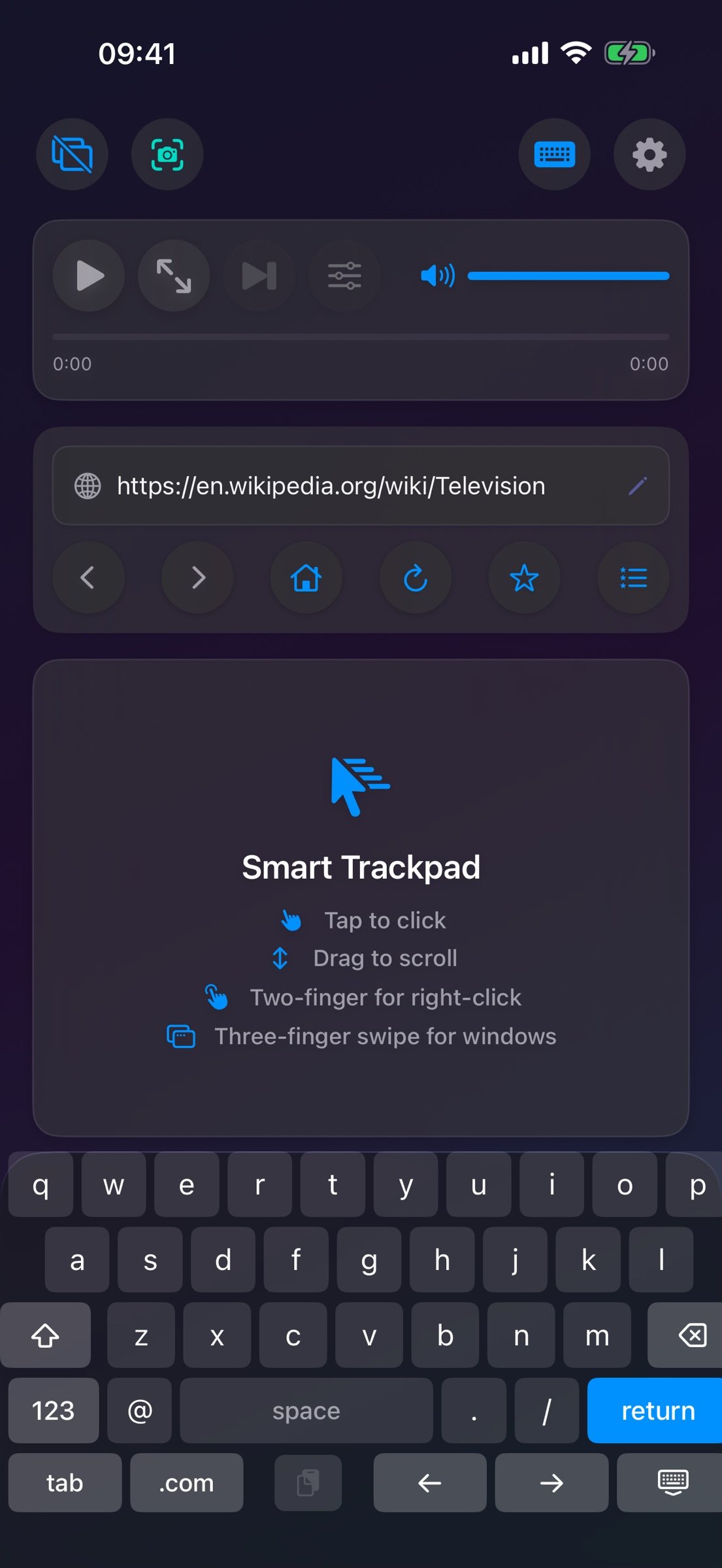
o Full keyboard support for web forms and search
o Type on a hardware keyboard, with shortcuts like ?L, ?T and ?R
o Smart URL bar: type a web address or a search query
o Automatic input field detection and focus
MEDIA CONTROLS
o Play/pause video with one tap
o Change YouTube video quality on the fly, up to 4K (2160p), even in fullscreen
o Adjust media volume with an on-screen slider
o Seek through videos with intuitive progress bar
o Fullscreen toggle support
o Cinema mode for distraction-free viewing
POWERFUL BROWSING FEATURES
o Up to 4 browser windows with 12 tabs each, saved between sessions
o Two windows side by side on the TV
o Password AutoFill for sign-ins on the TV
o Desktop mode for full website compatibility
o "What Works Here" shows how your device connects
o Prevents unwanted app redirects
o Pop-up blocker with a per-site switch
CUSTOMIZATION
o Adjustable cursor size (0.2x - 5.0x)
o Adjustable mouse speed for precision or speed (0.5x - 5.0x)
o Configure homepage URL
o Auto-launch browser on monitor connect
PRIVACY FIRST
o No data collection or tracking
o No third-party analytics
o All processing happens locally on your device
o No internet connection required (except for browsing)
PERFECT FOR:
o Professionals who need a larger workspace
o Students doing research on a bigger screen
o Content creators managing social media
o Anyone wanting desktop browsing from an iPad or iPhone
HOW IT WORKS:
1. Connect your iPad or iPhone to an external monitor (USB-C or HDMI adapter), or AirPlay to an Apple TV
2. Launch ScreenCommand
3. Browser automatically opens on your external display
4. Use your iPad or iPhone as a trackpad and control center
5. Enjoy desktop-class browsing!
REQUIREMENTS:
o iPad with a USB-C port on iPadOS 17.0 or later (no M-series chip required)
o Or iPhone on iOS 17.0 or later. A cable needs USB-C video out (iPhone 15 or later, except iPhone 16e, iPhone 17e and iPhone Air); any iPhone can use AirPlay
o External monitor or TV
o USB-C to HDMI/DisplayPort adapter (or direct USB-C connection), or an Apple TV for wireless AirPlay (wired recommended for the lowest cursor latency)
ScreenCommand brings true desktop browsing to the external display of your iPad or iPhone.
License: Commercial
The big screen gets a full desktop-class browser. Your iPad or iPhone becomes the trackpad and keyboard: 8 cursor styles, up to 12 persistent tabs, YouTube quality up to 4K, and Netflix and other streaming over a cable. A hardware keyboard works too, and so does a mouse on iPad. Pay once, no subscription.
IMPORTANT: REQUIRES AN EXTERNAL MONITOR OR TV. ScreenCommand runs the browser on an external display connected over USB-C (or a USB-C-to-HDMI/DisplayPort adapter) or via AirPlay to an Apple TV, and your iPad or iPhone becomes the trackpad and control center. Without a display connected, the app opens to a "Connect External Monitor" setup screen. There is no standalone on-device browsing mode. ScreenCommand shows websites on the TV; other apps can't run there.
STREAMING ON THE BIG SCREEN: Netflix, Prime Video, Apple TV+, Paramount+, Peacock and other streaming services play on the TV over a USB-C cable. YouTube, Vimeo, and other web video play over a cable or AirPlay.
SEAMLESS EXTERNAL DISPLAY
o Full web browsing on your external monitor
o Automatic display detection - plug and play
o Optimized for 1080p, 4K, and ultrawide displays
ADVANCED CURSOR & CONTROLS
o Eight stunning cursor styles: Default, Cyberpunk Neon, Elegant Glass, Liquid Crystal, Gaming Pro, Luxury Gold, Aurora Borealis, Minimal Dark
o Smooth trackpad navigation with gesture support
o Use a Bluetooth or USB mouse or trackpad on iPad
o Natural scrolling with two-finger gestures
o Precise click, double-click, and right-click support
INTELLIGENT KEYBOARD INPUT
o Full keyboard support for web forms and search
o Type on a hardware keyboard, with shortcuts like ?L, ?T and ?R
o Smart URL bar: type a web address or a search query
o Automatic input field detection and focus
MEDIA CONTROLS
o Play/pause video with one tap
o Change YouTube video quality on the fly, up to 4K (2160p), even in fullscreen
o Adjust media volume with an on-screen slider
o Seek through videos with intuitive progress bar
o Fullscreen toggle support
o Cinema mode for distraction-free viewing
POWERFUL BROWSING FEATURES
o Up to 4 browser windows with 12 tabs each, saved between sessions
o Two windows side by side on the TV
o Password AutoFill for sign-ins on the TV
o Desktop mode for full website compatibility
o "What Works Here" shows how your device connects
o Prevents unwanted app redirects
o Pop-up blocker with a per-site switch
CUSTOMIZATION
o Adjustable cursor size (0.2x - 5.0x)
o Adjustable mouse speed for precision or speed (0.5x - 5.0x)
o Configure homepage URL
o Auto-launch browser on monitor connect
PRIVACY FIRST
o No data collection or tracking
o No third-party analytics
o All processing happens locally on your device
o No internet connection required (except for browsing)
PERFECT FOR:
o Professionals who need a larger workspace
o Students doing research on a bigger screen
o Content creators managing social media
o Anyone wanting desktop browsing from an iPad or iPhone
HOW IT WORKS:
1. Connect your iPad or iPhone to an external monitor (USB-C or HDMI adapter), or AirPlay to an Apple TV
2. Launch ScreenCommand
3. Browser automatically opens on your external display
4. Use your iPad or iPhone as a trackpad and control center
5. Enjoy desktop-class browsing!
REQUIREMENTS:
o iPad with a USB-C port on iPadOS 17.0 or later (no M-series chip required)
o Or iPhone on iOS 17.0 or later. A cable needs USB-C video out (iPhone 15 or later, except iPhone 16e, iPhone 17e and iPhone Air); any iPhone can use AirPlay
o External monitor or TV
o USB-C to HDMI/DisplayPort adapter (or direct USB-C connection), or an Apple TV for wireless AirPlay (wired recommended for the lowest cursor latency)
ScreenCommand brings true desktop browsing to the external display of your iPad or iPhone.
License: Commercial
| Release info | Update on Oct 22, 2026 |
|---|---|
| Release notes | ScreenCommand 2.1 fixes the keyboard and makes pages on the TV look right from an iPhone. • The on-screen keyboard opens again when you click a text field on the TV. If the TV was already connected the first time you opened ScreenCommand, the walkthrough could get stuck out of sight and hold back the keyboard, a hardware keyboard, the mouse and the shortcuts. • Type in your own language: the globe key on the compact keyboard switches to your iPad's or iPhone's own keyboard, in every language you've added, with accents and dictation. "Compact Keyboard" above it switches back. • It also opens when a page puts the cursor in its own box, like Google's search box. And the cursor now goes where you click, instead of to the start of the text. • Clicking in the box where you write an email, a chat message or a post now puts the cursor there, ready to type. • From an iPhone, pages on the TV are no longer zoomed in: they fill the TV's width, with the same text size as from an iPad. • Video and audio files opened directly now play, instead of showing an error page. Questions or feedback? support@screencommand.app |
| Listing data | App Store |
Reviews
No reviews yet. Be the first to review ScreenCommand.
Used ScreenCommand? Tell other visitors what you thought.
Log in to write a reviewOther products by this publisher
- "No Distractions" for YouTube 4.10 ----
- #Bible 11.5 "Incredible App - My sister shared this app with me a few weeks ago and it is truly incredible.
- #filmphotography 1.4.2 So, you decided to shoot on film?
- $quirrel 1.5.1 $quirrel Budget & Finance helps you plan each paycheck, track spending, manage debt, and see what is safe to spend before the next payday.
- % Percentage Calculator Pro 1.41 This is the Pro version of % Percentage Calculator.
Most viewed iOS Productivity
- 1 Voice Translator - Alive 1.6 Translation app that turns your iPhone into an interpreter instantly.
-
2
 WordPress 27.4
Manage or create your WordPress blog or website right from your iOS device: create and edit posts and pages, upload your favorite photos and videos, view stats and reply to comments.
-
3
 Claude by Anthropic 1.261104.19
Meet Claude, your AI problem solver and thinking partner.
- 4 "No Distractions" for YouTube 4.10 ----
- 5 (beat) for iOS 0.5.10 An elegant Fountain screenwriting app, created by a screenwriter for screenwriters.
-
6
 DeepSeek 2.7.2
Experience seamless interaction with DeepSeek's official AI assistant for free!
-
7
 Life360 26.42.0
Whether at home, online, or on the move, our comprehensive family safety features bring peace of mind to your loved ones AND help safeguard your personal belongings.
-
8
 Howbout 16.6.0
The shared calendar for friends, couples, and family
-
9
 Plot Digitizer 1.4.1
Plot Digitizer is an app to extract numerical data from plot images.
-
10
 Voices AI 1.16.11
Discover Voices, the premier voice transformation app designed exclusively for iOS.
Most downloaded iOS Productivity
- 1 Voice Translator - Alive 1.6 Translation app that turns your iPhone into an interpreter instantly.
-
2
DeepSeek 2.7.2
Experience seamless interaction with DeepSeek's official AI assistant for free!
-
3
 SessionsAI 1.2.1
Sessions AI is a private AI workspace that runs entirely on your iPhone, iPad, or Mac.
-
4
Voices AI 1.16.11
Discover Voices, the premier voice transformation app designed exclusively for iOS.
-
5
 Block Distracting Websites 1.11
"It's a great way to save time, and stop browsing Reddit when you should be doing coursework."
-
6
Plot Digitizer 1.4.1
Plot Digitizer is an app to extract numerical data from plot images.
-
7
 Google Docs 1.2026.43105
Create, edit, and collaborate on online documents with the Google Docs app.
-
8
 VPN 2.60.0
VPN - Super Unlimited Proxy is a free VPN and proxy app for iPhone, iPad, Mac and Apple Vision Pro.
- 9 (beat) for iOS 0.5.10 An elegant Fountain screenwriting app, created by a screenwriter for screenwriters.
-
10
Life360 26.42.0
Whether at home, online, or on the move, our comprehensive family safety features bring peace of mind to your loved ones AND help safeguard your personal belongings.