Screen Off Recorder 1.7
Screen Off Recorder is a native iOS camera app built for outdoor POV and long takes.
Download
7.78 MB
2downloads
2this week
FreeCommercial
0reviews
Screenshots
About Screen Off Recorder
Screen Off Recorder is a native iOS camera app built for outdoor POV and long takes. Mount your iPhone and keep recording through hikes, runs, ski days, and road trips—or set it on a desk tripod for classes and meetings. It supports front+back dual camera, Apple Watch remote control, and album timestamps.
THE CORE IDEA
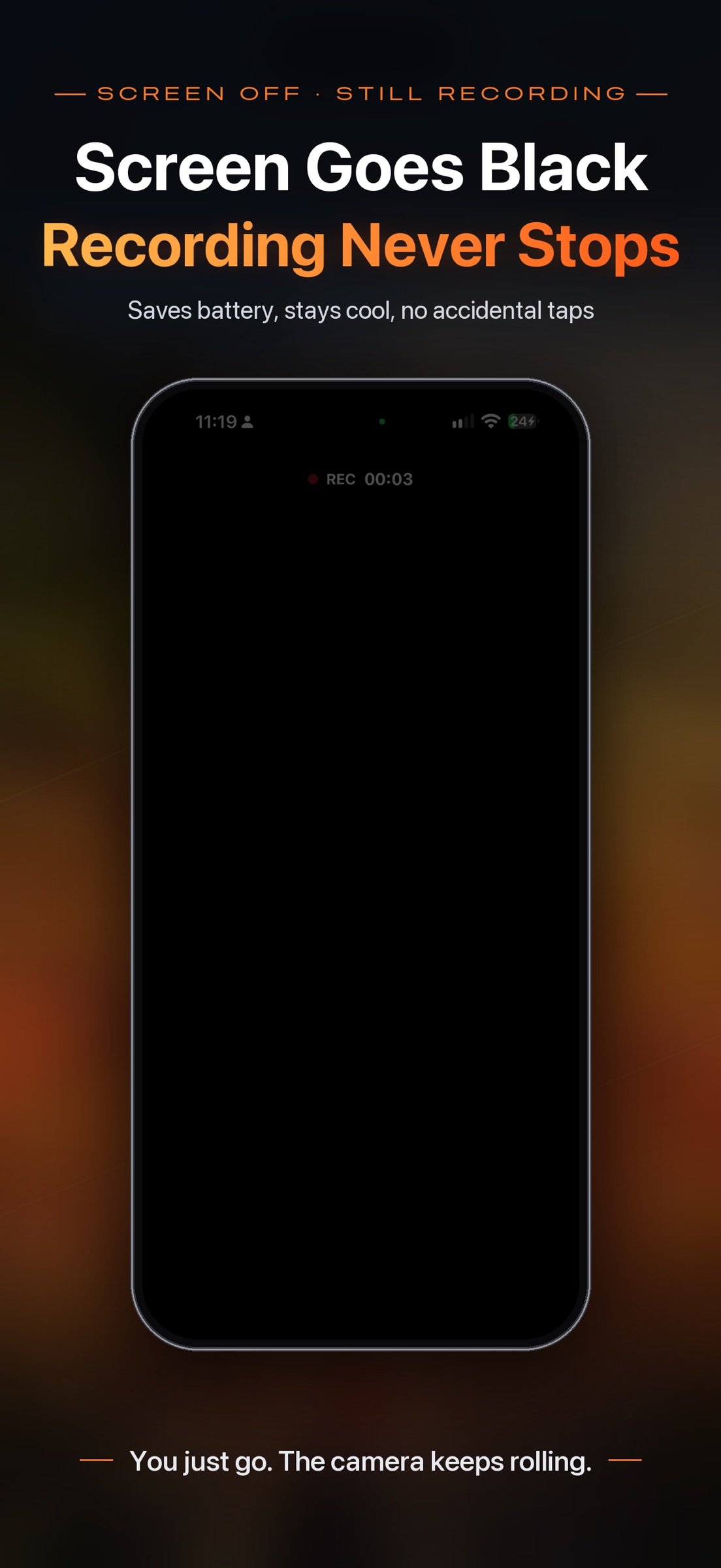
While recording, tap Screen Off: a near-black full-screen overlay lowers brightness to save power, stay cool, and prevent accidental taps. Recording continues as long as the app stays in the foreground. Tap to wake the controls, then Stop & Save to Photos or discard the clip.
A SIMPLER CAMERA SCREEN (1.7)
• Turn dual cam on or off with one tap at the top right; long-press it for quick layout, aspect, and border options
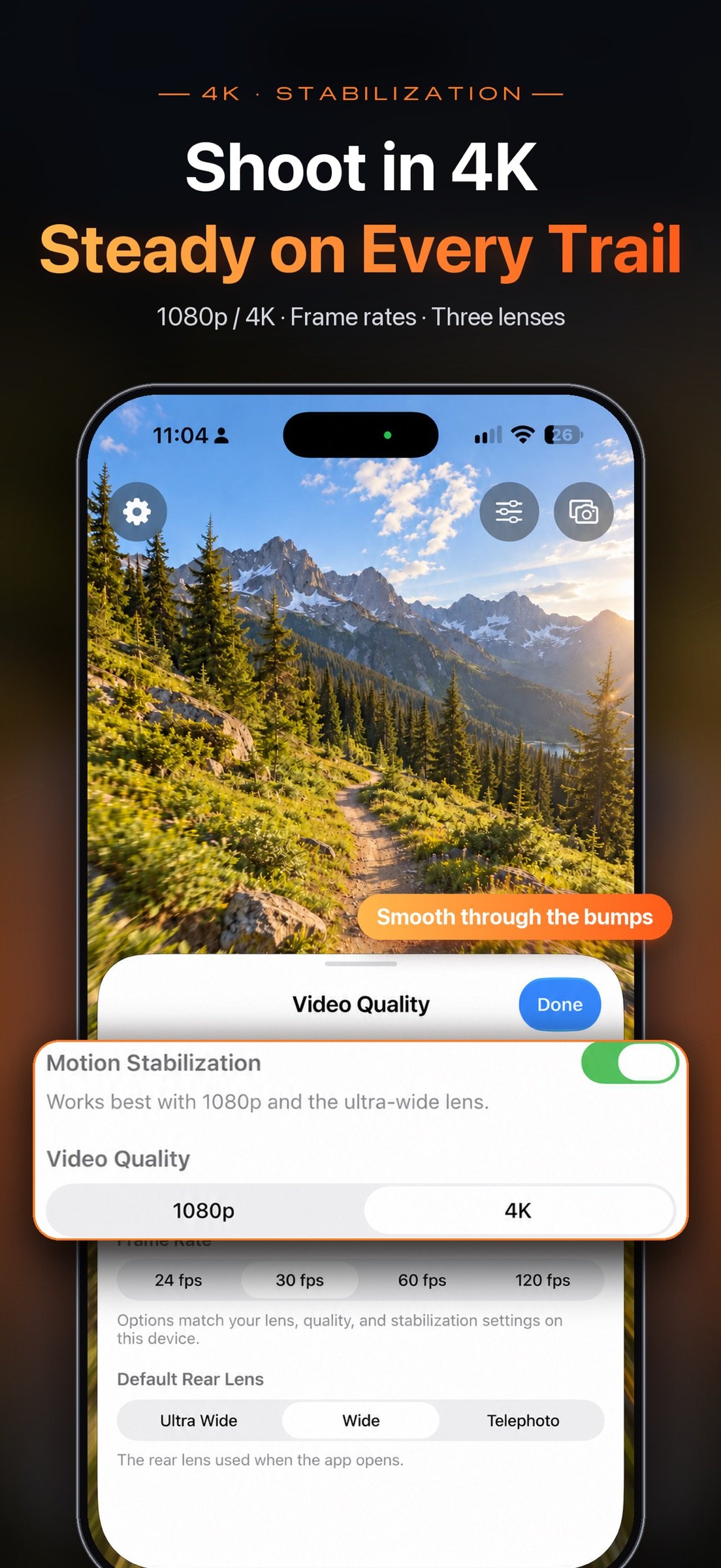
• The Adjust panel at the top right holds every shooting setting: quality, frame rate, stabilization, and default lens in single cam; layout, aspect, border, and frame rate in dual cam—with a live preview above
• The album button at the bottom left includes tools to timestamp videos from Photos; while recording, it becomes the Screen Off button
• Faster, more reliable switching between single and dual cam
DUAL CAMERA
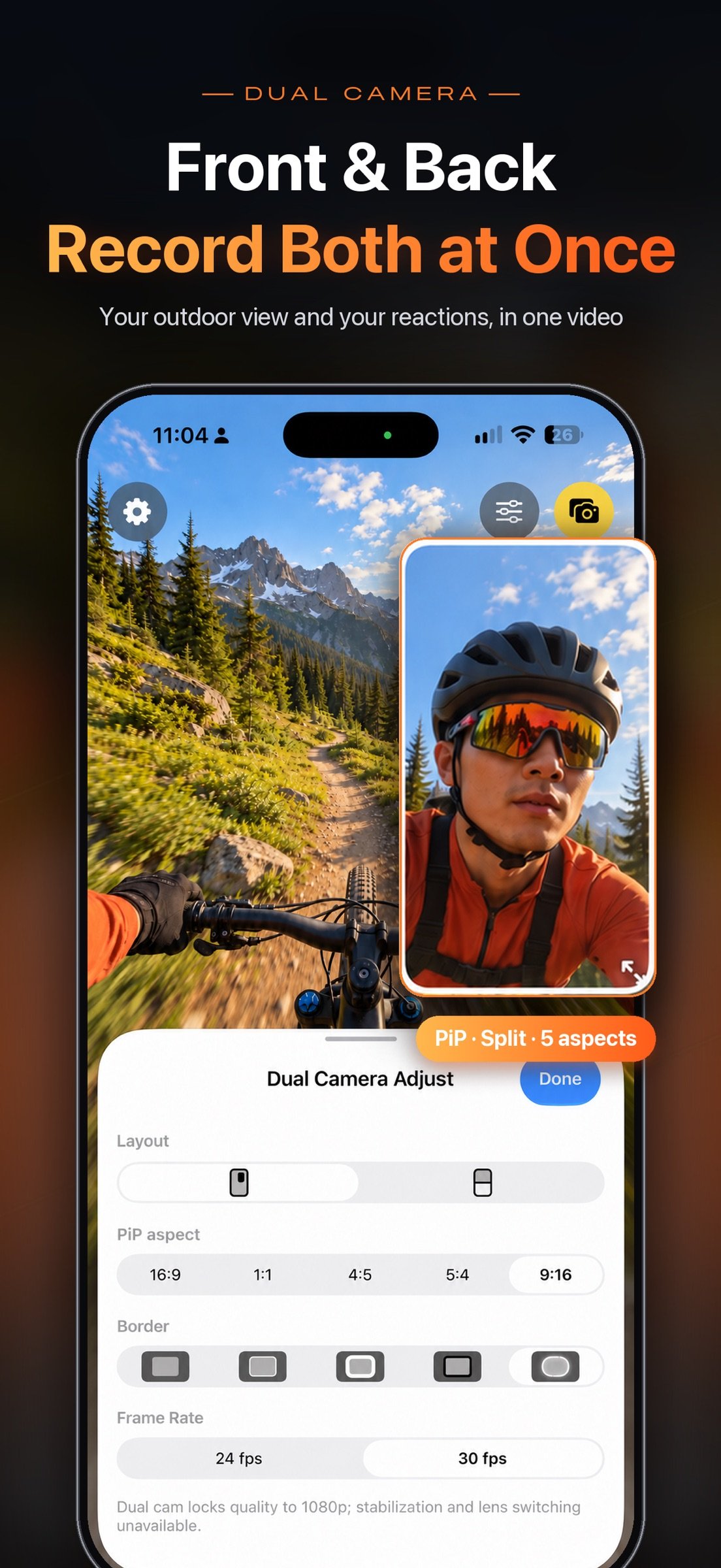
• Record front and back cameras at once into a single video in Photos—capture the view and your reaction together
• Picture-in-picture: drag the inset, resize with the corner handle or a pinch; aspects 16:9 / 1:1 / 4:5 / 5:4 / 9:16; position and size are remembered
• Long-edge split: top/bottom in portrait, left/right in landscape
• Border styles: None, Thin white, Thick white, Black, Soft white
• Tap the inset or the bottom-right button to swap views; Apple Watch preview follows the current primary view
• Requires iPhone XS/XR or later (A12+), or iPad with A12X or later. Stabilization and lens switching are unavailable in dual-cam mode
DYNAMIC TIMESTAMP
• Open the album button at the bottom left, pick a video, and burn in a clock that advances with the capture time
• Six positions with live preview; multiple styles (classic, outline, yellow, cyan, red, and more)
• Saves a new video and keeps the original; HDR / Dolby Vision sources export as SDR
LONG TAKES, LESS WORRY
• Dark Screen Off overlay; the recording indicator stays visible
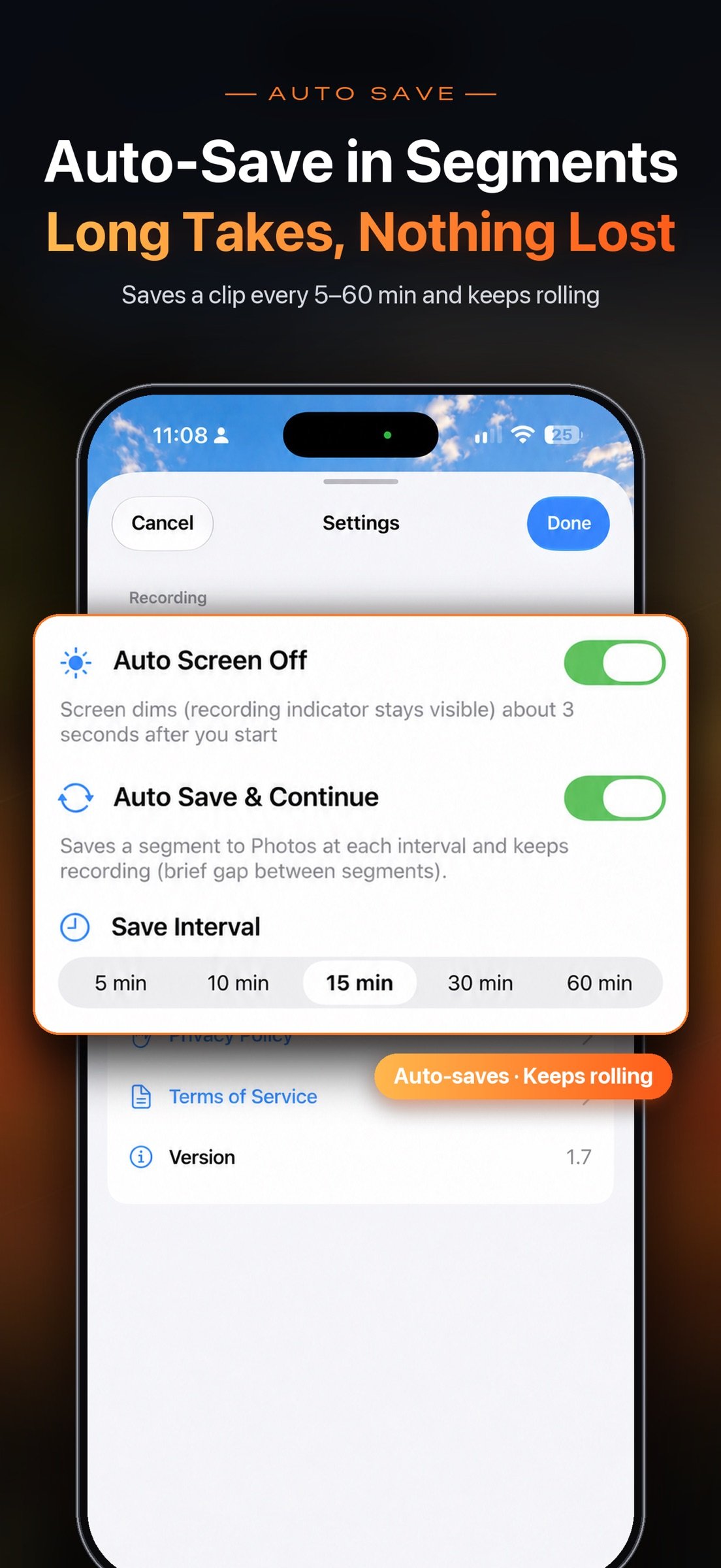
• Auto Save & Continue (off by default): every 5/10/15/30/60 minutes, save the current clip to Photos and immediately continue
• Stop & Save ends the session after saving the current clip; Discard drops only the unsaved segment
APPLE WATCH REMOTE
• Start/stop and save, preview the shot, enter Screen Off, and adjust settings from your wrist
• Live preview mirrors your iPhone framing (unavailable while recording); follows the primary view in dual cam
• The Watch app installs with the iPhone app
HOW IT WORKS
• Native Swift + AVFoundation—not a WebView shell
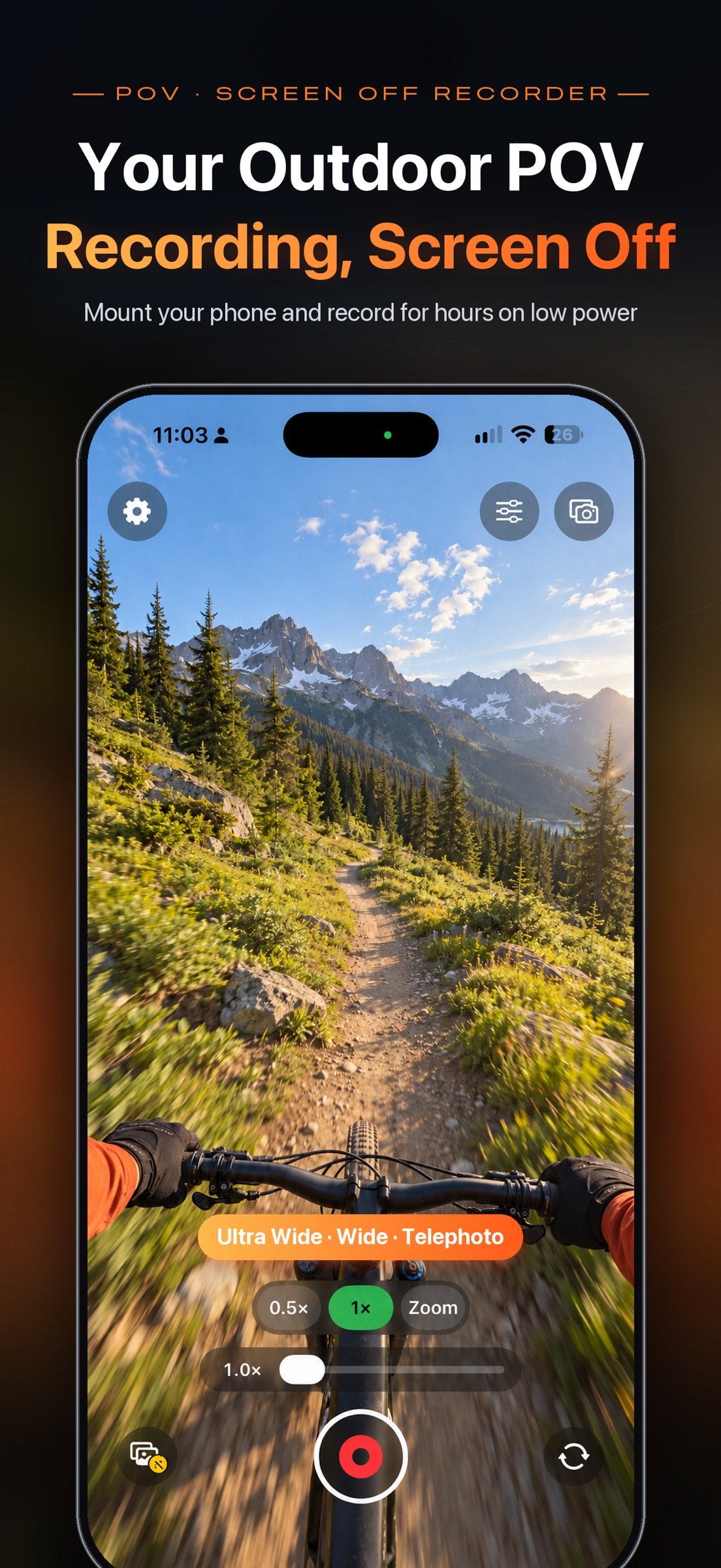
• Single cam: frame rates, 1080p/4K, Ultra Wide / Wide / Telephoto (device-dependent), zoom, tap to focus, motion stabilization (best at 1080p + Ultra Wide)
• Tap Screen Off while recording, or let it turn on ~3 seconds after you start
• Orientation follows how you hold the phone
PRIVACY & DATA
• No account required
• No upload to our servers—videos are saved to your on-device Photos library
• iCloud Photos sync, if enabled, is managed by Apple
IMPORTANT NOTES
• Screen Off is an in-app blackout—not recording after the side-button hardware lock. Keep the app in the foreground.
• Dual cam uses more power and generates more heat than single cam; watch battery and temperature on long takes.
• Timestamps are on-device post-processing, not burned in live while recording.
• Auto-save creates separate clips with a brief gap between them.
• Watch preview and instant remote control require the iPhone app in the foreground.
• Green/orange privacy indicators while recording are normal on iOS.
• Record only where you have permission and follow local laws.
Screen Off Recorder—you just go. The camera keeps rolling.
License: Commercial
THE CORE IDEA
While recording, tap Screen Off: a near-black full-screen overlay lowers brightness to save power, stay cool, and prevent accidental taps. Recording continues as long as the app stays in the foreground. Tap to wake the controls, then Stop & Save to Photos or discard the clip.
A SIMPLER CAMERA SCREEN (1.7)
• Turn dual cam on or off with one tap at the top right; long-press it for quick layout, aspect, and border options
• The Adjust panel at the top right holds every shooting setting: quality, frame rate, stabilization, and default lens in single cam; layout, aspect, border, and frame rate in dual cam—with a live preview above
• The album button at the bottom left includes tools to timestamp videos from Photos; while recording, it becomes the Screen Off button
• Faster, more reliable switching between single and dual cam
DUAL CAMERA
• Record front and back cameras at once into a single video in Photos—capture the view and your reaction together
• Picture-in-picture: drag the inset, resize with the corner handle or a pinch; aspects 16:9 / 1:1 / 4:5 / 5:4 / 9:16; position and size are remembered
• Long-edge split: top/bottom in portrait, left/right in landscape
• Border styles: None, Thin white, Thick white, Black, Soft white
• Tap the inset or the bottom-right button to swap views; Apple Watch preview follows the current primary view
• Requires iPhone XS/XR or later (A12+), or iPad with A12X or later. Stabilization and lens switching are unavailable in dual-cam mode
DYNAMIC TIMESTAMP
• Open the album button at the bottom left, pick a video, and burn in a clock that advances with the capture time
• Six positions with live preview; multiple styles (classic, outline, yellow, cyan, red, and more)
• Saves a new video and keeps the original; HDR / Dolby Vision sources export as SDR
LONG TAKES, LESS WORRY
• Dark Screen Off overlay; the recording indicator stays visible
• Auto Save & Continue (off by default): every 5/10/15/30/60 minutes, save the current clip to Photos and immediately continue
• Stop & Save ends the session after saving the current clip; Discard drops only the unsaved segment
APPLE WATCH REMOTE
• Start/stop and save, preview the shot, enter Screen Off, and adjust settings from your wrist
• Live preview mirrors your iPhone framing (unavailable while recording); follows the primary view in dual cam
• The Watch app installs with the iPhone app
HOW IT WORKS
• Native Swift + AVFoundation—not a WebView shell
• Single cam: frame rates, 1080p/4K, Ultra Wide / Wide / Telephoto (device-dependent), zoom, tap to focus, motion stabilization (best at 1080p + Ultra Wide)
• Tap Screen Off while recording, or let it turn on ~3 seconds after you start
• Orientation follows how you hold the phone
PRIVACY & DATA
• No account required
• No upload to our servers—videos are saved to your on-device Photos library
• iCloud Photos sync, if enabled, is managed by Apple
IMPORTANT NOTES
• Screen Off is an in-app blackout—not recording after the side-button hardware lock. Keep the app in the foreground.
• Dual cam uses more power and generates more heat than single cam; watch battery and temperature on long takes.
• Timestamps are on-device post-processing, not burned in live while recording.
• Auto-save creates separate clips with a brief gap between them.
• Watch preview and instant remote control require the iPhone app in the foreground.
• Green/orange privacy indicators while recording are normal on iOS.
• Record only where you have permission and follow local laws.
Screen Off Recorder—you just go. The camera keeps rolling.
License: Commercial
| Release info | New Release on Oct 10, 2026 |
|---|---|
| Release notes | • Redesigned camera screen: turn dual cam on or off with one tap at the top right; long-press for quick layout, aspect, and border options • All shooting settings now live in the Adjust panel at the top right—quality, frame rate, stabilization, default lens, and dual-cam layout—with live preview • The album button at the bottom left now includes tools: add timestamps to videos from Photos right away • In dual cam, tap the inset to swap front and back views • Faster, more reliable switching between single and dual cam • Simpler Settings and other refinements |
| Listing data | App Store |
Reviews
No reviews yet. Be the first to review Screen Off Recorder.
Used Screen Off Recorder? Tell other visitors what you thought.
Log in to write a reviewOther products by this publisher
- "No Distractions" for YouTube 4.10 ----
- #Bible 11.5 "Incredible App - My sister shared this app with me a few weeks ago and it is truly incredible.
- % Percentage Calculator Pro 1.41 This is the Pro version of % Percentage Calculator.
- (beat) for iOS 0.5.9 An elegant Fountain screenwriting app, created by a screenwriter for screenwriters.
- (Deep) HIARCS Chess Explorer 1.14 Chess database, analysis and game playing program
Most viewed iOS Photo & Video
-
1
 AI Video Generator 2.0
Vixel – AI Video Generator
AI Video Generator 2.0
Vixel – AI Video Generator
-
2
 Infuse 8.5.8
Infuse: Enterprise provides the same great features as the standard version of Infuse and includes permanent access to all Pro features via a traditional paid app.
Infuse 8.5.8
Infuse: Enterprise provides the same great features as the standard version of Infuse and includes permanent access to all Pro features via a traditional paid app.
-
3
 Ai Photo 1.1.1
AI Photo Retouch – BG Eraser
Ai Photo 1.1.1
AI Photo Retouch – BG Eraser
-
4
 JLab 1.4.2
Compatible Models:
JLab 1.4.2
Compatible Models:
-
5
 TouchSiren Delta 3.1
--------------------------------------------------------------
TouchSiren Delta 3.1
--------------------------------------------------------------
-
6
 CapCut 19.8.1
CapCut offers easy-to-use video editing functions, in-APP fonts and effects, advanced features such as keyframe animation, smooth slow-motion, chroma key, and stabilization, to help you capture and snip moments.
CapCut 19.8.1
CapCut offers easy-to-use video editing functions, in-APP fonts and effects, advanced features such as keyframe animation, smooth slow-motion, chroma key, and stabilization, to help you capture and snip moments.
-
7
 Sci-Fi Keyboard 3.0
Make your keyboard a Sci-Fi input panel.
Sci-Fi Keyboard 3.0
Make your keyboard a Sci-Fi input panel.
-
8
 Locket Widget 2.70.0
Locket is a widget that shows live photos from your best friends, right to your Home Screen.
Locket Widget 2.70.0
Locket is a widget that shows live photos from your best friends, right to your Home Screen.
-
9
 CNU 3.0.12
CNU?????????????????????,???????????????
CNU 3.0.12
CNU?????????????????????,???????????????
-
10
 Emoji Maker 3.11.3
Emoji Up is an emoji maker that lets you create your own custom emojis.
Emoji Maker 3.11.3
Emoji Up is an emoji maker that lets you create your own custom emojis.
Most downloaded iOS Photo & Video
-
1
Infuse 8.5.8
Infuse: Enterprise provides the same great features as the standard version of Infuse and includes permanent access to all Pro features via a traditional paid app.
-
2
 DJI Fly 1.21.16
DJI Fly is designed to help pilots fly drones with ease.
DJI Fly 1.21.16
DJI Fly is designed to help pilots fly drones with ease.
-
3
 Analog Radio 3.0
The iPhone and iPad devices don't have the FM/AM radio antenna installed.
Analog Radio 3.0
The iPhone and iPad devices don't have the FM/AM radio antenna installed.
-
4
 TurboCollage Automatic 1.2.4
#1 Easy automatic photo collage maker for iPhone & iPad.
TurboCollage Automatic 1.2.4
#1 Easy automatic photo collage maker for iPhone & iPad.
-
5
 Speaker & Headphones Connect 7.2
Seamlessly connect and smartly control any speakers, headphones, earbuds, TVCast, and Carplay that support Airplay & Bluetooth with our Headphones & Speakers Connect App.
Speaker & Headphones Connect 7.2
Seamlessly connect and smartly control any speakers, headphones, earbuds, TVCast, and Carplay that support Airplay & Bluetooth with our Headphones & Speakers Connect App.
-
6
 ReelyGo 1.1.41
ReelyGo: Your Daily Drama Escape
ReelyGo 1.1.41
ReelyGo: Your Daily Drama Escape
-
7
 Open Source Selfie Stick 2.0
Shot Caller turns one iPhone or iPad into a camera and another into its remote control.
Open Source Selfie Stick 2.0
Shot Caller turns one iPhone or iPad into a camera and another into its remote control.
-
8
 SSS IPTV, Simple, Smart Super 1.0.2
An Easiest way to watch TV Online or Movies or Series, Bring your Own list M3u,
SSS IPTV, Simple, Smart Super 1.0.2
An Easiest way to watch TV Online or Movies or Series, Bring your Own list M3u,
-
9
Emoji Maker 3.11.3
Emoji Up is an emoji maker that lets you create your own custom emojis.
-
10
 BeReal 4.97.2
BeReal is the simplest photo-sharing app where you and your friends post once a day to show what you’re really up to.
BeReal 4.97.2
BeReal is the simplest photo-sharing app where you and your friends post once a day to show what you’re really up to.