
RemoteLight 1.2.6
RemoteLight is a third-party remote play app for iPhone, iPad, and Apple silicon Mac, designed to help you connect to PS5 and PS4 with more flexibility and continue your games at home or away from your console.
Download
60.10 MB
2downloads
2this week
FreeCommercial
0reviews
Screenshots


About RemoteLight
RemoteLight is a third-party remote play app for iPhone, iPad, and Apple silicon Mac, designed to help you connect to PS5 and PS4 with more flexibility and continue your games at home or away from your console.
Whether you are in the living room, in bed, or on the go, RemoteLight gives you more control over streaming quality, input methods, and runtime tools, so your console experience can move with you.
Features
Local and Remote Play
Connect to your console on the local network, or use remote connection options for supported setups so you can keep playing in more places.
Flexible Streaming Settings
Choose resolution, frame rate, bitrate, codec, and rendering method to better match your network conditions and device performance.
H.264, H.265, and H.265 HDR
Supports multiple codec options, including HDR streaming on compatible devices for richer highlights and color detail.
Metal Rendering and MetalFX Upscaling
Offers both system rendering and Metal rendering. On supported devices, MetalFX upscaling and sharpness options can further improve image detail.
Controller and Virtual Controls
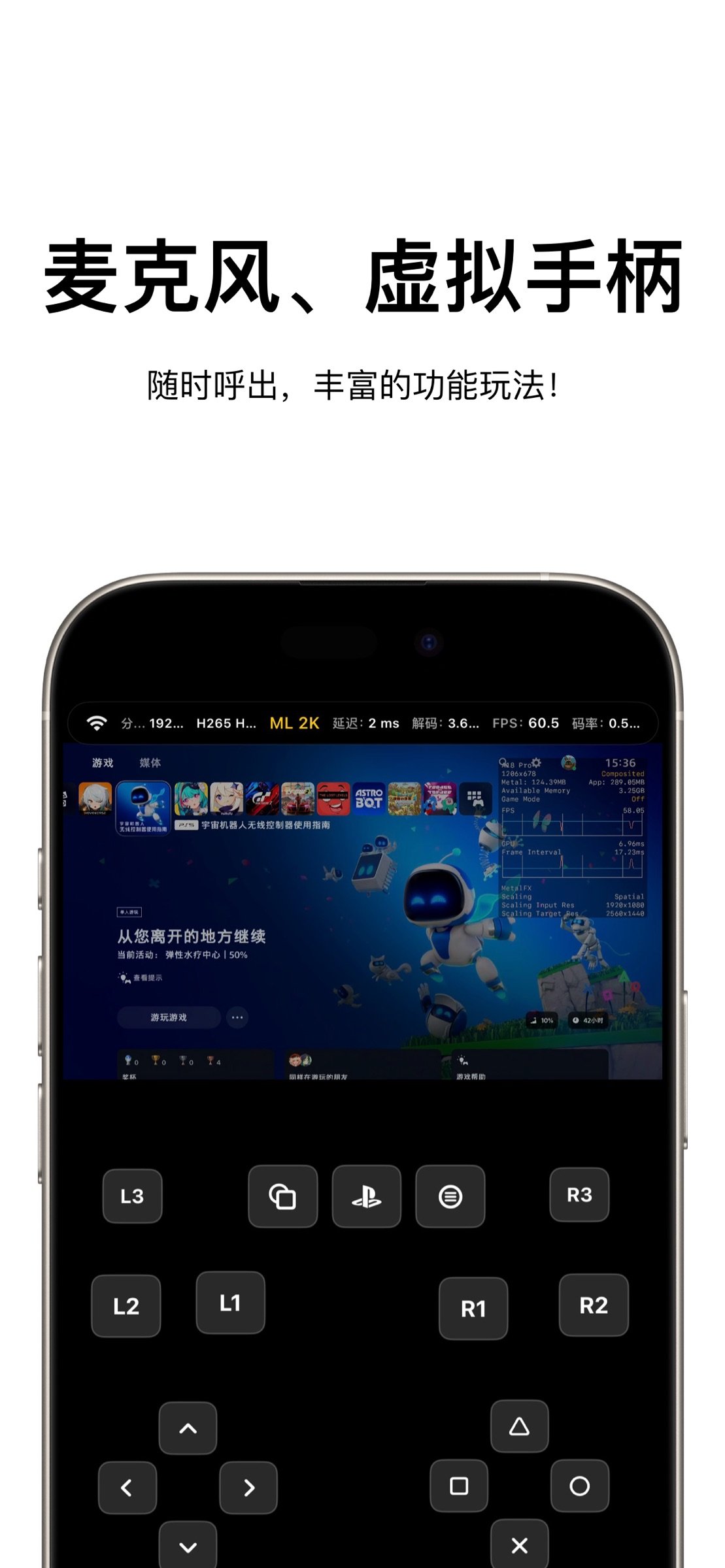
Works with DualSense, DualShock 4, and compatible controllers. Virtual controller and virtual touchpad support are also available for more flexible play styles.
Haptics and Adaptive Triggers
On supported controllers, the app supports vibration, haptic feedback, and adaptive trigger features for a more complete gameplay experience.
Motion, Touchpad, and Microphone
Supports device motion input, controller motion input, touchpad actions, and in-stream microphone features where available.
In-Game Menu and Performance Overlay
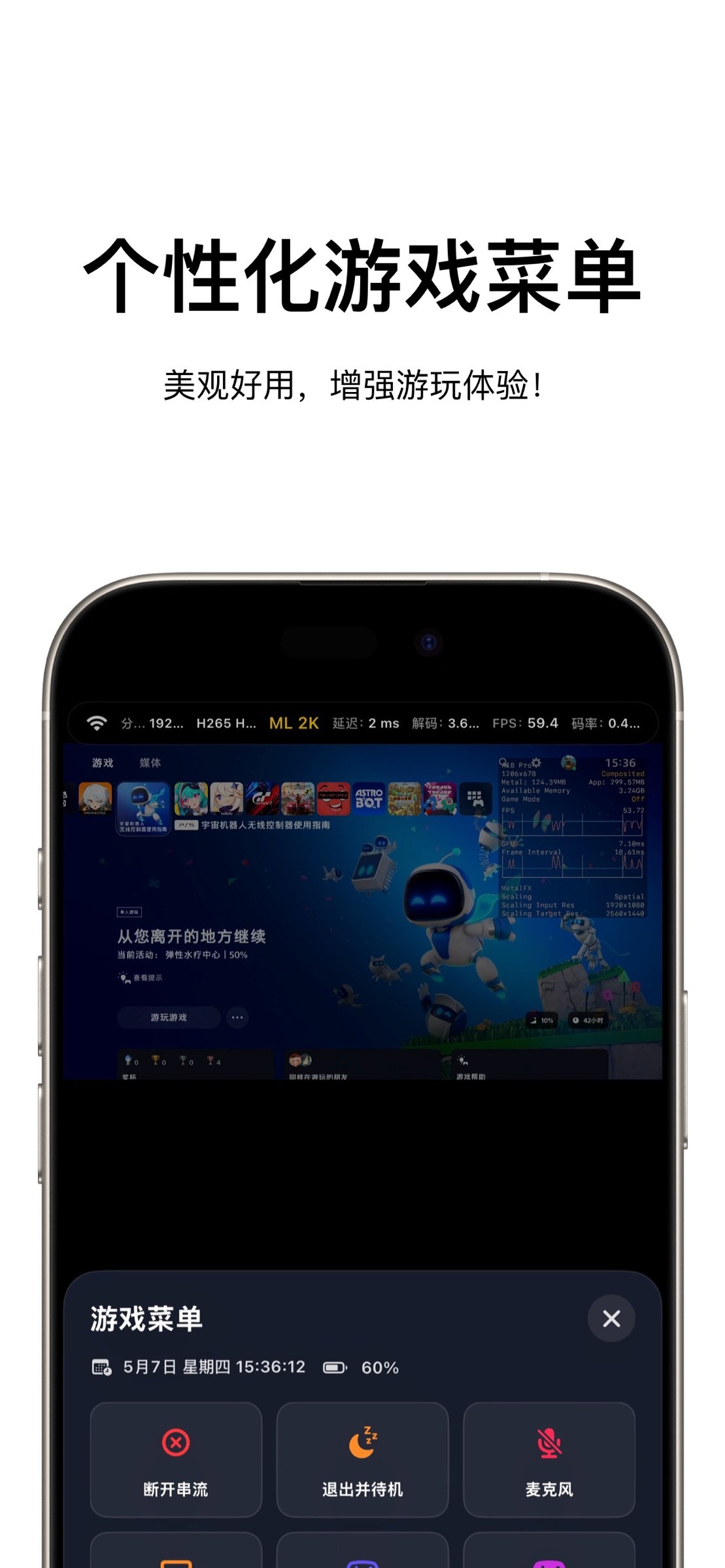
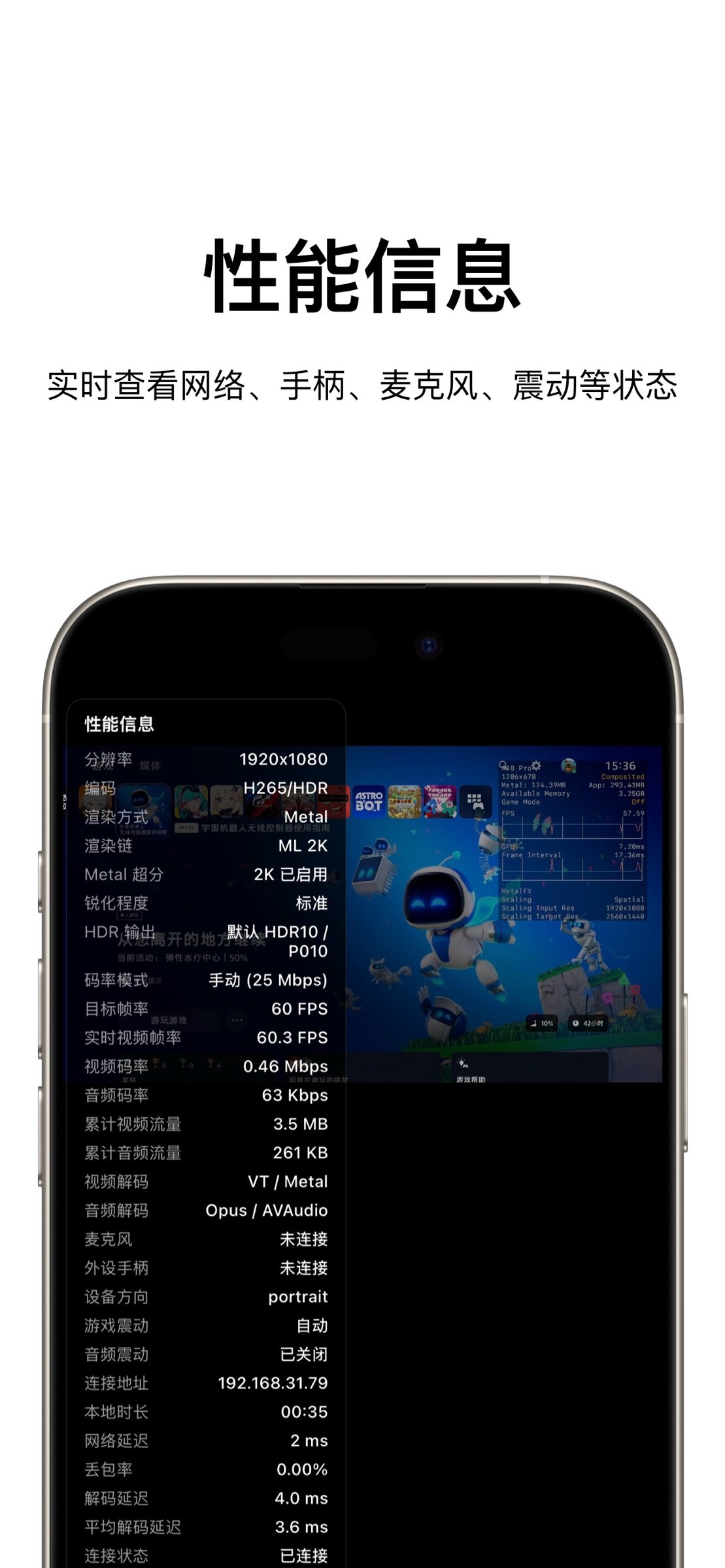
Open the in-game menu at any time to adjust virtual controls, touchpad, performance overlays, display position, and other stream options. You can also monitor latency, bitrate, frame rate, and more.
Host and Account Management
Manage hosts, local accounts, PSN-related configuration, and backup import/export for easier migration across devices.
Before You Start
1. Enable Remote Play on your PS5 or PS4
2. Make sure your console and device are on a working network
3. Add your console and complete pairing in the app
4. For remote connection, complete the required account and connection setup first
Recommended Environment
- Stable 5GHz Wi-Fi or better
- Wired connection for the console when possible
- A compatible external controller for the best gameplay experience
- HDR, Metal rendering, and upscaling availability may vary by device capability
Supported Platforms
- iPhone
- iPad
- Apple silicon Mac
Disclaimer
This is a third-party remote play app.
“PlayStation”, “PS5”, “PS4”, “DualSense”, “DualShock”, and related names and marks are trademarks of Sony Interactive Entertainment Inc. or its affiliates.
RemoteLight is not affiliated with, endorsed by, or officially associated with Sony Interactive Entertainment Inc.
License: Commercial
Whether you are in the living room, in bed, or on the go, RemoteLight gives you more control over streaming quality, input methods, and runtime tools, so your console experience can move with you.
Features
Local and Remote Play
Connect to your console on the local network, or use remote connection options for supported setups so you can keep playing in more places.
Flexible Streaming Settings
Choose resolution, frame rate, bitrate, codec, and rendering method to better match your network conditions and device performance.
H.264, H.265, and H.265 HDR
Supports multiple codec options, including HDR streaming on compatible devices for richer highlights and color detail.
Metal Rendering and MetalFX Upscaling
Offers both system rendering and Metal rendering. On supported devices, MetalFX upscaling and sharpness options can further improve image detail.
Controller and Virtual Controls
Works with DualSense, DualShock 4, and compatible controllers. Virtual controller and virtual touchpad support are also available for more flexible play styles.
Haptics and Adaptive Triggers
On supported controllers, the app supports vibration, haptic feedback, and adaptive trigger features for a more complete gameplay experience.
Motion, Touchpad, and Microphone
Supports device motion input, controller motion input, touchpad actions, and in-stream microphone features where available.
In-Game Menu and Performance Overlay
Open the in-game menu at any time to adjust virtual controls, touchpad, performance overlays, display position, and other stream options. You can also monitor latency, bitrate, frame rate, and more.
Host and Account Management
Manage hosts, local accounts, PSN-related configuration, and backup import/export for easier migration across devices.
Before You Start
1. Enable Remote Play on your PS5 or PS4
2. Make sure your console and device are on a working network
3. Add your console and complete pairing in the app
4. For remote connection, complete the required account and connection setup first
Recommended Environment
- Stable 5GHz Wi-Fi or better
- Wired connection for the console when possible
- A compatible external controller for the best gameplay experience
- HDR, Metal rendering, and upscaling availability may vary by device capability
Supported Platforms
- iPhone
- iPad
- Apple silicon Mac
Disclaimer
This is a third-party remote play app.
“PlayStation”, “PS5”, “PS4”, “DualSense”, “DualShock”, and related names and marks are trademarks of Sony Interactive Entertainment Inc. or its affiliates.
RemoteLight is not affiliated with, endorsed by, or officially associated with Sony Interactive Entertainment Inc.
License: Commercial
| Release info | New Release on Oct 15, 2026 |
|---|---|
| Release notes | Added performance overlay preferences: Compact, Full, or Off. Your selection is saved for future streaming sessions. |
| Listing data | App Store |
Reviews
No reviews yet. Be the first to review RemoteLight.
Used RemoteLight? Tell other visitors what you thought.
Log in to write a reviewOther products by this publisher
- "No Distractions" for YouTube 4.10 ----
- #Bible 11.5 "Incredible App - My sister shared this app with me a few weeks ago and it is truly incredible.
- % Percentage Calculator Pro 1.41 This is the Pro version of % Percentage Calculator.
- (beat) for iOS 0.5.8 An elegant Fountain screenwriting app, created by a screenwriter for screenwriters.
- (Deep) HIARCS Chess Explorer 1.14 Chess database, analysis and game playing program
Most viewed iOS Photo & Video
-
1
 AI Video Generator 2.0
Vixel – AI Video Generator
AI Video Generator 2.0
Vixel – AI Video Generator
-
2
 Infuse 8.5.8
Infuse: Enterprise provides the same great features as the standard version of Infuse and includes permanent access to all Pro features via a traditional paid app.
Infuse 8.5.8
Infuse: Enterprise provides the same great features as the standard version of Infuse and includes permanent access to all Pro features via a traditional paid app.
-
3
 Ai Photo 1.1.1
AI Photo Retouch – BG Eraser
Ai Photo 1.1.1
AI Photo Retouch – BG Eraser
-
4
 Sci-Fi Keyboard 3.0
Make your keyboard a Sci-Fi input panel.
Sci-Fi Keyboard 3.0
Make your keyboard a Sci-Fi input panel.
-
5
 TouchSiren Delta 3.1
--------------------------------------------------------------
TouchSiren Delta 3.1
--------------------------------------------------------------
-
6
 CapCut 19.8.1
CapCut offers easy-to-use video editing functions, in-APP fonts and effects, advanced features such as keyframe animation, smooth slow-motion, chroma key, and stabilization, to help you capture and snip moments.
CapCut 19.8.1
CapCut offers easy-to-use video editing functions, in-APP fonts and effects, advanced features such as keyframe animation, smooth slow-motion, chroma key, and stabilization, to help you capture and snip moments.
-
7
 Locket Widget 2.69.0
Locket is a widget that shows live photos from your best friends, right to your Home Screen.
Locket Widget 2.69.0
Locket is a widget that shows live photos from your best friends, right to your Home Screen.
-
8
 JLab 1.4.2
Compatible Models:
JLab 1.4.2
Compatible Models:
-
9
 CNU 3.0.12
CNU?????????????????????,???????????????
CNU 3.0.12
CNU?????????????????????,???????????????
-
10
 Dance AI 1.1.1
CREATE YOUR AI DANCE VIDEOS
Dance AI 1.1.1
CREATE YOUR AI DANCE VIDEOS
Most downloaded iOS Photo & Video
-
1
Infuse 8.5.8
Infuse: Enterprise provides the same great features as the standard version of Infuse and includes permanent access to all Pro features via a traditional paid app.
-
2
 ReelyGo 1.1.41
ReelyGo: Your Daily Drama Escape
ReelyGo 1.1.41
ReelyGo: Your Daily Drama Escape
-
3
 Open Source Selfie Stick 2.0
Shot Caller turns one iPhone or iPad into a camera and another into its remote control.
Open Source Selfie Stick 2.0
Shot Caller turns one iPhone or iPad into a camera and another into its remote control.
-
4
 Instagram 452.0.0
Little moments lead to big friendships.
Instagram 452.0.0
Little moments lead to big friendships.
-
5
JLab 1.4.2
Compatible Models:
-
6
 Emoji Maker 3.11.2
Emoji Up is an emoji maker that lets you create your own custom emojis.
Emoji Maker 3.11.2
Emoji Up is an emoji maker that lets you create your own custom emojis.
-
7
 BeReal 4.97.2
BeReal is the simplest photo-sharing app where you and your friends post once a day to show what you’re really up to.
BeReal 4.97.2
BeReal is the simplest photo-sharing app where you and your friends post once a day to show what you’re really up to.
-
8
 Mega Photo Pro 3.2.10
The most fun you can have with your photos -- Mega Photo Pro is the hilarious app that brings your photos and videos to life.
Mega Photo Pro 3.2.10
The most fun you can have with your photos -- Mega Photo Pro is the hilarious app that brings your photos and videos to life.
-
9
 Explorer for Sketchfab 1.2
Discover the world of 3D models with Explorer for Sketchfab, an unofficial Sketchfab app from Sozzled.
Explorer for Sketchfab 1.2
Discover the world of 3D models with Explorer for Sketchfab, an unofficial Sketchfab app from Sozzled.
-
10
CNU 3.0.12
CNU?????????????????????,???????????????