Real Paint mixing tools 3.26.2
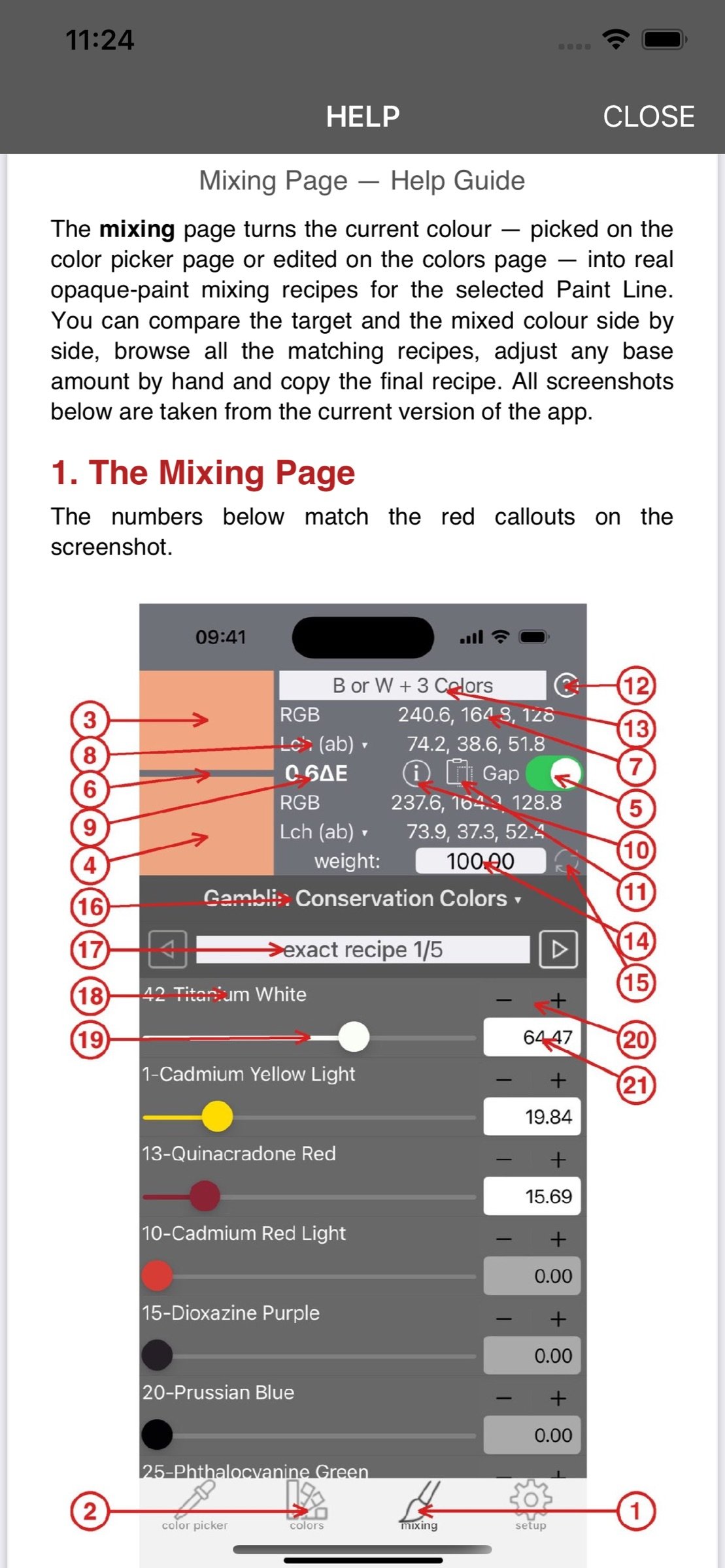
Painters can load an image, pick colors and obtain OPAQUE paint mixing recipes for several commercial paint brands.
Download
29.23 MB
18downloads
3this week
FreeCommercial
0reviews
Screenshots
About Real Paint mixing tools
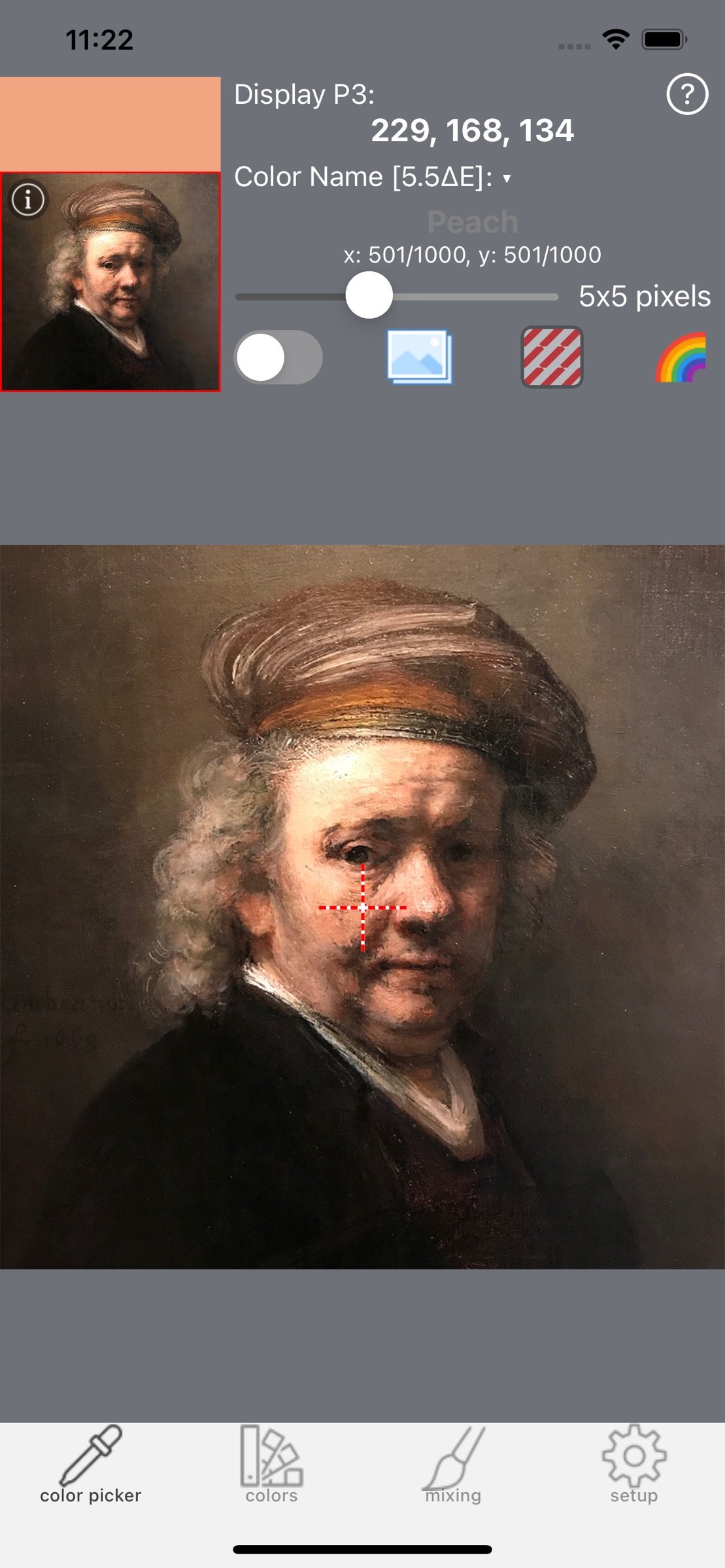
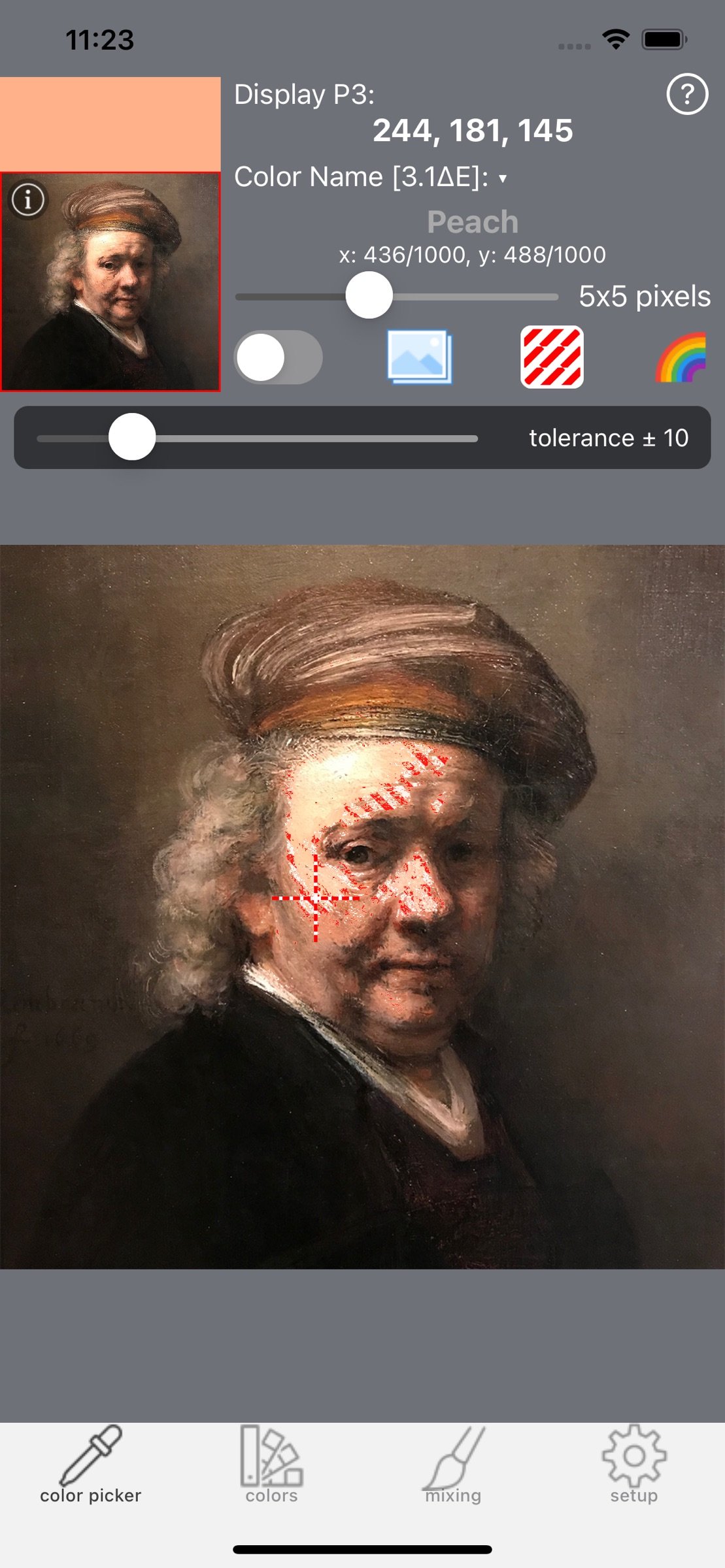
Painters can load an image, pick colors and obtain OPAQUE paint mixing recipes for several commercial paint brands. This is useful for art students, painters with color vision difficulties, and professionals working in painting conservation and restoration. It can also help reduce paint, time, and money waste.
Optishade images can be imported directly from the Optishade by StyleItaliano app and used by technicians to create gum or dental colors for mockups.
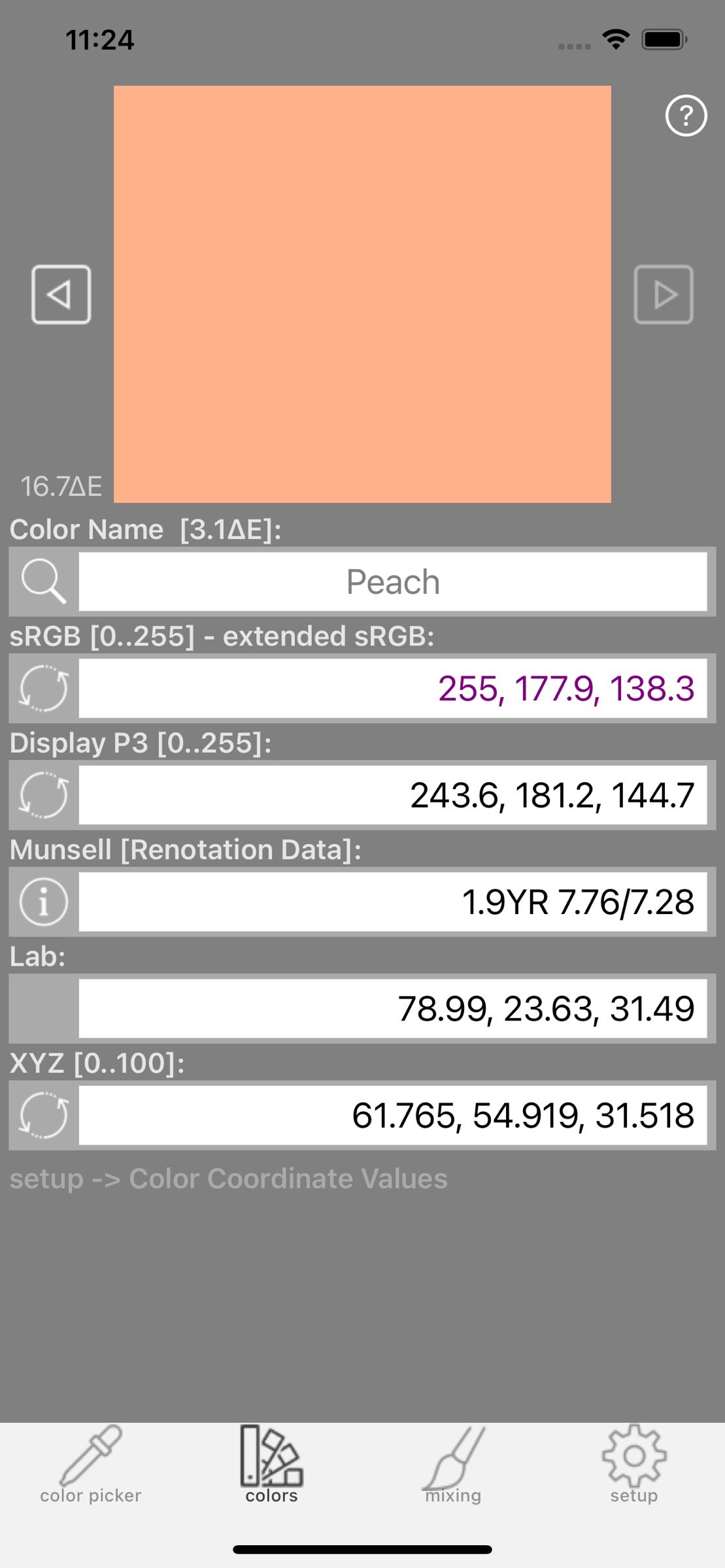
RealPaint includes many color spaces: sRGB, Display P3, CMYK, HSL, HSV/B, Lab, Lch-ab, Luv, Lch-uv, XYZ, xyY, and Munsell coordinates. Munsell coordinates are calculated from the original and extrapolated Renotation Data with high precision, even near the neutral axis. You can also check the color transformation error for full control over conversions.
RealPaint includes one Ideal Paint set and many measured Paint Sets from well-known manufacturers: Createx, Daler-Rowney, Ferrario, Gamblin, Grumbacher-Chartpak, Golden, Liquitex, Maimeri, Royal Talens, Schmincke, Sennelier, Vallejo, and Winsor & Newton.
Each Paint Set includes 8 paint bases. Once you select a Paint Line, you can purchase the 8 bases wherever you prefer and use them for all your paintings. The 6 colored bases in each Paint Set are optimized to cover the widest possible opaque color space, providing as many mixable colors as possible. Some sets also include phthalocyanine pigments because they offer a wider mixing gamut, although they may be more difficult for beginners.
The apps in the “Real Paint mixing tools” family use measured spectral data from painted samples. A large portion of the RGB/P3 space can be mixed, but not every RGB/P3 color is physically achievable with real paints. This is not an app limitation, but a consequence of paint physics. However, many colors outside the RGB/P3 color space can also be mixed by manually adjusting paint amounts on the “Mixing” page.
Paint recipes can be generated with several Mixing Strategies:
“B and W + 2 Colors”: Black and White first create a gray, then 2 colored bases adjust Hue and Saturation.
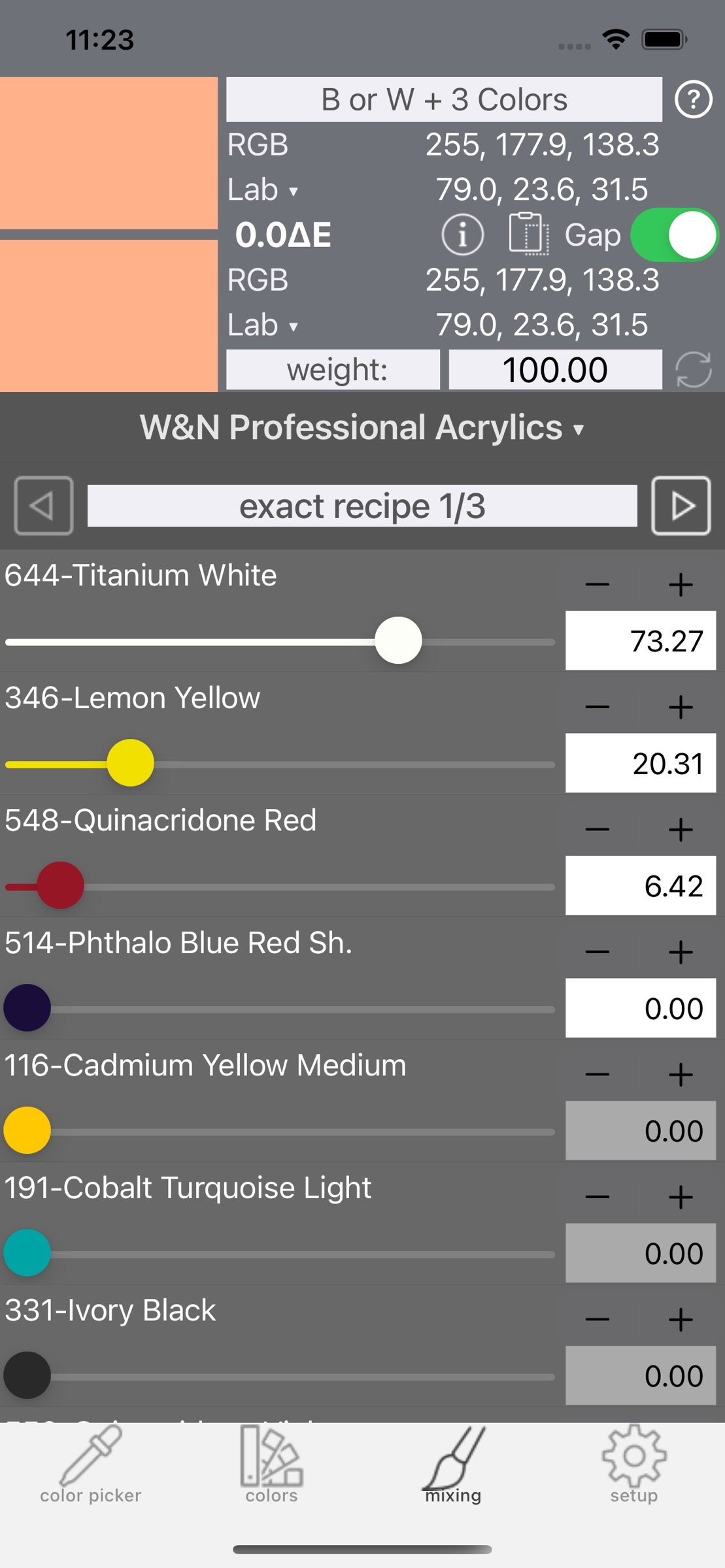
“B or W + 3 Colors”: 3 colored bases set Hue and Saturation, while either Black or White sets the Value.
“At least one opaque”: shows all possible opaque mixing combinations.
“No Black used”: shows opaque combinations without Black.
“All bases at once”: calculates one recipe using all bases together. The result is usually not unique and opacity is not guaranteed, but it can be useful for color gamut testing.
Each recipe can be Exact or Rounded:
“Exact recipe” calculates each base amount with 0.01-unit precision. To obtain percentage values, enter 100 as the total amount. This is useful for weight-based measurements with a scale.
“Rounded recipe” expresses each base amount as an integer and uses the smallest possible total amount. It is useful for volume-based measurements, such as drops, spoons, or squared paper with paint squeezed directly from tubes.
Digital images usually do not fit entirely within the gamut of real paint sets. RealPaint can estimate an approximate desaturation value to adapt an image to the selected Paint Set and current mixing parameters. This heuristic value is approximate, but usually provides very good results.
Please note that paint color may vary within the same tube or jar, between different batches, and when manufacturers change formulations over time. Always mix small test amounts first to make sure the computed recipes meet your needs!
To learn how to use the app, watch the video tutorials on YouTube by searching for “Real Paint mixing tools”.
Optishade images can be imported directly from the Optishade by StyleItaliano app and used by technicians to create gum or dental colors for mockups.
RealPaint includes many color spaces: sRGB, Display P3, CMYK, HSL, HSV/B, Lab, Lch-ab, Luv, Lch-uv, XYZ, xyY, and Munsell coordinates. Munsell coordinates are calculated from the original and extrapolated Renotation Data with high precision, even near the neutral axis. You can also check the color transformation error for full control over conversions.
RealPaint includes one Ideal Paint set and many measured Paint Sets from well-known manufacturers: Createx, Daler-Rowney, Ferrario, Gamblin, Grumbacher-Chartpak, Golden, Liquitex, Maimeri, Royal Talens, Schmincke, Sennelier, Vallejo, and Winsor & Newton.
Each Paint Set includes 8 paint bases. Once you select a Paint Line, you can purchase the 8 bases wherever you prefer and use them for all your paintings. The 6 colored bases in each Paint Set are optimized to cover the widest possible opaque color space, providing as many mixable colors as possible. Some sets also include phthalocyanine pigments because they offer a wider mixing gamut, although they may be more difficult for beginners.
The apps in the “Real Paint mixing tools” family use measured spectral data from painted samples. A large portion of the RGB/P3 space can be mixed, but not every RGB/P3 color is physically achievable with real paints. This is not an app limitation, but a consequence of paint physics. However, many colors outside the RGB/P3 color space can also be mixed by manually adjusting paint amounts on the “Mixing” page.
Paint recipes can be generated with several Mixing Strategies:
“B and W + 2 Colors”: Black and White first create a gray, then 2 colored bases adjust Hue and Saturation.
“B or W + 3 Colors”: 3 colored bases set Hue and Saturation, while either Black or White sets the Value.
“At least one opaque”: shows all possible opaque mixing combinations.
“No Black used”: shows opaque combinations without Black.
“All bases at once”: calculates one recipe using all bases together. The result is usually not unique and opacity is not guaranteed, but it can be useful for color gamut testing.
Each recipe can be Exact or Rounded:
“Exact recipe” calculates each base amount with 0.01-unit precision. To obtain percentage values, enter 100 as the total amount. This is useful for weight-based measurements with a scale.
“Rounded recipe” expresses each base amount as an integer and uses the smallest possible total amount. It is useful for volume-based measurements, such as drops, spoons, or squared paper with paint squeezed directly from tubes.
Digital images usually do not fit entirely within the gamut of real paint sets. RealPaint can estimate an approximate desaturation value to adapt an image to the selected Paint Set and current mixing parameters. This heuristic value is approximate, but usually provides very good results.
Please note that paint color may vary within the same tube or jar, between different batches, and when manufacturers change formulations over time. Always mix small test amounts first to make sure the computed recipes meet your needs!
To learn how to use the app, watch the video tutorials on YouTube by searching for “Real Paint mixing tools”.
| Release info | New Release on Aug 31, 2026 |
|---|---|
| Release notes | minor bug fixes |
| Listing data | App Store |
Reviews
No reviews yet. Be the first to review Real Paint mixing tools.
Used Real Paint mixing tools? Tell other visitors what you thought.
Log in to write a reviewOther products by this publisher
- "No Distractions" for YouTube 4.10 ----
- #Bible 11.6 "Incredible App - My sister shared this app with me a few weeks ago and it is truly incredible.
- #filmphotography 1.4.2 So, you decided to shoot on film?
- $quirrel 1.5.1 $quirrel Budget & Finance helps you plan each paycheck, track spending, manage debt, and see what is safe to spend before the next payday.
- % Percentage Calculator Pro 1.41 This is the Pro version of % Percentage Calculator.
Most viewed iOS Photo & Video
-
1
 ShortDiShow 2.0
Drama Quest Island — An offline interactive short-drama adventure.
-
2
 Infuse 8.5.10
Infuse: Enterprise provides the same great features as the standard version of Infuse and includes permanent access to all Pro features via a traditional paid app.
-
3
 AI Video Generator 2.0.2
Vixel – AI Video Generator
-
4
 OPlayer 4.8
Play all your videos directly without having to convert them!
-
5
 Necrometer II 1.2
Necrometer II is a paranormal investigation companion designed for ghost hunters and researchers.
-
6
 CapCut 20.1.0
CapCut offers easy-to-use video editing functions, in-APP fonts and effects, advanced features such as keyframe animation, smooth slow-motion, chroma key, and stabilization, to help you capture and snip moments.
-
7
 Ai Photo 1.1.2
AI Photo Retouch – BG Eraser
-
8
 Treblo 1.6.0
Make songs with the world's best AI music model.
-
9
 TouchSiren Delta 3.1
--------------------------------------------------------------
-
10
 CNU 3.0.12
CNU?????????????????????,???????????????
Most downloaded iOS Photo & Video
-
1
Infuse 8.5.10
Infuse: Enterprise provides the same great features as the standard version of Infuse and includes permanent access to all Pro features via a traditional paid app.
-
2
 DJI Fly 1.21.18
DJI Fly is designed to help pilots fly drones with ease.
-
3
 Analog Radio 3.0
The iPhone and iPad devices don't have the FM/AM radio antenna installed.
-
4
 TurboCollage Automatic 1.2.4
#1 Easy automatic photo collage maker for iPhone & iPad.
-
5
 ReelyGo 1.1.42
ReelyGo: Your Daily Drama Escape
-
6
 AGAIN. Rehearsal Notes 2.0.1
AGAIN. is the rehearsal app that remembers why the band stopped — and, new in Version 2, who said what in a writing session or a table read.
-
7
 Rozeta Sequencer Suite 1.3.16
Rozeta is a suite of MIDI sequencers and controllers that lets you explore a new, freeform approach to sequencing and controlling mobile music apps.
-
8
Treblo 1.6.0
Make songs with the world's best AI music model.
-
9
 Pop Dot Comics 1.48
Create a comic worthy of the Sunday newspaper or your favorite pulp-fiction cover.
-
10
 SSS IPTV, Simple, Smart Super 1.0.2
An Easiest way to watch TV Online or Movies or Series, Bring your Own list M3u,