
PipeBook Pipefitter Calculator 1.1.0
The pipefitter's pocket reference and field calculator.
Download
31.04 MB
14downloads
7this week
FreeCommercial
0reviews
Screenshots
About PipeBook Pipefitter Calculator
The pipefitter's pocket reference and field calculator. One purchase, no subscription, no account. Yours.
REFERENCE: verified, not scraped
Every dimension in PipeBook is extracted from two independent published sources, machine-compared, and hand-resolved against a third before it ships. The handful of values that haven't cleared that process are marked in the app, in plain sight, rather than quietly shipped. No guesses, no filler.
• Pipe schedules (ASME B36.10M/B36.19M): wall, ID in decimals and 16ths, weight per foot. NPS 1/8 to 48, Schedule 5 through XXS
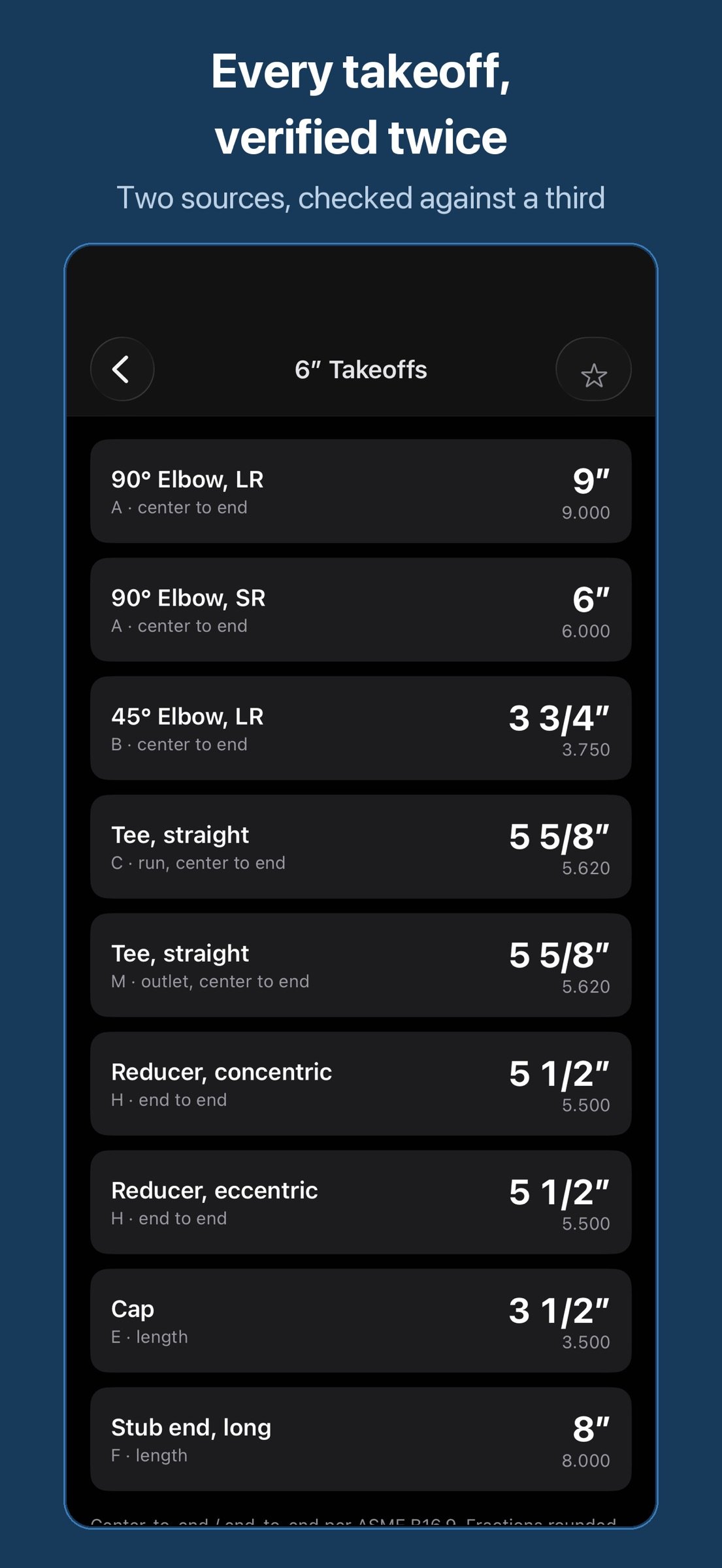
• Fitting takeoffs (ASME B16.9), the takeouts on the print: 90s and 45s (LR and SR), tees, concentric and eccentric reducers, caps, stub ends, 1/2 to 24
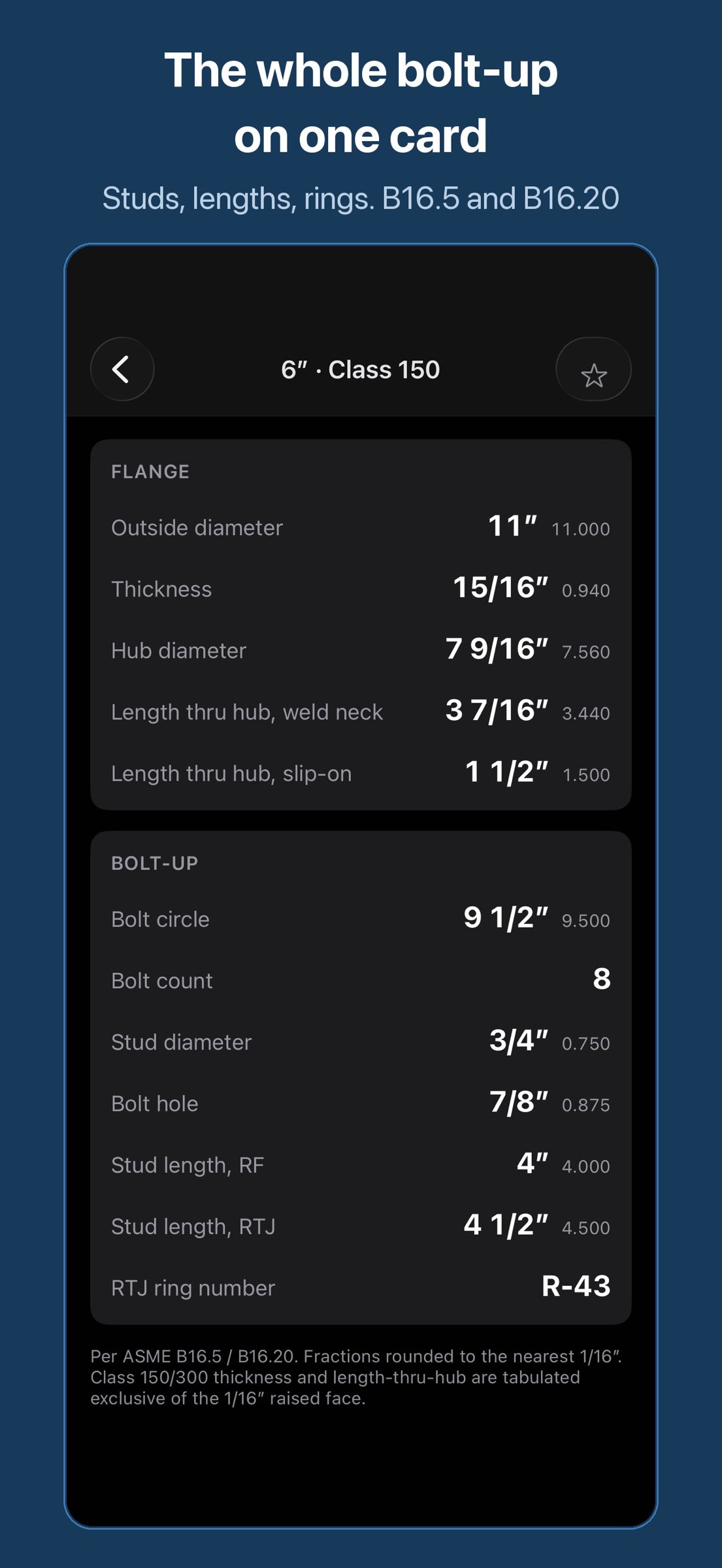
• Flanges (ASME B16.5, classes 150/300/600): OD, thickness, bolt circle, hub, length thru hub, plus the full bolt-up: stud count, diameter, and length (RF and RTJ) and B16.20 ring gasket numbers
CALCULATORS: fraction-native, in 16ths, 32nds or 64ths
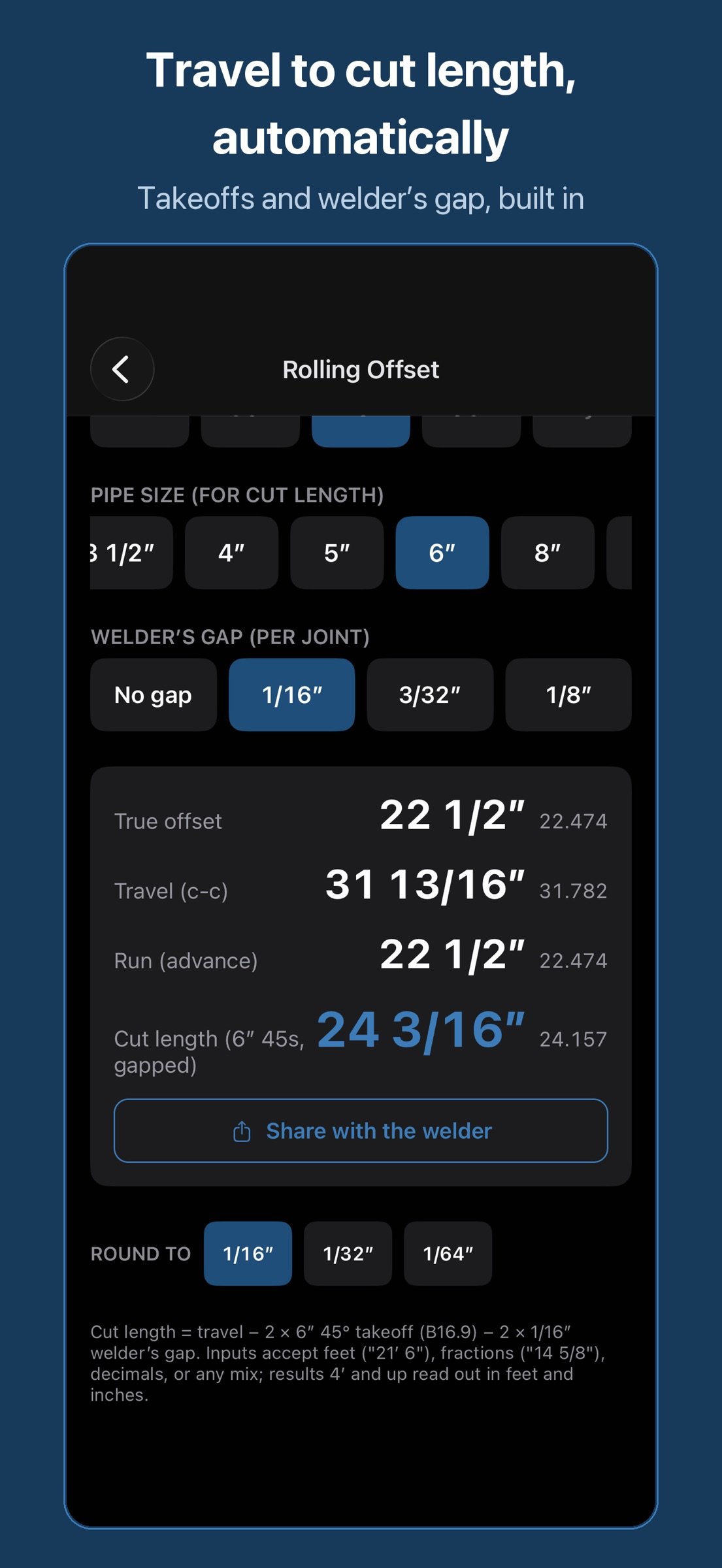
• Rolling offset: set, roll, travel, run. Pick a pipe size and get the end-to-end cut length with the takeoffs and your welder's root gap already subtracted
• Cut a fitting: any angle out of a factory 90, with the heel, centerline and throat marks
• Miter cuts: cut angle, cutback, heel-to-throat drop, segment lengths
• Parallel offset: equal-spread runs through any turn
• Right angle: any two of set, run, travel or angle gives the rest, with grade in percent and inches per foot
• Weight & fill: pipe, plate and tube weight, and what the line holds. Pounds and gallons per foot of water, for rigging and hydro
• Feet & inches: running tape math that accepts 3' 4 1/2 and never loses a 16th
BUILT FOR THE FIELD
• Works completely offline. No license checks, no sign-in, nothing to time out in a basement or on a pipeline right-of-way
• Send the welder the cut: the text and a dimensioned diagram, straight out of the calculator, with the root gap it assumed printed on the drawing
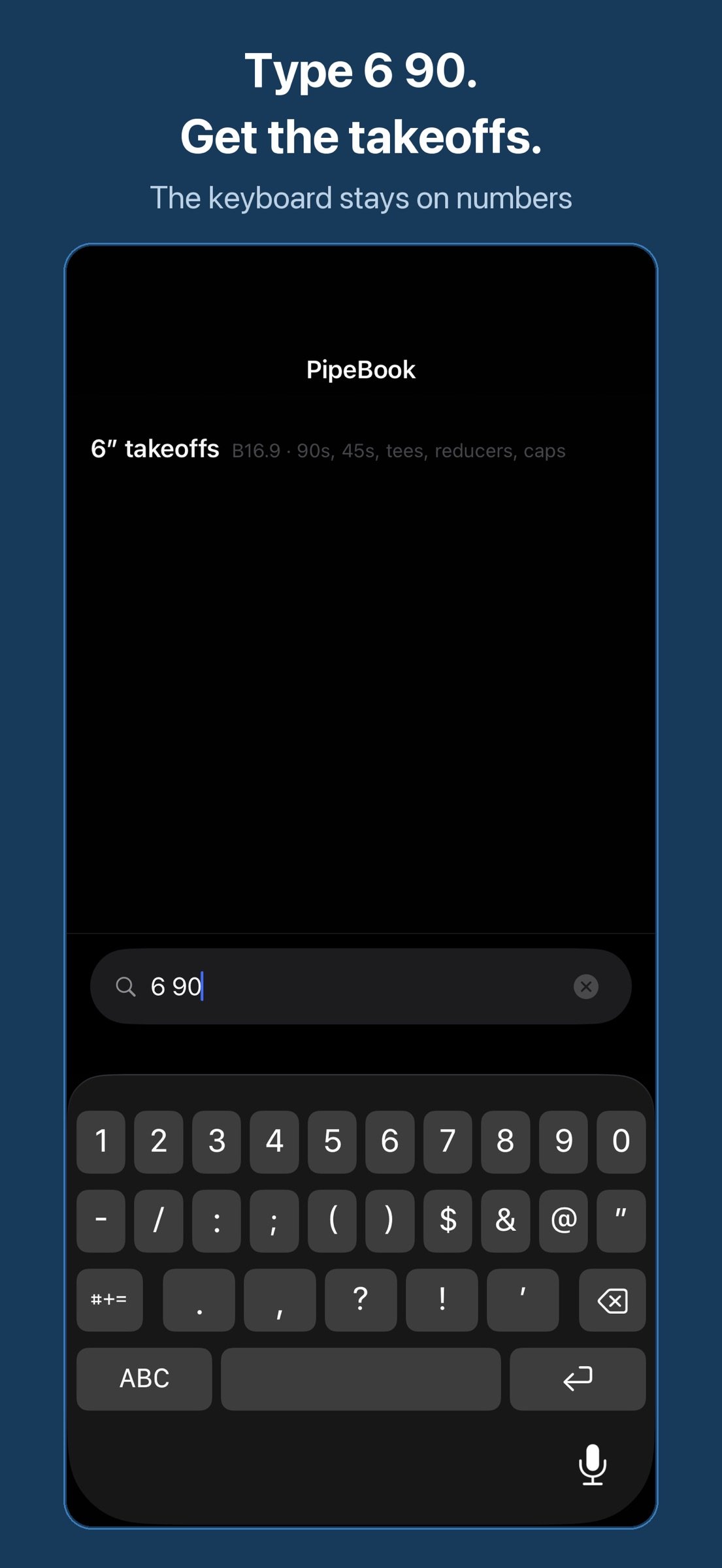
• Type "6 90" and get the 6-inch takeoffs. "6 150" gets the flange. "dn150" works too
• Metric: one switch and every calculator takes and gives millimetres. Tables show mm, kg/m and DN
• Pin your job's sizes; your recent lookups stay one tap away
• Screen stays awake while a table is open
• Big targets that work with gloves on
No ads. No subscription. No accounts. Features never move behind a paywall.
Built in the U.S.A. by one developer who answers email.
License: Commercial
REFERENCE: verified, not scraped
Every dimension in PipeBook is extracted from two independent published sources, machine-compared, and hand-resolved against a third before it ships. The handful of values that haven't cleared that process are marked in the app, in plain sight, rather than quietly shipped. No guesses, no filler.
• Pipe schedules (ASME B36.10M/B36.19M): wall, ID in decimals and 16ths, weight per foot. NPS 1/8 to 48, Schedule 5 through XXS
• Fitting takeoffs (ASME B16.9), the takeouts on the print: 90s and 45s (LR and SR), tees, concentric and eccentric reducers, caps, stub ends, 1/2 to 24
• Flanges (ASME B16.5, classes 150/300/600): OD, thickness, bolt circle, hub, length thru hub, plus the full bolt-up: stud count, diameter, and length (RF and RTJ) and B16.20 ring gasket numbers
CALCULATORS: fraction-native, in 16ths, 32nds or 64ths
• Rolling offset: set, roll, travel, run. Pick a pipe size and get the end-to-end cut length with the takeoffs and your welder's root gap already subtracted
• Cut a fitting: any angle out of a factory 90, with the heel, centerline and throat marks
• Miter cuts: cut angle, cutback, heel-to-throat drop, segment lengths
• Parallel offset: equal-spread runs through any turn
• Right angle: any two of set, run, travel or angle gives the rest, with grade in percent and inches per foot
• Weight & fill: pipe, plate and tube weight, and what the line holds. Pounds and gallons per foot of water, for rigging and hydro
• Feet & inches: running tape math that accepts 3' 4 1/2 and never loses a 16th
BUILT FOR THE FIELD
• Works completely offline. No license checks, no sign-in, nothing to time out in a basement or on a pipeline right-of-way
• Send the welder the cut: the text and a dimensioned diagram, straight out of the calculator, with the root gap it assumed printed on the drawing
• Type "6 90" and get the 6-inch takeoffs. "6 150" gets the flange. "dn150" works too
• Metric: one switch and every calculator takes and gives millimetres. Tables show mm, kg/m and DN
• Pin your job's sizes; your recent lookups stay one tap away
• Screen stays awake while a table is open
• Big targets that work with gloves on
No ads. No subscription. No accounts. Features never move behind a paywall.
Built in the U.S.A. by one developer who answers email.
License: Commercial
| Release info | New Release on Sep 24, 2026 |
|---|---|
| Release notes | Two new calculators, and metric throughout. WEIGHT & FILL: pipe, plate and tube weight, and what the line holds when full. Pounds and gallons per foot, or kilograms and litres per metre. RIGHT ANGLE: any two of set, run, travel or angle gives you the rest, with grade in percent and inches per foot. METRIC: one switch in Settings and every calculator takes and gives millimetres. Tables show mm, kg/m and DN. Thanks to the fitter who wrote in asking for more functions. This is that update. |
| Listing data | App Store |
Reviews
No reviews yet. Be the first to review PipeBook Pipefitter Calculator.
Used PipeBook Pipefitter Calculator? Tell other visitors what you thought.
Log in to write a reviewOther products by this publisher
- "No Distractions" for YouTube 4.10 ----
- #Bible 11.6 "Incredible App - My sister shared this app with me a few weeks ago and it is truly incredible.
- #filmphotography 1.4.2 So, you decided to shoot on film?
- $quirrel 1.5.1 $quirrel Budget & Finance helps you plan each paycheck, track spending, manage debt, and see what is safe to spend before the next payday.
- % Percentage Calculator Pro 1.41 This is the Pro version of % Percentage Calculator.
Most viewed iOS Productivity
-
1
 WordPress 27.4
Manage or create your WordPress blog or website right from your iOS device: create and edit posts and pages, upload your favorite photos and videos, view stats and reply to comments.
- 2 Voice Translator - Alive 1.6 Translation app that turns your iPhone into an interpreter instantly.
-
3
 Claude by Anthropic 1.261111.19
Meet Claude, your AI problem solver and thinking partner.
-
4
 WristMemo 2.0
WristMemo turns your Apple Watch into an all-day voice recorder.
- 5 "No Distractions" for YouTube 4.10 ----
- 6 (beat) for iOS 0.5.10 An elegant Fountain screenwriting app, created by a screenwriter for screenwriters.
-
7
 Colicine 1.3.0
Have you ever been there—
-
8
 Life360 26.43.0
Whether at home, online, or on the move, our comprehensive family safety features bring peace of mind to your loved ones AND help safeguard your personal belongings.
-
9
 DeepSeek 2.8.0
Experience seamless interaction with DeepSeek's official AI assistant for free!
-
10
 Howbout 16.7.2
The shared calendar for friends, couples, and family
Most downloaded iOS Productivity
- 1 Voice Translator - Alive 1.6 Translation app that turns your iPhone into an interpreter instantly.
-
2
DeepSeek 2.8.0
Experience seamless interaction with DeepSeek's official AI assistant for free!
-
3
 SessionsAI 1.2.1
Sessions AI is a private AI workspace that runs entirely on your iPhone, iPad, or Mac.
-
4
 Voices AI 1.16.15
Discover Voices, the premier voice transformation app designed exclusively for iOS.
-
5
 Block Distracting Websites 1.11
"It's a great way to save time, and stop browsing Reddit when you should be doing coursework."
-
6
 Plot Digitizer 1.4.1
Plot Digitizer is an app to extract numerical data from plot images.
-
7
 Google Docs 1.2026.45104
Create, edit, and collaborate on online documents with the Google Docs app.
-
8
 Pixy Mood Tracker 1.110.0
Track your mood, one pixel at a time.
-
9
 MyHyundai with Bluelink 5.4.5
The MyHyundai app makes getting information about your Hyundai vehicle easier than ever.
-
10
 ScreenRecess 1.0.0
A gentle nudge to put your device down when it’s hard to stop.