
Permission Manager X 1.34-pro
eXtended Permission Manager - a small app to manage permissions and AppOps
Download
5.38 MB · PMX_v1.34-pro.apk
28downloads
1this week
FreeFreeware
0reviews
Screenshots
About Permission Manager X
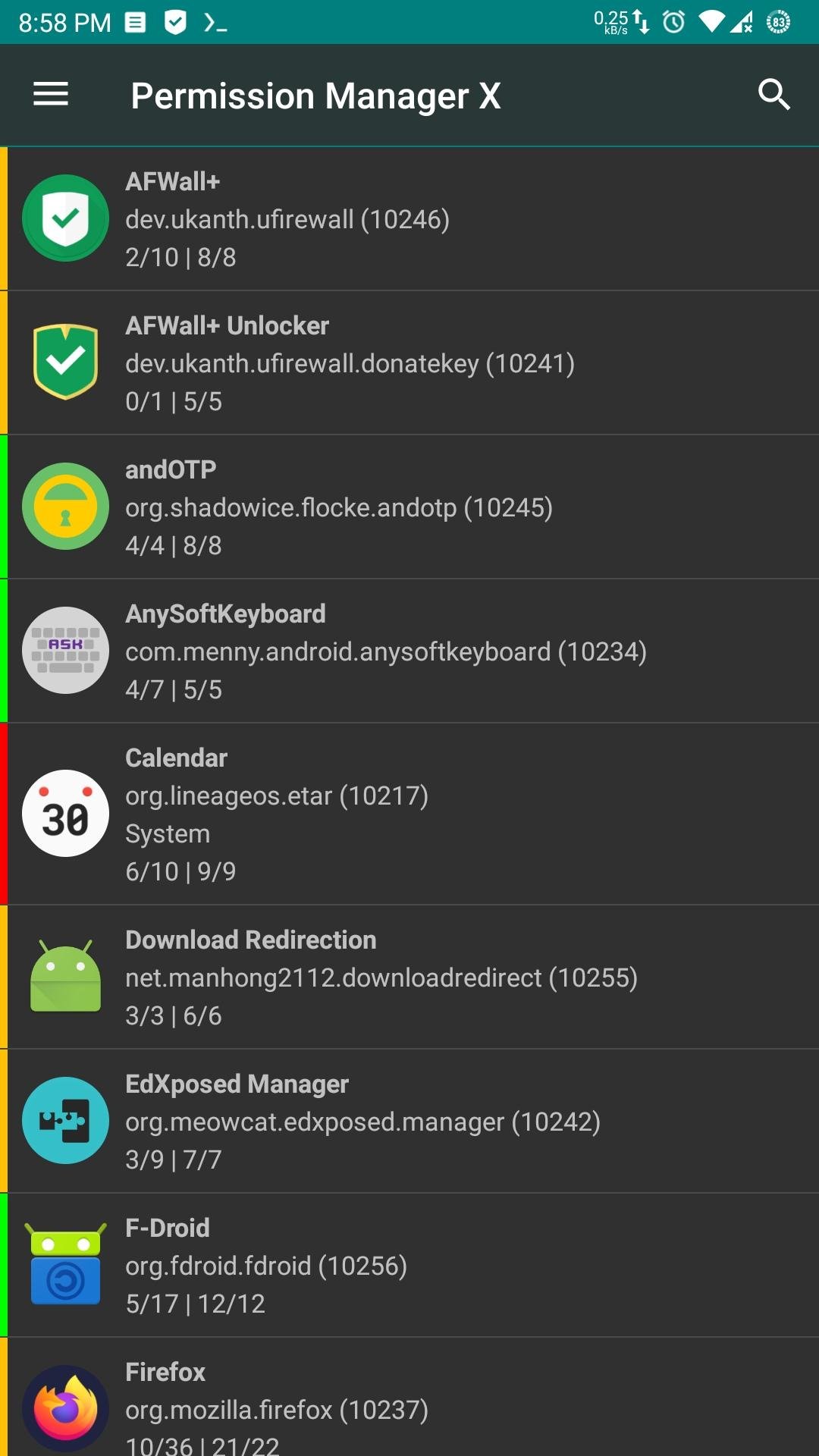
Using eXtended Permission Manager, for each installed app, on single screen, you can:
• View, grant or revoke manifest permissions
• View AppOps permissions and choose one of multiple modes
• Set your desired reference value for every changeable permission
Manifest permissions are those normally called permissions e.g. Storage, Camera etc. AppOps (app operations) is a robust framework Android uses at back end for access control. With every Android release manifest permissions are becoming more dependent on AppOps. So it's fun to control both simultaneously and see how they relate to each other.
In short, AppOps provide a fine-grained control over many of the manifest permissions. Plus it provides additional controls like background execution, vibration, clipboard access etc. Just install the app to explore it yourself.
When you reinstall an app, or change your device, or upgrade your ROM, it's a time-taking process to review all installed apps for granted permissions and revoke the unnecessary ones (after all privacy matters). PMX provides you the solution. Set reference states of permissions, which can be quickly backed up and restored, and colored bars at left make it quite easy to review packages and permissions at a glance.
Confused? We are here to explain. Please start with:
• What is PMX?
• Why do I need to use PMX?
• What are manifest permissions and AppOps?
• What are Permission References?
Paid version (available as Play Store and Pro flavors) offers extra features including Permission Watcher, Scheduled Checks, Permission View and Batch Operations / Profiles.
Beta builds are released in Telegram channel.
Guide: [link removed]
License: AGPL-3.0-or-later
• View, grant or revoke manifest permissions
• View AppOps permissions and choose one of multiple modes
• Set your desired reference value for every changeable permission
Manifest permissions are those normally called permissions e.g. Storage, Camera etc. AppOps (app operations) is a robust framework Android uses at back end for access control. With every Android release manifest permissions are becoming more dependent on AppOps. So it's fun to control both simultaneously and see how they relate to each other.
In short, AppOps provide a fine-grained control over many of the manifest permissions. Plus it provides additional controls like background execution, vibration, clipboard access etc. Just install the app to explore it yourself.
When you reinstall an app, or change your device, or upgrade your ROM, it's a time-taking process to review all installed apps for granted permissions and revoke the unnecessary ones (after all privacy matters). PMX provides you the solution. Set reference states of permissions, which can be quickly backed up and restored, and colored bars at left make it quite easy to review packages and permissions at a glance.
Confused? We are here to explain. Please start with:
• What is PMX?
• Why do I need to use PMX?
• What are manifest permissions and AppOps?
• What are Permission References?
Paid version (available as Play Store and Pro flavors) offers extra features including Permission Watcher, Scheduled Checks, Permission View and Batch Operations / Profiles.
Beta builds are released in Telegram channel.
Guide: [link removed]
License: AGPL-3.0-or-later
| Release info | Update on Sep 29, 2026 |
|---|---|
| Release notes | Integration with AdbPairingHelper |
| Listing data | F-Droid |
Reviews
No reviews yet. Be the first to review Permission Manager X.
Used Permission Manager X? Tell other visitors what you thought.
Log in to write a reviewOther products by this publisher
- "No Distractions" for YouTube 4.10 ----
- #Bible 11.6 "Incredible App - My sister shared this app with me a few weeks ago and it is truly incredible.
- #filmphotography 1.4.2 So, you decided to shoot on film?
- $quirrel 1.5.1 $quirrel Budget & Finance helps you plan each paycheck, track spending, manage debt, and see what is safe to spend before the next payday.
- % Percentage Calculator Pro 1.41 This is the Pro version of % Percentage Calculator.
Most viewed Android App Manager
-
1
 AppShelf 1.38.3
List of installed apps with sources — save, sync and restore on a new phone
- 2 Hail 1.11.0 Freeze Android apps
- 3 Universal Installer 1.21.0 APK/XAPK installer with silent installs via Shizuku, Root or Dhizuku.
- 4 Arcade 1.2 A minimal game launcher with a twist
- 5 Amaze File Manager 3.11.4 An open-source file manager following the Material Design guidelines
- 6 Amarok 0.10.1 Hide your private Files and APPs with a single click.
- 7 Operator 2.3 List and kill processes that consume a lot of resources
- 8 ClassyShark3xodus - Scan apps for warnings 2.0-34 Checks apk(s) for known trackers (provided by Exodus) +other warnings and specs.
-
9
 Canta 4.1.0
Canta Debloater lets you uninstall any(*) app without root (updated version).
- 10 SAI 4.5 SAI lets you install and export split APKs
Most downloaded Android App Manager
-
1
 Pixel Tag Drawer 0.1.7
Organize and launch Android apps with tags and usage-based sorting.
- 2 Arcade 1.2 A minimal game launcher with a twist
- 3 Amaze File Manager 3.11.4 An open-source file manager following the Material Design guidelines
-
4
Canta 4.1.0
Canta Debloater lets you uninstall any(*) app without root (updated version).
- 5 Force Stop Helper 0.13.0 Helps you manually force-stop background apps.
-
6
 Package Manager v8.0
A powerful application to manage your apps!
- 7 AppStow 3.0.3 Organize and launch apps, websites, web apps and deep links
-
8
Permission Manager X 1.34-pro
eXtended Permission Manager - a small app to manage permissions and AppOps
- 9 Inure App Manager (Trial) build107.2.4 Fast, refined app manager for power users, with root and Shizuku support.
- 10 ClassyShark3xodus - Scan apps for warnings 2.0-34 Checks apk(s) for known trackers (provided by Exodus) +other warnings and specs.