PE Explorer 1.99 R6
PE Explorer makes it easy to view, analyze and edit win32 executable files (EXE, DLL, SYS, ActiveX). Offers easy-to-use tools such as a Visual Resource Editor, powerful Win32 Disassembler, DLL Export Viewer, UPX and Upack Unpackers, and more.
Product Specifications
| User Rating: | item has less then 1 vote |
|
| FileCart Rating | ||
| Submitted by: | pexplorer | |
| Homepage | Visit Homepage | |
| License | Shareware | |
| Expires | 30 Days | |
| Price | $129.00 | |
| Downloads | 1,394 | |
| OS Support | Windows Install and Uninstall | |
| File Name | pexsetup.exe | |
| File Size | 3.64 MB ( 3,724 KB ) | |
| Published | Dec 16, 2003 (23 years ago) | |
| Updated | Dec 13, 2013 (13 years ago) | |
Follow Us!
Latest Searches
floor layout 1 minute ago
fkbg rujhsfkbg rujhsfkbg rujhsfkbg rujhsfkbg rujhsfkbg rujhsfkbg rujhsfkbg rujhsfkbg rujhsfkbg rujhsfkbg rujhsfkb rujhsfkbg rujhsfkbg rujhsfkbg rujhsfkbg rujhsfkbg rujhsfkbg rujhsfkbg rujhsfkbg rujhs 2 minutes ago
fkbg rujhsfkbg rujhsfkbg rujhsfkbg rujhsfkbg rujhsfkbg rujhsfkbg rujhsfkbg rujhsfkbg rujhsfkbg rujhsfkbg rujhsfkb rujhsfkbg rujhs 2 minutes ago
xr650l head porting 3 minutes ago
A wall is 1500 sq ft.A gallon of paint covers 300 sq ft.Complete the conversion factor. 7 minutes ago
Premise selectionfor mathematics by corpus analysis and kernel methods. 9 minutes ago
@TheRealDreHazel 12 minutes ago
MOVING OUT OF TIME REALLY THOUGHT U WERE BY MY SIDE SONG 12 minutes ago
jev ai download for windows 13 minutes ago
Popular Searches
id cards 602 times
2025 495 times
2024 386 times
Softperfect 330 times
5g spf sonicwall compatible copper module 316 times
Gypsy 2.0 Onlyfans Leaked Photos 310 times
2026 305 times
targetamazon credit card.asp?highlight=0 275 times
Who is Music 274 times
Product Details
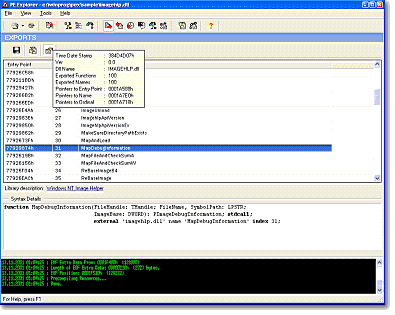
PE Explorer comes with a Visual Resource Editor, PE Header Viewer, UPX, NsPack and Upack Unpacker, Exported/Imported API Function Viewer, API Function Syntax Lookup, Digital Signature Viewer, Dependency Scanner, and powerful Disassembler. The product allows you to peek inside Delphi applications and edit the properties of controls on Delphi forms within the PE file. Once inside, file structure can be analyzed and optimized, problems diagnosed, changes made and resources repaired.
Whether you are an advanced computer user just wondered what makes an executable file tick, or software developer suffered from hard-to-find program bugs, PE Explorer is the software solution that will make it easy to find the answers. With PE Explorer you can view, edit and repair the internal structures of PE files with the click of a button. It works with PE formats such as EXE, DLL, MSSTYLES, SYS, OCX, SCR and other win32 executables. Support for custom plug-ins. Use it for serious development projects, for restoring lost information, for keeping damaged files intact, for determination of the existence of viruses or malicious code in the programs, to reverse engineer projects with missing source code, to view the imports/exports of the standard dll's, or to simply reduce the numerous internal information sources of PE files into a more convenient viewing format and save your valuable time. The possibilities are up to you. PE Explorer gives you an easy to use point and click approach from which to operate. More info at http://www.heaventools.com
| Requirements: | 16 MB RAM |
| Release Info: | Minor Update on Oct 15, 2009 |
| Release Notes: | Added the options to create the Windows 7 Compatibility and DPI-Aware sections in the Manifest Wizard, mark blocks as Byte, Word, DWord, QWord and GUID. |
| Related Tags: | resource editor dll viewer bitmap |
Reviews
You must be logged in to write a review
Reviews of PE Explorer 1.99 R6
You can be the first to write a review of PE Explorer!Other products submitted by this publisher
View, add or replace icons and other resources contained within 32- and 64-bit Windows executable files with other images, texts and sounds. Translate any application, or fix and mark it with a requested execution level.