
OpenIntelligence 5.7
Ask a question about your own PDFs, contracts, lecture recordings or code, and get an answer with the exact passage it came from.
Download
170.25 MB
0downloads
0this week
FreeFreeware
0reviews
Screenshots
About OpenIntelligence
Ask a question about your own PDFs, contracts, lecture recordings or code, and get an answer with the exact passage it came from. Nothing you import leaves your device unless you allow it. Free to start, no account, no API key.
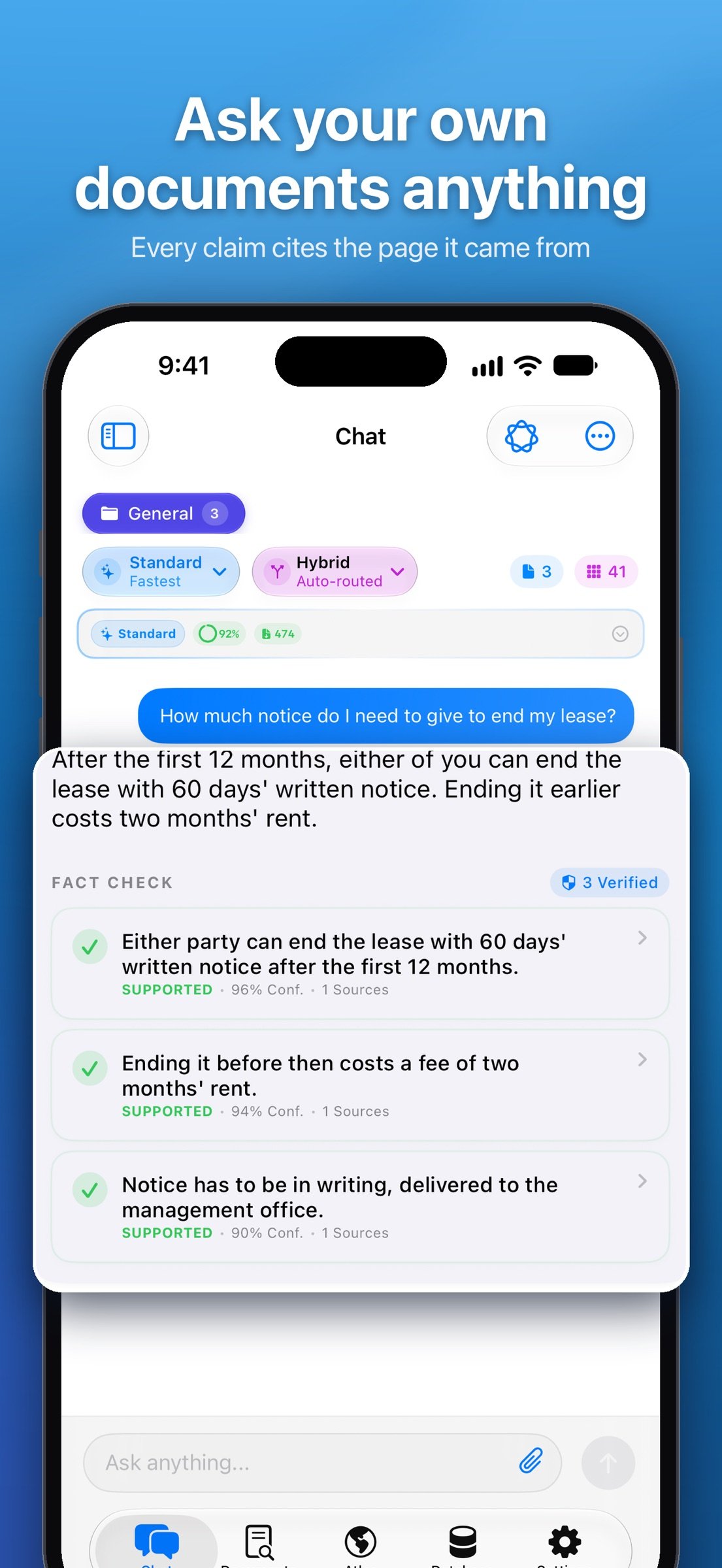
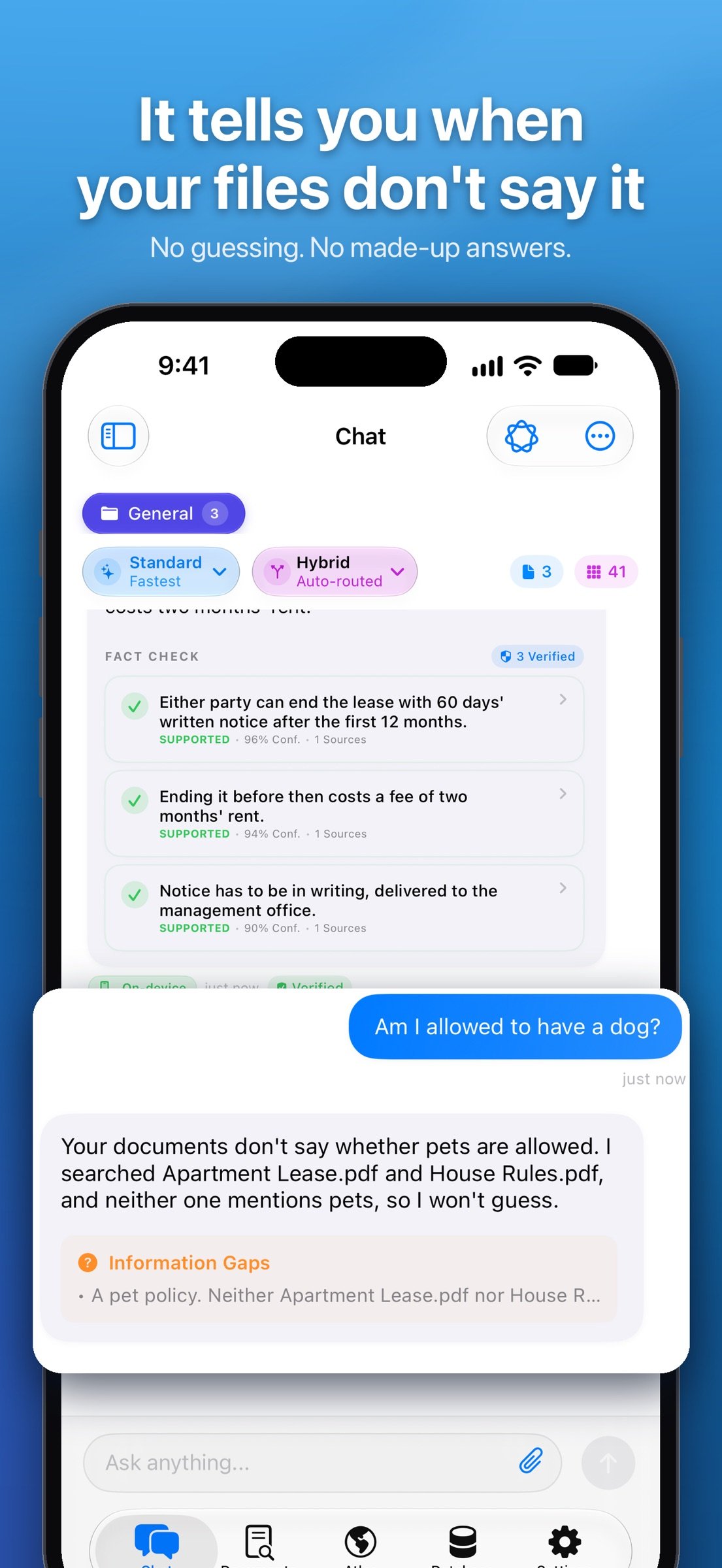
OpenIntelligence reads what you import and answers in plain language, with citations you can tap to see where each claim came from. When your files don't contain the answer, it says so instead of guessing.
ANSWERS START IN YOUR FILES
Not in a chatbot's imagination. OpenIntelligence searches your library first, pulls the exact passages that matter, and only then writes, using Apple's on-device Apple Intelligence models. Requires an Apple Intelligence-capable device: iPhone 15 Pro or later, or an M1-or-later iPad or Mac, on iOS/iPadOS/macOS 26. Your device already had the intelligence. This gives it your knowledge, and rules of evidence.
WHAT YOU CAN DO
- Summarize long documents, recordings, or entire libraries.
- Compare claims and details across multiple sources.
- Find exact facts, dates, specifications, measurements, and table values.
- Ask follow-up questions without losing the sources or the thread.
- Choose Standard for quick factual work, Deep Think for multi-step questions, or Maximum for broader evidence synthesis.
BRING YOUR OWN MATERIAL
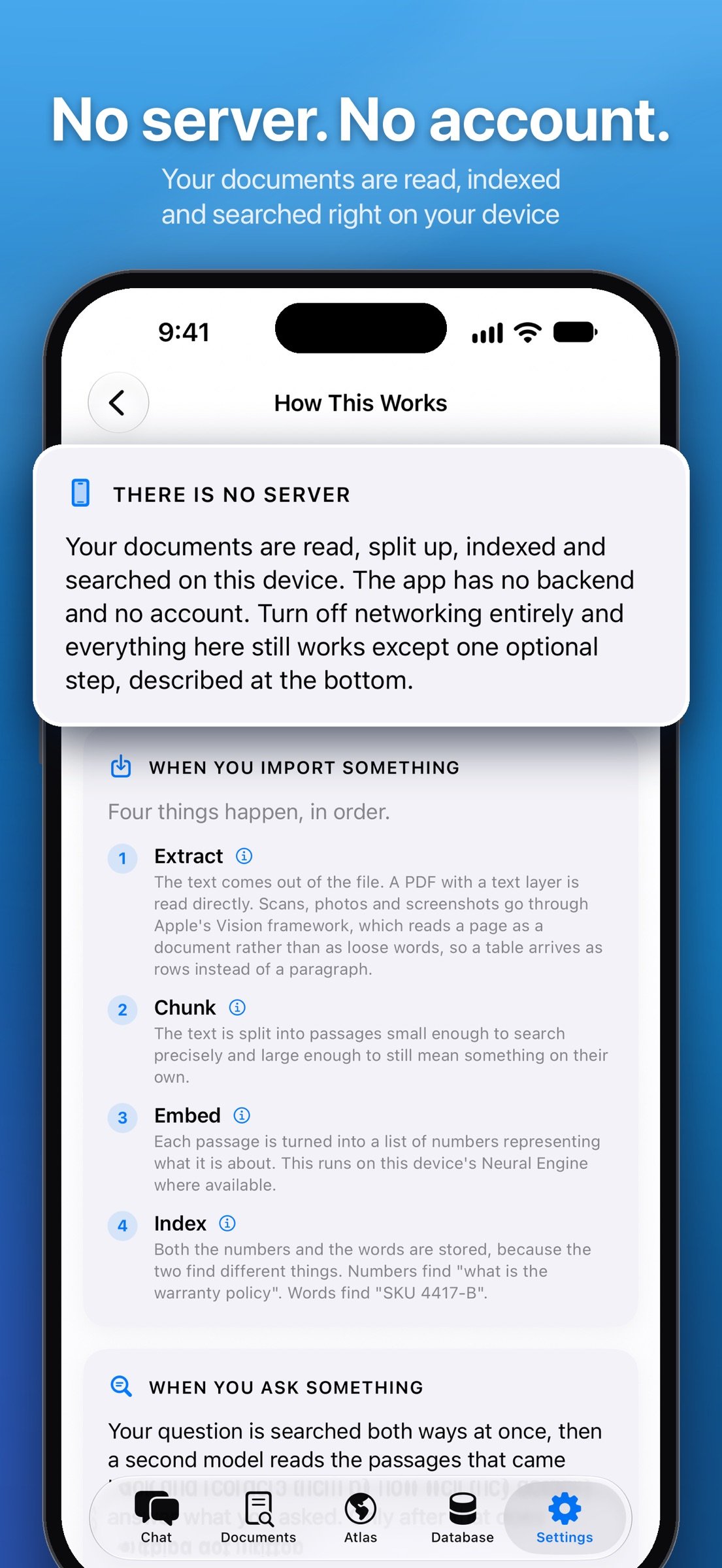
Import PDFs, Office documents, text and Markdown files, CSVs, code, images and scans, audio, or video. Pages, Numbers and Keynote files need to be exported to PDF first. OpenIntelligence extracts text, uses Vision OCR where needed, transcribes speech, and builds a searchable index for each library.
HOW ANSWERS ARE BUILT
Exact keyword matching and semantic search work together to retrieve the passages that matter. Apple Foundation Models turn those passages into a natural-language response. Then the app checks its own answer against the passages it actually used, so you can inspect what it's standing on instead of taking its word.
If the sources do not establish an answer, the app flags weak support or abstains. No confident filler.
WHERE YOUR FILES GO (AND DON'T)
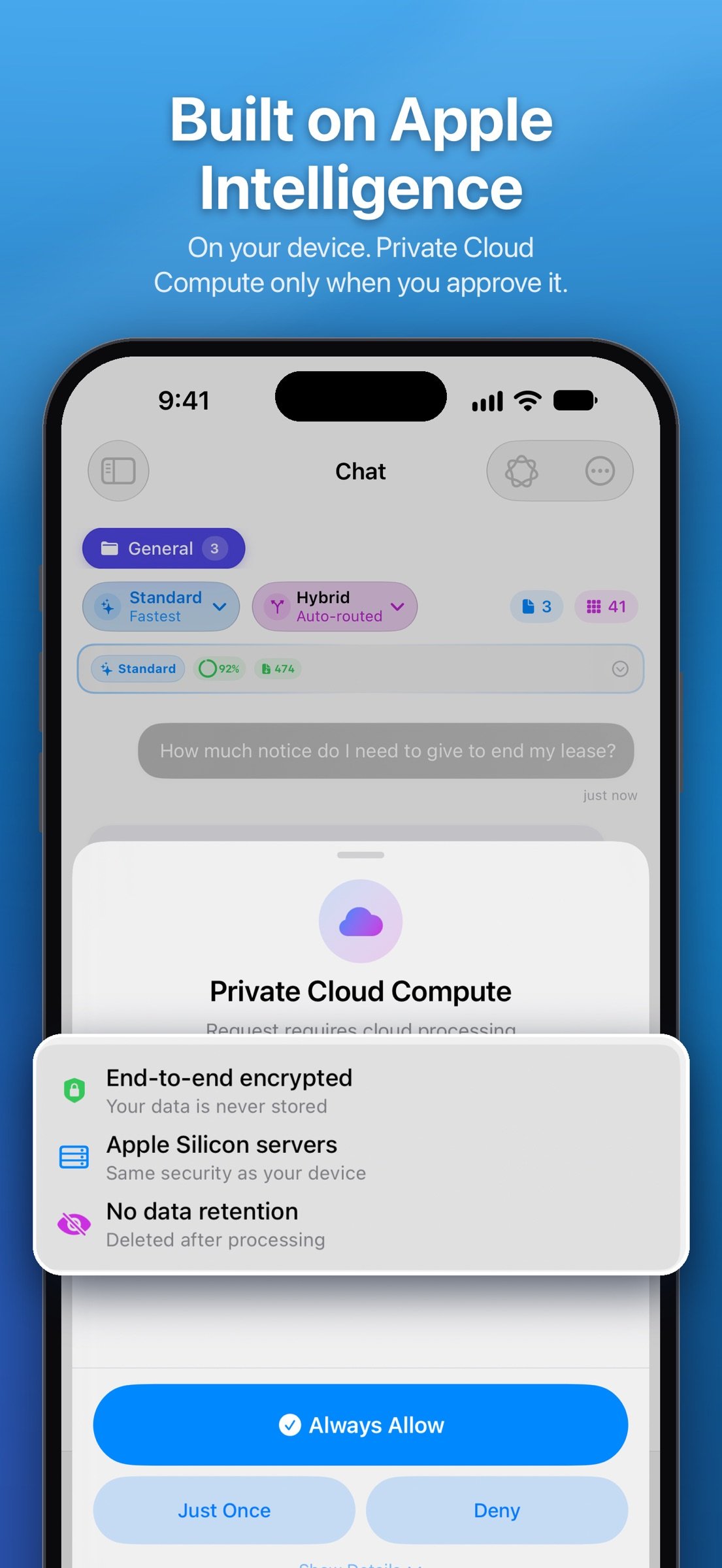
Reading your files, searching them, and choosing what to cite all happen on your device, start to finish, before anything is written. On-device answers need no connection at all. On a plane, in a dead zone, in a locked-down office, your library still works. For longer, evidence-heavy questions on iOS, iPadOS or macOS 27, you can optionally allow Apple Private Cloud Compute to do the writing. The app shows you how much would be sent and why, and asks you first. Apple says its servers keep nothing afterwards. Your material is never sent to a third-party AI provider.
ANSWERS YOU CAN INSPECT
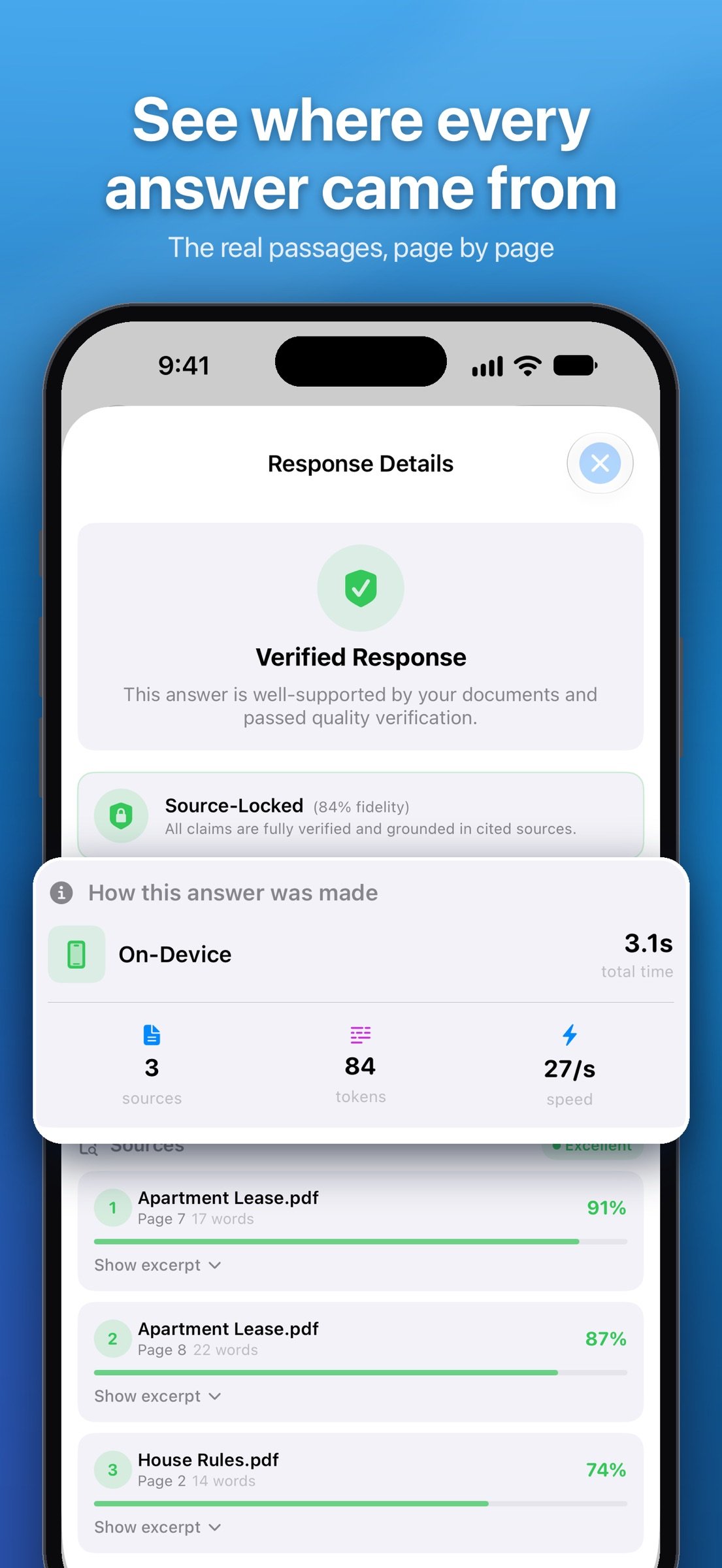
Inline citations connect answers to their supporting pages and passages, one tap from claim to source. If you want more, response details go deeper: source snippets, retrieval quality, verification warnings, timing, and the route that actually produced the answer. The optional telemetry interface goes deeper when you want it and stays out of the way when you don't.
LIBRARIES THAT FIT YOUR WORK
Keep different subjects, projects, or clients in separate libraries. Choose Local Only or iCloud Drive (paid plans) for each library, and organize ongoing research in saved conversation threads. Siri and Shortcuts actions are available for common document and library workflows.
PLANS
Every plan runs the same model: Apple Intelligence on your device, Deep Think, and Private Cloud Compute after you approve what is sent. Free: 5 documents, one library, Maximum mode three times a day. Pro lifts that cap and grows to 1,000 documents and 10 libraries, monthly or yearly. Lifetime: one payment, unlimited documents, 20 libraries, Maximum every day, no renewal.
OpenIntelligence is built and maintained by one developer. Pro and Lifetime support directly fund continued development. To everyone already supporting the app: thank you. It has been a wild journey.
Privacy Policy: [link removed]
OpenIntelligence reads what you import and answers in plain language, with citations you can tap to see where each claim came from. When your files don't contain the answer, it says so instead of guessing.
ANSWERS START IN YOUR FILES
Not in a chatbot's imagination. OpenIntelligence searches your library first, pulls the exact passages that matter, and only then writes, using Apple's on-device Apple Intelligence models. Requires an Apple Intelligence-capable device: iPhone 15 Pro or later, or an M1-or-later iPad or Mac, on iOS/iPadOS/macOS 26. Your device already had the intelligence. This gives it your knowledge, and rules of evidence.
WHAT YOU CAN DO
- Summarize long documents, recordings, or entire libraries.
- Compare claims and details across multiple sources.
- Find exact facts, dates, specifications, measurements, and table values.
- Ask follow-up questions without losing the sources or the thread.
- Choose Standard for quick factual work, Deep Think for multi-step questions, or Maximum for broader evidence synthesis.
BRING YOUR OWN MATERIAL
Import PDFs, Office documents, text and Markdown files, CSVs, code, images and scans, audio, or video. Pages, Numbers and Keynote files need to be exported to PDF first. OpenIntelligence extracts text, uses Vision OCR where needed, transcribes speech, and builds a searchable index for each library.
HOW ANSWERS ARE BUILT
Exact keyword matching and semantic search work together to retrieve the passages that matter. Apple Foundation Models turn those passages into a natural-language response. Then the app checks its own answer against the passages it actually used, so you can inspect what it's standing on instead of taking its word.
If the sources do not establish an answer, the app flags weak support or abstains. No confident filler.
WHERE YOUR FILES GO (AND DON'T)
Reading your files, searching them, and choosing what to cite all happen on your device, start to finish, before anything is written. On-device answers need no connection at all. On a plane, in a dead zone, in a locked-down office, your library still works. For longer, evidence-heavy questions on iOS, iPadOS or macOS 27, you can optionally allow Apple Private Cloud Compute to do the writing. The app shows you how much would be sent and why, and asks you first. Apple says its servers keep nothing afterwards. Your material is never sent to a third-party AI provider.
ANSWERS YOU CAN INSPECT
Inline citations connect answers to their supporting pages and passages, one tap from claim to source. If you want more, response details go deeper: source snippets, retrieval quality, verification warnings, timing, and the route that actually produced the answer. The optional telemetry interface goes deeper when you want it and stays out of the way when you don't.
LIBRARIES THAT FIT YOUR WORK
Keep different subjects, projects, or clients in separate libraries. Choose Local Only or iCloud Drive (paid plans) for each library, and organize ongoing research in saved conversation threads. Siri and Shortcuts actions are available for common document and library workflows.
PLANS
Every plan runs the same model: Apple Intelligence on your device, Deep Think, and Private Cloud Compute after you approve what is sent. Free: 5 documents, one library, Maximum mode three times a day. Pro lifts that cap and grows to 1,000 documents and 10 libraries, monthly or yearly. Lifetime: one payment, unlimited documents, 20 libraries, Maximum every day, no renewal.
OpenIntelligence is built and maintained by one developer. Pro and Lifetime support directly fund continued development. To everyone already supporting the app: thank you. It has been a wild journey.
Privacy Policy: [link removed]
| Release info | New Release on Oct 22, 2026 |
|---|---|
| Release notes | This one's about getting things in and out of the app. JSON and JSONL files import as records, Siri and Shortcuts can ask, search and add to your libraries, Spotlight and Visual Intelligence find your documents, and an answer you share takes its sources with it. YOUR DOCUMENTS • JSON and JSONL files import as records, with their field names and numbers kept as they are. • Big imports keep going. Very large text and JSONL files import a piece at a time, a PDF of any size imports (over 500 MB used to be turned away), and an interrupted import picks up where it was, even after an app update, without redoing the pages and embeddings it had. The queue has a Pause button, and if iOS stops an import in the background the banner says Paused. • Share a web page or text to OpenIntelligence from any app, send it files with "Open in", drop in a whole folder, or tap Paste on the Documents screen for a copied file, address or text. • Scan into Library on the Lock Screen or the Action button takes a page without unlocking. • Numbers in tables are kept, pages in Greek, Chinese, Arabic and other scripts keep their text, and non-UTF-8 text files come in readable. • Addresses, phone numbers, dates and amounts are found anywhere in a document, not only in its tables. • An import stops and says so if the search model comes back empty, and a document missing from search is rebuilt. LARGE LIBRARIES • A very large library doesn't hold the app up: it's read once at launch, not twice, the app answers taps right after you open it, and starting an import doesn't freeze it. SIRI, SHORTCUTS AND SPOTLIGHT • Actions hand back what they found, so the next step of a shortcut can use the answer and its sources. "Ask My Documents" and "Ask a Library" have a Mode menu. • New actions: Find Passages, Check a Claim, Add to Library, Create Library, Set Answer Mode, Open Library and Open Document. • If a question from Siri needs Private Cloud Compute and you haven't decided yet, the app |
| Listing data | App Store |
Reviews
No reviews yet. Be the first to review OpenIntelligence.
Used OpenIntelligence? Tell other visitors what you thought.
Log in to write a reviewOther products by this publisher
- "No Distractions" for YouTube 4.10 ----
- #Bible 11.6.1 "Incredible App - My sister shared this app with me a few weeks ago and it is truly incredible.
- #filmphotography 1.4.2 So, you decided to shoot on film?
- $quirrel 1.5.1 $quirrel Budget & Finance helps you plan each paycheck, track spending, manage debt, and see what is safe to spend before the next payday.
- % Percentage Calculator Pro 1.41 This is the Pro version of % Percentage Calculator.
Most viewed iOS Productivity
-
1
 WordPress 27.4
Manage or create your WordPress blog or website right from your iOS device: create and edit posts and pages, upload your favorite photos and videos, view stats and reply to comments.
- 2 Voice Translator - Alive 1.6 Translation app that turns your iPhone into an interpreter instantly.
-
3
 Claude by Anthropic 1.261116.19
Meet Claude, your AI problem solver and thinking partner.
-
4
 Life360 26.44.0
Whether at home, online, or on the move, our comprehensive family safety features bring peace of mind to your loved ones AND help safeguard your personal belongings.
-
5
 WristMemo 2.0
WristMemo turns your Apple Watch into an all-day voice recorder.
- 6 "No Distractions" for YouTube 4.10 ----
-
7
 Colicine 1.3.0
Have you ever been there—
- 8 (beat) for iOS 0.5.10 An elegant Fountain screenwriting app, created by a screenwriter for screenwriters.
-
9
 DeepSeek 2.8.0
Experience seamless interaction with DeepSeek's official AI assistant for free!
-
10
 Howbout 16.7.2
The shared calendar for friends, couples, and family
Most downloaded iOS Productivity
- 1 Voice Translator - Alive 1.6 Translation app that turns your iPhone into an interpreter instantly.
-
2
DeepSeek 2.8.0
Experience seamless interaction with DeepSeek's official AI assistant for free!
-
3
 SessionsAI 1.2.1
Sessions AI is a private AI workspace that runs entirely on your iPhone, iPad, or Mac.
-
4
 Voices AI 1.16.15
Discover Voices, the premier voice transformation app designed exclusively for iOS.
-
5
 Block Distracting Websites 1.11
"It's a great way to save time, and stop browsing Reddit when you should be doing coursework."
-
6
 Plot Digitizer 1.4.1
Plot Digitizer is an app to extract numerical data from plot images.
-
7
 Google Docs 1.2026.46102
Create, edit, and collaborate on online documents with the Google Docs app.
-
8
 MyHyundai with Bluelink 5.4.5
The MyHyundai app makes getting information about your Hyundai vehicle easier than ever.
-
9
 Pixy Mood Tracker 1.110.0
Track your mood, one pixel at a time.
-
10
 Minder 1.4
Minder turns your phone into a pair of eyes that watch you work.