
NoInputMixer 1.3
No-Input Mixing is an experimental technique for creating a wide range of amazing, otherworldly electronic sounds by feeding the mixer output back to the input, thereby making a feedback loop.
Download
30.87 MB
15downloads
1this week
FreeCommercial
0reviews
Screenshots
About NoInputMixer
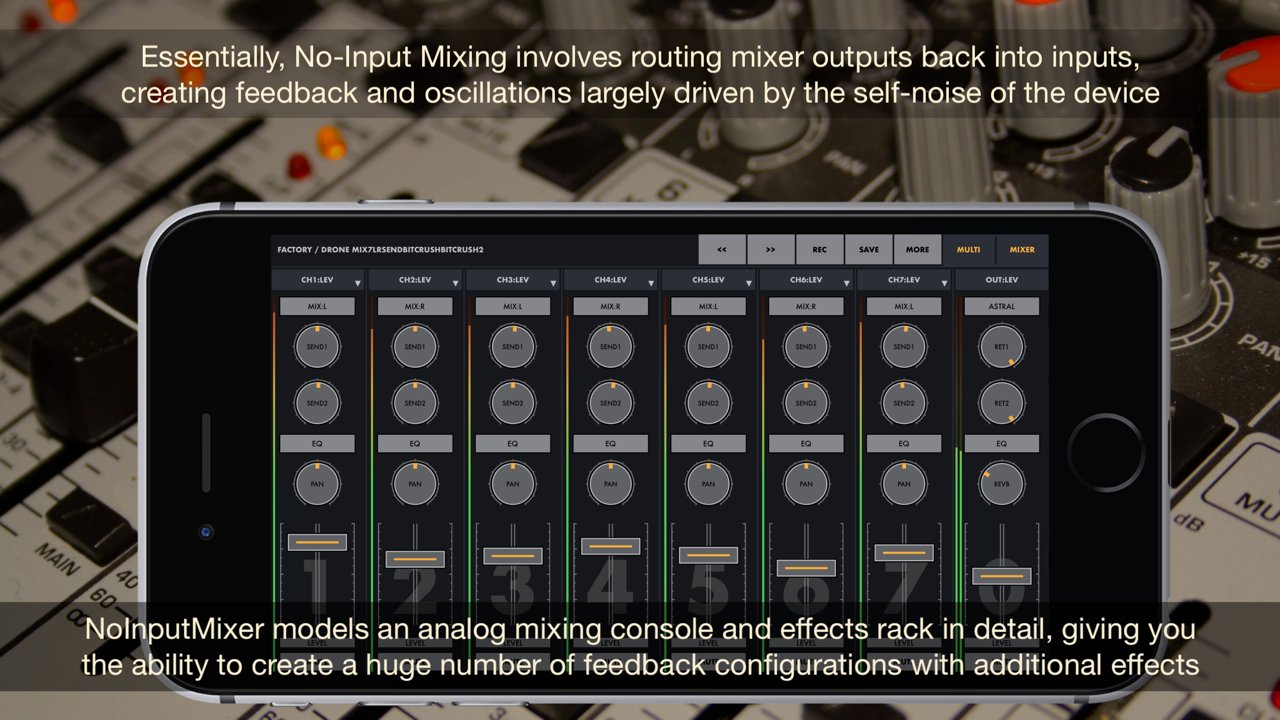
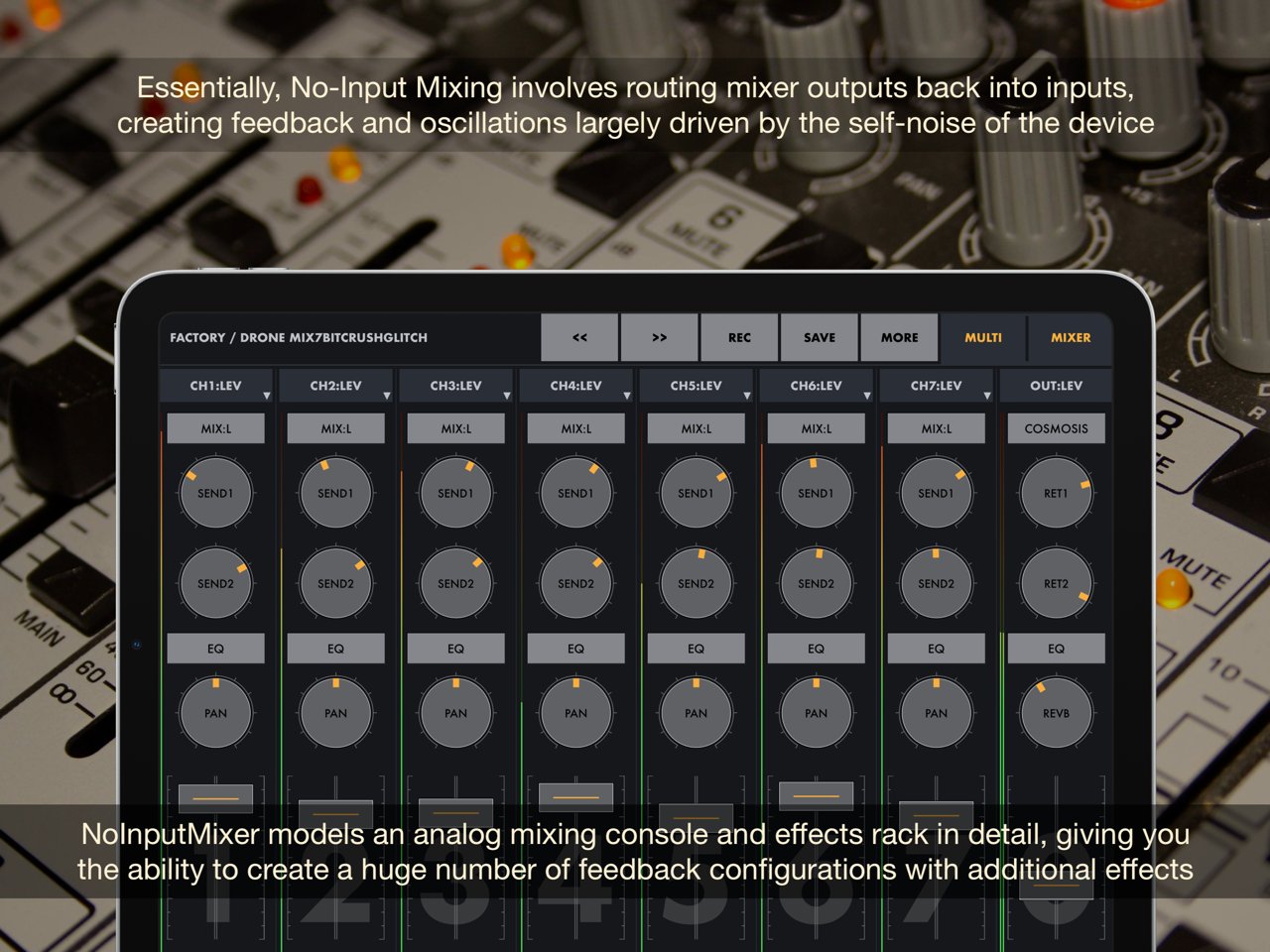
No-Input Mixing is an experimental technique for creating a wide range of amazing, otherworldly electronic sounds by feeding the mixer output back to the input, thereby making a feedback loop. This application models an analog mixing console and effects rack in detail, providing the ability to make a huge number of feedback configurations with additional effects.
By using this technique in the creative process, the sound designer can explore many different and special ways to create sound. Unsettling soundscapes perfect for sci-fi, dystopian and horror projects, like strange noises, disrupted signals, broken communication, buzzing drones, faulty machinery, futuristic tech sounds, and glitchy elements are some results of the No-Input Mixing technique.
The downside of this technique, which can scare off beginners, is extreme unpredictability and instability, when the movement of any knob on the mixer can dramatically change the sound in the most unexpected way. But at the same time, this discover an endless space of experimentation and inspiration when creating new and unique sounds or live performance. In addition, a large set of ready-to-use drone and noise presets with a parameter randomizer provide a great point for quickly getting started with this application.
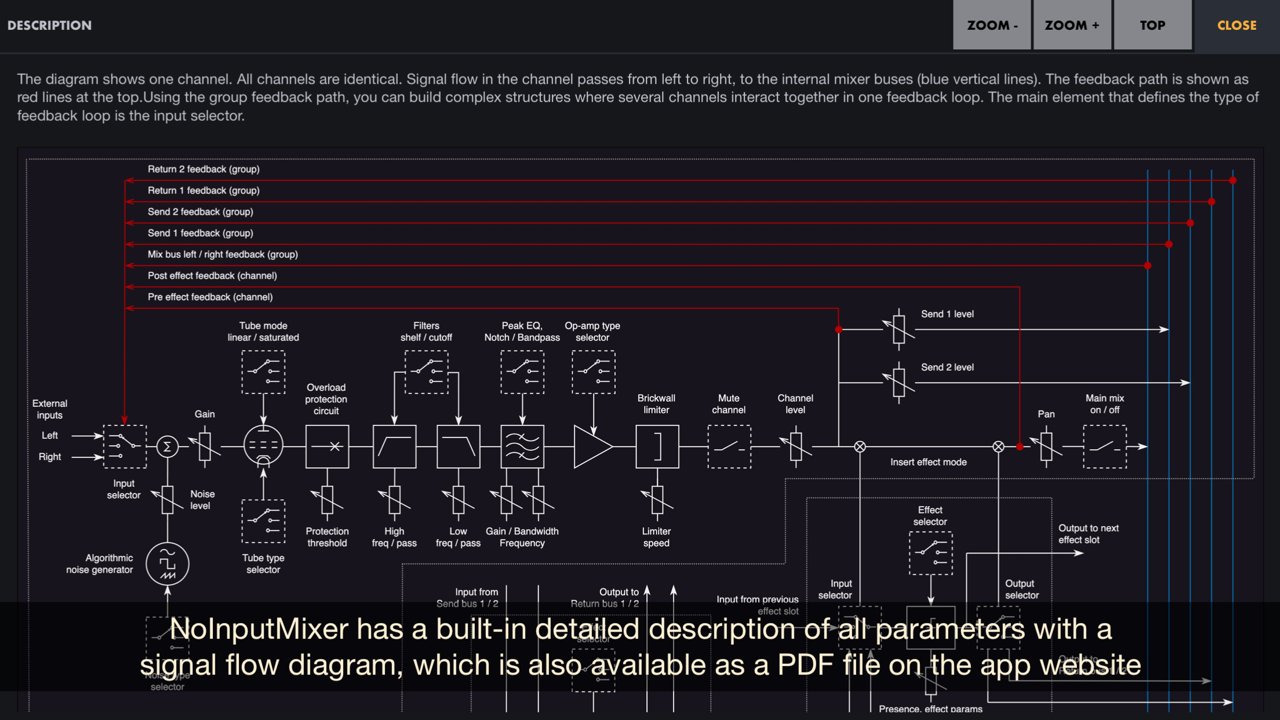
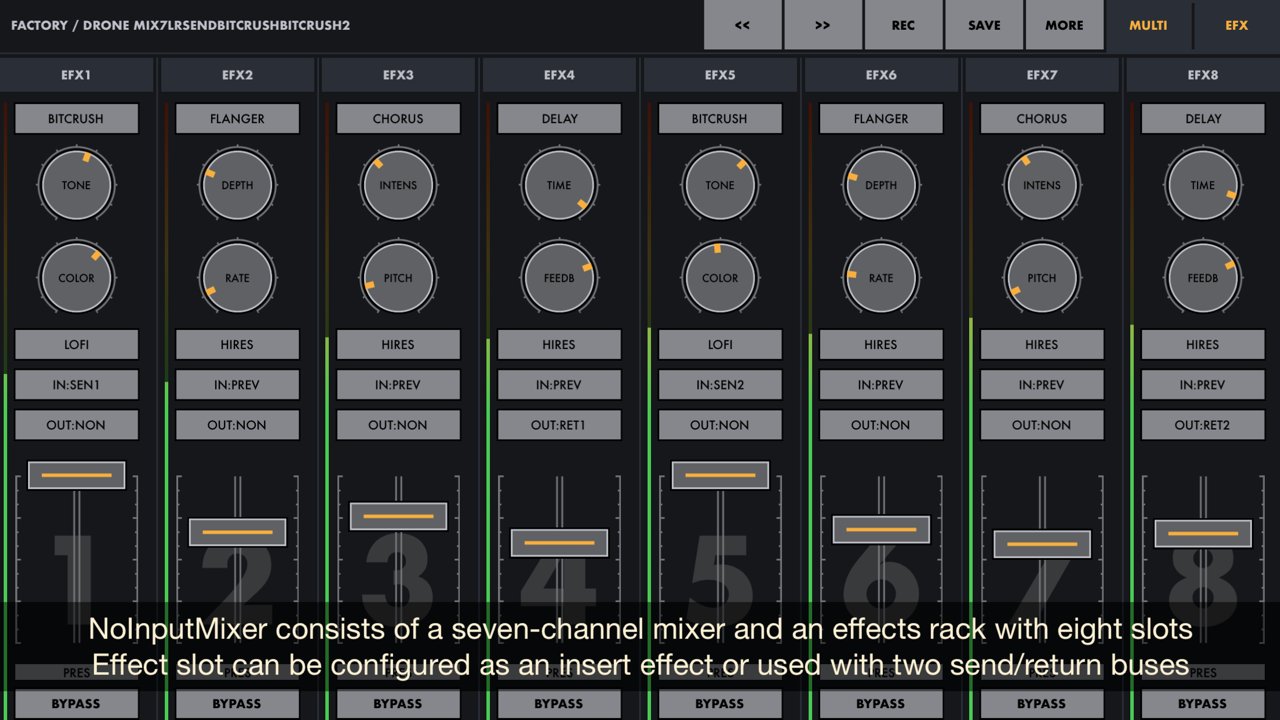
NoInputMixer consists of a seven-channel mixer and an effects rack with eight slots. Each effect slot can be configured as an insert effect for a mixer channel or used with two send/return buses. Effects has an option for hi-res or lo-fi sound processing. Each mixer channel has its own algorithmic generator of different types of noise, which can be added to the feedback signal or used separately. The input selector switches between multiple points in the signal path to make different types of feedback loops or can be switched to an external input for any channel to use it as an effect processor.
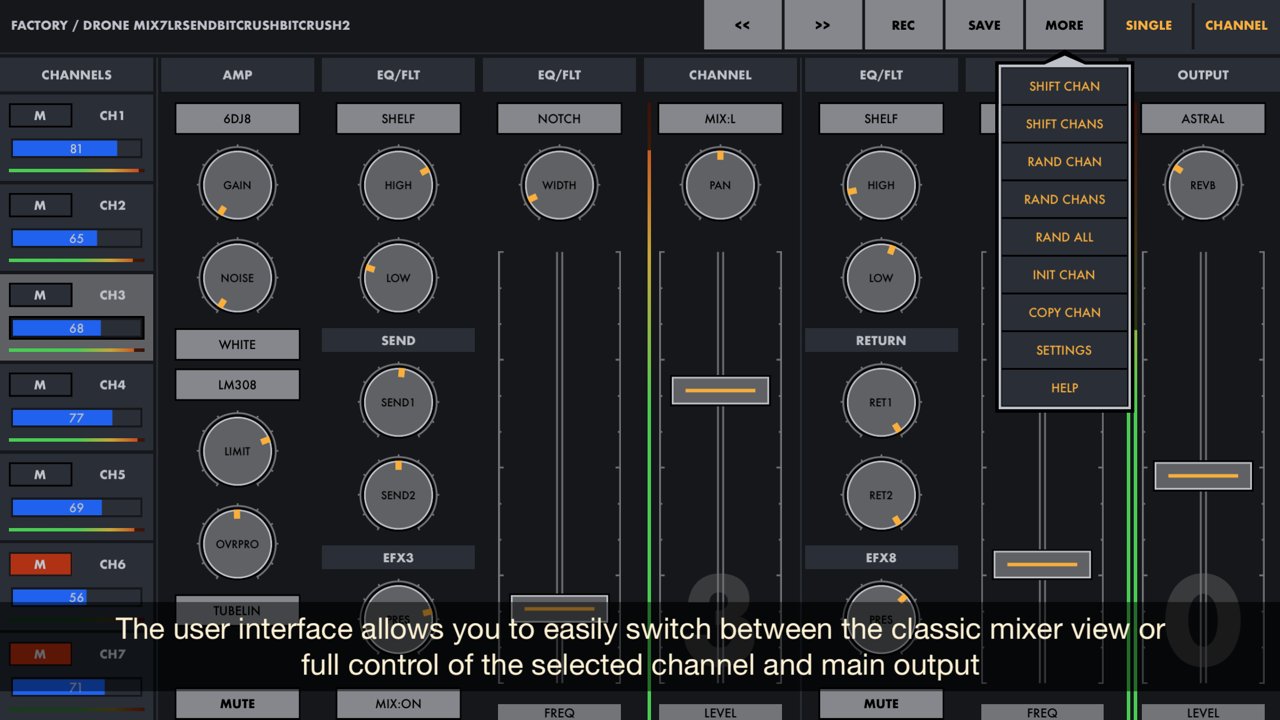
Also this application provides several additional options not found in usual mixers, such as preamp tube type and mode selection, op-amp type selection, adjustment of overload protection circuit, and other features that greatly expand the possibilities for experimenting with sound. The user interface can be presented in the form of a classic mixer, or in the form of complete control of a single channel.
NoInputMixer is a universal application for iOS and macOS. It can work on iPhone and iPad as well as Mac / MacBook with M1 chip (and later). NoInputMixer works on iPhone and iPad standalone, as an Audio Unit or Inter-App Audio module, and supports Audiobus. On MacOS, NoInputMixer can works both as a standalone application and as an Audio unit (AUv3) with DAWs and other hosts that support AUv3 plugins. All application features are available on iOS and macOS, including MIDI support (with a MIDI learn option) and audio unit parameters. NoInputMixer has a built-in detailed description of all parameters also available as PDF file on the application website.
Quick start and demos:
[link removed]
[link removed]
[link removed]
[link removed]
You can find more information on NoInputMixer and other experimental audio processing apps at:
[link removed]
License: Commercial
By using this technique in the creative process, the sound designer can explore many different and special ways to create sound. Unsettling soundscapes perfect for sci-fi, dystopian and horror projects, like strange noises, disrupted signals, broken communication, buzzing drones, faulty machinery, futuristic tech sounds, and glitchy elements are some results of the No-Input Mixing technique.
The downside of this technique, which can scare off beginners, is extreme unpredictability and instability, when the movement of any knob on the mixer can dramatically change the sound in the most unexpected way. But at the same time, this discover an endless space of experimentation and inspiration when creating new and unique sounds or live performance. In addition, a large set of ready-to-use drone and noise presets with a parameter randomizer provide a great point for quickly getting started with this application.
NoInputMixer consists of a seven-channel mixer and an effects rack with eight slots. Each effect slot can be configured as an insert effect for a mixer channel or used with two send/return buses. Effects has an option for hi-res or lo-fi sound processing. Each mixer channel has its own algorithmic generator of different types of noise, which can be added to the feedback signal or used separately. The input selector switches between multiple points in the signal path to make different types of feedback loops or can be switched to an external input for any channel to use it as an effect processor.
Also this application provides several additional options not found in usual mixers, such as preamp tube type and mode selection, op-amp type selection, adjustment of overload protection circuit, and other features that greatly expand the possibilities for experimenting with sound. The user interface can be presented in the form of a classic mixer, or in the form of complete control of a single channel.
NoInputMixer is a universal application for iOS and macOS. It can work on iPhone and iPad as well as Mac / MacBook with M1 chip (and later). NoInputMixer works on iPhone and iPad standalone, as an Audio Unit or Inter-App Audio module, and supports Audiobus. On MacOS, NoInputMixer can works both as a standalone application and as an Audio unit (AUv3) with DAWs and other hosts that support AUv3 plugins. All application features are available on iOS and macOS, including MIDI support (with a MIDI learn option) and audio unit parameters. NoInputMixer has a built-in detailed description of all parameters also available as PDF file on the application website.
Quick start and demos:
[link removed]
[link removed]
[link removed]
[link removed]
You can find more information on NoInputMixer and other experimental audio processing apps at:
[link removed]
License: Commercial
| Release info | New Release on Nov 18, 2024 |
|---|---|
| Release notes | - New app icon. - Added new drone/noise presets. - Switching presets with MIDI controller. - Selecting channels with MIDI controller in single-channel mode. - Switching between Single/Multi and Mixer/Efx screen modes with MIDI controller. - Lock channel parameters when muting (this mode can be disabled in the settings). - Some user interface improvements. - The description has been updated. - Several minor bugs have been fixed. |
| Listing data | App Store |
Reviews
No reviews yet. Be the first to review NoInputMixer.
Used NoInputMixer? Tell other visitors what you thought.
Log in to write a reviewOther products by this publisher
- "No Distractions" for YouTube 4.10 ----
- #Bible 11.6 "Incredible App - My sister shared this app with me a few weeks ago and it is truly incredible.
- #filmphotography 1.4.2 So, you decided to shoot on film?
- $quirrel 1.5.1 $quirrel Budget & Finance helps you plan each paycheck, track spending, manage debt, and see what is safe to spend before the next payday.
- % Percentage Calculator Pro 1.41 This is the Pro version of % Percentage Calculator.
Most viewed iOS Photo & Video
-
1
 ShortDiShow 2.0
Drama Quest Island — An offline interactive short-drama adventure.
-
2
 Infuse 8.5.9
Infuse: Enterprise provides the same great features as the standard version of Infuse and includes permanent access to all Pro features via a traditional paid app.
-
3
 AI Video Generator 2.0.2
Vixel – AI Video Generator
-
4
 OPlayer 4.8
Play all your videos directly without having to convert them!
-
5
 Necrometer II 1.2
Necrometer II is a paranormal investigation companion designed for ghost hunters and researchers.
-
6
 CapCut 20.0.0
CapCut offers easy-to-use video editing functions, in-APP fonts and effects, advanced features such as keyframe animation, smooth slow-motion, chroma key, and stabilization, to help you capture and snip moments.
-
7
 Ai Photo 1.1.2
AI Photo Retouch – BG Eraser
-
8
 Treblo 1.6.0
Make songs with the world's best AI music model.
-
9
 TouchSiren Delta 3.1
--------------------------------------------------------------
-
10
 CNU 3.0.12
CNU?????????????????????,???????????????
Most downloaded iOS Photo & Video
-
1
Infuse 8.5.9
Infuse: Enterprise provides the same great features as the standard version of Infuse and includes permanent access to all Pro features via a traditional paid app.
-
2
 DJI Fly 1.21.18
DJI Fly is designed to help pilots fly drones with ease.
-
3
 TurboCollage Automatic 1.2.4
#1 Easy automatic photo collage maker for iPhone & iPad.
-
4
 Analog Radio 3.0
The iPhone and iPad devices don't have the FM/AM radio antenna installed.
-
5
 ReelyGo 1.1.42
ReelyGo: Your Daily Drama Escape
-
6
 AGAIN. Rehearsal Notes 2.0.1
AGAIN. is the rehearsal app that remembers why the band stopped — and, new in Version 2, who said what in a writing session or a table read.
-
7
Treblo 1.6.0
Make songs with the world's best AI music model.
-
8
 Rozeta Sequencer Suite 1.3.16
Rozeta is a suite of MIDI sequencers and controllers that lets you explore a new, freeform approach to sequencing and controlling mobile music apps.
-
9
 Pop Dot Comics 1.48
Create a comic worthy of the Sunday newspaper or your favorite pulp-fiction cover.
-
10
 SSS IPTV, Simple, Smart Super 1.0.2
An Easiest way to watch TV Online or Movies or Series, Bring your Own list M3u,