NerDie 1.0.4
NerDie is an 8-bit noise machine for iPad and iPhone: four oscillators, four LFOs, a summing tree with eight algorithms, a resonant low-pass filter and a one-bar sequencer.
Download
9.95 MB
8downloads
1this week
FreeCommercial
0reviews
Screenshots
About NerDie
NerDie is an 8-bit noise machine for iPad and iPhone: four oscillators, four LFOs, a summing tree with eight algorithms, a resonant low-pass filter and a one-bar sequencer. Thirty-two registers, integer arithmetic, mono output — the sound of a chip rather than a picture of one.
The engine runs in whole numbers at a fixed chip rate. Overflow, wrap and quantisation are not added afterwards to make it sound old: they are the signal itself.
It runs on its own or as an AUv3 instrument on a MIDI track in any host that loads them, in portrait and in landscape.
THE MACHINE
• 4 oscillators, 16 waveforms each, 19 to 1350 Hz
• 4 LFOs, 8 shapes, moving pitch or volume — free-running in Hz, or multipliers of the clock up to x128 with the phase reset on every tick
• 3 summing topologies x 3 nodes x 8 algorithms: addition, overflow, subtraction, ring modulation, XOR, FM and wave-shaping — 1,536 ways to add four voices together
• 8-bit resonant low-pass filter that self-oscillates at the top of its travel
• One-bar sequencer with overdub, recorded finer than a sixteenth-note grid, driven by the internal clock, the host transport or MIDI clock
• 32 registers on 8 pages of 4 pots, with optional hardware-style pot pickup
• Four chip rates — 15625, 31250, 62500, 78125 Hz — and three outputs: RAW, CLEAN, TAPE
TWO KINDS OF ACCIDENT
CHAOS throws every register at once, the way the machine does, and sometimes lands on silence. RND builds a whole patch, renders it and measures it before handing it over, so it always makes a sound. UNDO brings back what you had.
MADE FOR GLASS
Drag a knob up and down for the coarse move and sideways for the fine one, eight times slower, without lifting your finger. Long press to type a value in its real unit - Hz, ms, %, the name of a waveform - to reset it, or to assign a MIDI CC with MIDI Learn. Double tap for the default. Two knobs turn at once, and the four pads are played with as many fingers as you like. Pinch the panel up to 250% and drag it around; the top bar and the value strip never scale, so the preset name and the register you are turning stay readable at any zoom.
MPE
The four oscillators become four MPE voices. Press, slide, strike and bend pass through a matrix that decides what each one moves — tuning, level, waveform, LFO depth, filter cutoff — with a response curve per gesture. Controllers reach the app over Bluetooth or a Camera Connection Kit, and reach the AUv3 through its host.
THREE FACES
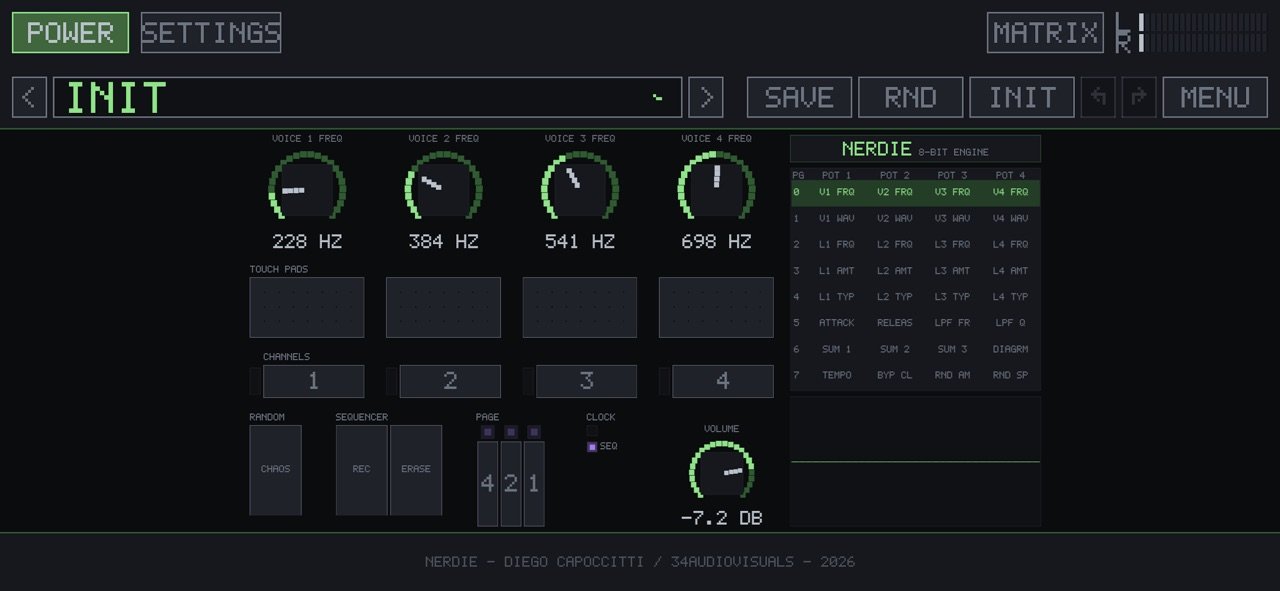
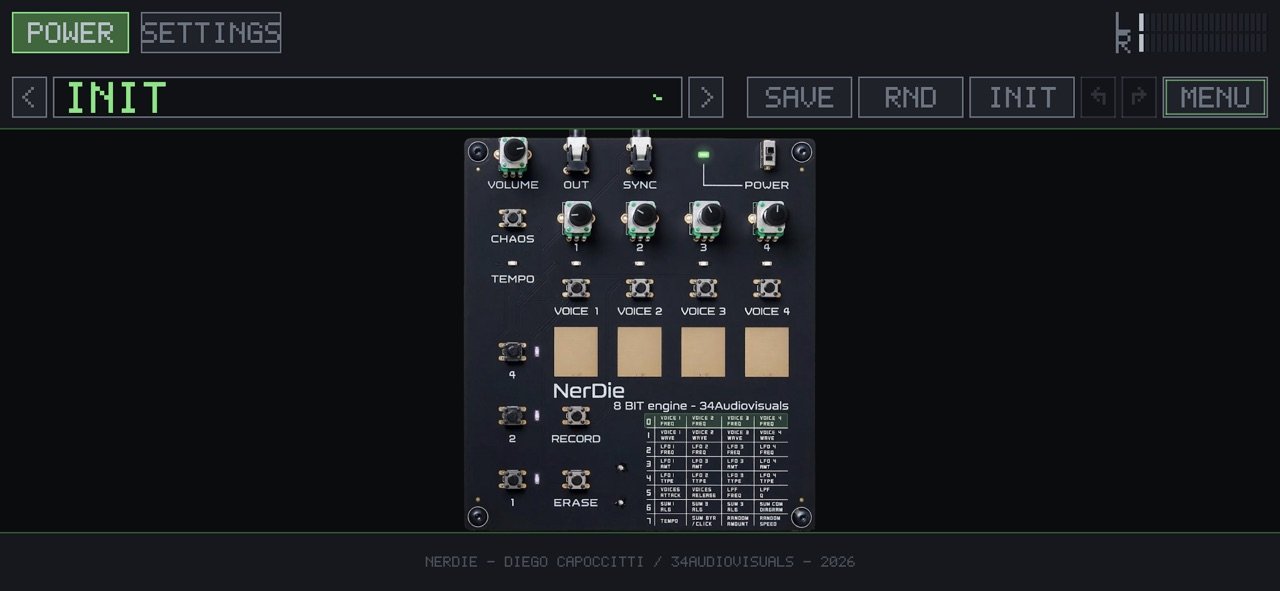
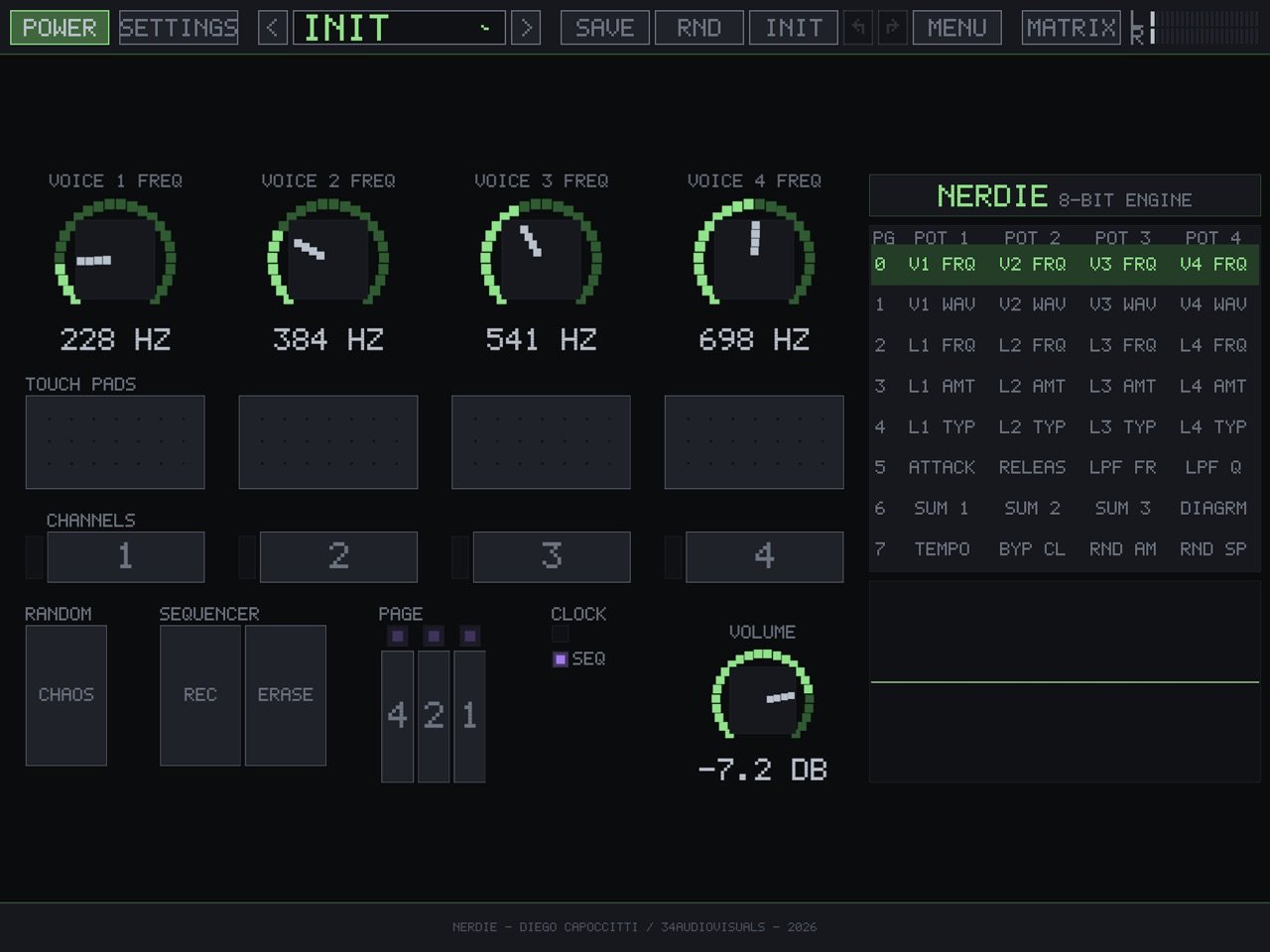
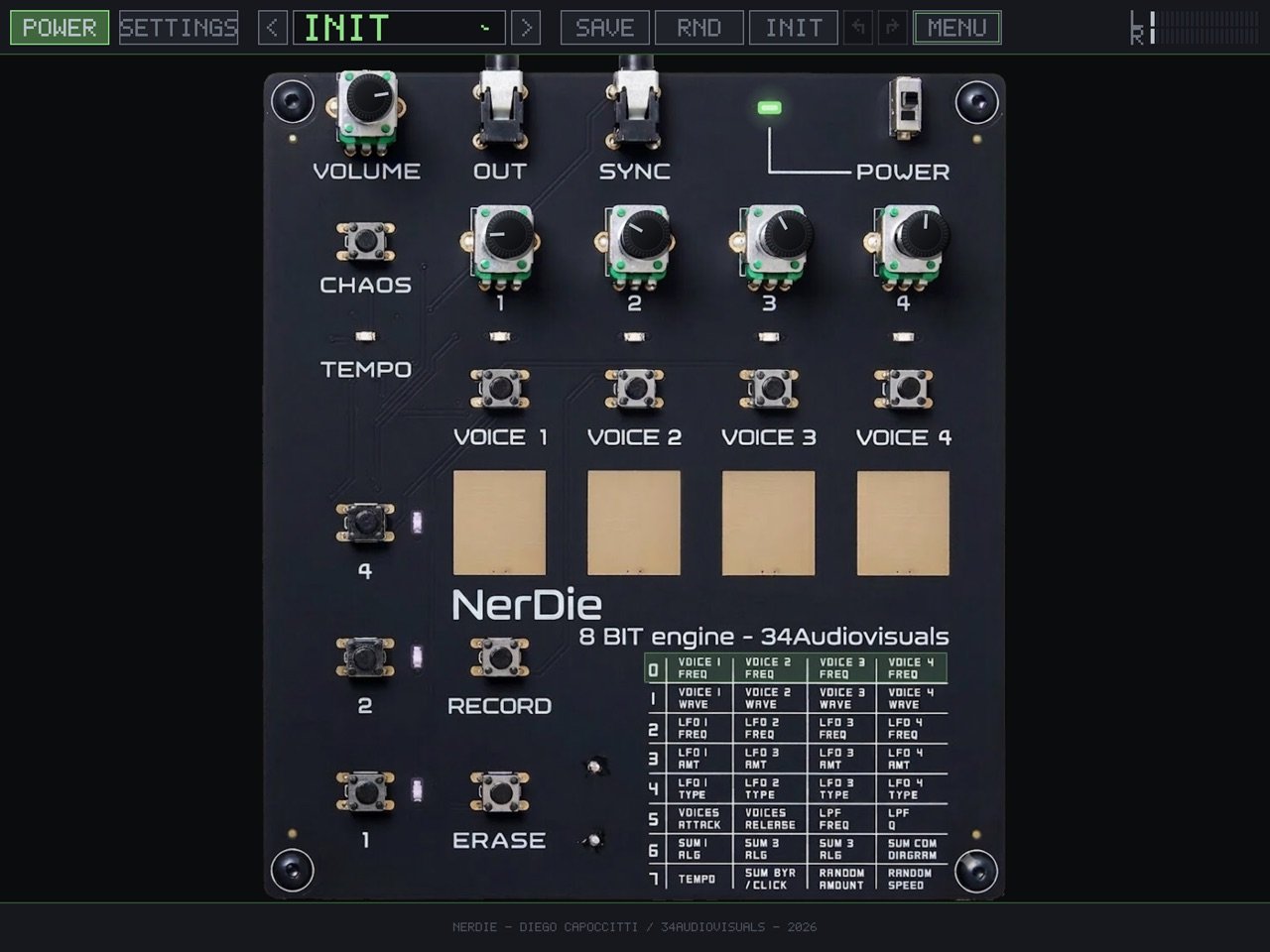
The pixel panel with its four pots and page buttons; the matrix, with all 32 registers on screen at once; and a photograph of the circuit with the controls mounted on it.
PRESETS
45 factory presets in nine folders — Bass, Drones, FX, Glitch, Melodic, Noise, Rhythms, Sequenced, Init — installed on the first run. The ones you save live in the Files app under On My iPad / NerDie / Presets, so you can copy them out or drop new ones in. The .ner format is identical to the desktop version and travels in both directions. Presets saved inside a host are there when you open the app on its own.
NO ACCOUNT, NO SUBSCRIPTION, NO ADS
Buy it once. There is nothing to activate, nothing to sign in to, and nothing is collected.
NerDie is an independent project, modelled on the behaviour of the SOMA Laboratory Rumble of Ancient Times. It is not affiliated with or endorsed by SOMA Laboratory, and no firmware, artwork, font or layout of the original is used in this product.
License: Commercial
The engine runs in whole numbers at a fixed chip rate. Overflow, wrap and quantisation are not added afterwards to make it sound old: they are the signal itself.
It runs on its own or as an AUv3 instrument on a MIDI track in any host that loads them, in portrait and in landscape.
THE MACHINE
• 4 oscillators, 16 waveforms each, 19 to 1350 Hz
• 4 LFOs, 8 shapes, moving pitch or volume — free-running in Hz, or multipliers of the clock up to x128 with the phase reset on every tick
• 3 summing topologies x 3 nodes x 8 algorithms: addition, overflow, subtraction, ring modulation, XOR, FM and wave-shaping — 1,536 ways to add four voices together
• 8-bit resonant low-pass filter that self-oscillates at the top of its travel
• One-bar sequencer with overdub, recorded finer than a sixteenth-note grid, driven by the internal clock, the host transport or MIDI clock
• 32 registers on 8 pages of 4 pots, with optional hardware-style pot pickup
• Four chip rates — 15625, 31250, 62500, 78125 Hz — and three outputs: RAW, CLEAN, TAPE
TWO KINDS OF ACCIDENT
CHAOS throws every register at once, the way the machine does, and sometimes lands on silence. RND builds a whole patch, renders it and measures it before handing it over, so it always makes a sound. UNDO brings back what you had.
MADE FOR GLASS
Drag a knob up and down for the coarse move and sideways for the fine one, eight times slower, without lifting your finger. Long press to type a value in its real unit - Hz, ms, %, the name of a waveform - to reset it, or to assign a MIDI CC with MIDI Learn. Double tap for the default. Two knobs turn at once, and the four pads are played with as many fingers as you like. Pinch the panel up to 250% and drag it around; the top bar and the value strip never scale, so the preset name and the register you are turning stay readable at any zoom.
MPE
The four oscillators become four MPE voices. Press, slide, strike and bend pass through a matrix that decides what each one moves — tuning, level, waveform, LFO depth, filter cutoff — with a response curve per gesture. Controllers reach the app over Bluetooth or a Camera Connection Kit, and reach the AUv3 through its host.
THREE FACES
The pixel panel with its four pots and page buttons; the matrix, with all 32 registers on screen at once; and a photograph of the circuit with the controls mounted on it.
PRESETS
45 factory presets in nine folders — Bass, Drones, FX, Glitch, Melodic, Noise, Rhythms, Sequenced, Init — installed on the first run. The ones you save live in the Files app under On My iPad / NerDie / Presets, so you can copy them out or drop new ones in. The .ner format is identical to the desktop version and travels in both directions. Presets saved inside a host are there when you open the app on its own.
NO ACCOUNT, NO SUBSCRIPTION, NO ADS
Buy it once. There is nothing to activate, nothing to sign in to, and nothing is collected.
NerDie is an independent project, modelled on the behaviour of the SOMA Laboratory Rumble of Ancient Times. It is not affiliated with or endorsed by SOMA Laboratory, and no firmware, artwork, font or layout of the original is used in this product.
License: Commercial
| Release info | New Release on Sep 24, 2026 |
|---|---|
| Release notes | - Presets are now shared between the app and the AUv3: save in one, find it in the other - Info bar explains the selected waveform, LFO shape, summing algorithm and diagram - Info bar text no longer gets cut off - Info bar tells you why the sequencer won't start when the clock is off - Pinch-to-zoom now works on the bands around the panel - Fine knob adjustment no longer jumps the wrong way on the first step - Knob long-press menu now waits 2 seconds - MIDI notes 48–51 now toggle the channels - Pads light up when played via MIDI - CLEAR menu no longer swallows the next pad touch; it now opens only with ERASE held |
| Listing data | App Store |
Reviews
No reviews yet. Be the first to review NerDie.
Used NerDie? Tell other visitors what you thought.
Log in to write a reviewOther products by this publisher
- "No Distractions" for YouTube 4.10 ----
- #Bible 11.6 "Incredible App - My sister shared this app with me a few weeks ago and it is truly incredible.
- #filmphotography 1.4.2 So, you decided to shoot on film?
- $quirrel 1.5.1 $quirrel Budget & Finance helps you plan each paycheck, track spending, manage debt, and see what is safe to spend before the next payday.
- % Percentage Calculator Pro 1.41 This is the Pro version of % Percentage Calculator.
Most viewed iOS Photo & Video
-
1
 ShortDiShow 2.0
Drama Quest Island — An offline interactive short-drama adventure.
-
2
 Infuse 8.5.10
Infuse: Enterprise provides the same great features as the standard version of Infuse and includes permanent access to all Pro features via a traditional paid app.
-
3
 AI Video Generator 2.0.3
Vixel – AI Video Generator
-
4
 OPlayer 4.8
Play all your videos directly without having to convert them!
-
5
 Necrometer II 1.2
Necrometer II is a paranormal investigation companion designed for ghost hunters and researchers.
-
6
 CapCut 20.1.0
CapCut offers easy-to-use video editing functions, in-APP fonts and effects, advanced features such as keyframe animation, smooth slow-motion, chroma key, and stabilization, to help you capture and snip moments.
-
7
 Ai Photo 1.1.2
AI Photo Retouch – BG Eraser
- 8 #filmphotography 1.4.2 So, you decided to shoot on film?
-
9
 Treblo 1.6.5
Make songs with the world's best AI music model.
-
10
 Pop Dot Comics 1.48
Create a comic worthy of the Sunday newspaper or your favorite pulp-fiction cover.
Most downloaded iOS Photo & Video
-
1
 DJI Fly 1.21.18
DJI Fly is designed to help pilots fly drones with ease.
-
2
Infuse 8.5.10
Infuse: Enterprise provides the same great features as the standard version of Infuse and includes permanent access to all Pro features via a traditional paid app.
-
3
 Analog Radio 3.0
The iPhone and iPad devices don't have the FM/AM radio antenna installed.
-
4
 TurboCollage Automatic 1.2.4
#1 Easy automatic photo collage maker for iPhone & iPad.
-
5
 Rozeta Sequencer Suite 1.3.16
Rozeta is a suite of MIDI sequencers and controllers that lets you explore a new, freeform approach to sequencing and controlling mobile music apps.
-
6
 ReelyGo 1.1.42
ReelyGo: Your Daily Drama Escape
-
7
Treblo 1.6.5
Make songs with the world's best AI music model.
-
8
Pop Dot Comics 1.48
Create a comic worthy of the Sunday newspaper or your favorite pulp-fiction cover.
-
9
 AGAIN. Rehearsal Notes 2.0.1
AGAIN. is the rehearsal app that remembers why the band stopped — and, new in Version 2, who said what in a writing session or a table read.
-
10
 Sun Scout 1.5.0
If your work or play requires sunlight, Sun Scout is built for you.