
MultiTrack DAW 7.0.2
The power of a digital audio workstation in the palm of your hand.
Download
54.13 MB
10downloads
0this week
FreeFreeware
0reviews
Screenshots

About MultiTrack DAW
The power of a digital audio workstation in the palm of your hand. MultiTrack has been recording on iPhone since 2009, and version 7 rebuilds it from the engine up — with all 32 tracks for everyone.
RECORD
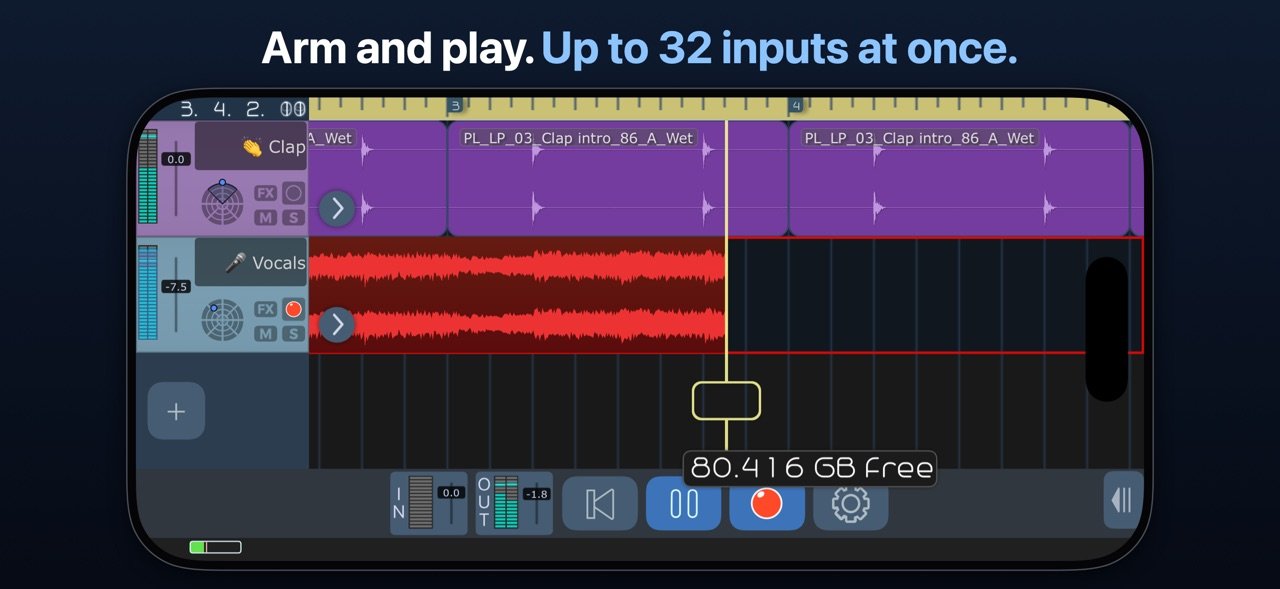
Record from the built-in mic, any USB or multichannel interface, or an AUv3 or Inter-App Audio instrument — up to 32 inputs at once. Monitoring, Auto Input, punch and loop recording, and latency compensation tuned to your own setup: tap Detect and a short chirp measures it, or set it by hand to the sample. Recorded audio lines up with what you heard.
EDIT WITHOUT LOSING TAKES
Nothing you record is overwritten, and a take survives a call, a lost interface, or a closed song. Regions point at the audio, so slicing and trimming never touch the file.
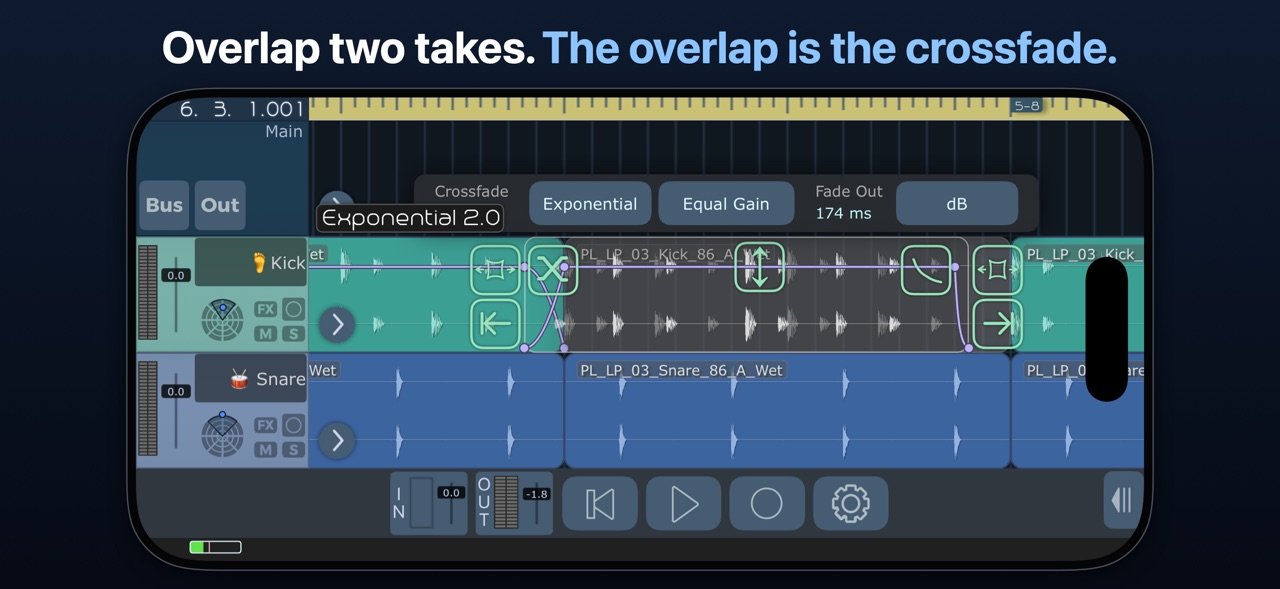
Regions can overlap, and the overlap is the crossfade. Drag one over its neighbor to blend two takes — eight curve shapes, equal-power or equal-gain. Every fade has a curve of its own: drag a fade handle up or down to bend it.
Smart Snap throughout, and 100 levels of undo.
TEMPO AND TIME
Change time signatures on the ruler, wherever your song requires. Automate the tempo itself (Unlock All Features): draw ramps and curves, and audio, MIDI, and Ableton Link follow in real time.
MIX
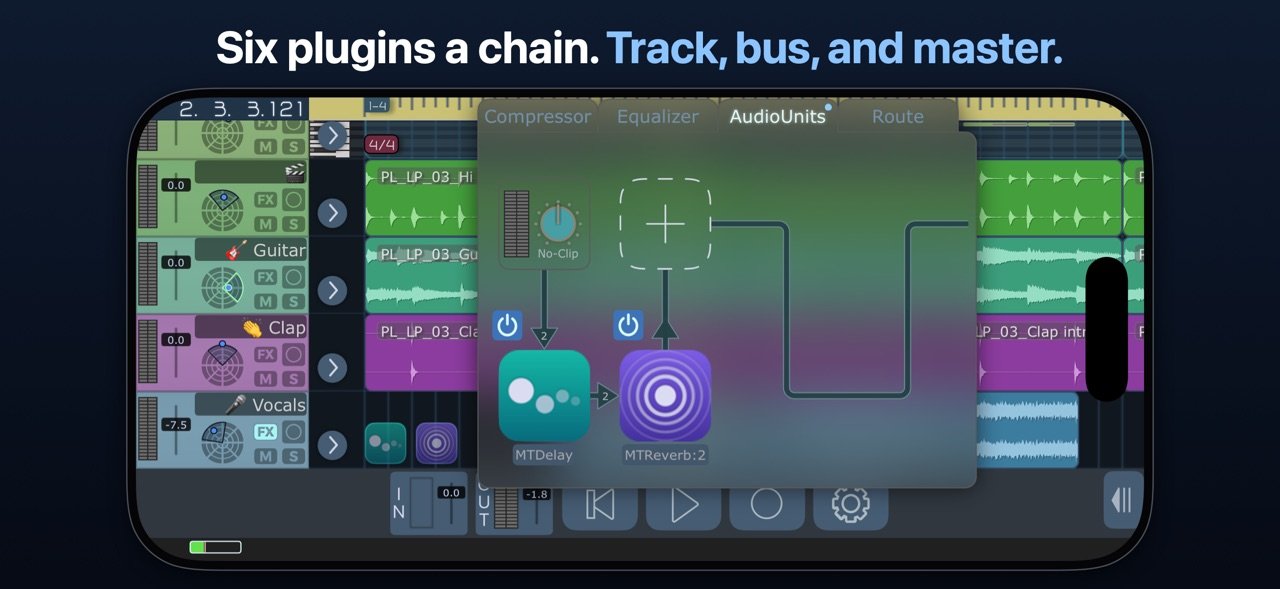
Up to six AUv3 or Inter-App Audio plugins on every track, bus, and the master. Four send busses, pre- or post-fader. EQ and compressor throughout, plus bundled delay and reverb. Sidechains from any track or bus. Freeze a track to reclaim CPU.
SURROUND, DONE PROPERLY
Stereo, Quad, LCRS, 5.1, 6.1, both 7.1s, and 9.1, plus discrete pass-through from 4 to 16 channels.
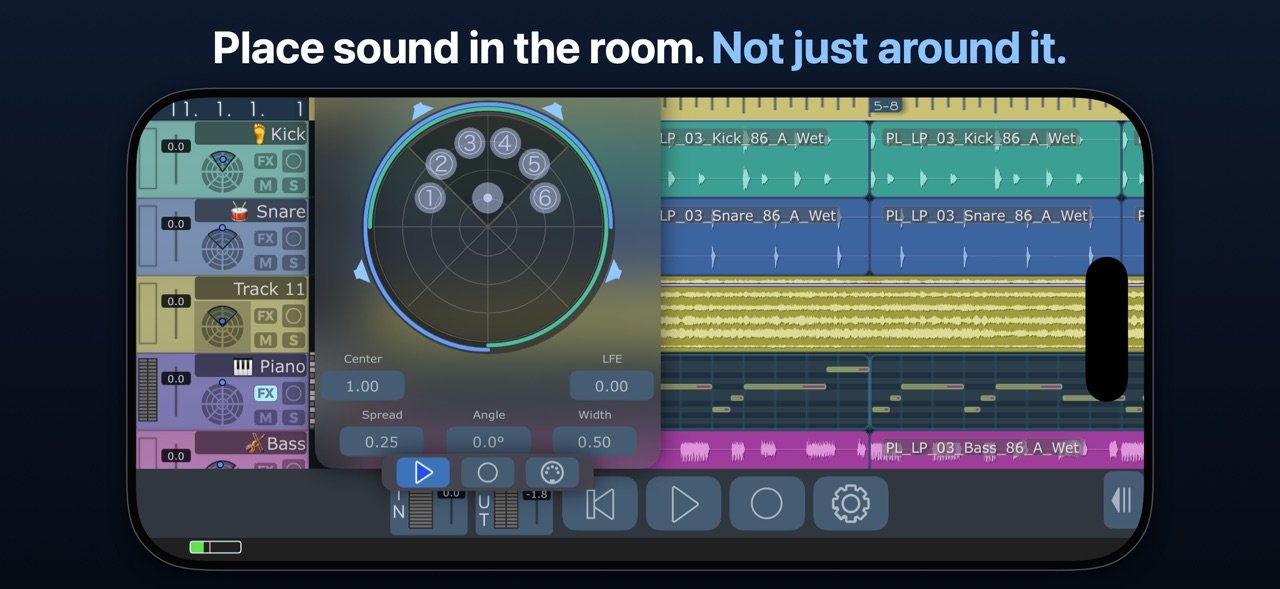
The panner places sound instead of smearing it: at least 24 dB between neighboring speakers in every layout, and constant level across the field. Switch a speaker off and its share is redistributed, not dropped.
MIDI
Play AUv3 instruments from hardware controllers, Network MIDI, or other apps, and record every note, loops included. Route it all through the MIDI Matrix with savable filter and transform chains, and import Standard MIDI Files with their tempo maps. Unlock All Features adds piano-roll editing, where Draw mode puts a note under your finger.
AUTOMATION — Unlock All Features
Draw or record automation for volume, mute, pan, EQ, compressor, sends, pitch, any Audio Unit parameter, and MIDI CC, pitch bend, and channel pressure. MIDI 2.0 goes further: every note carries its own pitch bend and pressure, shaped note by note with a bendable curve on every segment.
WARP AND PITCH
Pitch shift up to two octaves either way, with formant preservation, no unlock needed. Time stretching and warp editing (Unlock All Features) put source and target timing in one editor: place markers, correct a source BPM, and loop while you audition.
EXPORT THAT SOUNDS LIKE YOUR MIX
WAV, MP3, FLAC, Apple Lossless, AAC, and Ogg Vorbis. Normalize only if you choose, to a ceiling from -6 to 0 dBFS. Real dither, triangular or noise-shaped, applied after sample rate conversion, where the depth actually drops. Export the song, the loop, stems, or one surround mixdown.
FILES AND iCLOUD
Projects live in iCloud Drive or on device. Drag audio, MIDI, presets, and projects in and out of Files and other apps, or over Wi-Fi. No account, no tracking, no analytics.
SPECIFICATIONS
32 tracks, 32 inputs, 16 outputs, 16 channels per track. 16-bit, 24-bit, and 32-bit float at 44.1 to 192 kHz. AUv3 hosting, Inter-App Audio, Ableton Link, external MIDI Clock, hardware and Network MIDI.
UNLOCK ALL FEATURES
Adds three things: MIDI editing, time stretching and warp editing, and automation. Everything else is part of the app, all 32 tracks and pitch shifting included. Subscribe with a free trial, or buy once and keep them forever.
Bought extra tracks in an earlier version? What you spent comes back as free months of Unlock All Features and a lower one-time price.
Terms of Use: [link removed]
harmonicdog.com
RECORD
Record from the built-in mic, any USB or multichannel interface, or an AUv3 or Inter-App Audio instrument — up to 32 inputs at once. Monitoring, Auto Input, punch and loop recording, and latency compensation tuned to your own setup: tap Detect and a short chirp measures it, or set it by hand to the sample. Recorded audio lines up with what you heard.
EDIT WITHOUT LOSING TAKES
Nothing you record is overwritten, and a take survives a call, a lost interface, or a closed song. Regions point at the audio, so slicing and trimming never touch the file.
Regions can overlap, and the overlap is the crossfade. Drag one over its neighbor to blend two takes — eight curve shapes, equal-power or equal-gain. Every fade has a curve of its own: drag a fade handle up or down to bend it.
Smart Snap throughout, and 100 levels of undo.
TEMPO AND TIME
Change time signatures on the ruler, wherever your song requires. Automate the tempo itself (Unlock All Features): draw ramps and curves, and audio, MIDI, and Ableton Link follow in real time.
MIX
Up to six AUv3 or Inter-App Audio plugins on every track, bus, and the master. Four send busses, pre- or post-fader. EQ and compressor throughout, plus bundled delay and reverb. Sidechains from any track or bus. Freeze a track to reclaim CPU.
SURROUND, DONE PROPERLY
Stereo, Quad, LCRS, 5.1, 6.1, both 7.1s, and 9.1, plus discrete pass-through from 4 to 16 channels.
The panner places sound instead of smearing it: at least 24 dB between neighboring speakers in every layout, and constant level across the field. Switch a speaker off and its share is redistributed, not dropped.
MIDI
Play AUv3 instruments from hardware controllers, Network MIDI, or other apps, and record every note, loops included. Route it all through the MIDI Matrix with savable filter and transform chains, and import Standard MIDI Files with their tempo maps. Unlock All Features adds piano-roll editing, where Draw mode puts a note under your finger.
AUTOMATION — Unlock All Features
Draw or record automation for volume, mute, pan, EQ, compressor, sends, pitch, any Audio Unit parameter, and MIDI CC, pitch bend, and channel pressure. MIDI 2.0 goes further: every note carries its own pitch bend and pressure, shaped note by note with a bendable curve on every segment.
WARP AND PITCH
Pitch shift up to two octaves either way, with formant preservation, no unlock needed. Time stretching and warp editing (Unlock All Features) put source and target timing in one editor: place markers, correct a source BPM, and loop while you audition.
EXPORT THAT SOUNDS LIKE YOUR MIX
WAV, MP3, FLAC, Apple Lossless, AAC, and Ogg Vorbis. Normalize only if you choose, to a ceiling from -6 to 0 dBFS. Real dither, triangular or noise-shaped, applied after sample rate conversion, where the depth actually drops. Export the song, the loop, stems, or one surround mixdown.
FILES AND iCLOUD
Projects live in iCloud Drive or on device. Drag audio, MIDI, presets, and projects in and out of Files and other apps, or over Wi-Fi. No account, no tracking, no analytics.
SPECIFICATIONS
32 tracks, 32 inputs, 16 outputs, 16 channels per track. 16-bit, 24-bit, and 32-bit float at 44.1 to 192 kHz. AUv3 hosting, Inter-App Audio, Ableton Link, external MIDI Clock, hardware and Network MIDI.
UNLOCK ALL FEATURES
Adds three things: MIDI editing, time stretching and warp editing, and automation. Everything else is part of the app, all 32 tracks and pitch shifting included. Subscribe with a free trial, or buy once and keep them forever.
Bought extra tracks in an earlier version? What you spent comes back as free months of Unlock All Features and a lower one-time price.
Terms of Use: [link removed]
harmonicdog.com
| Release info | Update on Nov 03, 2026 |
|---|---|
| Release notes | MultiTrack 7 is here: a new audio engine, a new timeline, and a mixer that runs all the way to 9.1 surround. Your projects from earlier versions open in it. Version 7.0.2 - Fills the whole screen on iPhone Duo, with no black bar when it's closed. - Time stretching stays on the grid at any Dynamic Tempo. - A 6.3.6 song saved during a solo keeps its other tracks powered on once you un-solo. - A 48 kHz interface under a 44.1 kHz song no longer nudges the playhead. - Plugin icons use the system icon shape, without the thin line on iOS 26. - A large volume fader opened from the toolbar stays above the Options panel. - Duplicating a track copies its automation and tempo lane, and the new lanes play right away. - Recording automation on a button toggles it back and forth and records each change. - Dragging automation points snaps only Hold points on button lanes, and a selection moves as one group. - Songs saved by 6.3.6 or earlier keep their main-channel plugins when opened. - Stretched regions with a tempo curve play all of their audio on a tempo-off track. EVERY TRACK, FOR EVERYONE All 32 tracks are part of the app, whatever you bought before. If you paid for extra tracks, that money comes back: open Options > Upgrades for free months of Unlock All Features and a lower price on the one-time purchase. NEW IN 7 - MIDI tracks and clips, a piano roll with Draw mode, the MIDI Matrix, filter chains, Network MIDI, and Standard MIDI Files with tempo maps. - MIDI loop recording: each lap is a take, and MIDI 2.0 per-note pitch bend and pressure get curves you bend with a drag. - Automation for volume, pan, sends, EQ, compressor, pitch, Audio Unit parameters, and MIDI CC. - Tempo automation: draw ramps and curves, and audio, MIDI, and Ableton Link follow in real time. - Time signature changes anywhere on the ruler. - Time stretching and warp markers, and pitch shifting up to two octaves with formant preservation. - Surround and multichannel, from stereo to 9.1 and 4-16 channel |
| Listing data | App Store |
Reviews
No reviews yet. Be the first to review MultiTrack DAW.
Used MultiTrack DAW? Tell other visitors what you thought.
Log in to write a reviewOther products by this publisher
- "No Distractions" for YouTube 4.10 ----
- #Bible 11.5 "Incredible App - My sister shared this app with me a few weeks ago and it is truly incredible.
- #filmphotography 1.4.2 So, you decided to shoot on film?
- $quirrel 1.5.1 $quirrel Budget & Finance helps you plan each paycheck, track spending, manage debt, and see what is safe to spend before the next payday.
- % Percentage Calculator Pro 1.41 This is the Pro version of % Percentage Calculator.
Most viewed iOS Photo & Video
-
1
 Infuse 8.5.9
Infuse: Enterprise provides the same great features as the standard version of Infuse and includes permanent access to all Pro features via a traditional paid app.
Infuse 8.5.9
Infuse: Enterprise provides the same great features as the standard version of Infuse and includes permanent access to all Pro features via a traditional paid app.
-
2
 ShortDiShow 2.0
Drama Quest Island — An offline interactive short-drama adventure.
ShortDiShow 2.0
Drama Quest Island — An offline interactive short-drama adventure.
-
3
 AI Video Generator 2.0.2
Vixel – AI Video Generator
AI Video Generator 2.0.2
Vixel – AI Video Generator
-
4
 OPlayer 4.8
Play all your videos directly without having to convert them!
OPlayer 4.8
Play all your videos directly without having to convert them!
-
5
 Necrometer II 1.2
Necrometer II is a paranormal investigation companion designed for ghost hunters and researchers.
Necrometer II 1.2
Necrometer II is a paranormal investigation companion designed for ghost hunters and researchers.
-
6
 CapCut 20.0.0
CapCut offers easy-to-use video editing functions, in-APP fonts and effects, advanced features such as keyframe animation, smooth slow-motion, chroma key, and stabilization, to help you capture and snip moments.
CapCut 20.0.0
CapCut offers easy-to-use video editing functions, in-APP fonts and effects, advanced features such as keyframe animation, smooth slow-motion, chroma key, and stabilization, to help you capture and snip moments.
-
7
 TouchSiren Delta 3.1
--------------------------------------------------------------
TouchSiren Delta 3.1
--------------------------------------------------------------
-
8
 Ai Photo 1.1.2
AI Photo Retouch – BG Eraser
Ai Photo 1.1.2
AI Photo Retouch – BG Eraser
-
9
 CNU 3.0.12
CNU?????????????????????,???????????????
CNU 3.0.12
CNU?????????????????????,???????????????
-
10
 Treblo 1.6.0
Make songs with the world's best AI music model.
Treblo 1.6.0
Make songs with the world's best AI music model.
Most downloaded iOS Photo & Video
-
1
Infuse 8.5.9
Infuse: Enterprise provides the same great features as the standard version of Infuse and includes permanent access to all Pro features via a traditional paid app.
-
2
 DJI Fly 1.21.18
DJI Fly is designed to help pilots fly drones with ease.
DJI Fly 1.21.18
DJI Fly is designed to help pilots fly drones with ease.
-
3
 ReelyGo 1.1.42
ReelyGo: Your Daily Drama Escape
ReelyGo 1.1.42
ReelyGo: Your Daily Drama Escape
-
4
 TurboCollage Automatic 1.2.4
#1 Easy automatic photo collage maker for iPhone & iPad.
TurboCollage Automatic 1.2.4
#1 Easy automatic photo collage maker for iPhone & iPad.
-
5
 Analog Radio 3.0
The iPhone and iPad devices don't have the FM/AM radio antenna installed.
Analog Radio 3.0
The iPhone and iPad devices don't have the FM/AM radio antenna installed.
-
6
 AGAIN. Rehearsal Notes 2.0.1
AGAIN. is the rehearsal app that remembers why the band stopped — and, new in Version 2, who said what in a writing session or a table read.
AGAIN. Rehearsal Notes 2.0.1
AGAIN. is the rehearsal app that remembers why the band stopped — and, new in Version 2, who said what in a writing session or a table read.
-
7
Treblo 1.6.0
Make songs with the world's best AI music model.
-
8
 Pop Dot Comics 1.48
Create a comic worthy of the Sunday newspaper or your favorite pulp-fiction cover.
Pop Dot Comics 1.48
Create a comic worthy of the Sunday newspaper or your favorite pulp-fiction cover.
-
9
 Rozeta Sequencer Suite 1.3.16
Rozeta is a suite of MIDI sequencers and controllers that lets you explore a new, freeform approach to sequencing and controlling mobile music apps.
Rozeta Sequencer Suite 1.3.16
Rozeta is a suite of MIDI sequencers and controllers that lets you explore a new, freeform approach to sequencing and controlling mobile music apps.
-
10
 SSS IPTV, Simple, Smart Super 1.0.2
An Easiest way to watch TV Online or Movies or Series, Bring your Own list M3u,
SSS IPTV, Simple, Smart Super 1.0.2
An Easiest way to watch TV Online or Movies or Series, Bring your Own list M3u,