
15downloads
1this week
FreeFreeware
0reviews
Screenshots
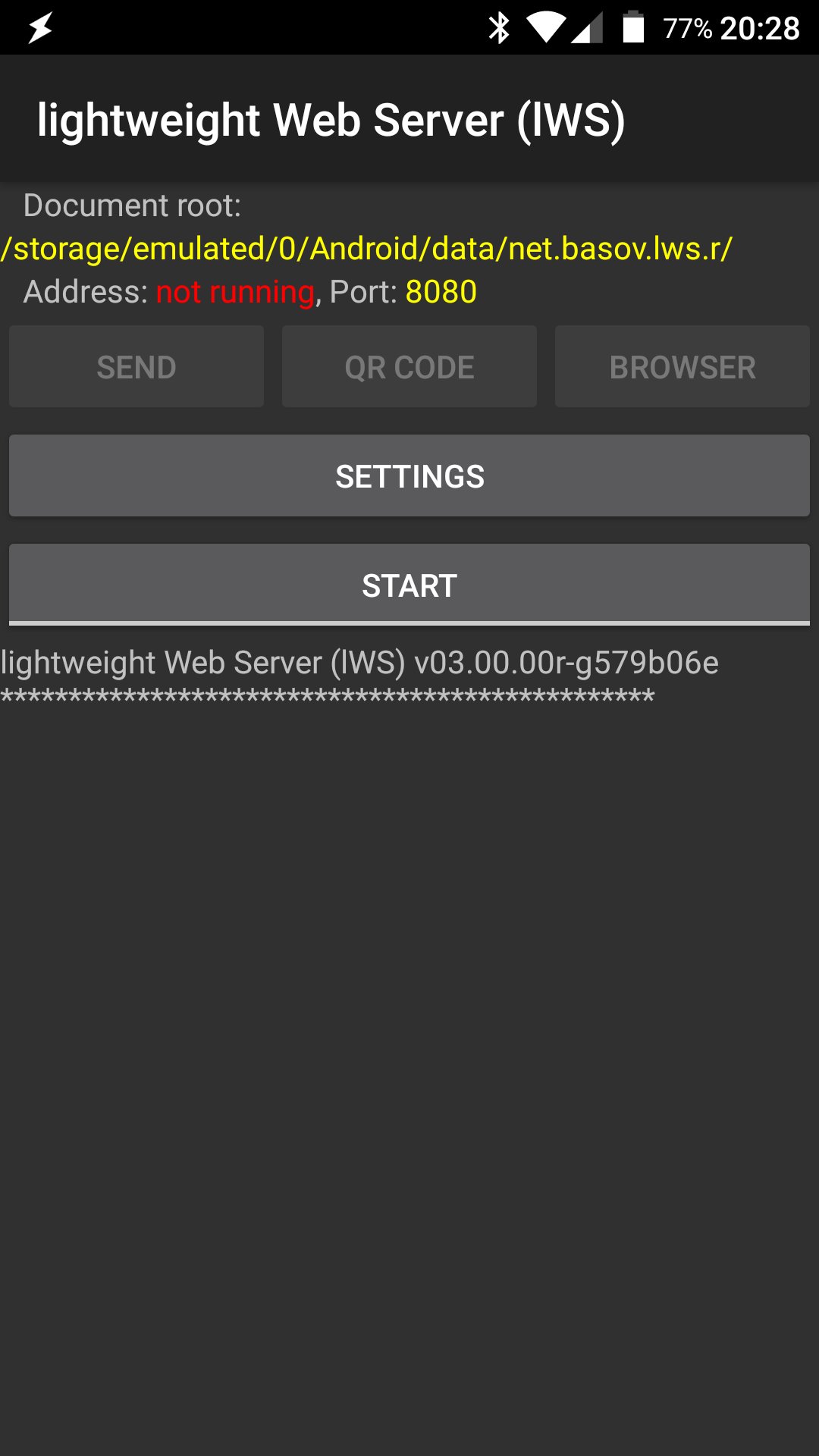
About lWS
It is ...
* ... a Web Server for static content.
* ... lightweight. APK size less then 100 Kb.
* ... as simple as possible. Only essential features implemented.
* ... open. Source code released under GPL-3.0.
* ... a personal solution. It is not optimized/tested for many parallel connections and large file transfer.
* ... network state responsive. Requires Wi-Fi connected or tethering enabled. Service will stop automatically if network is disconnected.
Based on
This application continues the development of
Webserver for Android.
What is configurable
* Document root. Path may be entered as text or optionally selected using [link removed]. If it is not installed it will offered for install.
* Port. May be between 1024 and 65535. Default is 8080
Any wrong values in parameters will automatically be set back to their defaults.
Document root
Document root by default is set to application private directory, example index
file automatically created. It is a safe configuration. You can place your pages
in this directory. But be careful! If you use Android 5.0 or above and uninstall
the application this directory and its content will be removed.
Security warning
You can change document root to any readable path on file system, but you need
to understand what are you doing. __Be careful: you could (suddenly?) create the
configuration so than anyone on the same Wi-Fi network could access the data on
your device whether you like it or not.__ All files from document root and below
are available for reading without any restrictions to anyone who's connected to
the network and knows the URL of the server.
"Send", "QR code" and "Browser"
After server starts you can press:
* "Browser" button for check server operation in your local browser
* "QR code" to call [link removed] or [link removed] to share URL by QR code. If no app is installed it offers to install lWS QR plugin
* "Send" to share the working server URL to another device via Bluetooth, Android Beam, E-Mail and any other way available on your device.
On screen log
The application has no permanent logging. This was treated this as redundant
functionality. The app tries to have the notification up to date. The on screen
log works only when the application is visible. Log screen may be cleared after
returning from background.
License: GPL-3.0-only
* ... a Web Server for static content.
* ... lightweight. APK size less then 100 Kb.
* ... as simple as possible. Only essential features implemented.
* ... open. Source code released under GPL-3.0.
* ... a personal solution. It is not optimized/tested for many parallel connections and large file transfer.
* ... network state responsive. Requires Wi-Fi connected or tethering enabled. Service will stop automatically if network is disconnected.
Based on
This application continues the development of
Webserver for Android.
What is configurable
* Document root. Path may be entered as text or optionally selected using [link removed]. If it is not installed it will offered for install.
* Port. May be between 1024 and 65535. Default is 8080
Any wrong values in parameters will automatically be set back to their defaults.
Document root
Document root by default is set to application private directory, example index
file automatically created. It is a safe configuration. You can place your pages
in this directory. But be careful! If you use Android 5.0 or above and uninstall
the application this directory and its content will be removed.
Security warning
You can change document root to any readable path on file system, but you need
to understand what are you doing. __Be careful: you could (suddenly?) create the
configuration so than anyone on the same Wi-Fi network could access the data on
your device whether you like it or not.__ All files from document root and below
are available for reading without any restrictions to anyone who's connected to
the network and knows the URL of the server.
"Send", "QR code" and "Browser"
After server starts you can press:
* "Browser" button for check server operation in your local browser
* "QR code" to call [link removed] or [link removed] to share URL by QR code. If no app is installed it offers to install lWS QR plugin
* "Send" to share the working server URL to another device via Bluetooth, Android Beam, E-Mail and any other way available on your device.
On screen log
The application has no permanent logging. This was treated this as redundant
functionality. The app tries to have the notification up to date. The on screen
log works only when the application is visible. Log screen may be cleared after
returning from background.
License: GPL-3.0-only
| Release info | New Release on May 20, 2019 |
|---|---|
| Listing data | F-Droid |
Reviews
No reviews yet. Be the first to review lWS.
Used lWS? Tell other visitors what you thought.
Log in to write a reviewOther products by this publisher
- "No Distractions" for YouTube 4.10 ----
- #Bible 11.6 "Incredible App - My sister shared this app with me a few weeks ago and it is truly incredible.
- #filmphotography 1.4.2 So, you decided to shoot on film?
- $quirrel 1.5.1 $quirrel Budget & Finance helps you plan each paycheck, track spending, manage debt, and see what is safe to spend before the next payday.
- % Percentage Calculator Pro 1.41 This is the Pro version of % Percentage Calculator.
Most viewed Android Connectivity
- 1 XrayFA 1.7.4 XrayFA is a fast, secure, and user-friendly Android client for Xray-core.
- 2 Device Connect 0.12.1 Yet another tool to connect Android phone with desktop
-
3
 Pulse 0.99.0-pulse
Garmin watch companion — your data stays on your phone
-
4
 Airplane Scheduler 3.0
Automatically switch airplane mode on a schedule
- 5 Inkcast 0.0.1 The companion app for Xteink X4 CrossPoint Reader
-
6
 FocusMastodon 2.12.0.20240624
FocusMastodon is a bright and colourful Mastodon client
-
7
 AwakeOnLANMobile 1.0.2
Send WakeOnLAN packets (IPv4/IPv6) over the internet, includes a CIDR scanner
- 8 getgovroam 2.3.2(2696) Configure the govroam Wi-Fi network securely and correctly
- 9 JMP SIM Manager jmp-v1.7.2 Companion app for the JMP eSIM Adapter
- 10 Flashbyte 3.1.4 A fast cross-platform file sharing app.
Most downloaded Android Connectivity
- 1 DCC++Throttle 1.5.2065 Application to drive DCC-EX command station via Bluetooth
- 2 Pixel 5G 3.1.1 Change the 5G NR mode and enable VoLTE on rooted Pixel phones
-
3
 xlog2 0.6.10
Peer-to-peer amateur-radio field logbook that syncs with the xlog2 desktop
-
4
 RemotePhone 2.2.0
Mirror and control your Android phone from Linux over WiFi
- 5 Flashbyte 3.1.4 A fast cross-platform file sharing app.
-
6
 Network Survey 2.0
Survey cellular, Wi-Fi, Bluetooth and GNSS, then log, stream or upload the data
-
7
 ekklesia — Direct Democracy 1.0.37
Anonymous civic participation for Greek citizens
-
8
 WolLight 1.0.8
Wake-on-LAN app with device list, LAN scan and stale-IP recovery. LAN-only.
-
9
 Fread 1.10.5
A fediverse microblogging client supporting Mastodon, Bluesky, and RSS.
- 10 KabelWacht 174 A simple, free WireGuard VPN client: scan, import, and manage tunnels.