
Network Survey 2.0
Survey cellular, Wi-Fi, Bluetooth and GNSS, then log, stream or upload the data
Download
69.21 MB
49downloads
13this week
FreeFreeware
0reviews
Screenshots
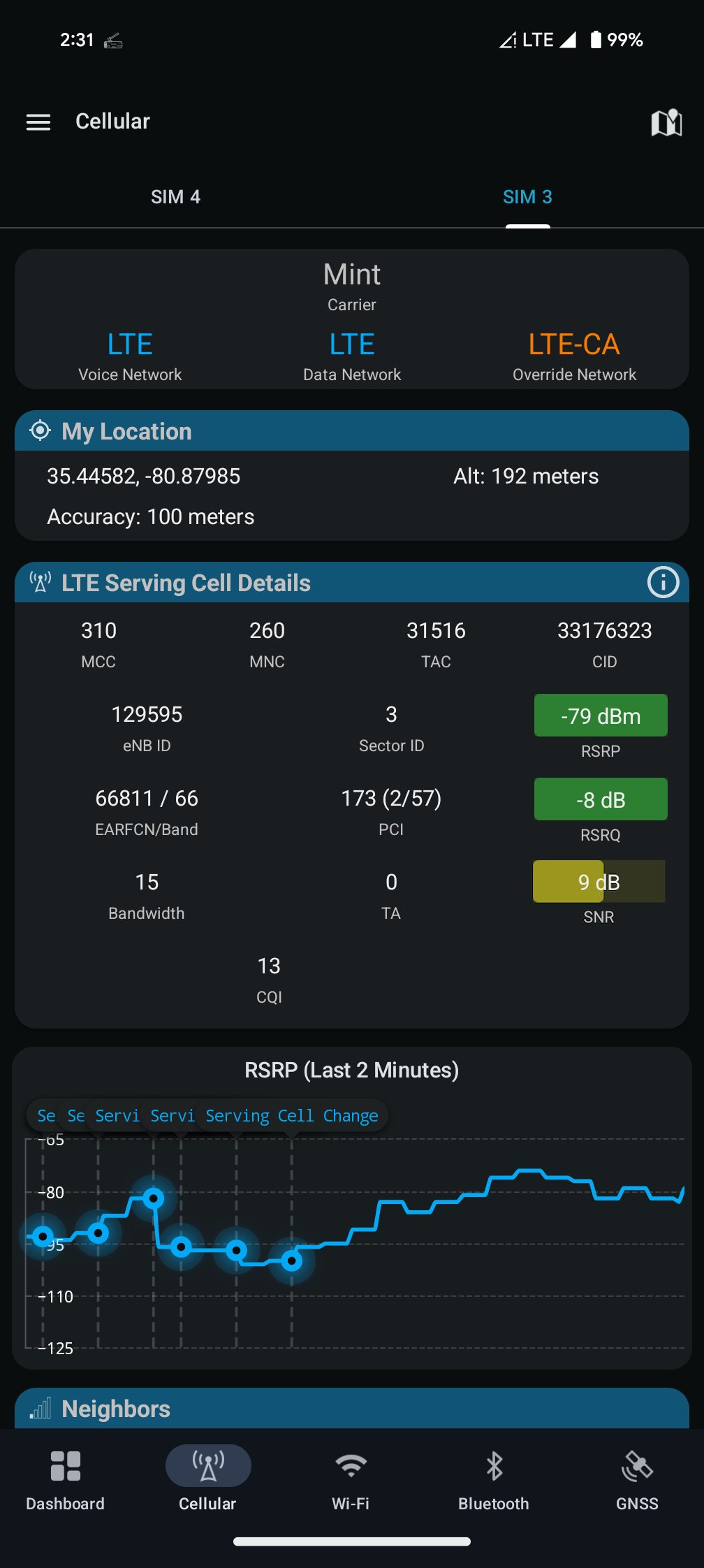
About Network Survey
Network Survey turns an Android phone into a wireless survey tool. Pick what to survey, pick where the data goes, and press Start survey. One survey, one Start and one Stop.
What it records
• Cellular: serving and neighbor cells for GSM, CDMA, UMTS, LTE and 5G NR, including carrier aggregation
• Phone state: what the radio is doing
• Wi-Fi: access points, with channel, security and 802.11 standard
• Bluetooth: Classic and BLE devices, with company names and Find My trackers
• GNSS: GPS, GLONASS, Galileo, BeiDou, QZSS, IRNSS and SBAS satellites
• Call records: calls, texts (SMS and MMS) and cell tower changes, saved to log files
Where the data goes
Turn on one destination or several at once:
• Log files: CSV files on the phone
• NS Analytics: uploads to your team's workspace
• MQTT stream: JSON records to your own broker (for example Mosquitto), with TLS and QR code setup
• gRPC stream: records to your own gRPC server
• Community databases: OpenCelliD and BeaconDB
Message formats: messaging.networksurvey.app
NS Analytics
NS Analytics is the web analytics companion for Network Survey data. Connected phones upload their records to your workspace, so nobody copies files off phones. See your surveys on one map, open an analysis page for each record type, and export the raw records. Connect a phone by scanning the QR code on your workspace's Devices page. It is a separate web service: networksurvey.app/analytics
And more
• Signals: live Cellular, Wi-Fi, Bluetooth and GNSS views, including AGC and C/N0 trends
• Map: towers from OpenCelliD and BTSearch, and the points your NS Analytics and Community database surveys covered, colored by signal strength
• Watchlist alerts when a saved Wi-Fi network is seen
• Cellular tools, PLMN lookup, OUI lookup and Wi-Fi spectrum
• Saved setups, light and dark themes, and nine accent colors
• Managed configuration (MDM) per record type and destination, and an Intent API
Permissions and privacy
Location is needed because every record needs a position, and Android requires it to scan Wi-Fi and Bluetooth. Background location is requested only if you turn on Start survey automatically. This build has no Firebase, analytics or crash reporting. Privacy policy
Some anti-malware apps flag Network Survey because it can read SMS. It never sends texts and installs nothing. The SMS and call log permissions are used only for Call records (text events and the other party's number) and are asked for only when you turn Call records on, or set a survey that records them to start automatically. Both are optional: without them Call records still logs calls and tower changes. More on GitHub
Open source (Apache 2.0): github.com/christianrowlands/android-network-survey. Manual: networksurvey.app/manual. Requires Android 8.0 or later.
License: Apache-2.0
What it records
• Cellular: serving and neighbor cells for GSM, CDMA, UMTS, LTE and 5G NR, including carrier aggregation
• Phone state: what the radio is doing
• Wi-Fi: access points, with channel, security and 802.11 standard
• Bluetooth: Classic and BLE devices, with company names and Find My trackers
• GNSS: GPS, GLONASS, Galileo, BeiDou, QZSS, IRNSS and SBAS satellites
• Call records: calls, texts (SMS and MMS) and cell tower changes, saved to log files
Where the data goes
Turn on one destination or several at once:
• Log files: CSV files on the phone
• NS Analytics: uploads to your team's workspace
• MQTT stream: JSON records to your own broker (for example Mosquitto), with TLS and QR code setup
• gRPC stream: records to your own gRPC server
• Community databases: OpenCelliD and BeaconDB
Message formats: messaging.networksurvey.app
NS Analytics
NS Analytics is the web analytics companion for Network Survey data. Connected phones upload their records to your workspace, so nobody copies files off phones. See your surveys on one map, open an analysis page for each record type, and export the raw records. Connect a phone by scanning the QR code on your workspace's Devices page. It is a separate web service: networksurvey.app/analytics
And more
• Signals: live Cellular, Wi-Fi, Bluetooth and GNSS views, including AGC and C/N0 trends
• Map: towers from OpenCelliD and BTSearch, and the points your NS Analytics and Community database surveys covered, colored by signal strength
• Watchlist alerts when a saved Wi-Fi network is seen
• Cellular tools, PLMN lookup, OUI lookup and Wi-Fi spectrum
• Saved setups, light and dark themes, and nine accent colors
• Managed configuration (MDM) per record type and destination, and an Intent API
Permissions and privacy
Location is needed because every record needs a position, and Android requires it to scan Wi-Fi and Bluetooth. Background location is requested only if you turn on Start survey automatically. This build has no Firebase, analytics or crash reporting. Privacy policy
Some anti-malware apps flag Network Survey because it can read SMS. It never sends texts and installs nothing. The SMS and call log permissions are used only for Call records (text events and the other party's number) and are asked for only when you turn Call records on, or set a survey that records them to start automatically. Both are optional: without them Call records still logs calls and tower changes. More on GitHub
Open source (Apache 2.0): github.com/christianrowlands/android-network-survey. Manual: networksurvey.app/manual. Requires Android 8.0 or later.
License: Apache-2.0
| Release info | Update on Oct 29, 2026 |
|---|---|
| Release notes | What's Changed Network Survey 2.0 rebuilds the whole app. WHAT'S NEW • One survey with one Start and one Stop. On the Survey tab, pick the record types to survey (Cellular, Phone state, Wi-Fi, Bluetooth, GNSS, and Call records) and the destinations they go to (Log files, MQTT, gRPC, NS Analytics, OpenCelliD and BeaconDB). • Save what is selected as a named setup and switch between setups with one tap. Starred setups are listed first. • Four tabs replace the side menu: Survey (replacing the Dashboard and Survey Monitor), Signals (Cellular, Wi-Fi, Bluetooth and GNSS), Map, and More. • One Map tab replaces both the Tower Map and the Survey Monitor map, with the serving cell card and your survey points. It keeps the Tower Map's settings. • The tower sheet on the Map names the tower's provider, with its legal name and country, and the provider color can be changed from there. • Each destination has its own page with its status, and the Survey screen and the notification show the same status. MQTT can save more than one broker. Streams hold records while they connect, and the Survey tab lists anything still waiting to upload. • The Cellular, Wi-Fi, Bluetooth and GNSS screens are rebuilt. Every value is still there, long press copies one, and when a missing permission, location or a radio being off stops a screen, it says so with one button to fix it. • Signal quality is rated on published thresholds. RSRQ, SS-RSRQ, SNR and SS-SINR have their own scales, and the signal colors run dark green, light green, yellow, orange and red, so only weak readings look like a warning. • Filter the Bluetooth list by name, address or company, or show only named devices or only Find My trackers. • A short first run on a fresh install explains each permission and asks where your data should go. The "Enable Location" dialog and the "Please turn on GPS" toast no longer appear on every launch, and background location is only requested when the survey is set to start automatically. • A new… |
| Listing data | F-Droid |
Reviews
No reviews yet. Be the first to review Network Survey.
Used Network Survey? Tell other visitors what you thought.
Log in to write a reviewOther products by this publisher
- "No Distractions" for YouTube 4.10 ----
- #Bible 11.6 "Incredible App - My sister shared this app with me a few weeks ago and it is truly incredible.
- #filmphotography 1.4.2 So, you decided to shoot on film?
- $quirrel 1.5.1 $quirrel Budget & Finance helps you plan each paycheck, track spending, manage debt, and see what is safe to spend before the next payday.
- % Percentage Calculator Pro 1.41 This is the Pro version of % Percentage Calculator.
Most viewed Android Connectivity
- 1 XrayFA 1.7.4 XrayFA is a fast, secure, and user-friendly Android client for Xray-core.
-
2
 Pulse 0.99.0-pulse
Garmin watch companion — your data stays on your phone
-
3
 Airplane Scheduler 2.2
Automatically switch airplane mode on a schedule
- 4 JMP SIM Manager jmp-v1.7.2 Companion app for the JMP eSIM Adapter
-
5
 FocusMastodon 2.12.0.20240624
FocusMastodon is a bright and colourful Mastodon client
- 6 getgovroam 2.3.1(2693) Configure the govroam Wi-Fi network securely and correctly
-
7
 SimpleX Chat 7.0.4
SimpleX Chat - e2e encrypted messenger without any user IDs - private by design!
- 8 DumDum 1.1.6 Simple VPN over SOCKS/HTTP/HTTPS proxy
-
9
 AwakeOnLANMobile 1.0.2
Send WakeOnLAN packets (IPv4/IPv6) over the internet, includes a CIDR scanner
-
10
 FocusPodcast 2.8.1.20240715
FocusPodcast is a quality podcast management and playback application
Most downloaded Android Connectivity
- 1 DCC++Throttle 1.5.2065 Application to drive DCC-EX command station via Bluetooth
- 2 Pixel 5G 3.0.0 Config pixel modem NR mode
-
3
 Mages 5.3.7
Experimental Matrix client made using Compose Multiplatform (and Rust).
-
4
Network Survey 2.0
Survey cellular, Wi-Fi, Bluetooth and GNSS, then log, stream or upload the data
-
5
 xlog2 0.6.10
Peer-to-peer amateur-radio field logbook that syncs with the xlog2 desktop
-
6
 RemotePhone 2.2.0
Mirror and control your Android phone from Linux over WiFi
-
7
 MateDroid 1.12.0
View Tesla vehicle data from your self-hosted Teslamate instance
-
8
 Fread 1.10.5
A fediverse microblogging client supporting Mastodon, Bluesky, and RSS.
- 9 KabelWacht 142 A simple, free WireGuard VPN client: scan, import, and manage tunnels.
- 10 droidVNC-NG 2.22.2 VNC server app that does not require root privileges.